
1. முக்கியமான பாதுகாப்பு தகவல்
Please read this manual carefully before installing and using your Amica KMI 776 660 C induction hob. Keep these instructions for future reference. Incorrect installation or use can cause injury or damage.
- மின் பாதுகாப்பு: Ensure the hob is connected to a properly grounded electrical supply by a qualified electrician. The voltage and frequency must match the specifications.
- சூடான மேற்பரப்புகள்: பயன்படுத்தும் போதும் அதற்குப் பிறகும் ஹாப் மேற்பரப்பு சூடாகிவிடும். சூடான மேற்பரப்புகளைத் தொடாதீர்கள். அடுப்பு கையுறைகள் அல்லது பானை வைத்திருப்பவர்களைப் பயன்படுத்தவும்.
- குழந்தை பாதுகாப்பு: This appliance is not intended for use by persons (including children) with reduced physical, sensory or mental capabilities, or lack of experience and knowledge, unless they have been given supervision or instruction concerning use of the appliance by a person responsible for their safety. Supervise children to ensure they do not play with the appliance. Activate the Child Lock feature when not in use.
- காற்றோட்டம்: Ensure adequate ventilation around the appliance as described in the installation section.
- முறையான பயன்பாடு: Use the hob only for cooking food. Do not place metallic objects such as knives, forks, spoons, and lids on the hob surface as they can get hot.
2. தயாரிப்பு முடிந்துவிட்டதுview
The Amica KMI 776 660 C is an autonomous 60 cm induction hob designed for efficient and flexible cooking. Key features include:
- PowerBooster: Increases heating power for rapid boiling or searing.
- AutoBridge: Combines two cooking zones into one large zone for oversized cookware.
- DirectTouch Slider Control: Intuitive touch controls for precise power level adjustments.
- Stop'n'Go Function: Pauses cooking and resumes with previous settings.
- குழந்தை பூட்டு: தற்செயலான செயல்பாட்டைத் தடுக்கிறது.
- Timer & Short-Term Timer: For precise cooking duration.
- பானை கண்டறிதல்: Automatically detects suitable cookware.
- எஞ்சிய வெப்ப காட்டி: Shows which zones are still hot.
- பிரேம்லெஸ் டிசைன்: For a sleek, flush-mounted installation.
படம்: முன்பக்கம் view of the Amica KMI 776 660 C induction hob, showcasing its sleek, frameless black glass surface and touch controls.
3. அமைவு மற்றும் நிறுவல்
Installation must be performed by a qualified technician in accordance with local regulations and safety standards.
3.1 பேக்கிங்
Carefully remove the hob from its packaging. Inspect for any damage. Retain packaging for transport if needed.
3.2 நிறுவல் பரிமாணங்கள்
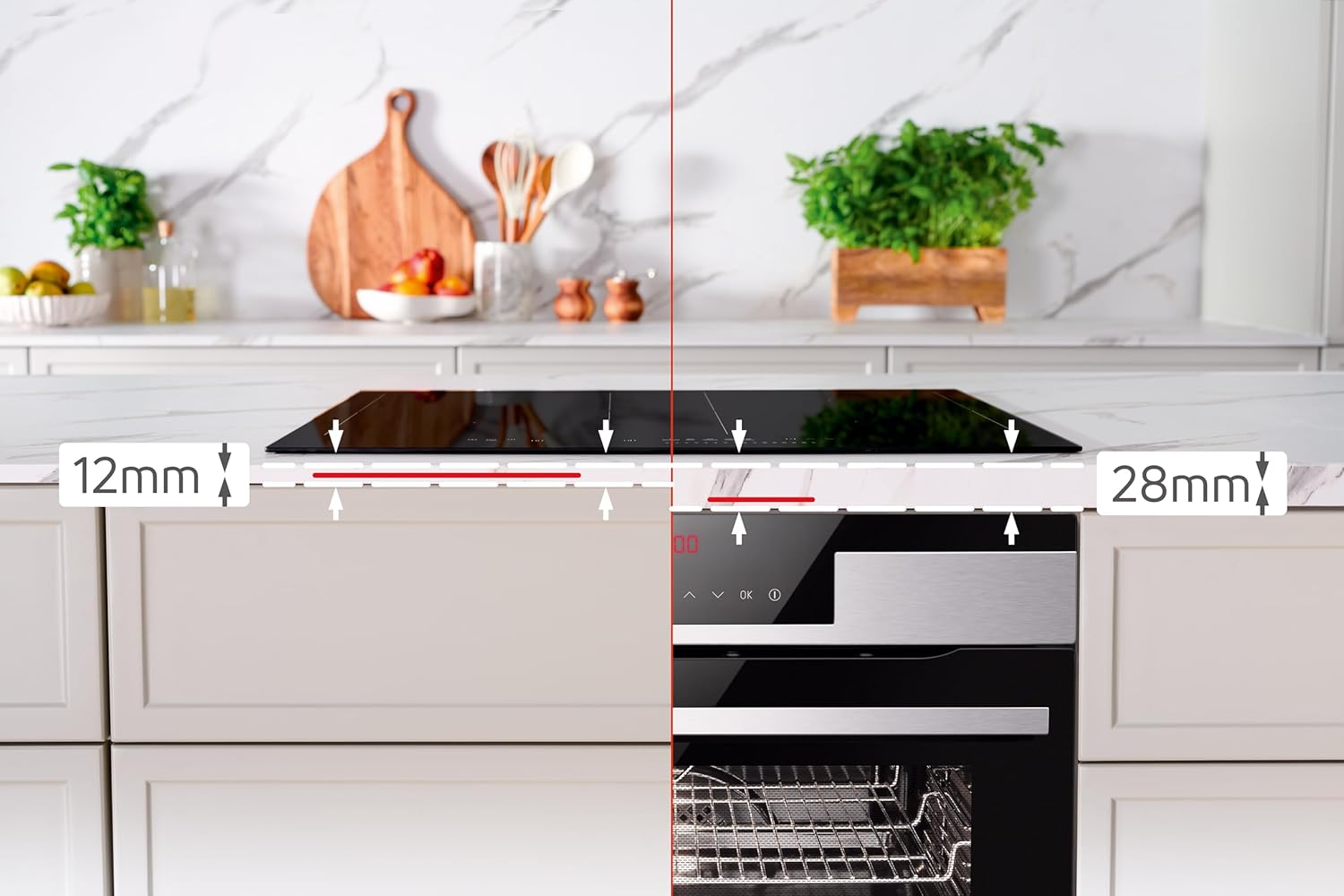
Ensure the countertop cutout dimensions are correct and that there is sufficient clearance for ventilation. The hob requires specific clearances from the front (12mm) and rear (28mm) for proper airflow.

Image: Installation diagram illustrating the required 12mm front clearance and 28mm rear clearance for the hob to ensure proper ventilation.
3.3. மின்சார இணைப்பு
The hob operates on a 3N ~ 230/400 V / 50 Hz power supply with a total load of 7.35 kW. The electrical connection must be made by a licensed electrician, ensuring compliance with all local electrical codes.
4. இயக்க வழிமுறைகள்
The Amica KMI 776 660 C induction hob features intuitive DirectTouch slider controls for easy operation.
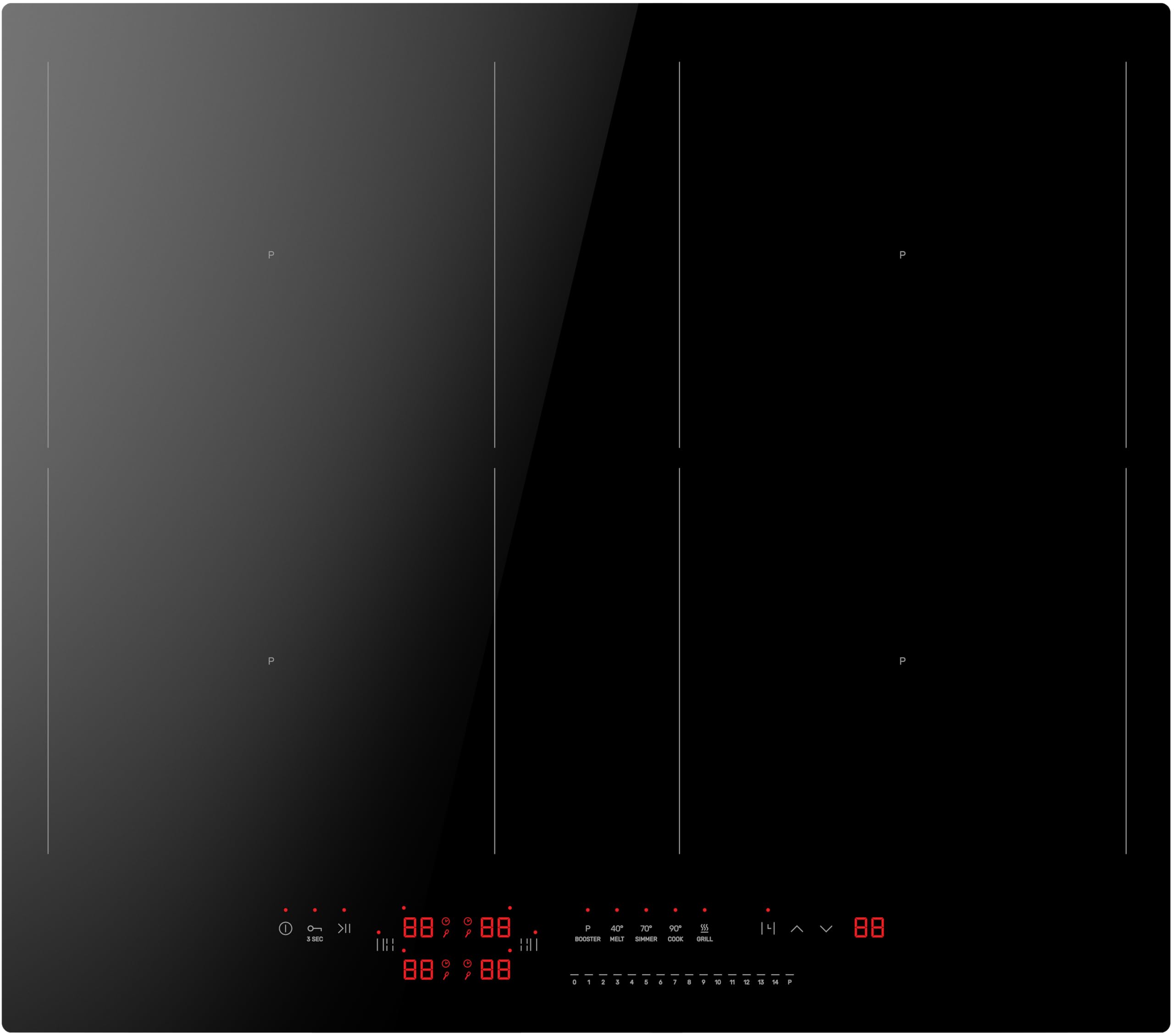
Image: A user's hand adjusting the power level on the hob's DirectTouch slider control panel, with pots cooking on the surface.
4.1. ஆன்/ஆஃப் செய்தல்
- இயக்க: சக்தி சின்னத்தைத் தொடவும் (ⓘ ⓘ தமிழ்) on the control panel. The display will light up.
- அணைப்பதற்கு: Touch and hold the power symbol until the display turns off.
4.2. சமையல் மண்டலத்தைத் தேர்ந்தெடுத்து சக்தியை சரிசெய்தல்
- விரும்பிய சமையல் மண்டலத்தில் பொருத்தமான சமையல் பாத்திரங்களை வைக்கவும்.
- தொடர்புடைய மண்டலத் தேர்வு பொத்தானைத் தொடவும்.
- Use the DirectTouch slider to select a power level from 1 to 14.

Image: The induction hob demonstrating its ability to maintain different precise temperatures across four cooking zones, suitable for various dishes simultaneously.
4.3. PowerBooster Function
The PowerBooster function provides maximum power to a selected zone for a short period, ideal for rapidly boiling water or searing food.
- விரும்பிய சமையல் மண்டலத்தைத் தேர்ந்தெடுக்கவும்.
- Touch the Booster symbol (often indicated by a 'P' or a specific icon) on the control panel. The display will show 'P'.
- The Booster will automatically deactivate after a set time or when the temperature is reached, returning to a lower power setting.
4.4. AutoBridge Function
The AutoBridge function allows you to combine two adjacent cooking zones into one large zone, perfect for griddle pans or large roasting dishes.
- Place a large pot or pan over the two bridgeable zones.
- Touch the AutoBridge symbol (often two linked circles or a bridge icon). The hob will automatically detect the large cookware and activate both zones as one.
- Adjust the power level for the combined zone using the slider.
4.5. Stop'n'Go (Pause) Function
The Stop'n'Go function allows you to pause all active cooking zones and then resume cooking with the same settings.
- Touch the Stop'n'Go symbol (often a pause icon). All active zones will switch to a low keep-warm setting or pause.
- Touch the Stop'n'Go symbol again to resume cooking at the previous power settings.
4.6. டைமர் செயல்பாடுகள்
The hob includes a cooking timer and a short-term timer.
- சமையல் டைமர்: Set a duration for a specific cooking zone. The zone will turn off automatically when the time expires.
- Short-Term Timer (Minute Minder): Set a general timer that does not affect cooking zones. An acoustic signal will sound when the time expires.
- Refer to the full manual for detailed instructions on setting and adjusting timers.
4.7. குழந்தை பூட்டு
The Child Lock prevents accidental operation of the hob, enhancing safety, especially in households with children.

Image: A child safely interacting near the hob, highlighting the importance and benefit of the child lock feature for family safety.
- செயல்படுத்த: With the hob off, touch and hold the Child Lock symbol (often a key or lock icon) for a few seconds until an indicator light or symbol appears.
- செயலிழக்க: Touch and hold the Child Lock symbol again until the indicator disappears.
5. பராமரிப்பு மற்றும் சுத்தம்
வழக்கமான சுத்தம் மற்றும் பராமரிப்பு உங்கள் தூண்டல் ஹாப்பின் நீண்ட ஆயுளையும் உகந்த செயல்திறனையும் உறுதி செய்யும்.
- தினசரி சுத்தம்: After each use, wipe the hob surface with a soft cloth and warm soapy water. Rinse and dry thoroughly.
- பிடிவாதமான கறைகள்: For burnt-on food or stubborn stains, use a ceramic hob scraper and a specialized ceramic hob cleaner. Follow the product instructions carefully.
- உராய்வைத் தவிர்க்கவும்: சிராய்ப்பு கடற்பாசிகள், தேய்க்கும் பட்டைகள் அல்லது கடுமையான இரசாயன கிளீனர்களைப் பயன்படுத்த வேண்டாம், ஏனெனில் இவை கண்ணாடி மேற்பரப்பைக் கீறலாம் அல்லது சேதப்படுத்தலாம்.
- கண்ட்ரோல் பேனல்: விளம்பரத்துடன் கட்டுப்பாட்டுப் பலகத்தைத் துடைக்கவும்amp cloth. Ensure it is dry before operating the hob.
- காற்றோட்டம் திறப்புகள்: Ensure that the ventilation openings underneath the hob are not blocked.
6. சரிசெய்தல்
உங்கள் ஹாப்பில் சிக்கல்கள் ஏற்பட்டால், சேவையைத் தொடர்புகொள்வதற்கு முன் பின்வரும் பொதுவான சிக்கல்கள் மற்றும் தீர்வுகளைப் பார்க்கவும்.
| பிரச்சனை | சாத்தியமான காரணம் | தீர்வு |
|---|---|---|
| ஹாப் ஆன் ஆகவில்லை. | No power supply; Child Lock active. | Check circuit breaker. Deactivate Child Lock. |
| சமையல் மண்டலம் சூடாகவில்லை. | Incorrect cookware; Pot not detected; Power level too low. | Use induction-compatible cookware. Ensure pot is centered. Increase power level. |
| காட்சி ஒரு பிழைக் குறியீட்டைக் காட்டுகிறது. | உள் கோளாறு; அதிக வெப்பமடைதல். | Turn off the hob, wait a few minutes, then restart. If the error persists, contact service. |
| செயல்பாட்டின் போது அசாதாரண சத்தம். | Normal induction hum; Cookware quality. | A slight humming or buzzing is normal for induction hobs. This can vary with cookware type. |
For issues not listed here or if problems persist, please contact Amica customer support or a qualified service technician.
7. தொழில்நுட்ப விவரக்குறிப்புகள்
| அம்சம் | விவரக்குறிப்பு |
|---|---|
| பிராண்ட் | அமிகா |
| மாதிரி எண் | KMI 776 660 C |
| வகை | Autonomous Induction Hob |
| பரிமாணங்கள் (L x W x H) | 59.2 x 52.2 x 4.9 செ.மீ |
| Cutout Dimensions (approx.) | 56.0 x 49.0 செ.மீ |
| நிகர எடை | 7.8 கிலோ |
| மொத்த சக்தி | 7350 வாட்ஸ் (7.35 கிலோவாட்) |
| தொகுதிtagமின் / அதிர்வெண் | 3N ~ 230/400 V / 50 Hz |
| சமையல் மண்டலங்கள் | 4 தூண்டல் மண்டலங்கள் |
| பாலம் மண்டலங்கள் | 2 (AutoBridge function) |
| முன் இடது மண்டலம் | 220 x 190 mm, 2.2 kW (Booster: 3.0 kW) |
| பின்புற இடது மண்டலம் | 220 x 190 mm, 2.2 kW (Booster: 3.0 kW) |
| முன் வலது மண்டலம் | 220 x 190 mm, 2.2 kW (Booster: 3.0 kW) |
| பின்புற வலது மண்டலம் | 220 x 190 mm, 2.2 kW (Booster: 3.0 kW) |
| Bridge Zone Power | 3.0 kW (Booster: 3.7 kW) |
| கட்டுப்பாட்டு வகை | DirectTouch Slider Sensor |
| சக்தி நிலைகள் | 14 |
| வெப்பநிலை நிலைகள் | 4 (Gar-Temperaturstufen) |
| பாதுகாப்பு அம்சங்கள் | Child Lock, Residual Heat Indicator, Pot Detection |
8. உத்தரவாதம் மற்றும் வாடிக்கையாளர் ஆதரவு
For warranty information, please refer to the warranty card included with your product or the terms and conditions of your purchase. Keep your proof of purchase for any warranty claims.
For technical assistance, spare parts, or service requests, please contact your local Amica service center or the retailer where you purchased the product. Ensure you have your model number (KMI 776 660 C) and serial number ready.

Image: Amica 'Made in Europe' logo, signifying the product's origin and commitment to design, functionality, and innovation.