
அறிமுகம்
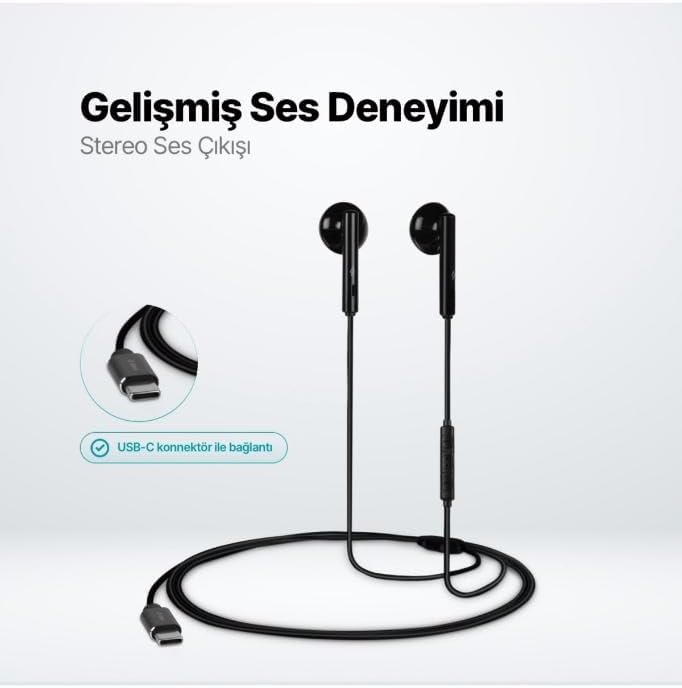
The TTEC Rio 2 Stereo USB-C Headset with Microphone is designed to provide a high-quality audio experience for music and calls. Its comfortable, lightweight design ensures a perfect fit and effective ambient noise isolation, allowing for hands-free communication and entertainment.
முக்கிய அம்சங்கள்:
- Advanced stereo sound output for an immersive audio experience.
- Integrated microphone for clear phone calls.
- Smart inline controller for easy management of volume, calls, and music playback.
- Lightweight and ergonomic design for extended comfort.
- Universal USB-C connection.
அமைவு
To begin using your TTEC Rio 2 headset, follow these simple steps:
- ஹெட்செட்டை இணைக்கவும்: Locate the USB-C port on your device (smartphone, tablet, laptop, etc.). Insert the USB-C connector of the TTEC Rio 2 headset firmly into the device's USB-C port.
- சாதன அங்கீகாரம்: Your device should automatically recognize the headset. If prompted, select the TTEC Rio 2 as the audio output and input device.
- பொருத்தத்தை சரிசெய்யவும்: Place the earbuds comfortably in your ears. The ergonomic design ensures a snug fit for optimal sound quality and noise isolation.
இயக்க வழிமுறைகள்
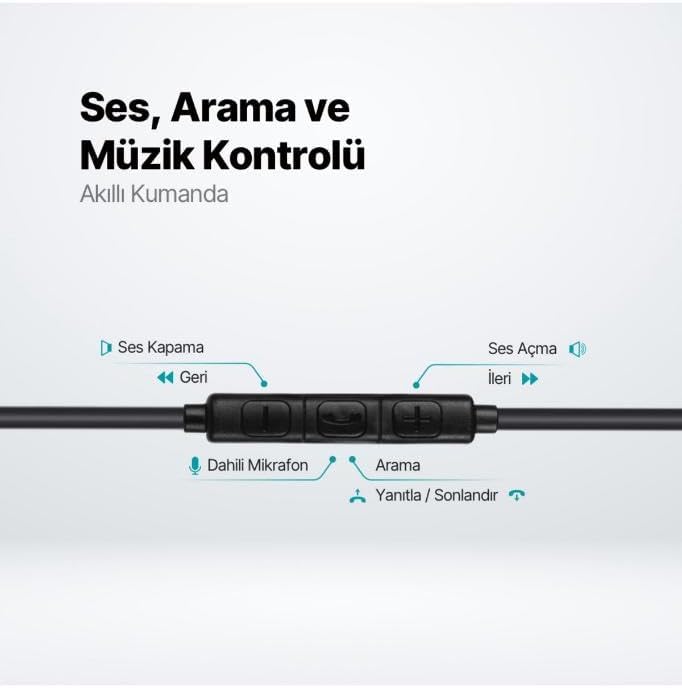
The TTEC Rio 2 headset features an inline smart controller for convenient management of your audio and calls.
Inline Controller Functions:
- வால்யூம் அப் (+): Press to increase audio volume.
- வால்யூம் டவுன் (-): Press to decrease audio volume.
- Play/Pause/Answer/End Call (Center Button):
- Single press to play or pause music.
- உள்வரும் அழைப்பிற்கு பதிலளிக்க ஒருமுறை அழுத்தவும்.
- செயலில் உள்ள அழைப்பை முடிக்க ஒருமுறை அழுத்தவும்.
- உள்வரும் அழைப்பை நிராகரிக்க நீண்ட நேரம் அழுத்தவும்.
- Next Track (Forward Button): அடுத்த பாடலுக்குச் செல்ல அழுத்தவும்.
- Previous Track (Backward Button): Press to go back to the beginning of the current song or to the previous song.
- உள்ளமைக்கப்பட்ட மைக்ரோஃபோன்: Located on the inline controller, it captures your voice for calls and voice commands.
பராமரிப்பு
Proper care will extend the life and performance of your TTEC Rio 2 headset.
- சுத்தம்: மென்மையான, உலர்ந்த துணியால் இயர்பட்கள் மற்றும் கேபிளை மெதுவாகத் துடைக்கவும். கடுமையான இரசாயனங்கள் அல்லது சிராய்ப்புப் பொருட்களைப் பயன்படுத்த வேண்டாம்.
- சேமிப்பு: When not in use, store the headset in a clean, dry place. Avoid extreme temperatures. The included cable organizer clip can help prevent tangling.
- ஈரப்பதத்தைத் தவிர்க்கவும்: ஹெட்செட்டை தண்ணீர் அல்லது அதிக ஈரப்பதத்திற்கு வெளிப்படுத்த வேண்டாம்.
- கவனத்துடன் கையாளவும்: Avoid pulling on the cable or applying excessive force to the connectors.

சரிசெய்தல்
If you encounter issues with your TTEC Rio 2 headset, refer to the following common solutions:
| பிரச்சனை | சாத்தியமான தீர்வு |
|---|---|
| ஹெட்செட்டிலிருந்து ஒலி இல்லை. |
|
| மைக்ரோஃபோன் வேலை செய்யவில்லை. |
|
| ஒலி தரம் மோசமாக உள்ளது அல்லது சிதைந்துள்ளது. |
|
| Hissing or static noise. |
|
விவரக்குறிப்புகள்
| அம்சம் | விவரம் |
|---|---|
| பிராண்ட் | TTEC |
| மாதிரி எண் | 2KMM14S |
| இணைப்பு | USB-C |
| ஹெட்ஃபோன்கள் படிவ காரணி | உள்-காது |
| காது வைப்பு | உள்-காது |
| ஒலிவாங்கி | உள்ளமைக்கப்பட்ட |
| தொகுப்பு பரிமாணங்கள் | 19.8 x 8.5 x 3.1 செ.மீ |
| பொருளின் எடை | 40 கிராம் |
| ASIN | B0D3XJ5SP7 |
உத்தரவாதம் மற்றும் ஆதரவு
For warranty information and customer support, please refer to the documentation included with your purchase or visit the official TTEC webஎந்தவொரு உத்தரவாதக் கோரிக்கைகளுக்கும் உங்கள் வாங்கியதற்கான ஆதாரத்தை வைத்திருங்கள்.