
அறிமுகம்
The Shokz OpenSwim Pro is a versatile bone conduction headphone designed for both land and water activities. It seamlessly integrates two distinct modes: Bluetooth and MP3, allowing you to choose your listening experience based on your environment. Engineered with PremiumPitch 2.0+ bone conduction technology, these headphones deliver clear audio, powerful volume, and rich bass. Its open-ear design prioritizes safety by keeping your ears open to ambient sounds, making it ideal for outdoor sports and activities.
The OpenSwim Pro boasts an IP68 waterproof rating, ensuring durability and performance in various conditions, including submersion up to 2 meters for 2 hours. Physical buttons are optimized for easy control during intense workouts or while wet, preventing accidental touches. Enjoy your favorite music and stay connected without compromise.
பெட்டியில் என்ன இருக்கிறது
- Shokz OpenSwim Pro Headphones
- 4-pin Magnetic Charging Cable
- நீச்சல் காதணிகள்
- சிலிகான் ரப்பர் கேரிங் கேஸ்
- பயனர் கையேடுகள்
- உத்தரவாத அட்டை
தயாரிப்பு முடிந்துவிட்டதுview
Familiarize yourself with the components of your OpenSwim Pro headphones.
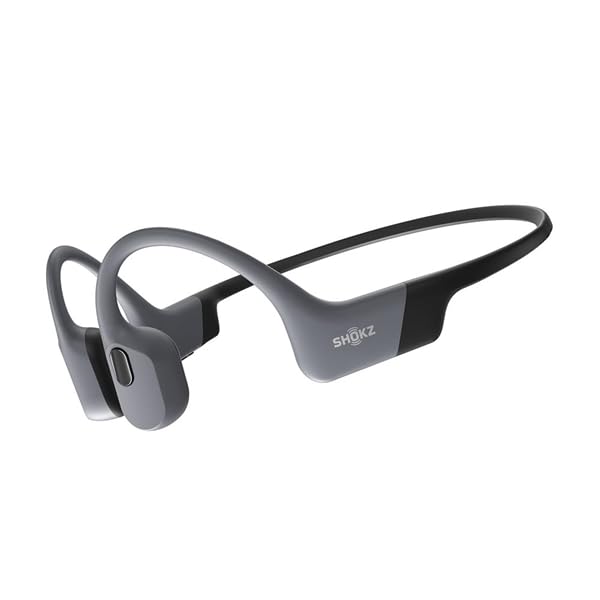
Figure 1: Shokz OpenSwim Pro Headphones (Grey)

Figure 2: Control Buttons and Charging Port
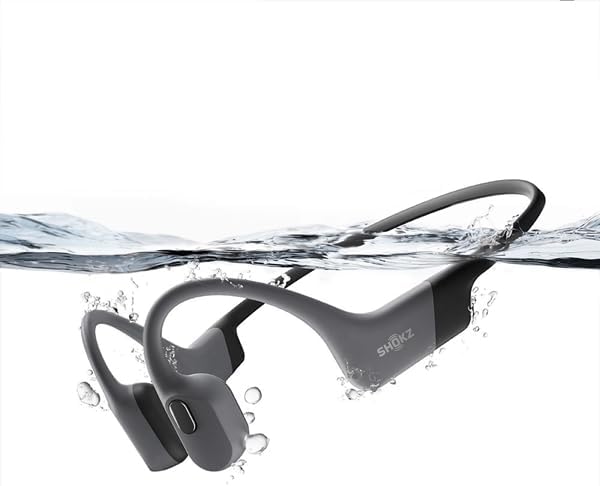
Figure 3: Waterproof Design
அமைவு
1. உங்கள் ஹெட்ஃபோன்களை சார்ஜ் செய்தல்
Before first use, fully charge your OpenSwim Pro headphones.
- Connect the 4-pin magnetic charging cable to the charging port on your headphones.
- Connect the USB end of the cable to a USB power adapter (not included) or a computer's USB port.
- LED காட்டி சார்ஜிங் நிலையைக் காண்பிக்கும். முழுமையாக சார்ஜ் செய்ய பொதுவாக சுமார் 1.5 மணிநேரம் ஆகும்.
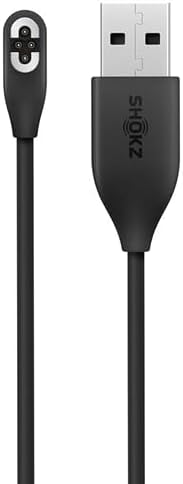
Figure 4: Magnetic Charging Cable
2. Transferring Music (MP3 Mode)
The OpenSwim Pro has internal storage for music playback without a connected device. It supports various audio formats including MP3, FLAC, WAV, AAC, M4A, APE, and WMA. You can store approximately 4,000 high-quality songs.
- Connect your OpenSwim Pro to a computer using the magnetic charging cable. The headphones will appear as a removable disk drive.
- உங்களுக்கு விருப்பமான ஆடியோவை இழுத்து விடுங்கள் files into the headphone's storage folder.
- Safely eject the device from your computer once the transfer is complete.
3. புளூடூத் இணைத்தல்
To use the OpenSwim Pro with your smartphone or other Bluetooth-enabled devices:
- ஹெட்ஃபோன்கள் அணைக்கப்பட்டுள்ளன என்பதை உறுதிப்படுத்தவும்.
- Press and hold the Power/Mode button until the LED indicator flashes red and blue, indicating pairing mode.
- On your device, go to Bluetooth settings and select "OpenSwim Pro" from the list of available devices.
- Once connected, the LED will flash blue, and you will hear a voice prompt.
இயக்க வழிமுறைகள்
பவர் ஆன்/ஆஃப்
- பவர் ஆன்: Press and hold the Power/Mode button for 2 seconds.
- பவர் ஆஃப்: Press and hold the Power/Mode button for 3 seconds.
Switching Between Bluetooth and MP3 Modes
The OpenSwim Pro allows for easy switching between its two modes:
- Press and hold the Mode button (often integrated with the Power button) for 2 seconds while the device is on to switch between Bluetooth and MP3 modes. A voice prompt will confirm the current mode.
இசை பின்னணி கட்டுப்பாடுகள்
- விளையாடு/இடைநிறுத்தம்: பல செயல்பாட்டு பொத்தானை ஒரு முறை அழுத்தவும்.
- அடுத்த ட்ராக்: வால்யூம் + பட்டனை 2 வினாடிகள் அழுத்திப் பிடிக்கவும்.
- முந்தைய ட்ராக்: வால்யூம் - பட்டனை 2 வினாடிகள் அழுத்திப் பிடிக்கவும்.
- ஒலியை பெருக்கு: தொகுதி + பொத்தானை அழுத்தவும்.
- ஒலியை குறை: தொகுதி - பொத்தானை அழுத்தவும்.
Call Controls (Bluetooth Mode Only)
- பதில்/முடிவு அழைப்பு: பல செயல்பாட்டு பொத்தானை ஒரு முறை அழுத்தவும்.
- அழைப்பை நிராகரி: மல்டி ஃபங்க்ஷன் பட்டனை 2 வினாடிகள் அழுத்திப் பிடிக்கவும்.
நீச்சலுக்குப் பயன்படுத்துதல்
When swimming, it is recommended to use the MP3 mode for optimal performance as Bluetooth signals do not transmit well through water. Insert the included swimming earplugs to enhance sound quality underwater.
- தண்ணீருக்குள் நுழைவதற்கு முன் MP3 பயன்முறைக்கு மாறவும்.
- Insert the swimming earplugs into your ears.
- Ensure the headphones are securely fitted.
பராமரிப்பு
Proper care ensures the longevity and performance of your OpenSwim Pro headphones.
- சுத்தம்: After use, especially after swimming or heavy sweating, rinse the headphones with clean fresh water. Wipe them dry with a soft cloth. Ensure the charging port is completely dry before charging.
- சேமிப்பு: Store the headphones in the silicone rubber carrying case in a cool, dry place away from direct sunlight and extreme temperatures.
- சார்ஜ்: Only use the provided magnetic charging cable. Avoid using damaged cables or chargers.
- நீர் வெளிப்பாடு: While IP68 rated, avoid prolonged submersion beyond specified limits (2 meters for 2 hours). Do not expose to saltwater or chemicals without immediate rinsing.
சரிசெய்தல்
If you encounter issues with your OpenSwim Pro, refer to the following common solutions:
| பிரச்சனை | சாத்தியமான தீர்வு |
|---|---|
| ஒலி இல்லை | Check volume levels. Ensure headphones are powered on and in the correct mode (Bluetooth or MP3). If in Bluetooth mode, ensure it's paired and connected to your device. If in MP3 mode, ensure music fileகள் ஏற்றப்படுகின்றன. |
| புளூடூத் வழியாக இணைக்க முடியாது | Ensure headphones are in pairing mode (red and blue flashing LED). Turn off and on your device's Bluetooth. Move closer to your device. Clear previous pairings on your device and try again. |
| ஹெட்ஃபோன்கள் சார்ஜ் ஆகவில்லை | Ensure the charging cable is securely connected to both the headphones and the power source. Check if the charging port is clean and dry. Try a different USB port or power adapter. |
| Sound quality issues underwater | Ensure you are in MP3 mode. Use the included swimming earplugs to improve sound clarity underwater. |
| பொத்தான்கள் பதிலளிக்கவில்லை | Ensure the headphones are not locked. If wet, dry the buttons thoroughly. Try restarting the headphones. |
If the issue persists, please refer to the official Shokz support webதளம் அல்லது வாடிக்கையாளர் சேவையை தொடர்பு கொள்ளவும்.
விவரக்குறிப்புகள்
| அம்சம் | விவரம் |
|---|---|
| பிராண்ட் | SHOKZ |
| மாதிரி பெயர் | OpenSwim Pro (S710) |
| நிறம் | சாம்பல் |
| காது வைப்பு | Open-Ear (Bone Conduction) |
| ஹெட்ஃபோன் ஃபார்ம் ஃபேக்டர் | உண்மையான வயர்லெஸ் |
| சத்தம் கட்டுப்பாடு | இல்லை |
| இணைப்பு தொழில்நுட்பம் | வயர்லெஸ் (புளூடூத்) |
| நீர்ப்புகா மதிப்பீடு | IP68 (Submersible up to 2 meters for 2 hours) |
| உள் சேமிப்பு | Supports approximately 4,000 high-quality songs |
| ஆதரிக்கப்படும் ஆடியோ வடிவங்கள் | MP3, FLAC, WAV, AAC, M4A, APE, WMA |
| ஒலிவாங்கி | சேர்க்கப்பட்டுள்ளது |
உத்தரவாதம் மற்றும் ஆதரவு
உத்தரவாத தகவல்
The Shokz OpenSwim Pro comes with a 2 வருட உற்பத்தியாளரின் உத்தரவாதம். இந்த உத்தரவாதமானது சாதாரண பயன்பாட்டின் கீழ் பொருட்கள் மற்றும் வேலைப்பாடுகளில் உள்ள குறைபாடுகளை உள்ளடக்கும். உத்தரவாதக் கோரிக்கைகளுக்கு உங்கள் வாங்கியதற்கான ஆதாரத்தை வைத்திருங்கள்.
வாடிக்கையாளர் ஆதரவு
For further assistance, technical support, or warranty claims, please visit the official Shokz website or contact their customer service department. Contact details can typically be found on the Shokz webதளத்தில் அல்லது உங்கள் தயாரிப்புடன் சேர்க்கப்பட்டுள்ள உத்தரவாத அட்டையில்.