
1. அறிமுகம்
நன்றி, நன்றி.asing the Edifier R990BT Bluetooth Computer Speakers. These 2.0 active bookshelf speakers are designed to provide high-quality audio for your PC, smartphone, tablet, and other compatible devices. Featuring Bluetooth V5.4 connectivity and dual RCA inputs, the R990BT offers versatile audio options in a classic MDF enclosure. Please read this manual thoroughly to ensure proper setup and optimal performance of your speakers.
2. தொகுப்பு உள்ளடக்கங்கள்
தொகுப்பில் அனைத்து பொருட்களும் இருப்பதை உறுதிசெய்யவும்:
- Edifier R990BT Active Bookshelf Speakers (1 Pair)
- ஸ்பீக்கர் இணைப்பு கேபிள்
- RCA to RCA Audio Cable
- RCA ஆடியோ கேபிளுக்கு 3.5mm
- பவர் கேபிள்
- விரைவு தொடக்க வழிகாட்டி
3 அமைவு
3.1 பேச்சாளர் இடம்
Place the speakers on a stable, flat surface such as a desk or shelf. For optimal stereo imaging, position the speakers equidistant from your listening position, forming an equilateral triangle. Ensure there is adequate space behind the speakers for cable connections and ventilation.

Image: Edifier R990BT speakers positioned on a desk, demonstrating typical placement for computer use.
3.2 ஸ்பீக்கர்களை இணைத்தல்
- Connect the Passive Speaker: Use the included speaker connection cable to link the active speaker (with controls) to the passive speaker. Ensure the correct polarity (+ to + and - to -) for proper sound reproduction.
- சக்தியுடன் இணைக்கவும்: Plug the power cable into the active speaker's power input and then into a wall outlet.
3.3 ஆடியோ மூலங்களை இணைத்தல்
The R990BT speakers support both wired (RCA) and wireless (Bluetooth) connections.
Wired Connection (RCA)
The speakers feature two sets of RCA input ports (Line In 1 and Line In 2) for connecting two different wired audio devices simultaneously.
- Use the RCA to RCA cable to connect devices with RCA outputs (e.g., CD player, turntable with pre-amp).
- Use the 3.5mm to RCA cable to connect devices with a 3.5mm audio jack (e.g., computer, smartphone, tablet).

Image: Close-up of the rear panel of the active speaker, highlighting the dual RCA input ports (Line In 1 and Line In 2) and the power input.
புளூடூத் இணைப்பு
The R990BT features Bluetooth V5.4 for wireless audio streaming.
- Turn on the speakers.
- Press the volume/input knob on the rear panel to select the Bluetooth input. The indicator light will flash blue.
- உங்கள் ஆடியோ சாதனத்தில் (ஸ்மார்ட்போன், டேப்லெட், கணினி), புளூடூத்தை இயக்கி, கிடைக்கும் சாதனங்களைத் தேடவும்.
- Select "EDIFIER R990BT" from the list to pair. The indicator light will turn solid blue once connected.

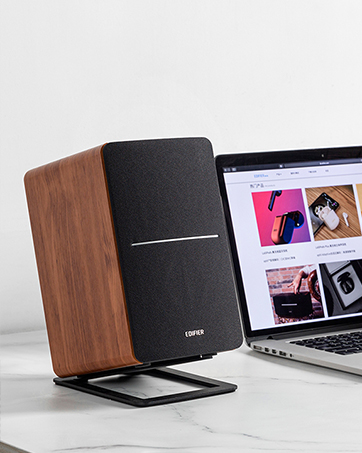
Image: A single Edifier R990BT speaker on a desk next to a laptop, symbolizing the ease of Bluetooth connectivity.
4. இயக்க வழிமுறைகள்
4.1 பவர் ஆன்/ஆஃப்
The power switch is located on the rear panel of the active speaker. Flip the switch to the 'ON' position to power on the speakers. Flip to 'OFF' to power off.
4.2 தொகுதி கட்டுப்பாடு
The large knob on the rear panel of the active speaker controls the master volume. Rotate clockwise to increase volume and counter-clockwise to decrease volume.
படம்: விரிவானது view of the multi-function control knob on the rear of the speaker, used for volume adjustment and input selection.
4.3 உள்ளீடு தேர்வு
Press the volume/input knob on the rear panel to cycle through the available audio inputs: Line In 1, Line In 2, and Bluetooth. The indicator light will change color or flash to indicate the selected input mode.
- Line In 1 / Line In 2: Solid green or red indicator (depending on model/firmware).
- புளூடூத்: Flashing blue (pairing mode) or solid blue (connected).
4.4 Using the Edifier ConneX App
For enhanced control and customization, download the Edifier ConneX mobile application. The app allows you to adjust equalization settings and access additional features for your R990BT speakers.
- Download the Edifier ConneX app from your device's app store.
- Ensure your speakers are powered on and connected via Bluetooth to your mobile device.
- Open the app and follow the on-screen instructions to connect to your R990BT speakers.

Image: The official logo for the Edifier ConneX mobile application.
5. பராமரிப்பு
5.1 சுத்தம் செய்தல்
To maintain the appearance and performance of your speakers:
- Wipe the speaker cabinets with a soft, dry cloth.
- Do not use liquid cleaners, aerosols, or abrasive chemicals, as these may damage the finish or internal components.
- Gently brush dust from the speaker grilles using a soft brush or vacuum cleaner with a brush attachment.
5.2 சேமிப்பு
If storing the speakers for an extended period, ensure they are powered off and disconnected from the power source. Store them in a cool, dry place away from direct sunlight and extreme temperatures.
6. சரிசெய்தல்
If you encounter any issues with your Edifier R990BT speakers, please refer to the following common problems and solutions:
| பிரச்சனை | சாத்தியமான காரணம் | தீர்வு |
|---|---|---|
| ஒலி இல்லை |
|
|
| சிதைந்த ஒலி |
|
|
| Bluetooth not connecting/disconnecting |
|
|
| Difficulty switching inputs |
|
|
7. விவரக்குறிப்புகள்
Detailed technical specifications for the Edifier R990BT speakers:
- மாதிரி பெயர்: R990BT
- பேச்சாளர் வகை: புத்தக அலமாரி
- மவுண்டிங் வகை: Shelf Mount/Tabletop Mount
- பொருள்: MDF (நடுத்தர அடர்த்தி ஃபைபர் போர்டு)
- இணைப்பு தொழில்நுட்பம்: Bluetooth V5.4, Wired (Dual RCA)
- ஆடியோ வெளியீட்டு முறை: ஸ்டீரியோ (2.0)
- பேச்சாளர் அதிகபட்ச வெளியீட்டு சக்தி: 24 வாட்ஸ் (ஆர்.எம்.எஸ்)
- வூஃபர் விட்டம்: 4 அங்குலம்
- ட்வீட்டர் விட்டம்: 1 அங்குலம்
- அதிர்வெண் பதில்: 18 KHz (Upper limit, typical for compact speakers)
- சிக்னல்-டு-சத்தம் விகிதம்: 85 டி.பி
- கட்டுப்பாட்டு முறை: Touch (via rear knob)
- சக்தி ஆதாரம்: Corded Electric (100-240V ~ 50/60Hz)
- தயாரிப்பு பரிமாணங்கள்: 11.5"D x 7.5"W x 17"H (ஒரு ஸ்பீக்கருக்கு, தோராயமாக)
- பொருளின் எடை: 7.94 Pounds (per speaker, approximate)
- நிறம்: கருப்பு
- இணக்கமான சாதனங்கள்: Devices with Bluetooth technology, devices with RCA or 3.5mm audio output.
8. உத்தரவாதம் மற்றும் ஆதரவு
8.1 உத்தரவாதத் தகவல்
The Edifier R990BT speakers come with a Limited Warranty. Please refer to the warranty card included in your package or visit the official Edifier webஉங்கள் தயாரிப்பின் உத்தரவாதக் காப்பீடு தொடர்பான விரிவான விதிமுறைகள் மற்றும் நிபந்தனைகளுக்கு தளத்தைப் பார்வையிடவும்.
8.2 வாடிக்கையாளர் ஆதரவு
For technical assistance, troubleshooting, or general inquiries, please contact Edifier customer support. Contact details can typically be found on the official Edifier webதளத்தில் அல்லது உங்கள் தயாரிப்பின் விரைவு தொடக்க வழிகாட்டியில்.
ஆன்லைன் ஆதரவு: வருகை www.edifier.com for FAQs, support resources, and contact information.