
MESWAO MES-B3
MESWAO 15.6 Inch Android 14 Tablet MES-B3 User Manual
அமைப்பு, செயல்பாடு மற்றும் பராமரிப்புக்கான விரிவான வழிமுறைகள்.
1. அறிமுகம்
This manual provides detailed instructions for the MESWAO 15.6 Inch Android 14 Tablet, model MES-B3. It covers essential information regarding product features, setup, operation, maintenance, and troubleshooting to ensure optimal performance and user experience. Please read this manual thoroughly before using your device.
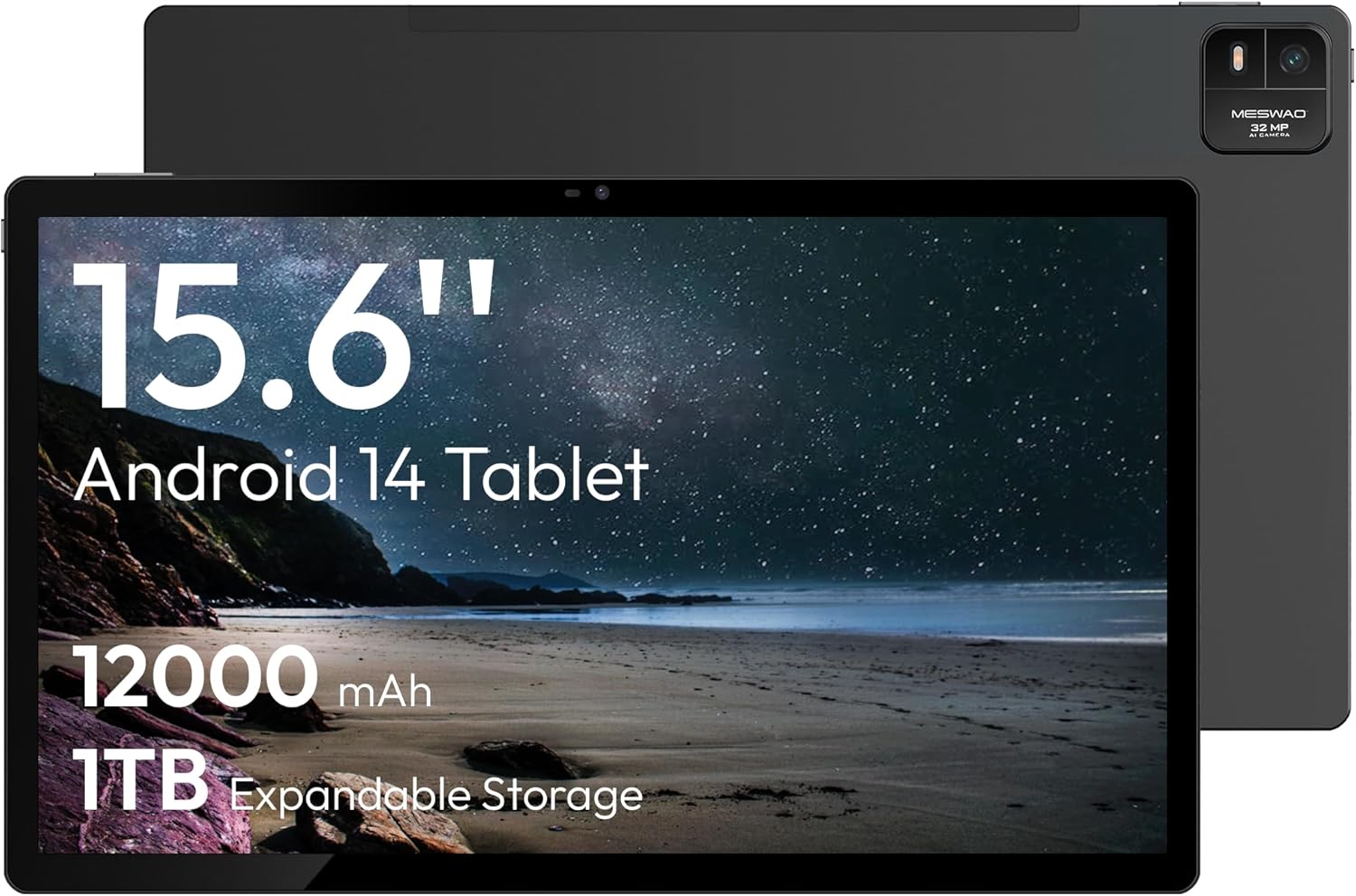
Figure 1.1: MESWAO 15.6 Inch Android 14 Tablet. This image displays the front and back view of the tablet, highlighting its large screen and rear camera module.
2. பாதுகாப்பு தகவல்
உங்கள் சாதனத்திற்கு சேதம் ஏற்படுவதையோ அல்லது உங்களுக்கோ அல்லது பிறருக்கோ காயம் ஏற்படுவதையோ தடுக்க, பின்வரும் முன்னெச்சரிக்கை நடவடிக்கைகளைக் கவனியுங்கள்:
- டேப்லெட்டை தீவிர வெப்பநிலை, நேரடி சூரிய ஒளி அல்லது அதிக ஈரப்பதத்திற்கு வெளிப்படுத்த வேண்டாம்.
- மாத்திரையை கீழே போடுவதையோ அல்லது கடுமையான தாக்கத்திற்கு ஆளாக்குவதையோ தவிர்க்கவும்.
- அங்கீகரிக்கப்பட்ட சார்ஜர்கள் மற்றும் துணைக்கருவிகளை மட்டுமே பயன்படுத்தவும்.
- Do not attempt to disassemble or repair the tablet yourself.
- மாத்திரையை தண்ணீர் மற்றும் பிற திரவங்களிலிருந்து விலக்கி வைக்கவும்.
- Observe all local regulations regarding the use of electronic devices.
3. தொகுப்பு உள்ளடக்கங்கள்
தொகுப்பில் அனைத்து பொருட்களும் உள்ளதா என சரிபார்க்கவும்:
- 15.6-inch Tablet x1
- 15W Charger x1
- Type-C to 3.5mm Adapter x1
- USB-A to Type-C Adapter x1
- Stuck Pin x1 (for SIM/TF card tray)
4. சாதனம் முடிந்ததுview
Familiarize yourself with the physical components of your MESWAO tablet.
4.1. உடல் அம்சங்கள்
- முன் கேமரா: Located at the top center of the screen when held horizontally.
- ஃபிளாஷ் கொண்ட பின்புற கேமரா: Located on the back, typically in a corner.
- பவர் பட்டன்: Usually on the side, used to power on/off or wake/sleep the device.
- தொகுதி பொத்தான்கள்: ஆடியோ நிலைகளை சரிசெய்யவும்.
- யூ.எஸ்.பி-சி போர்ட்: சார்ஜிங் மற்றும் டேட்டா பரிமாற்றத்திற்கு.
- TF அட்டை ஸ்லாட்: விரிவாக்கக்கூடிய சேமிப்பகத்திற்கு.
- பேச்சாளர்கள்: Quad speakers with 8 sound chambers for audio output.

படம் 4.1: மேல்view of MESWAO Tablet's physical features. This image illustrates the location of stereo speakers, power and volume buttons, front camera, rear camera with flashlight, Type-C port, and TF card slot.
5 அமைவு
5.1. ஆரம்ப கட்டணம் வசூலித்தல்
Before first use, fully charge the tablet using the provided 15W charger and USB-C cable. Connect the charger to the USB-C port on the tablet and plug it into a power outlet. The battery indicator on the screen will show charging progress.

Figure 5.1: Tablet charging illustration. This image shows the tablet connected to a charger, displaying a charging icon and indicating 100% charge in 3.5 hours.
5.2. ஆன் / ஆஃப் செய்தல்
- பவர் ஆன் செய்ய: Press and hold the Power button until the MESWAO logo appears.
- பவர் ஆஃப் செய்ய: Press and hold the Power button until the power options menu appears, then select "Power off."
- தூங்க/விழிக்க: பவர் பட்டனை சுருக்கமாக அழுத்தவும்.
5.3. ஆரம்ப கட்டமைப்பு
முதல் பவர்-ஆன் செய்தவுடன், உங்கள் டேப்லெட்டை அமைக்க திரையில் தோன்றும் வழிமுறைகளைப் பின்பற்றவும்:
- உங்களுக்கு விருப்பமான மொழியைத் தேர்ந்தெடுக்கவும்.
- வைஃபை நெட்வொர்க்குடன் இணைக்கவும்.
- உங்கள் Google கணக்கில் உள்நுழையவும் அல்லது புதிய ஒன்றை உருவாக்கவும்.
- Review மற்றும் விதிமுறைகள் மற்றும் நிபந்தனைகளை ஏற்றுக்கொள்ளுங்கள்.
- திரைப் பூட்டை அமைக்கவும் (பின், பேட்டர்ன் அல்லது கடவுச்சொல்).
5.4. Inserting a TF Card
To expand storage, insert a TF (microSD) card:
- Locate the TF card slot on the side of the tablet.
- Use the provided stuck pin to gently eject the card tray.
- Place the TF card into the tray with the gold contacts facing down.
- Carefully reinsert the tray into the tablet.

Figure 5.2: Tablet storage capabilities. This image highlights the 128GB ROM and support for up to 1TB expandable storage via TF card.
6. இயக்க வழிமுறைகள்
6.1. அடிப்படை வழிசெலுத்தல்
The MESWAO tablet uses Android 14, offering intuitive touch-based navigation:
- தட்டவும்: ஒரு பொருளைத் தேர்ந்தெடுக்கவும் அல்லது பயன்பாட்டைத் திறக்கவும்.
- ஸ்வைப்: திரைகள் அல்லது பட்டியல்களை உருட்டவும்.
- பெரிதாக்க பின்ச்: திரையில் உள்ள உள்ளடக்கத்தை பெரிதாக்கவும் அல்லது குறைக்கவும்.
- நீண்ட பத்திரிகை: சூழல் மெனுக்களை அணுகவும் அல்லது ஐகான்களை நகர்த்தவும்.

Figure 6.1: Android 14 operating system interface. This image displays various application icons and highlights features like smooth multitasking, parental control, and enhanced privacy.
6.2. Wi-Fi உடன் இணைக்கிறது
- செல்க அமைப்புகள் > நெட்வொர்க் & இணையம் > Wi-Fi.
- வைஃபையை நிலைமாற்று On.
- பட்டியலிலிருந்து உங்களுக்கு விருப்பமான நெட்வொர்க்கைத் தேர்ந்தெடுக்கவும்.
- கேட்கப்பட்டால் கடவுச்சொல்லை உள்ளிட்டு, பின்னர் தட்டவும் இணைக்கவும்.
6.3. பயன்பாடுகளை நிர்வகித்தல்
- பயன்பாடுகளை நிறுவவும்: Download from the Google Play Store.
- பயன்பாடுகளை நிறுவல் நீக்கவும்: Long-press an app icon, then drag it to "Uninstall" or go to அமைப்புகள் > பயன்பாடுகள்.
- பயன்பாடுகளை மூடு: Swipe up from the bottom of the screen and swipe away the app card.
6.4. கேமரா பயன்பாடு
The tablet features a 32MP rear camera with flash and a 5MP front camera.
- திற கேமரா விண்ணப்பம்.
- புகைப்படம் எடுக்க ஷட்டர் பொத்தானைத் தட்டவும்.
- கேமரா சுவிட்ச் ஐகானைப் பயன்படுத்தி முன் மற்றும் பின் கேமராக்களுக்கு இடையில் மாறவும்.
- Access settings for flash, modes, and other options.
6.5. பேட்டரி மேலாண்மை
12000mAh பேட்டரி நீட்டிக்கப்பட்ட பயன்பாட்டை வழங்குகிறது. பேட்டரி ஆயுளை மேம்படுத்த:
- திரையின் பிரகாசத்தை சரிசெய்யவும்.
- பயன்படுத்தப்படாத பயன்பாடுகளை மூடு.
- பேட்டரி சேமிப்பான் பயன்முறையை இயக்கு அமைப்புகள் > பேட்டரி.
6.6. இணைப்பு
- புளூடூத்: Pair with wireless headphones, speakers, or other devices via அமைப்புகள் > இணைக்கப்பட்ட சாதனங்கள் > புளூடூத்.
- யூ.எஸ்.பி-சி: கணினியுடன் இணைக்கவும்: file transfer or use with compatible USB-C accessories.
- வயர்லெஸ் திரை அனுப்புதல்: Share your tablet's screen to a compatible smart TV or monitor. Access this feature from the Quick Settings panel or அமைப்புகள் > இணைக்கப்பட்ட சாதனங்கள் > நடிகர்கள்.
6.7. ஒலி அமைப்புகள்
Adjust volume and audio output options:
- Use the physical volume buttons on the side of the tablet.
- Access detailed settings in அமைப்புகள் > ஒலி & அதிர்வு.
- The tablet supports multiple audio options, including USB-C audio and 3.5mm via the provided adapter.
7. பராமரிப்பு
7.1. உங்கள் டேப்லெட்டை சுத்தம் செய்தல்
டேப்லெட்டை சுத்தம் செய்ய, மென்மையான, பஞ்சு இல்லாத துணியைப் பயன்படுத்தவும். பிடிவாதமான கறைகளுக்கு, சிறிது dampta தண்ணீருடன் கூடிய துணி அல்லது மின்னணு சாதனங்களுக்காக வடிவமைக்கப்பட்ட திரை துப்புரவாளர். கடுமையான இரசாயனங்கள் அல்லது சிராய்ப்புப் பொருட்களைத் தவிர்க்கவும்.
7.2. மென்பொருள் புதுப்பிப்புகள்
சிறந்த செயல்திறன், பாதுகாப்பு மற்றும் புதிய அம்சங்களுக்கான அணுகலை உறுதிசெய்ய, மென்பொருள் புதுப்பிப்புகளைத் தொடர்ந்து சரிபார்த்து நிறுவவும். செல்க அமைப்புகள் > அமைப்பு > கணினி மேம்படுத்தல்.
7.3. சேமிப்பு மேலாண்மை
To maintain performance, periodically manage your tablet's storage:
- தேவையற்ற பயன்பாடுகளை நீக்கவும் மற்றும் files.
- பெரிதாக நகர்த்து files to the TF card or cloud storage.
- பயன்பாடுகளுக்கான தற்காலிக சேமிப்பு தரவை அழிக்கவும் அமைப்புகள் > பயன்பாடுகள் > [பயன்பாட்டின் பெயர்] > சேமிப்பகம் & தற்காலிக சேமிப்பு.
8. சரிசெய்தல்
பின்வரும் பொதுவான சிக்கல்கள் மற்றும் தீர்வுகளைப் பார்க்கவும்:
| பிரச்சனை | தீர்வு |
|---|---|
| டேப்லெட் இயக்கப்படவில்லை. | பேட்டரி சார்ஜ் செய்யப்பட்டுள்ளதா என்பதை உறுதிப்படுத்திக் கொள்ளுங்கள். சார்ஜரை இணைத்து, மீண்டும் பவர் ஆன் செய்ய முயற்சிக்கும் முன் சில நிமிடங்கள் காத்திருக்கவும். |
| Wi-Fi உடன் இணைக்க முடியவில்லை. | Check if Wi-Fi is enabled. Verify the Wi-Fi password. Restart your router and the tablet. |
| பயன்பாடுகள் செயலிழந்து போகின்றன அல்லது உறைந்து போகின்றன. | Close background apps. Clear the app's cache. Restart the tablet. Ensure the app is updated. |
| மெதுவான செயல்திறன். | Free up storage space. Close unused apps. Restart the tablet. |
| பேட்டரி விரைவாக தீர்ந்துவிடும். | Reduce screen brightness. Disable unused features like Bluetooth or GPS. Close background apps. Check battery usage in settings. |
9. விவரக்குறிப்புகள்
Key technical specifications for the MESWAO 15.6 Inch Android 14 Tablet (MES-B3):
| அம்சம் | விவரம் |
|---|---|
| பிராண்ட் | MESWAO |
| மாதிரி பெயர் | எம்இஎஸ்-பி3 |
| இயக்க முறைமை | ஆண்ட்ராய்டு 14 |
| திரை அளவு | 15.6 அங்குலம் |
| திரை தெளிவுத்திறன் | 1920 x 1080 பிக்சல்கள் (IPS HD) |
| செயலி | Octa-Core (MediaTek Helio G99, up to 2.2 GHz) |
| கிராபிக்ஸ் கோப்ராசசர் | மாலி-ஜி57 |
| RAM (Memory Storage Capacity) | 6GB (DDR3 SDRAM) |
| Internal Storage (Flash Memory Size) | 128 ஜிபி |
| விரிவாக்கக்கூடிய சேமிப்பு | TF அட்டை வழியாக 1TB வரை |
| பின்புற கேமரா தெளிவுத்திறன் | 32 எம்.பி |
| முன் கேமரா தீர்மானம் | 5 எம்.பி |
| பேட்டரி திறன் | 12000mAh |
| சராசரி பேட்டரி ஆயுள் | 12 மணிநேரம் |
| வயர்லெஸ் வகை | 802.11a/b/g/n/ac (வைஃபை 5) |
| நிறம் | சாம்பல் |
| பொருளின் எடை | 2.35 பவுண்டுகள் |
| தயாரிப்பு பரிமாணங்கள் (LxWxH) | 14.53 x 8.78 x 0.43 அங்குலம் |

Figure 9.1: Processor and performance details. This image highlights the Helio G99 Octa-Core chipset, 6nm process, 950MHz GPU, and smooth gaming/streaming capabilities.
10. உத்தரவாதம் மற்றும் ஆதரவு
10.1. உத்தரவாதத் தகவல்
The MESWAO 15.6 Inch Android 14 Tablet comes with a 12 மாத உத்தரவாதம் உற்பத்தி குறைபாடுகளை உள்ளடக்கியது. உத்தரவாதக் கோரிக்கைகளுக்கு உங்கள் வாங்கியதற்கான ஆதாரத்தை வைத்திருங்கள்.
10.2. வாடிக்கையாளர் ஆதரவு
For technical assistance, troubleshooting, or warranty inquiries, please contact MESWAO customer support. They offer 24 மணி நேர வாடிக்கையாளர் ஆதரவு மற்றும் வேண்டும் local service centers in the US, EU, and Japan.
- தொடர்பு முறை: Refer to the contact information provided with your product packaging or visit the official MESWAO webதளம்.
- பிரச்சினைத் தீர்மானம்: Issues reported are typically responded to within 24 hours, with problems resolved or replaced according to policy.

Figure 10.1: MESWAO customer support and warranty details. This image highlights the 12-month warranty, 24-hour customer support, local after-sales centers, and quick response flow.
Ask a question about this manual
Ask about setup, troubleshooting, compatibility, parts, safety, or missing instructions. Manuals+ will review the question and use this page’s manual context to help answer it.