
1. தயாரிப்பு முடிந்துவிட்டதுview
The llano NP-W235 Dual Battery Fast Charger is designed for efficient charging of Fujifilm NP-W235 batteries. This compact and travel-friendly charger offers simultaneous charging for two batteries, featuring a digital display for instant battery level recognition. It also functions as a secure storage box for batteries and SD cards.

Image 1.1: The llano NP-W235 Dual Battery Fast Charger, showcasing அதன் சிறிய வடிவமைப்பு.
முக்கிய அம்சங்கள்:
- சூப்பர் ஃபாஸ்ட் சார்ஜிங்: Supports PD3.0 & QC3.0, fully charging two batteries in approximately 3 hours.
- Instant Battery Level Recognition: Digital display shows individual battery power levels and charging status.
- இரட்டை செயல்பாடு: Serves as both a charger and a storage box for two batteries and two SD cards.
- சிறிய மற்றும் பயணத்திற்கு ஏற்ற: Lightweight design with a magnetic flip-open lid for secure transport.
- பல்துறை சார்ஜிங் விருப்பங்கள்: Compatible with various power sources including car chargers, computers, power banks, and USB-C wall adapters.
- Multiple Safeguards: Built-in protections against overvoltage, overcharge, overheating, overcurrent, and short circuits.
2. அமைவு வழிமுறைகள்
- சார்ஜரை அவிழ்த்து விடுங்கள்: Carefully remove the llano NP-W235 Dual Battery Fast Charger from its packaging.
- பவர் இணைக்கவும்: Use the provided USB-C charging cable to connect the charger to a suitable power source. This can be a PD3.0 or QC3.0 compatible wall adapter, a computer USB-C port, a power bank, or a car charger.
- பேட்டரிகளைச் செருகவும்: Open the magnetic flip-open lid. Insert up to two Fujifilm NP-W235 batteries into the designated slots. Ensure the battery contacts align correctly with the charger pins.
- Insert SD Cards (Optional): The charger includes slots for two SD cards for convenient storage. Insert your SD cards into these slots if desired.
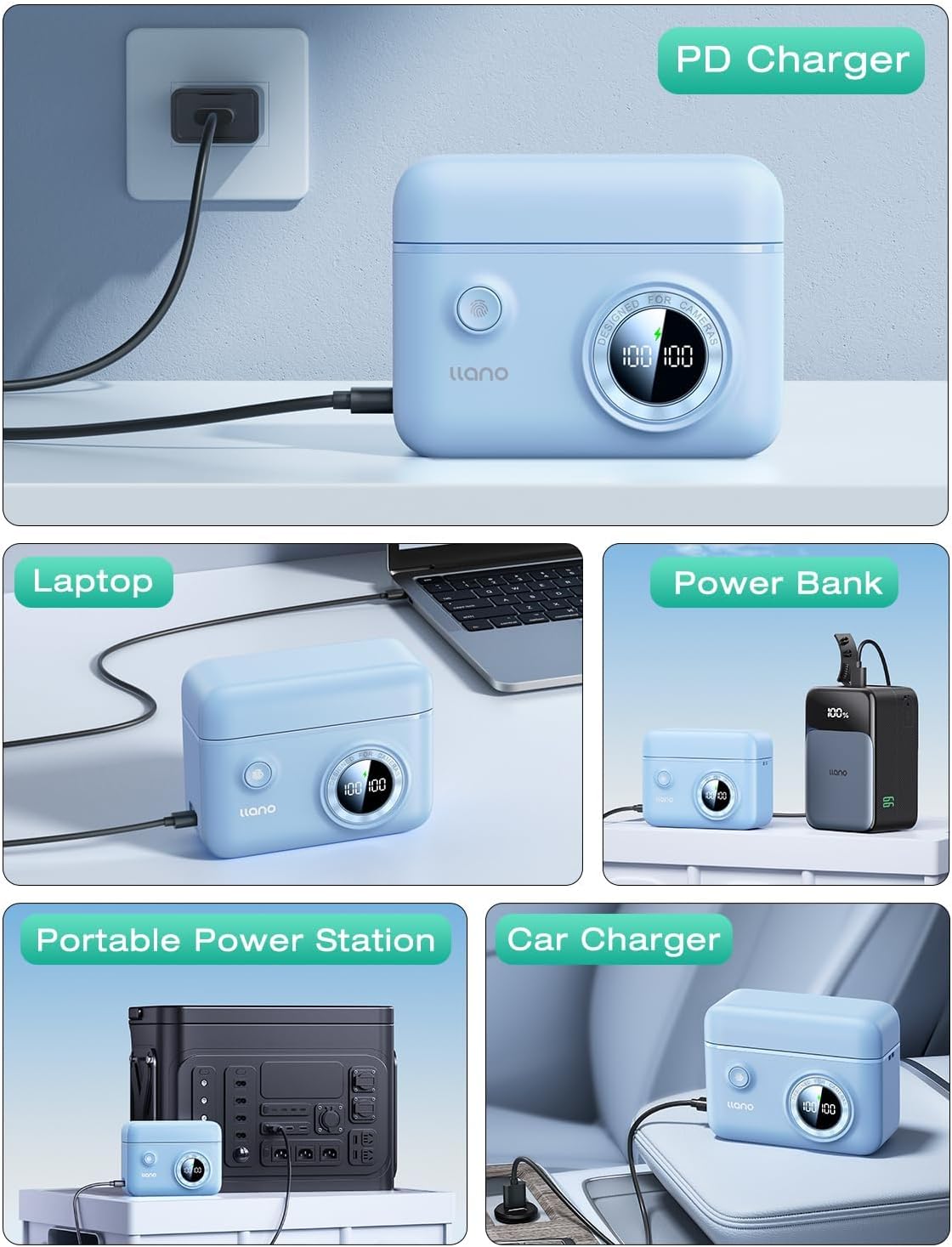
Image 2.1: The charger connected to a power source, demonstrating versatile charging options.
3. இயக்க வழிமுறைகள்
3.1 சார்ஜிங் செயல்முறை
- Once batteries are inserted and the charger is connected to a power source, the digital display will activate.
- The display shows the current charge percentage for each battery independently. A lightning bolt icon indicates active charging.
- Charging typically takes about 3 hours for two fully depleted batteries when using a PD3.0 or QC3.0 compatible power source.
- The display will show "100%" when a battery is fully charged.

Image 3.1: Digital display indicating battery charge levels and charging status.
3.2 பேட்டரி நிலைகளை சரிபார்த்தல்
- Even when not connected to a power source, pressing the button on the charger will briefly activate the digital display to show the current charge level of the inserted batteries.
- This allows for quick checks of battery readiness before use.
3.3 சேமிப்பக செயல்பாடு
- The magnetic flip-open lid securely holds batteries and SD cards in place, protecting them from dust and accidental disconnections.
- The compact design makes it suitable for travel and storage in camera bags.

Image 3.2: Features of the charger including the magnetic lid and SD card storage.
4. பராமரிப்பு
- சுத்தம்: Use a soft, dry cloth to clean the exterior of the charger. Avoid using liquid cleaners or solvents.
- சேமிப்பு: Store the charger in a cool, dry place away from direct sunlight and extreme temperatures. Ensure the lid is closed to protect batteries and SD cards from dust.
- பேட்டரி பராமரிப்பு: For optimal battery life, avoid fully discharging batteries frequently. Store batteries with a partial charge (around 50%) if not used for extended periods.
- கேபிள் பராமரிப்பு: Inspect the USB-C cable regularly for any signs of wear or damage. Replace if necessary.
5. சரிசெய்தல்
5.1 Charger Not Powering On
- ஆற்றல் மூலத்தை சரிபார்க்கவும்: Ensure the USB-C cable is securely connected to both the charger and a functional power outlet or device.
- கேபிளைச் சரிபார்க்கவும்: Try using a different USB-C cable to rule out a faulty cable.
- சோதனை கடை: Plug another device into the power outlet to confirm it is working.
5.2 பேட்டரிகள் சார்ஜ் ஆகவில்லை.
- முறையான செருகல்: Ensure batteries are correctly inserted into the slots with contacts aligned.
- பேட்டரி நிலை: Check if the batteries themselves are damaged or at the end of their lifespan. Try charging a different, known-good battery.
- சார்ஜர் செயல்பாடு: If the display shows an error or no charging indication, refer to "Charger Not Powering On" steps.
5.3 மெதுவான சார்ஜிங்
- பவர் அடாப்டர் வெளியீடு: For fast charging, use a power adapter that supports PD3.0 or QC3.0 with sufficient wattage (e.g., 18W or higher). Standard USB ports on computers may charge slower.
- கேபிள் தரம்: வேகமாக சார்ஜ் செய்வதை ஆதரிக்கும் திறன் கொண்ட உயர்தர USB-C கேபிளைப் பயன்படுத்துகிறீர்கள் என்பதை உறுதிப்படுத்தவும்.
6. தயாரிப்பு விவரக்குறிப்புகள்
| பிராண்ட் | லானோ |
| மாதிரி எண் | LJN-CS008 |
| இணக்கமான பேட்டரிகள் | Fujifilm NP-W235 |
| உள்ளீடு | USB-C (PD3.0 & QC3.0 compatible) |
| வெளியீடு தொகுதிtage | 8.4 வோல்ட் |
| சார்ஜிங் நேரம் | Approx. 3 hours for two batteries (with compatible fast charger) |
| தயாரிப்பு பரிமாணங்கள் | 4.3 x 3.3 x 1.7 அங்குலம் (10.9 x 8.4 x 4.3 செமீ) |
| பொருளின் எடை | 6.4 அவுன்ஸ் (181 கிராம்) |
| கூடுதல் அம்சங்கள் | Digital display, SD card storage, magnetic lid, portable lanyard attachment points, anti-slip pads. |
7. உத்தரவாதம் மற்றும் ஆதரவு
For warranty information and customer support, please refer to the documentation included with your purchase or contact llano customer service directly through their official webதயாரிப்பு வாங்கிய தளம் அல்லது சில்லறை விற்பனையாளர்.
நீட்டிக்கப்பட்ட காப்பீட்டிற்கு விருப்ப பாதுகாப்புத் திட்டங்கள் கிடைக்கக்கூடும். கிடைக்கக்கூடிய திட்டங்கள் குறித்த விவரங்களுக்கு உங்கள் சில்லறை விற்பனையாளரைத் தொடர்பு கொள்ளவும்.