
Next YE-65GFSG8-QLED
Next YE-65GFSG8-QLED 65-inch UHD 4K QLED Google TV User Manual
Model: YE-65GFSG8-QLED
1. அறிமுகம்
நன்றி, நன்றி.asing the Next YE-65GFSG8-QLED 65-inch UHD 4K QLED Google TV. This manual provides essential information for setting up, operating, and maintaining your new television. Please read it thoroughly before use and keep it for future reference.

படம் 1.1: முன் view of the Next YE-65GFSG8-QLED 65-inch QLED Google TV.
2. பாதுகாப்பு தகவல்
சேதத்தைத் தடுக்கவும் பாதுகாப்பான செயல்பாட்டை உறுதி செய்யவும் பின்வரும் பாதுகாப்பு முன்னெச்சரிக்கை நடவடிக்கைகளைக் கவனியுங்கள்:
- மழை அல்லது ஈரப்பதத்திற்கு டிவியை வெளிப்படுத்த வேண்டாம்.
- காற்றோட்டம் திறப்புகளைத் தடுக்க வேண்டாம்.
- மின் இணைப்புகளுக்கு சரியான தரையமைப்பை உறுதி செய்யவும்.
- நேரடி சூரிய ஒளி, வெப்ப மூலங்கள் மற்றும் திறந்த தீப்பிழம்புகளிலிருந்து டிவியை விலக்கி வைக்கவும்.
- டிவியுடன் வழங்கப்பட்ட மின் கம்பியை மட்டும் பயன்படுத்தவும்.
- டிவியை நீங்களே சர்வீஸ் செய்ய முயற்சிக்காதீர்கள். அனைத்து சர்வீசிங்கையும் தகுதிவாய்ந்த பணியாளர்களிடம் பரிந்துரைக்கவும்.
- டிவியை ஒரு நிலையான, சமதள மேற்பரப்பில் வைக்கவும் அல்லது சுவரில் பாதுகாப்பாக பொருத்தவும்.
3. தொகுப்பு உள்ளடக்கங்கள்
தொகுப்பில் அனைத்து பொருட்களும் உள்ளதா என சரிபார்க்கவும்:
- Next YE-65GFSG8-QLED 65-inch UHD 4K QLED Google TV
- ரிமோட் கண்ட்ரோல்
- பவர் கார்ட்
- பயனர் கையேடு (இந்த ஆவணம்)
- டிவி ஸ்டாண்ட் கூறுகள் (பொருந்தினால்)
- Screws for Stand Assembly (if applicable)
4 அமைவு
4.1. ஸ்டாண்ட் அசெம்பிளி (விரும்பினால்)
If you are not wall-mounting the TV, attach the stand as follows:
- திரை சேதமடைவதைத் தடுக்க, டிவியை மென்மையான, சுத்தமான மேற்பரப்பில் கவனமாக முகம் கீழே வைக்கவும்.
- டிவியின் அடிப்பகுதியில் உள்ள மவுண்டிங் துளைகளுடன் ஸ்டாண்ட் கூறுகளை சீரமைக்கவும்.
- கொடுக்கப்பட்டுள்ள திருகுகளைப் பயன்படுத்தி ஸ்டாண்டைப் பாதுகாக்கவும். அதிகமாக இறுக்க வேண்டாம்.
- ஒரு நிலையான மேற்பரப்பில் டிவியை அதன் நேர்மையான நிலைக்கு கவனமாக உயர்த்தவும்.
4.2. இணைக்கும் சாதனங்கள்
உங்கள் வெளிப்புற சாதனங்களை டிவியின் பின்புறத்தில் உள்ள பொருத்தமான போர்ட்களுடன் இணைக்கவும்.
படம் 4.1: பின்புறம் view of the TV with connection ports labeled.
- HDMI (3 ports, one with ARC): Connect Blu-ray players, game consoles, set-top boxes, etc. Use the HDMI (ARC) port for audio return channel functionality with compatible sound systems.
- USB (2 போர்ட்கள்): மீடியா பிளேபேக் அல்லது மென்பொருள் புதுப்பிப்புகளுக்கு USB சேமிப்பக சாதனங்களை இணைக்கவும்.
- DVB-S / DVB-T (TV 1, TV 2): Connect satellite (DVB-S) or terrestrial (DVB-T) antenna cables for broadcast TV reception.
- CI Module: Insert a Conditional Access Module (CAM) for encrypted digital TV services.
- மினி AV-IN: Connect older devices using an AV adapter cable (not always included).
- ஆப்டிகல் அவுட்: டிஜிட்டல் ஆடியோ வெளியீட்டிற்கு சவுண்ட்பார் அல்லது ஆடியோ ரிசீவருடன் இணைக்கவும்.
- ஈதர்நெட்: கம்பி இணைய இணைப்பிற்கு ஈதர்நெட் கேபிளை இணைக்கவும்.
4.3. மின் இணைப்பு
பவர் கார்டை டிவியின் பவர் உள்ளீட்டிலும், பின்னர் சுவர் அவுட்லெட்டிலும் செருகவும். டிவி காத்திருப்பு பயன்முறையில் நுழையும்.
5. இயக்க வழிமுறைகள்
5.1. முதல் முறை அமைப்பு
When you power on the TV for the first time, follow the on-screen instructions to:
- உங்கள் மொழியையும் பிராந்தியத்தையும் தேர்ந்தெடுக்கவும்.
- வைஃபை நெட்வொர்க்குடன் இணைக்கவும் அல்லது கம்பி ஈதர்நெட் இணைப்பைப் பயன்படுத்தவும்.
- Sign in with your Google account to access Google TV features.
- Scan for available TV channels (if using antenna/satellite).

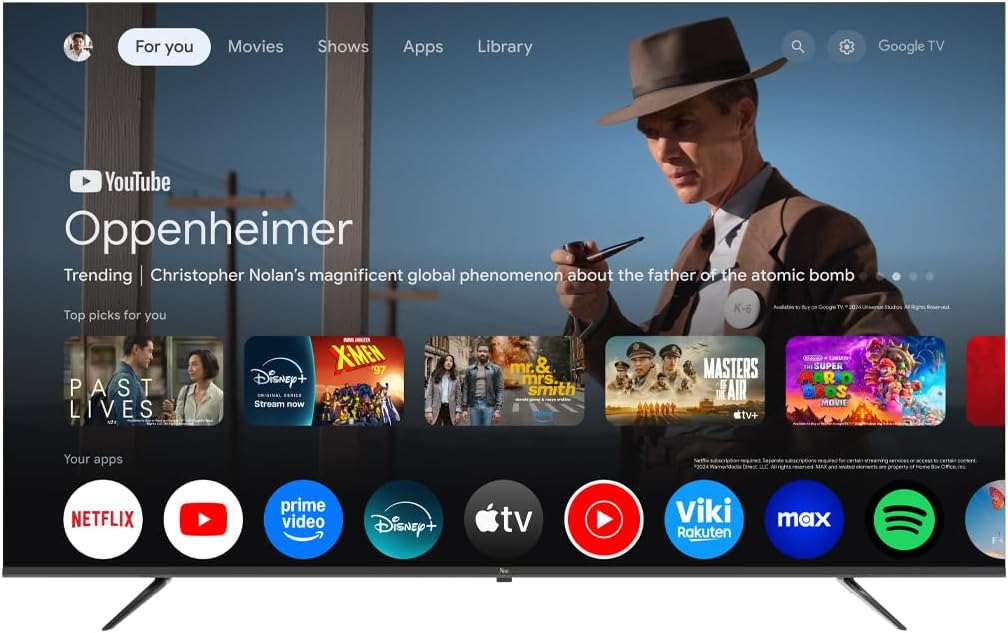
Image 5.1: Google TV interface on the Next QLED TV.
5.2. கூகிள் டிவி அம்சங்கள்
Your TV runs on Google TV, providing access to a wide range of content and smart features:
- தனிப்பயனாக்கப்பட்ட பரிந்துரைகள்: Get suggestions based on your viewவரலாறு.
- குரல் கட்டுப்பாடு: Use the built-in Google Assistant via the remote control to search for content, control smart home devices, and more.
- பயன்பாட்டு அணுகல்: Download and stream from popular services like YouTube, Netflix, Disney+, and more via the Google Play Store.
- Chromecast உள்ளமைவு: உங்கள் இணக்கமான மொபைல் சாதனங்களிலிருந்து உள்ளடக்கத்தை நேரடியாக டிவிக்கு அனுப்பவும்.
5.3. QLED Display Technology
The QLED display technology in your TV offers enhanced picture quality:
- துடிப்பான நிறங்கள்: Quantum Dot technology produces a wider color gamut and higher color saturation.
- அதிக பிரகாசம்: Experience brighter images with improved contrast.
- HDR ஆதரவு: High Dynamic Range (HDR) content delivers greater detail in both bright and dark scenes.

Image 5.2: Visual representation of QLED technology's enhanced color saturation.

Image 5.3: Visual representation of HDR technology's improved dynamic range.
5.4. ரிமோட் கண்ட்ரோல்
The included remote control allows you to navigate the TV's interface, adjust settings, and access smart features. Refer to the remote control diagram (if available in the physical manual) for specific button functions.
5.5. தயாரிப்பு முடிந்துவிட்டதுview வீடியோ
Watch this video for a brief overview of the Next QLED Google TV's key features, including QLED technology, Ultra HD quality, Google TV integration, and frameless design.
காணொளி 5.1: முடிந்ததுview of Next QLED Google TV features.
6. பராமரிப்பு
உங்கள் டிவியின் நீண்ட ஆயுளையும் உகந்த செயல்திறனையும் உறுதி செய்ய:
- திரையை சுத்தம் செய்தல்: மென்மையான, பஞ்சு இல்லாத துணியால் திரையை மெதுவாகத் துடைக்கவும். பிடிவாதமான அடையாளங்களுக்கு, திரையில் நேரடியாகப் பயன்படுத்தாமல், துணியில் தடவப்பட்ட திரை-குறிப்பிட்ட துப்புரவுக் கரைசலைப் பயன்படுத்தவும்.
- அமைச்சரவையை சுத்தம் செய்தல்: டிவி அலமாரியைத் துடைக்க மென்மையான, உலர்ந்த துணியைப் பயன்படுத்தவும். சிராய்ப்பு கிளீனர்கள் அல்லது கரைப்பான்களைப் பயன்படுத்த வேண்டாம்.
- காற்றோட்டம்: அதிக வெப்பமடைவதைத் தடுக்க காற்றோட்டத் திறப்புகள் தூசி மற்றும் தடைகள் இல்லாமல் இருப்பதை உறுதி செய்யவும்.
- பவர் ஆஃப்: Disconnect the TV from the power outlet during electrical storms or when it will be unused for extended periods.
7. சரிசெய்தல்
உங்கள் டிவியில் சிக்கல்கள் ஏற்பட்டால், பின்வரும் பொதுவான தீர்வுகளைப் பார்க்கவும்:
| பிரச்சனை | சாத்தியமான தீர்வு |
|---|---|
| சக்தி இல்லை | Check if the power cord is securely connected to both the TV and the wall outlet. Ensure the outlet is functional. |
| படம் இல்லை, ஆனால் ஒலி உள்ளது. | சரியான உள்ளீட்டு மூலத்தைத் தேர்ந்தெடுத்துள்ளீர்களா எனச் சரிபார்க்கவும். வெளிப்புற சாதனங்களுக்கான கேபிள் இணைப்புகளைச் சரிபார்க்கவும். |
| ஒலி இல்லை, ஆனால் படம் உள்ளது. | Check the volume level and mute status. Ensure audio cables are correctly connected. Check TV audio output settings. |
| ரிமோட் கண்ட்ரோல் வேலை செய்யவில்லை | பேட்டரிகளை மாற்றவும். ரிமோட்டுக்கும் டிவியின் ஐஆர் சென்சாருக்கும் இடையில் எந்த தடைகளும் இல்லை என்பதை உறுதிப்படுத்தவும். |
| மோசமான பட தரம் | Check antenna/cable connections. Adjust picture settings (brightness, contrast, sharpness). Ensure the source content is high quality. |
| Wi-Fi உடன் இணைக்க முடியவில்லை | Restart your router. Ensure the Wi-Fi password is correct. Move the TV closer to the router or use a wired Ethernet connection. |
இந்த தீர்வுகளை முயற்சித்த பிறகும் சிக்கல் தொடர்ந்தால், வாடிக்கையாளர் ஆதரவைத் தொடர்பு கொள்ளவும்.
8. விவரக்குறிப்புகள்
Key technical specifications for the Next YE-65GFSG8-QLED 65-inch UHD 4K QLED Google TV:
| அம்சம் | விவரம் |
|---|---|
| மாதிரி | YE-65GFSG8-QLED |
| திரை அளவு | 65 அங்குலம் (165 செமீ) |
| காட்சி தொழில்நுட்பம் | QLED |
| தீர்மானம் | 4K UHD (அல்ட்ரா உயர் தெளிவுத்திறன்) |
| புதுப்பிப்பு விகிதம் | 60 ஹெர்ட்ஸ் |
| இயக்க முறைமை | கூகுள் டிவி |
| இணைப்பு | ப்ளூடூத், ஈதர்நெட், HDMI (3 போர்ட்கள்), USB (2 போர்ட்கள்), வைஃபை |
| தோற்ற விகிதம் | 16:9 |
| தயாரிப்பு பரிமாணங்கள் (அளவு x அளவு x அளவு) | 27.8D x 144.6W x 88.9H செ.மீ. |
| தயாரிப்பு எடை | 16.3 கிலோகிராம் |
| உள்ளிட்ட கூறுகள் | ரிமோட் கண்ட்ரோல் |
| சிறப்பு அம்சம் | பிரேம்லெஸ் டிசைன் |
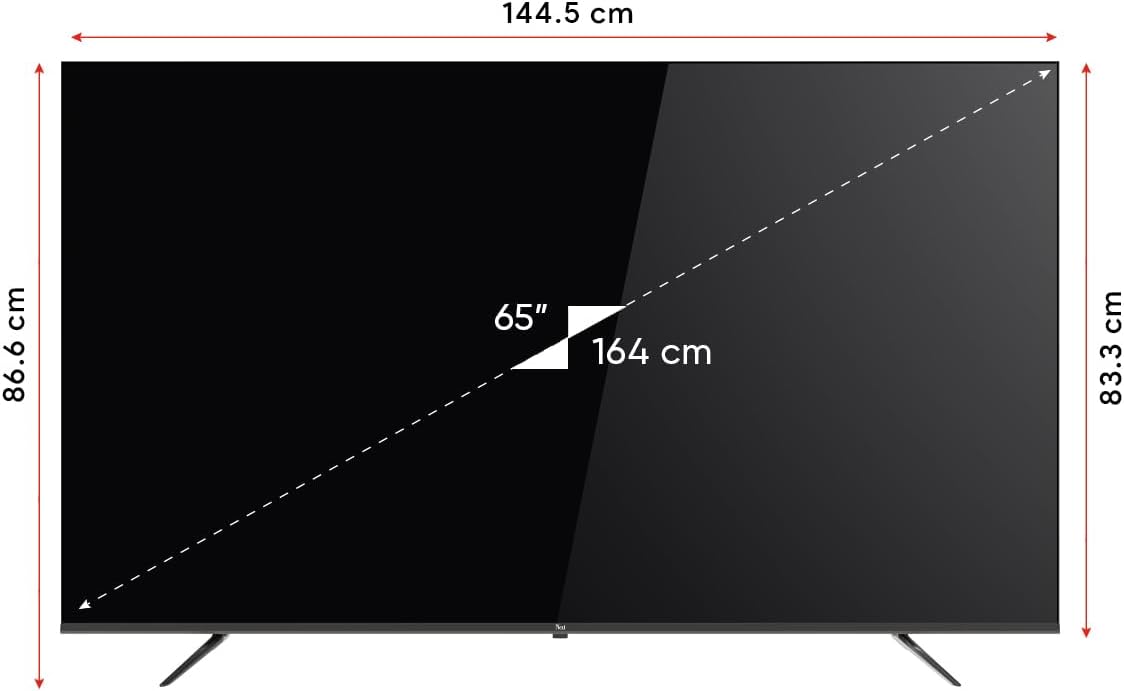
Image 8.1: TV dimensions (144.5 cm width, 86.6 cm height, 65" / 164 cm diagonal).
9. உத்தரவாதம் மற்றும் ஆதரவு
Your Next YE-65GFSG8-QLED TV comes with a manufacturer's warranty:
- உத்தரவாதக் காலம்: 2 Years Manufacturer Warranty.
- ஆதரவு: For technical assistance, warranty claims, or further inquiries, please refer to the contact information provided in your warranty card or visit the official Next webதளம்.
Ask a question about this manual
Ask about setup, troubleshooting, compatibility, parts, safety, or missing instructions. Manuals+ will review the question and use this page’s manual context to help answer it.