
Edifier W800BT SE
Edifier W800BT SE Wireless Over-Ear Headphones User Manual
Model: W800BT SE
அறிமுகம்
Thank you for choosing the Edifier W800BT SE Wireless Over-Ear Headphones. This manual provides detailed instructions for setting up, operating, and maintaining your headphones to ensure optimal performance and longevity. Please read this manual thoroughly before use.
தொகுப்பு உள்ளடக்கங்கள்
உங்கள் தொகுப்பில் அனைத்து பொருட்களும் உள்ளதா என சரிபார்க்கவும்:
- Edifier W800BT SE Headphones x 1
- USB Type-C சார்ஜிங் கேபிள் x 1
- பயனர் கையேடு x 1
தயாரிப்பு முடிந்துவிட்டதுview
ஹெட்ஃபோன் அம்சங்கள்
- 40மிமீ டைனமிக் டிரைவர்கள்: Equipped with titanium-coated diaphragm driver units for clear and detailed audio.
- புளூடூத் 5.4: நிலையான மற்றும் திறமையான வயர்லெஸ் இணைப்பை வழங்குகிறது.
- AI அழைப்பு இரைச்சல் குறைப்பு: Enhances voice clarity during calls by filtering background noise.
- பலமுனை இணைப்பு: Allows simultaneous connection to two Bluetooth devices.
- நீண்ட பேட்டரி ஆயுள்: Up to 45 hours of playback.
- வேகமாக சார்ஜ் செய்தல்: 15 நிமிடங்கள் சார்ஜ் செய்தால் 8 மணிநேரம் தொடர்ந்து கேட்க முடியும்.
- குறைந்த தாமத விளையாட்டு முறை: Reduces audio delay for gaming.
- வசதியான வடிவமைப்பு: Lightweight (approx. 242g), adaptive fit, pressure-relief headband, and soft earpads.
- மடிக்கக்கூடிய வடிவமைப்பு: எளிதான சேமிப்பு மற்றும் எடுத்துச் செல்லுதலுக்காக.
கட்டுப்பாடுகள் மற்றும் துறைமுகங்கள்
The Edifier W800BT SE headphones feature intuitive button controls on the earcup and a USB-C port for charging.
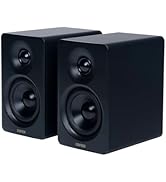
படம்: முடிந்ததுview of headphone controls and USB-C charging port.
- வால்யூம் அப் பட்டன்: Single press for volume up, press and hold for next track.
- பல செயல்பாட்டு பொத்தான்: Single press for play/pause or answer/end call, double press to reject call, triple press for voice assistant.
- வால்யூம் டவுன் பட்டன்: Single press for volume down, press and hold for previous track.
- பயன்முறை சுவிட்ச் பொத்தான்: Single press to cycle through Music mode, Game mode, and Theatre mode.
- யூ.எஸ்.பி-சி போர்ட்: ஹெட்ஃபோன்களை சார்ஜ் செய்வதற்கு.
அமைவு
1. ஹெட்ஃபோன்களை சார்ஜ் செய்தல்
Before first use, fully charge the headphones. A full charge takes approximately 1.5 hours. A 15-minute quick charge provides up to 8 hours of playback.
- வழங்கப்பட்ட USB டைப்-சி கேபிளை ஹெட்ஃபோன்களில் உள்ள சார்ஜிங் போர்ட்டுடன் இணைக்கவும்.
- கேபிளின் மறுமுனையை USB பவர் அடாப்டருடன் (சேர்க்கப்படவில்லை) அல்லது கணினியின் USB போர்ட்டுடன் இணைக்கவும்.
- The indicator light will show charging status (e.g., red for charging, off when fully charged).
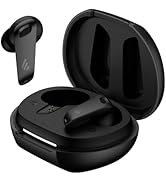
Image: USB-C charging port.

Image: Battery life and fast charging details.
2. பவர் ஆன்/ஆஃப்
- பவர் ஆன்: Press and hold the Multi-function button for approximately 3 seconds until the indicator light flashes.
- பவர் ஆஃப்: Press and hold the Multi-function button for approximately 5 seconds until the indicator light turns off.
3. புளூடூத் இணைத்தல்
உங்கள் ஹெட்ஃபோன்களை ஒரு சாதனத்துடன் இணைக்க:
- ஹெட்ஃபோன்கள் அணைக்கப்பட்டுள்ளன என்பதை உறுதிப்படுத்தவும்.
- Press and hold the Multi-function button for approximately 5 seconds until the indicator light flashes red and blue alternately, indicating pairing mode.
- உங்கள் சாதனத்தில் (ஸ்மார்ட்போன், டேப்லெட், கணினி), புளூடூத்தை இயக்கி, கிடைக்கக்கூடிய சாதனங்களைத் தேடுங்கள்.
- Select "EDIFIER W800BT SE" from the list of found devices.
- இணைக்கப்பட்டதும், காட்டி விளக்கு நீல நிறத்தில் மெதுவாக ஒளிரும்.
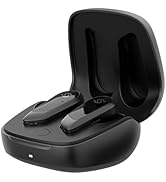
Image: Bluetooth 5.4 technology for stable connection.
4. பலமுனை இணைப்பு
The W800BT SE headphones support connecting to two Bluetooth devices simultaneously.
- Pair the headphones with the first device (e.g., your smartphone) as described above.
- முதல் சாதனத்தில் புளூடூத்தை முடக்கவும். ஹெட்ஃபோன்கள் மீண்டும் இணைத்தல் பயன்முறையில் நுழையும்.
- Pair the headphones with the second device (e.g., your laptop).
- முதல் சாதனத்தில் புளூடூத்தை மீண்டும் இயக்கவும். ஹெட்ஃபோன்கள் இரண்டு சாதனங்களுடனும் தானாகவே இணைக்கப்படும்.
- To switch between devices, pause playback on the currently active device and start playback on the other. For calls, the headphones will automatically switch to the device receiving the call.

Image: Multipoint connection with phone and laptop.
இயக்க வழிமுறைகள்
அடிப்படை கட்டுப்பாடுகள்
| செயல் | பட்டன் அழுத்தவும் |
|---|---|
| பவர் ஆன்/ஆஃப் | Press and hold Multi-function button (3s for On, 5s for Off) |
| இசையை இயக்கவும்/இடைநிறுத்தவும் | பல செயல்பாட்டு பொத்தானை ஒருமுறை அழுத்தவும் |
| பதில்/அழைப்பை முடிக்கவும் | பல செயல்பாட்டு பொத்தானை ஒருமுறை அழுத்தவும் |
| அழைப்பை நிராகரி | பல செயல்பாட்டு பொத்தானை இருமுறை அழுத்தவும் |
| வால்யூம் அப் | Single press Volume Up button |
| வால்யூம் டவுன் | Single press Volume Down button |
| அடுத்த ட்ராக் | Press and hold Volume Up button |
| முந்தைய ட்ராக் | Press and hold Volume Down button |
| குரல் உதவியாளரை இயக்கவும் | பல செயல்பாட்டு பொத்தானை மூன்று முறை அழுத்தவும். |
| Switch Mode (Music/Game/Theatre) | Single press Mode Switch button |
AI அழைப்பு இரைச்சல் குறைப்பு
The integrated AI call noise reduction algorithm and high-sensitivity microphones work to filter out ambient noise, ensuring your voice is clear during phone calls.

Image: AI Call Noise Reduction in action.
விளையாட்டு முறை
Activate Game Mode for an ultra-low latency experience (0.06s), providing enhanced sound effects and perfect audio-visual synchronization for gaming.
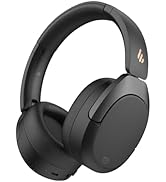
Image: Low latency gaming experience.
Edifier ConneX App
Enhance your headphone experience by downloading the EDIFIER ConneX app. The app provides additional functions:
- Personalized control settings
- Preset EQ options
- தனிப்பயனாக்கக்கூடிய EQ அமைப்புகள்
- Schedule power off
- "Find Your Product" feature

Image: Edifier ConneX App interface.
பராமரிப்பு
- Keep the headphones dry. Do not expose them to extreme temperatures.
- Clean the headphones with a soft, dry cloth. Avoid using harsh chemicals or abrasive materials.
- ஹெட்ஃபோன்களைப் பயன்படுத்தாதபோது குளிர்ந்த, உலர்ந்த இடத்தில் சேமிக்கவும். மடிக்கக்கூடிய வடிவமைப்பு சிறிய சேமிப்பை அனுமதிக்கிறது.
- ஹெட்ஃபோன்களை கீழே போடுவதையோ அல்லது வலுவான தாக்கங்களுக்கு உட்படுத்துவதையோ தவிர்க்கவும்.
- Do not attempt to disassemble the headphones. This will void the warranty.
சரிசெய்தல்
| பிரச்சனை | தீர்வு |
|---|---|
| Cannot power on headphones. | ஹெட்ஃபோன்கள் சார்ஜ் செய்யப்பட்டுள்ளதா என்பதை உறுதிப்படுத்திக் கொள்ளுங்கள். USB-C கேபிளைப் பயன்படுத்தி ஒரு மின் மூலத்துடன் இணைக்கவும். |
| புளூடூத் சாதனத்துடன் இணைக்க முடியாது. |
|
| ஒலி இல்லை அல்லது குறைந்த அளவு. |
|
| ஒலி தரம் மோசமாக உள்ளது. |
|
| அழைப்புகள் தெளிவாக இல்லை. | Ensure the microphone is not obstructed. The AI Call Noise Reduction feature is active during calls. |
விவரக்குறிப்புகள்
- மாதிரி: W800BT SE
- புளூடூத் பதிப்பு: 5.4
- புளூடூத் புரோfiles: A2DP, AVRCP, HFP
- பயனுள்ள தூரம்: 10 மீட்டர்
- ஓட்டுனர் பிரிவு: 40mm Dynamic Driver with Titanium-coated Diaphragm
- அதிர்வெண் பதில்: Up to 20 kHz (Typical range is 20Hz-20kHz)
- மின்மறுப்பு: 32 ஓம்ஸ்
- பேட்டரி ஆயுள்: Up to 45 hours (playback)
- சார்ஜிங் போர்ட்: USB வகை-C
- சார்ஜிங் நேரம்: Approximately 1.5 hours (full charge), 15 minutes for 8 hours playback
- எடை: தோராயமாக 242 கிராம்
- பரிமாணங்கள்: 3.35 x 3.15 x 3.35 inches (Product dimensions)
- கட்டுப்பாட்டு வகை: Button Control, App Control (Edifier ConneX)
- சிறப்பு அம்சங்கள்: AI Call Noise Reduction, Multipoint Connection, Low Latency Game Mode (0.06s), Lightweight, Foldable Design
உத்தரவாதம் மற்றும் ஆதரவு
Edifier products are designed for reliability and performance. For warranty information and technical support, please refer to the warranty card included in your package or visit the official Edifier webவாங்கியதற்கான சான்றாக உங்கள் கொள்முதல் ரசீதை வைத்திருங்கள்.
Official Edifier Webதளம்: www.edifier.com
அதிகாரப்பூர்வ தயாரிப்பு வீடியோ
வீடியோ: அதிகாரப்பூர்வ தயாரிப்பு முடிந்ததுview of the Edifier W800BT SE Wireless Over-Ear Bluetooth 5.4 Headphones, demonstrating key features and design.
Ask a question about this manual
Ask about setup, troubleshooting, compatibility, parts, safety, or missing instructions. Manuals+ will review the question and use this page’s manual context to help answer it.