
அறிமுகம்
Thank you for choosing the Doubc Q13 Wireless Bluetooth 5.3 Earbuds. These earbuds are designed to provide a high-quality audio experience with advanced features such as HiFi stereo sound, ENC noise-cancelling microphones, and IPX7 waterproofing. This manual will guide you through the setup, operation, and maintenance of your new earbuds.

Image: The Doubc Q13 Wireless Bluetooth 5.3 Earbuds in their open charging case, displaying the digital battery indicator.
தொகுப்பு உள்ளடக்கங்கள்
பின்வரும் பொருட்களுக்கு தொகுப்பைச் சரிபார்க்கவும்:
- Doubc Q13 Wireless Earbuds (Left and Right)
- சார்ஜிங் கேஸ்
- யூ.எஸ்.பி டைப்-சி சார்ஜிங் கேபிள்
- பயனர் கையேடு
- காது முனைகள் (பல்வேறு அளவுகள், பொதுவாக S/M/L)
அமைவு
1. ஆரம்ப கட்டணம் வசூலித்தல்
Before first use, fully charge the earbuds and the charging case. Connect the provided USB Type-C cable to the charging port on the case and a power source. The LED display on the charging case will show the battery percentage. முழுமையாக சார்ஜ் செய்ய தோராயமாக 1.5 மணிநேரம் ஆகும்.
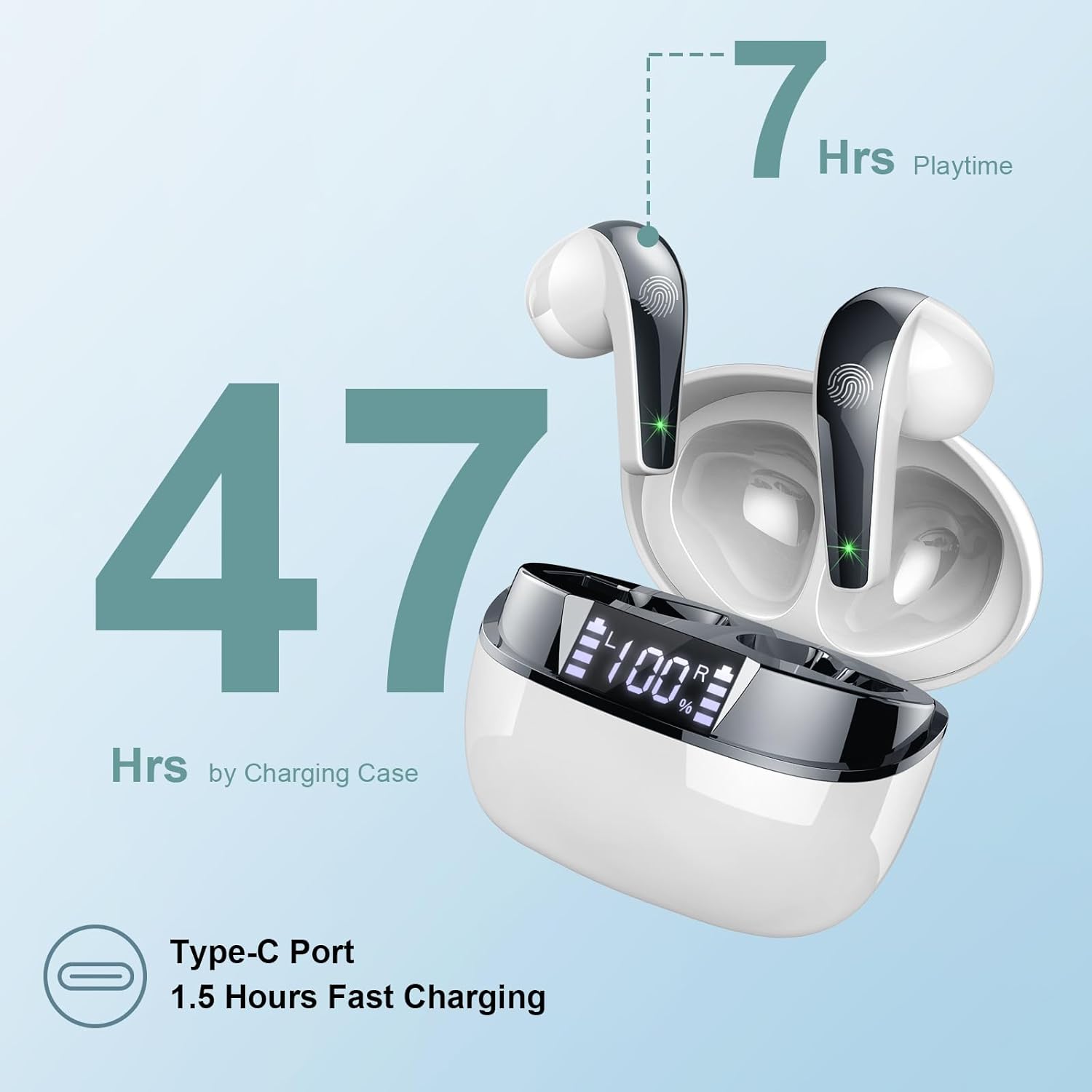
Image: The charging case highlighting 47 hours of total playtime and the Type-C charging port.

Image: A visual representation of the earbuds and charging case, emphasizing 7 hours of music time per charge and 47 hours total with the charging case, along with the dual LED digital display.
2. ஒரு சாதனத்துடன் இணைத்தல்
- இயர்பட்கள் சார்ஜ் செய்யப்படுவதை உறுதிசெய்யவும்.
- சார்ஜிங் கேஸைத் திறக்கவும். இயர்பட்கள் தானாகவே இணைத்தல் பயன்முறைக்குச் செல்லும்.
- உங்கள் சாதனத்தில் (ஸ்மார்ட்போன், டேப்லெட், கணினி), புளூடூத் அமைப்புகளுக்குச் செல்லவும்.
- தேடுங்கள் available devices and select "Q13" from the list.
- இணைக்கப்பட்டதும், உறுதிப்படுத்தல் தொனியைக் கேட்பீர்கள், மேலும் இயர்பட்கள் பயன்படுத்தத் தயாராக இருக்கும்.
The Doubc Q13 earbuds feature one-step pairing and wide compatibility with iOS, Android, and Windows devices.

Image: The earbuds in their charging case next to a smartphone displaying Bluetooth settings, showing "Q13" as a discoverable device, illustrating the one-step pairing process.
இயக்க வழிமுறைகள்
தொடு கட்டுப்பாடுகள்
The Doubc Q13 earbuds feature smart touch controls for easy management of music and calls. The touch sensitive area is located on the outer surface of each earbud.

Image: A user wearing an earbud, with icons indicating various touch control functions such as volume adjustment, call management, music playback, and voice assistant activation.
| செயல் | செயல்பாடு |
|---|---|
| ஒற்றைத் தட்டு (L/R) | இசையை இயக்கு/இடைநிறுத்து, அழைப்பை ஏற்கு/முடி |
| இருமுறை தட்டவும் (வலது) | அடுத்த ட்ராக் |
| இருமுறை தட்டவும் (இடதுபுறம்) | முந்தைய ட்ராக் |
| மூன்று முறை தட்டவும் (வலது) | வால்யூம் அப் |
| மூன்று முறை தட்டவும் (இடது) | வால்யூம் டவுன் |
| நீண்ட நேரம் அழுத்தவும் (2வி) (L/R) | அழைப்பை நிராகரி, குரல் உதவியாளரை செயல்படுத்து |
பவர் ஆன்/ஆஃப்
- பவர் ஆன்: Open the charging case, and the earbuds will automatically power on. Alternatively, long-press the touch area on both earbuds for 3 seconds.
- பவர் ஆஃப்: Place the earbuds back into the charging case and close the lid. They will automatically power off and begin charging. Alternatively, long-press the touch area on both earbuds for 5 seconds.
பராமரிப்பு
சுத்தம் செய்தல்
To ensure optimal performance and charging, regularly clean the charging contacts on both the earbuds and the charging case. Use a cotton swab lightly dampened with alcohol to gently wipe the contacts.

Image: A diagram illustrating the location of charging contacts on the earbuds and inside the charging case, with instructions to clean them if charging issues occur.
நீர் எதிர்ப்பு
The earbuds are IPX7 waterproof, meaning they can withstand immersion in water up to 1 meter for 30 minutes. This makes them suitable for workouts and light rain. However, the charging case is not waterproof. Do not expose the charging case to water.

Image: Two earbuds covered in water droplets, visually representing their IPX7 waterproof capability.
சேமிப்பு
Store the earbuds in their charging case when not in use to protect them and keep them charged. Avoid extreme temperatures and direct sunlight.
சரிசெய்தல்
இயர்பட்ஸ் சார்ஜ் ஆகவில்லை
- சார்ஜிங் கேபிள் கேஸ் மற்றும் பவர் சோர்ஸ் இரண்டிலும் பாதுகாப்பாக இணைக்கப்பட்டுள்ளதா என்பதை உறுதிப்படுத்தவும்.
- Verify that the charging contacts on both the earbuds and the case are clean and free of debris. Use alcohol to clean them if necessary.
- சார்ஜிங் பெட்டியில் போதுமான பேட்டரி சார்ஜ் உள்ளதா என சரிபார்க்கவும்.
Only One Earbud Has Sound
- இரண்டு இயர்பட்களையும் மீண்டும் சார்ஜிங் கேஸில் வைத்து மூடியை மூடவும்.
- On your phone's Bluetooth settings, manually "forget" or "unpair" the "Q13" device.
- After approximately 10 seconds, open the charging case. The earbuds should automatically re-enter pairing mode.
- Reconnect the earbuds with your phone via Bluetooth.
Image: A diagram illustrating solutions for common issues: cleaning charging contacts for charging problems and re-pairing steps for when only one earbud produces sound.
இயர்பட்கள் இணைக்கப்படவில்லை
- உங்கள் சாதனத்தில் புளூடூத் இயக்கப்பட்டுள்ளதை உறுதிசெய்யவும்.
- Make sure the earbuds are within the effective range (typically 10 meters) of your device.
- உங்கள் சாதனத்தின் புளூடூத்தை அணைத்துவிட்டு, பின்னர் இயக்கவும்.
- Repeat the pairing process as described in the "Setup" section.
விவரக்குறிப்புகள்
| அம்சம் | விவரம் |
|---|---|
| மாதிரி எண் | Q13 |
| புளூடூத் பதிப்பு | 5.3 |
| ஆடியோ டிரைவர் | 13mm Graphene Audio Driver |
| அதிர்வெண் வரம்பு | 20Hz - 20,000Hz |
| விளையாட்டு நேரம் (இயர்பட்ஸ்) | 7 மணி நேரம் வரை (ஒற்றை சார்ஜ்) |
| மொத்த விளையாட்டு நேரம் (கேஸுடன்) | 47 மணி நேரம் வரை |
| சார்ஜிங் போர்ட் | USB வகை-C |
| சார்ஜிங் நேரம் | தோராயமாக 1.5 மணிநேரம் (கேஸ்) |
| நீர்ப்புகா மதிப்பீடு | IPX7 (இயர்பட்கள் மட்டும்) |
| ஒலிவாங்கிகள் | 4 ENC Noise Cancelling Microphones |
| காதுகுழாய் எடை | தோராயமாக 3 கிராம் (ஒவ்வொன்றும்) |
| சார்ஜிங் கேஸ் எடை | தோராயமாக 29 கிராம் |
| தயாரிப்பு பரிமாணங்கள் | 2.13 x 1.81 x 1.34 அங்குலங்கள் (சார்ஜிங் கேஸ்) |

படம்: ஒரு விரிவான view of the 13mm Graphene Audio Driver, emphasizing HiFi Stereo Sound and built-in microphones with noise reduction for HD calling.

Image: A diagram illustrating the benefits of Advanced Bluetooth 5.3 technology, including faster transfer, lower power consumption, more stable connection, and lower latency.

Image: A visual showing the comfortable and lightweight design of the earbuds and charging case, including their dimensions and individual weights (3g per earbud, 29g for the case).
உத்தரவாதம் மற்றும் ஆதரவு
The Doubc Q13 Wireless Bluetooth 5.3 Earbuds come with a 3 வருட உத்தரவாதம், தயாரிப்பு தரம் மற்றும் செயல்திறன் தொடர்பாக மன அமைதியை உறுதி செய்தல்.
For technical support, warranty claims, or any inquiries, please refer to the contact information provided on the product packaging or the official Doubc website. Specific support contact details are not available in this manual.
முக்கியமான பாதுகாப்பு தகவல்
- தயாரிப்பை பிரிக்கவோ மாற்றவோ வேண்டாம்.
- தீவிர வெப்பநிலை மற்றும் நேரடி சூரிய ஒளியில் இருந்து விலகி இருங்கள்.
- Avoid exposing the charging case to water.
- வழங்கப்பட்ட சார்ஜிங் கேபிள் அல்லது அதற்கு சமமானதை மட்டும் பயன்படுத்தவும்.
- உள்ளூர் விதிமுறைகளின்படி தயாரிப்பை பொறுப்புடன் அகற்றவும்.