
1. அறிமுகம்
Welcome to the user manual for your new Xiaomi X Pro QLED Series Smart Google TV L55MA-SIN. This guide provides essential information for setting up, operating, maintaining, and troubleshooting your television. Please read this manual thoroughly before using your TV to ensure optimal performance and safety.
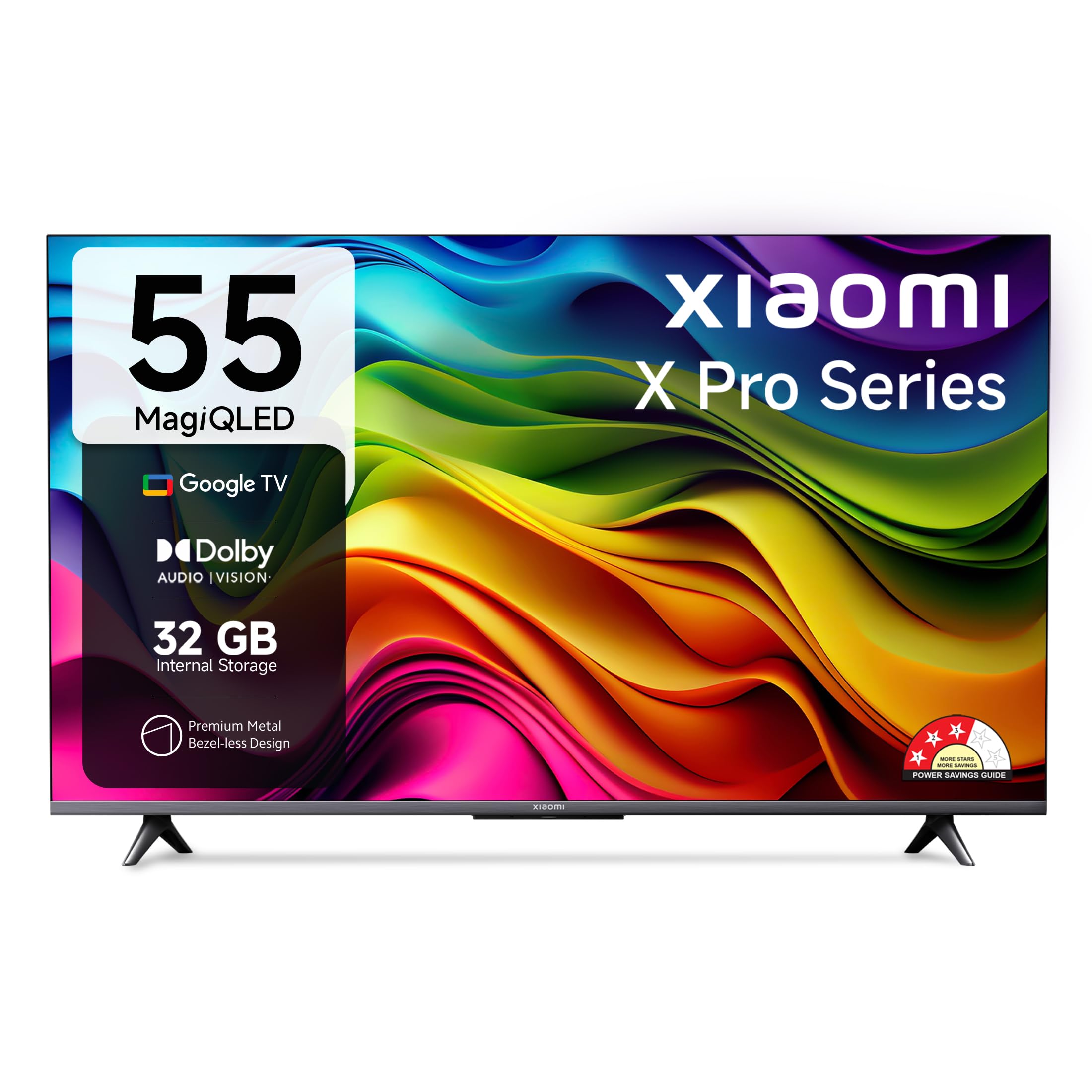
Figure 1: Xiaomi X Pro QLED Series Smart Google TV
2. பாதுகாப்பு தகவல்
தீ, மின்சார அதிர்ச்சி மற்றும் காயம் ஏற்படும் அபாயத்தைக் குறைக்க இந்த தயாரிப்பைப் பயன்படுத்தும் போது எப்போதும் அடிப்படை பாதுகாப்பு முன்னெச்சரிக்கைகளைப் பின்பற்றவும்.
- மழை அல்லது ஈரப்பதத்திற்கு டிவியை வெளிப்படுத்த வேண்டாம்.
- டிவியைத் திறக்காதே casing; அனைத்து சேவைகளையும் தகுதிவாய்ந்த பணியாளர்களிடம் பரிந்துரைக்கவும்.
- டிவியைச் சுற்றி சரியான காற்றோட்டத்தை உறுதி செய்யவும்.
- டிவியுடன் வழங்கப்பட்ட மின் கம்பியை மட்டும் பயன்படுத்தவும்.
- டிவியை வெப்ப மூலங்கள் மற்றும் நேரடி சூரிய ஒளியில் இருந்து விலக்கி வைக்கவும்.
3. பெட்டியில் என்ன இருக்கிறது
பெட்டியை வெளியே எடுத்தவுடன், அனைத்து கூறுகளும் உள்ளனவா என்பதை சரிபார்க்கவும்:
- 1 LED டிவி யூனிட்
- 2 டேபிள் ஸ்டாண்ட் பேஸ்கள்
- 1 தொலை கட்டுப்பாடு
- 1 ஏசி பவர் கார்டு
- 2 AAA பேட்டரிகள்
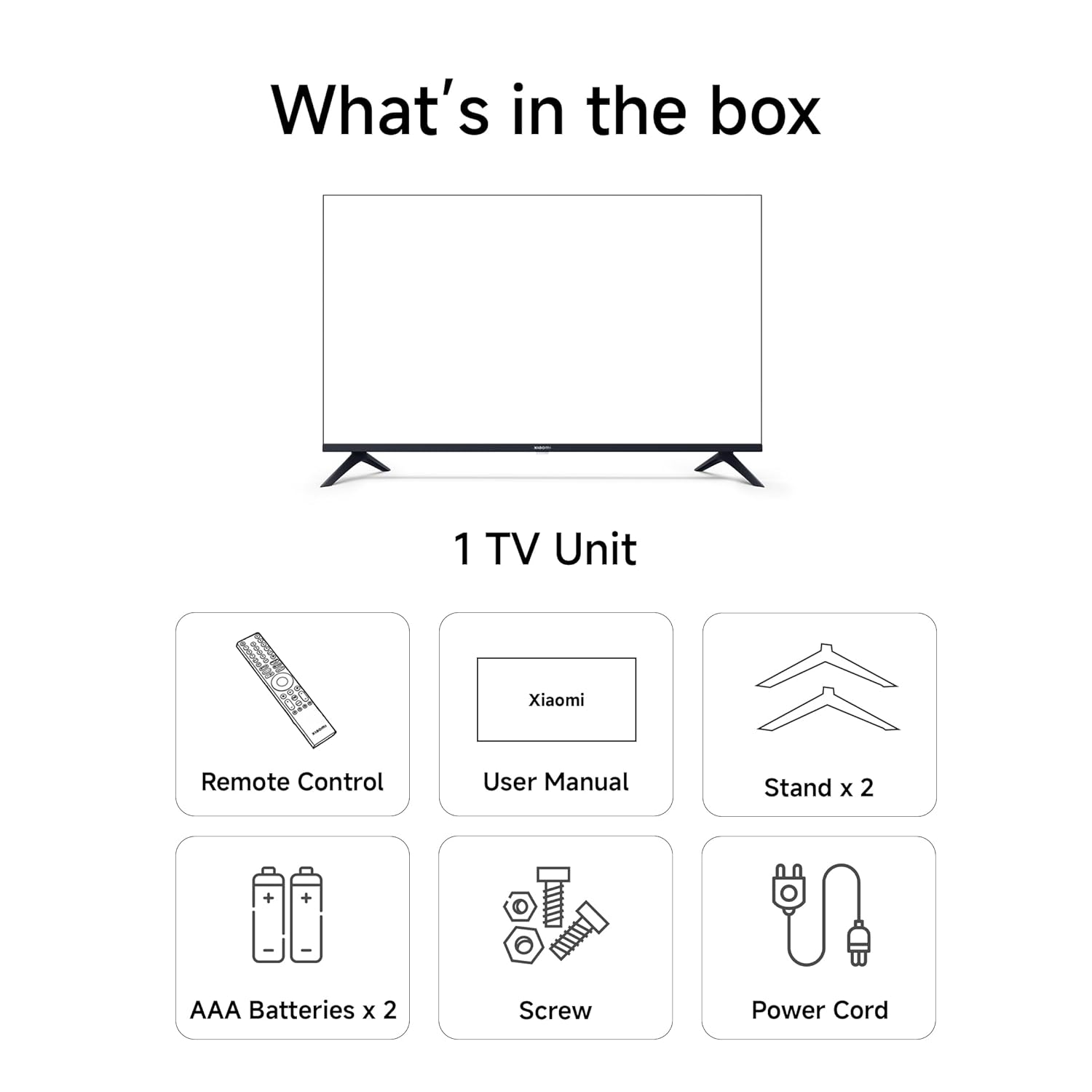
Figure 2: Included accessories with your Xiaomi TV
4 அமைவு
4.1 இயற்பியல் நிறுவல்
Your Xiaomi TV can be installed on a tabletop using the provided stands or wall-mounted (wall mount kit sold separately).
டேப்லெட் நிறுவல்:
- டிவி திரையை ஒரு மென்மையான, தட்டையான மேற்பரப்பில் கவனமாக வைக்கவும்.
- Attach the two table stand bases to the bottom of the TV using the screws provided.
- Ensure the stands are securely fastened.
- போதுமான காற்றோட்டத்தை உறுதிசெய்து, டிவியை நிலையான, சமதளமான மேற்பரப்பில் வைக்கவும்.
சுவர் மவுண்ட் நிறுவல்:
For wall mounting, consult a professional installer and use a compatible VESA wall mount kit. Refer to the TV's specifications for VESA mounting pattern details.

Figure 3: TV dimensions for planning installation
4.2 ஆரம்ப பவர் ஆன் மற்றும் நெட்வொர்க் இணைப்பு
- Connect the AC power cord to the TV and a power outlet.
- அதை இயக்க டிவி அல்லது ரிமோட் கண்ட்ரோலில் உள்ள பவர் பட்டனை அழுத்தவும்.
- மொழி தேர்வு, பகுதி மற்றும் நெட்வொர்க் இணைப்பு உள்ளிட்ட ஆரம்ப அமைப்பை முடிக்க திரையில் உள்ள வழிமுறைகளைப் பின்பற்றவும்.
- உங்கள் Wi-Fi நெட்வொர்க்குடன் இணைக்கவும் அல்லது கம்பி இணைப்புக்கு ஈதர்நெட் கேபிளைப் பயன்படுத்தவும்.
- Sign in with your Google account to access Google TV features.
5. உங்கள் டிவியை இயக்குதல்
5.1 தொலை கட்டுப்பாடு
The included remote control allows you to navigate your Smart Google TV. Insert the two AAA batteries into the remote control before use.
- பவர் பட்டன்: டிவியை ஆன்/ஆஃப் செய்கிறது.
- கூகிள் உதவியாளர் பட்டன்: குரல் கட்டளைகளை செயல்படுத்துகிறது.
- வழிசெலுத்தல் திண்டு: மெனு வழிசெலுத்தலுக்கு.
- தொகுதி +/-: அளவை சரிசெய்கிறது.
- சேனல் +/-: சேனல்களை மாற்றுகிறது.
- பிரத்யேக ஆப் பொத்தான்கள்: Quick access to Netflix, Prime Video, Disney+ Hotstar, YouTube, SonyLIV.

Figure 4: Xiaomi Smart TV Remote Control
5.2 Smart TV Features (Google TV & PatchWall)
Your TV runs on Google TV, offering a personalized content experience, and also features Xiaomi's PatchWall for curated content.
- கூகிள் டிவி: Organizes movies, shows, live TV, and more from your apps and subscriptions. Features include Content First UI, Recommendations, Google Assistant, Chromecast Built-in, Watchlist, Ambient Mode, Kids Profile, and Personal Profiles.
- Google உதவியாளர்: Use voice commands to find content, stream apps, play music, control smart home devices, and get answers. Press the Google Assistant button on your remote to activate.
- பேட்ச்வால்: A content-first user interface that curates content from various streaming services, providing a seamless viewஅனுபவம்.
- Chromecast உள்ளமைவு: உங்கள் தொலைபேசி அல்லது டேப்லெட்டிலிருந்து நேரடியாக உங்கள் டிவிக்கு திரைப்படங்கள், நிகழ்ச்சிகள், புகைப்படங்கள் மற்றும் பலவற்றை எளிதாக அனுப்பலாம்.

Figure 5: Google TV and PatchWall interface
5.3 இணைப்பு
The TV offers multiple connectivity options for your devices.
- HDMI போர்ட்கள் (3): Connect gaming consoles, set-top boxes, Blu-ray players. Supports ALLM and eARC.
- USB போர்ட்கள் (2): ஹார்டு டிரைவ்கள் மற்றும் பிற யூ.எஸ்.பி சாதனங்களை இணைக்கவும்.
- இரட்டை அலைவரிசை வைஃபை: வயர்லெஸ் இணைய இணைப்புக்கு.
- புளூடூத் 5.0: ஹெட்ஃபோன்கள் அல்லது ஸ்பீக்கர்கள் போன்ற வயர்லெஸ் துணைக்கருவிகளை இணைப்பதற்கு.
- ஒளியியல்: டிஜிட்டல் ஆடியோ வெளியீட்டிற்கு.
- ஈதர்நெட்: கம்பி இணைய இணைப்புக்கு.

Figure 6: Connectivity features of the TV
5.4 காட்சி மற்றும் ஆடியோ
Experience stunning visuals and immersive audio with your Xiaomi QLED TV.
- 4K அல்ட்ரா HD (3840 x 2160): Delivers crystal clear clarity and exquisite detail.
- QLED காட்சி: Features quantum dot technology for a vast spectrum of colors, incredible contrast, and enhanced brightness.
- டால்பி விஷன், HDR10, HLG: Supports multiple HDR formats for dynamic and vibrant picture quality.
- ரியாலிட்டி ஃப்ளோ MEMC: Ensures blur-free visuals and smoother transitions in fast-paced action scenes.
- 30 வாட்ஸ் அவுட்புட் ஸ்பீக்கர்கள்: Powerful audio output for clear, room-filling sound.
- Dolby Audio, DTS-X, DTS Virtual:X: Provides immersive sound experiences with exceptional depth and clarity.

Figure 7: MagiQLED Display Technology

Figure 8: High-resolution 4K display clarity

Figure 9: Billion Colour Display for true-to-life visuals

Figure 10: Cinematic Audio experience
5.5 Internal Storage and Processor
The TV is equipped with ample storage and a powerful processor for smooth performance.
- 32 ஜிபி உள் சேமிப்பு: Install your favorite apps, stream movies, and play games without storage concerns.
- Quad-core Processor (A55): Delivers efficient processing power for a responsive user experience.

படம் 11: Ample 32GB internal storage
Figure 12: Quad-core A55 processor
6. பராமரிப்பு
6.1 உங்கள் டிவியை சுத்தம் செய்தல்
- சுத்தம் செய்வதற்கு முன்பு எப்போதும் டிவியை அவிழ்த்து விடுங்கள்.
- திரை மற்றும் அலமாரியைத் துடைக்க மென்மையான, உலர்ந்த துணியைப் பயன்படுத்தவும்.
- பிடிவாதமான குறிகளுக்கு, லேசான dampen துணியை தண்ணீர் அல்லது லேசான, சிராய்ப்பு இல்லாத திரை கிளீனருடன் துடைக்கவும்.
- ஒருபோதும் திரையில் நேரடியாக கிளீனரை தெளிக்காதீர்கள்.
6.2 மென்பொருள் புதுப்பிப்புகள்
Your TV may receive software updates periodically to improve performance and add new features. Ensure your TV is connected to the internet to receive these updates. You can usually check for updates in the TV's settings menu.
7. சரிசெய்தல்
உங்கள் டிவியில் சிக்கல்கள் ஏற்பட்டால், பின்வரும் பொதுவான தீர்வுகளைப் பார்க்கவும்:
| பிரச்சனை | தீர்வு |
|---|---|
| சக்தி இல்லை | டிவி மற்றும் அவுட்லெட்டில் பவர் கார்டு பாதுகாப்பாக இணைக்கப்பட்டுள்ளதா எனச் சரிபார்க்கவும். வேறு அவுட்லெட்டை முயற்சிக்கவும். |
| படம் இல்லை, ஆனால் ஒலி இருக்கிறது. | Check the input source. Ensure all cables are connected correctly. Try restarting the TV. |
| ஒலி இல்லை, ஆனால் படம் உள்ளது. | Check the volume level and mute settings. Verify audio cables are connected properly. Check external audio device settings if applicable. |
| ரிமோட் கண்ட்ரோல் வேலை செய்யவில்லை | பேட்டரிகளை மாற்றவும். ரிமோட்டுக்கும் டிவிக்கும் இடையில் எந்த தடையும் இல்லை என்பதை உறுதிப்படுத்திக் கொள்ளுங்கள். தேவைப்பட்டால் புளூடூத் ரிமோட்டை மீண்டும் இணைக்கவும். |
| நெட்வொர்க் இணைப்பு சிக்கல்கள் | Restart your router and modem. Check Wi-Fi password. Try a wired Ethernet connection. |
8. விவரக்குறிப்புகள்
| அம்சம் | விவரம் |
|---|---|
| பிராண்ட் | XIAOMI |
| மாதிரி | L55MA-SIN அறிமுகம் |
| திரை அளவு | 55 அங்குலம் (138 செமீ) |
| காட்சி தொழில்நுட்பம் | QLED |
| தீர்மானம் | 4K அல்ட்ரா HD (3840 x 2160) |
| புதுப்பிப்பு விகிதம் | 60 ஹெர்ட்ஸ் |
| இயக்க முறைமை | கூகுள் டிவி |
| செயலி | Mali G52 MC1 (Graphics Coprocessor) |
| ரேம் | 2 ஜிபி |
| உள் சேமிப்பு | 32 ஜிபி |
| இணைப்பு | 3 HDMI ports, 2 USB ports, Dual Band Wi-Fi, Bluetooth 5.0, Optical, Ethernet |
| ஆடியோ வெளியீடு | 30 வாட்ஸ், டால்பி ஆடியோ, டிடிஎஸ்-எக்ஸ், டிடிஎஸ் விர்ச்சுவல்:எக்ஸ் |
| HDR ஆதரவு | டால்பி விஷன், HDR10, HLG |
| Viewing கோணம் | 178 டிகிரி |
| தயாரிப்பு பரிமாணங்கள் (LxWxH) | 8.17 x 122.6 x 71.5 செ.மீ |
| பொருளின் எடை | 10.3 கிலோ |
9. உத்தரவாதம் மற்றும் ஆதரவு
உங்கள் Xiaomi TV உடன் வருகிறது 1 ஆண்டு விரிவான உத்தரவாதம். To avail warranty services, please retain your Amazon invoice.
For any assistance, reach out to Xiaomi Care, which provides reliable after-sales service. You can contact their dedicated helpline at 1800 103 6286, காலை 9 மணி முதல் இரவு 9 மணி வரை கிடைக்கும்.

Figure 13: Xiaomi Care Support Information
10. தயாரிப்பு வீடியோக்கள்
10.1 Xiaomi X Pro QLED Series Showcase
Video 1: A visual showcase of the Xiaomi X Pro QLED Series, highlighting its display and audio capabilities.
10.2 Google TV Interface Overview
காணொளி 2: ஒரு ஓவர்view of the Google TV interface on the Xiaomi Smart TV, demonstrating app navigation and content display.