
VEAT00L VEAT00L
VEAT00L Wireless Bluetooth Earbuds User Manual
Model: VEAT00L
அறிமுகம்
Thank you for choosing the VEAT00L Wireless Bluetooth Earbuds. These earbuds are designed to provide a superior audio experience with advanced features such as Bluetooth 5.4 connectivity, extended battery life, noise-canceling microphone, and IP7 waterproof rating. This manual will guide you through the setup, operation, and maintenance of your new earbuds to ensure optimal performance and longevity.
பாதுகாப்பு தகவல்
காயம் அல்லது சேதத்தைத் தடுக்க இந்த தயாரிப்பைப் பயன்படுத்துவதற்கு முன் அனைத்து பாதுகாப்பு எச்சரிக்கைகள் மற்றும் வழிமுறைகளை கவனமாகப் படிக்கவும்.
- இயர்பட்கள் அல்லது சார்ஜிங் கேஸை அதிக வெப்பநிலை, நேரடி சூரிய ஒளி அல்லது நெருப்புக்கு வெளிப்படுத்த வேண்டாம்.
- சாதனத்தை கீழே போடுவதையோ, அடிப்பதையோ அல்லது பிரிப்பதையோ தவிர்க்கவும்.
- Keep away from water and liquids, even with the IP7 rating, prolonged submersion is not recommended.
- Do not use abrasive cleaners or chemicals to clean the earbuds.
- கேட்கும் திறனைப் பாதிக்காமல் இருக்க மிதமான ஒலி அளவில் கேளுங்கள்.
- குழந்தைகளுக்கு எட்டாத இடத்தில் வைக்கவும்.
தொகுப்பு உள்ளடக்கங்கள்
உங்கள் தொகுப்பில் அனைத்து பொருட்களும் இருப்பதை உறுதிசெய்து கொள்ளுங்கள்:
- VEAT00L Wireless Bluetooth Earbuds (Left and Right)
- சார்ஜிங் கேஸ்
- காது முனைகள் (பல்வேறு அளவுகள்)
- USB சார்ஜிங் கேபிள்
- பயனர் கையேடு
தயாரிப்பு முடிந்துவிட்டதுview
Familiarize yourself with the components of your VEAT00L earbuds and charging case.

Image: VEAT00L Wireless Bluetooth Earbuds inside their charging case, illustrating the charging process with digital battery indicators on the case.
- காதணிகள்: Left and Right earbuds with earhook design for secure fit.
- Multi-function Button/Touch Area: For controlling music, calls, and voice assistant.
- ஒலிவாங்கி: Built-in for calls and voice commands.
- சார்ஜிங் தொடர்புகள்: Located on the earbuds and inside the case.
- சார்ஜிங் கேஸ்: Stores and charges the earbuds, with a digital display for battery status.
- USB-C சார்ஜிங் போர்ட்: On the back or bottom of the charging case.
அமைவு
1. இயர்பட்ஸ் மற்றும் கேஸை சார்ஜ் செய்தல்
முதல் பயன்பாட்டிற்கு முன், இயர்பட்கள் மற்றும் சார்ஜிங் கேஸ் இரண்டையும் முழுமையாக சார்ஜ் செய்யவும்.
- Place the earbuds into the charging case, ensuring they are correctly seated. The earbuds will automatically begin charging.
- USB சார்ஜிங் கேபிளை கேஸில் உள்ள சார்ஜிங் போர்ட்டுடன் இணைக்கவும், மறுமுனையை USB பவர் அடாப்டர் (சேர்க்கப்படவில்லை) அல்லது கணினியின் USB போர்ட்டுடன் இணைக்கவும்.
- The digital display on the charging case will show the battery level. Allow approximately 1-2 hours for a full charge.
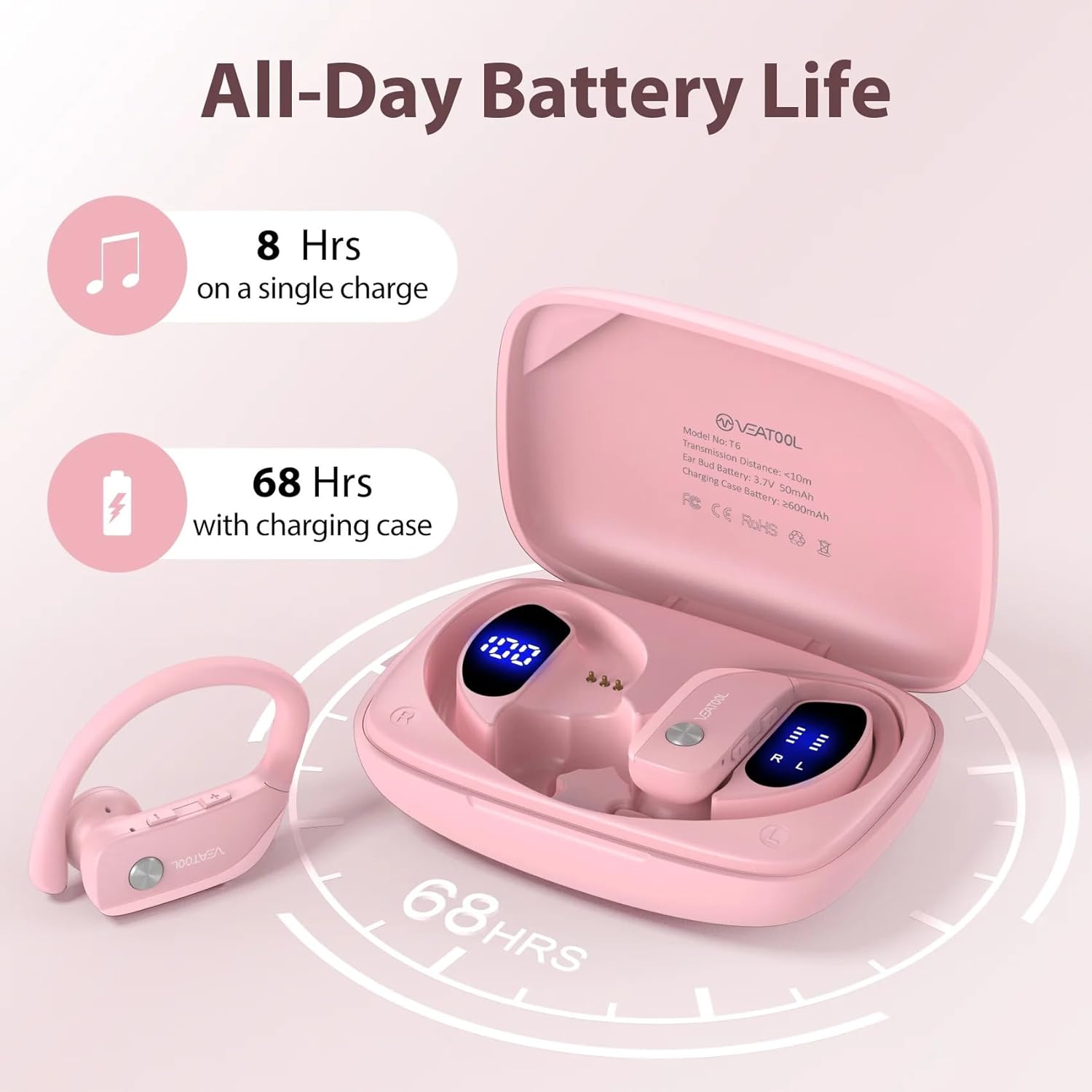
Image: Diagram showing the VEAT00L earbuds and charging case, highlighting the extended battery life of 8 hours on a single charge and 68 hours with the charging case, totaling 72 hours.
பேட்டரி ஆயுள்: The earbuds provide approximately 8 hours of playback on a single charge. The charging case provides multiple additional charges, extending the total playtime to up to 72 hours.
2. உங்கள் சாதனத்துடன் இணைத்தல்
சார்ஜிங் பெட்டியிலிருந்து வெளியே எடுக்கும்போது இயர்பட்கள் தானாகவே இணைத்தல் பயன்முறையில் நுழையும்.
- சார்ஜிங் கேஸைத் திறந்து இரண்டு இயர்பட்களையும் அகற்றவும். அவை தானாகவே பவர் ஆன் ஆகி ஒன்றோடொன்று இணைக்கப்படும்.
- உங்கள் ஸ்மார்ட்போன் அல்லது புளூடூத் இயக்கப்பட்ட சாதனத்தில், புளூடூத் அமைப்புகளுக்குச் செல்லவும்.
- தேடுங்கள் new devices and select "VEAT00L" from the list.
- இணைக்கப்பட்டதும், உறுதிப்படுத்தல் தொனியைக் கேட்பீர்கள், மேலும் இயர்பட்கள் பயன்படுத்தத் தயாராக இருக்கும்.
- இணைத்தல் தோல்வியுற்றால், இயர்பட்களை மீண்டும் கேஸில் வைத்து, மூடியை மூடி, சில வினாடிகள் காத்திருந்து, பின்னர் படிகளை மீண்டும் செய்யவும்.
இயக்க வழிமுறைகள்
The VEAT00L earbuds feature intuitive touch controls for various functions.

Image: Close-up of a VEAT00L earbud showing various touch control icons and their corresponding functions, such as Answer, Hang Up, ON/OFF, Play/Pause, Previous/Next, Voice Assistant, Reject, and Volume +/-.
| செயல்பாடு | செயல் |
|---|---|
| பவர் ஆன் | Take earbuds out of charging case. |
| பவர் ஆஃப் | Place earbuds back into charging case. |
| இசையை இயக்கவும்/இடைநிறுத்தவும் | இரண்டு இயர்பட்டிலும் ஒருமுறை தட்டவும். |
| அடுத்த ட்ராக் | வலதுபுற இயர்பட்டில் இருமுறை தட்டவும். |
| முந்தைய ட்ராக் | இடது இயர்பட்டில் இருமுறை தட்டவும். |
| வால்யூம் அப் | வலது இயர்பட்டில் மூன்று முறை தட்டவும். |
| வால்யூம் டவுன் | இடது இயர்பட்டில் மூன்று முறை தட்டவும். |
| பதில்/அழைப்பை முடிக்கவும் | உள்வரும் அழைப்பின் போது இரண்டு இயர்பட்களில் ஏதேனும் ஒன்றை ஒருமுறை தட்டவும். |
| அழைப்பை நிராகரி | உள்வரும் அழைப்பின் போது, ஏதேனும் ஒரு இயர்பட்டை 2 வினாடிகள் அழுத்திப் பிடிக்கவும். |
| குரல் உதவியாளரை இயக்கவும் | இயர்பட்டை 3 வினாடிகள் அழுத்திப் பிடிக்கவும். |
பராமரிப்பு
Proper care will extend the life of your VEAT00L earbuds.
- சுத்தம்: Use a soft, dry, lint-free cloth to clean the earbuds and charging case. Do not use harsh chemicals or abrasive materials. For earwax buildup, gently clean the earbud mesh with a small, soft brush.
- சேமிப்பு: When not in use, store the earbuds in their charging case to protect them and keep them charged. Store in a cool, dry place away from direct sunlight.
- பேட்டரி பராமரிப்பு: To preserve battery life, charge the earbuds and case regularly, even if not used frequently. Avoid fully discharging the battery for extended periods.
சரிசெய்தல்
உங்கள் இயர்பட்களில் சிக்கல்கள் ஏற்பட்டால், பின்வரும் தீர்வுகளை முயற்சிக்கவும்:
| பிரச்சனை | தீர்வு |
|---|---|
| இயர்பட்ஸ் சாதனத்துடன் இணைக்கப்படவில்லை. |
|
| ஒரே ஒரு இயர்பட் மட்டுமே வேலை செய்கிறது. |
|
| ஒலி இல்லை அல்லது குறைந்த அளவு. |
|
| சார்ஜிங் கேஸ் சார்ஜ் ஆகவில்லை. |
|
விவரக்குறிப்புகள்
| அம்சம் | விவரம் |
|---|---|
| மாதிரி பெயர் | VEAT00L |
| இணைப்பு தொழில்நுட்பம் | வயர்லெஸ் (புளூடூத்) |
| புளூடூத் பதிப்பு | 5.4 |
| பேட்டரி ஆயுள் (இயர்பட்ஸ்) | 8 மணி நேரம் வரை (ஒற்றை சார்ஜ்) |
| மொத்த விளையாட்டு நேரம் (கேஸுடன்) | 72 மணி நேரம் வரை |
| நீர் எதிர்ப்பு நிலை | IP7 நீர்ப்புகா |
| காதணி வடிவம் | காதுகுத்து |
| கட்டுப்பாட்டு வகை | மீடியா கட்டுப்பாடு (தொடுதல்) |
| உள்ளிட்ட கூறுகள் | காதுகள் |
| நிறம் | இளஞ்சிவப்பு |
உத்தரவாதம் மற்றும் ஆதரவு
For warranty information and technical support, please refer to the contact details provided with your purchase or visit the official VEAT00L webஉத்தரவாதக் கோரிக்கைகளுக்கு உங்கள் வாங்கியதற்கான ஆதாரத்தை வைத்திருங்கள்.
If you have any questions or require assistance, do not hesitate to contact our customer support team.
Ask a question about this manual
Ask about setup, troubleshooting, compatibility, parts, safety, or missing instructions. Manuals+ will review the question and use this page’s manual context to help answer it.