
Bobtot EP20
பாப்டாட் போர்ட்டபிள் புளூடூத் ஸ்பீக்கர் EP20 பயனர் கையேடு
மாதிரி: EP20
1. அறிமுகம்
Thank you for choosing the Bobtot Portable Bluetooth Speaker EP20. This manual provides essential information for setting up, operating, and maintaining your speaker. Please read it thoroughly to ensure optimal performance and longevity of your device.

Image 1.1: Bobtot Portable Bluetooth Speaker EP20. This image displays the white speaker with its handle and the front grille illuminated with colorful RGB lights.
2. பெட்டியில் என்ன இருக்கிறது
Carefully unpack your Bobtot EP20 speaker and ensure all items are present:
- EP20 Bluetooth Speaker x1
- வயர்லெஸ் மைக்ரோஃபோன் x1
- வகை C சார்ஜிங் கேபிள் x1
- Auxiliary Cable x1
- பயனர் கையேடு x1

Image 2.1: Package Contents. This image shows the Bobtot EP20 speaker, wireless microphone, Type C charging cable, auxiliary cable, and user manual laid out.
3. தயாரிப்பு முடிந்துவிட்டதுview
3.1 கண்ட்ரோல் பேனல்

Image 3.1: Speaker Control Panel. This image highlights the buttons on the top of the speaker, including power, volume, play/pause, EQ mode, and RGB light controls.
3.2 போர்ட்கள் மற்றும் இணைப்புகள்

Image 3.2: Speaker Connection Ports. This image shows the various input ports on the speaker, including Type C charging, 3.5mm AUX, and USB.
4 அமைவு
4.1 ஸ்பீக்கரை சார்ஜ் செய்தல்
- Connect the provided Type C charging cable to the speaker's Type C port.
- கேபிளின் மறுமுனையை USB பவர் அடாப்டருடன் (சேர்க்கப்படவில்லை) அல்லது கணினியின் USB போர்ட்டுடன் இணைக்கவும்.
- The charging indicator light will show the charging status. A full charge typically takes several hours.
4.2 Charging the Wireless Microphone
- The wireless microphone is rechargeable. Use a compatible charging cable (often micro-USB, check microphone port) to charge it.
- A charging indicator on the microphone will confirm charging status.
4.3 பவர் ஆன்/ஆஃப்
- பேச்சாளர்: Press and hold the Power button on the top panel to turn the speaker on or off.
- ஒலிவாங்கி: Press and hold the Power button on the microphone to turn it on or off.
4.4 ப்ளூடூத் இணைத்தல்
- Turn on the Bobtot EP20 speaker. It will automatically enter Bluetooth pairing mode, indicated by a flashing LED light.
- உங்கள் சாதனத்தில் (ஸ்மார்ட்போன், டேப்லெட், மடிக்கணினி), புளூடூத்தை இயக்கி, கிடைக்கும் சாதனங்களைத் தேடுங்கள்.
- Select "Bobtot EP20" from the list of devices.
- இணைக்கப்பட்டதும், ஸ்பீக்கர் ஒரு கேட்கக்கூடிய உறுதிப்படுத்தலை வெளியிடும், மேலும் LED விளக்கு ஒளிர்வதை நிறுத்திவிடும்.
4.5 Microphone Auto Connection
The wireless microphone is designed to automatically connect to the Bobtot EP20 speaker when both devices are powered on and within range. No manual pairing is typically required for the microphone.

Image 4.1: Microphone Auto Connection. This image shows the speaker and microphone together, highlighting the automatic connection feature and microphone controls.
5. இயக்க வழிமுறைகள்
5.1 அடிப்படை ஆடியோ பிளேபேக்
- ஒலியளவு கட்டுப்பாடு: Use the '+' and '-' buttons on the speaker's control panel to adjust the main speaker volume.
- விளையாடு/இடைநிறுத்தம்: ஆடியோ பிளேபேக்கைத் தொடங்க அல்லது இடைநிறுத்த, இயக்கு/இடைநிறுத்து பொத்தானை அழுத்தவும்.
- தட வழிசெலுத்தல்: Use the previous/next track buttons (often integrated with volume controls or separate) to skip tracks.
5.2 EQ Mode Adjustment
The speaker features adjustable EQ modes for different listening environments.
- Short press the 'M' (Mode) button on the speaker's control panel to cycle through EQ modes.
- உட்புற பயன்முறை: சீரான ஒலி புரோவை வழங்குகிறதுfile.
- வெளிப்புற பயன்முறை: Enhances bass for a more powerful sound in open environments.

Image 5.1: EQ Mode Switch. This image illustrates the difference between Indoor Mode (balanced sound) and Outdoor Mode (deep bass) and indicates the button to press for adjustment.
5.3 RGB ஒளி முறைகள்
The speaker includes dynamic RGB lighting effects.
- Short press the Light button (often indicated by a sun or star icon) on the control panel to cycle through different light modes.
- Long press the Light button to turn the RGB lights off.

Image 5.2: Controllable Dancing RGB Lights. This image shows multiple Bobtot EP20 speakers with different RGB light patterns, demonstrating the dynamic lighting feature.
5.4 Wireless Microphone Functions
- மைக்ரோஃபோன் வால்யூம்: Use the volume controls on the microphone itself to adjust its output level.
- எதிரொலி விளைவு: Adjust the echo effect using the dedicated button or dial on the microphone to add or reduce reverb.
- மேஜிக் ஒலி விளைவுகள்: The microphone offers 5 different voice-changing effects (e.g., baby, monster, female, male, original voice). Press the designated button to cycle through these effects.

Image 5.3: 5 Voice Changes for Fun. This image shows a family using the microphone with the speaker, illustrating the various voice-changing effects available.
5.5 Multiple Connection Methods
In addition to Bluetooth, the Bobtot EP20 supports several other audio input methods:
- AUX உள்ளீடு: Connect non-Bluetooth devices (e.g., projectors, computers) using the provided 3.5mm auxiliary cable. The speaker will automatically switch to AUX mode or require manual selection via the 'M' (Mode) button.
- USB டிரைவ் பிளேபேக்: ஆடியோ கொண்ட USB ஃபிளாஷ் டிரைவைச் செருகவும் files into the USB port. The speaker will automatically detect and play music from the drive.
- எஃப்.எம் வானொலி: Switch to FM radio mode using the 'M' (Mode) button. The speaker can automatically search and save available stations.

Image 5.4: Multiple Connection Methods. This image demonstrates the speaker's versatility by showing it connected to various devices via Bluetooth, AUX, and USB.
6. பராமரிப்பு
- சுத்தம்: ஸ்பீக்கரின் வெளிப்புறத்தை சுத்தம் செய்ய மென்மையான, உலர்ந்த துணியைப் பயன்படுத்தவும். சிராய்ப்பு கிளீனர்கள் அல்லது கரைப்பான்களைப் பயன்படுத்த வேண்டாம்.
- பேட்டரி பராமரிப்பு: To prolong battery life, fully charge the speaker before first use. Avoid completely draining the battery frequently. If storing for an extended period, charge the battery to approximately 50% every few months.
- நீர் எதிர்ப்பு: The speaker is IPX6 water-resistant, meaning it can resist gentle water spray and splashes. Do not submerge the speaker in water or expose it to heavy rain. Ensure all port covers are securely closed before exposure to moisture.
- சேமிப்பு: நேரடி சூரிய ஒளி மற்றும் அதிக வெப்பநிலையிலிருந்து விலகி குளிர்ந்த, உலர்ந்த இடத்தில் ஸ்பீக்கரை சேமிக்கவும்.

Image 6.1: IPX6 Water Resistant. This image shows the speaker in an outdoor setting near water, emphasizing its resistance to splashes.
7. சரிசெய்தல்
| பிரச்சனை | சாத்தியமான காரணம் | தீர்வு |
|---|---|---|
| ஸ்பீக்கர் இயக்கப்படவில்லை. | பேட்டரி குறைவாக உள்ளது; பவர் பட்டனை சரியாக அழுத்தவில்லை. | ஸ்பீக்கரை முழுவதுமாக சார்ஜ் செய்யவும். பவர் பட்டனை சில வினாடிகள் அழுத்திப் பிடிக்கவும். |
| ஸ்பீக்கரிலிருந்து சத்தம் இல்லை. | ஒலி அளவு மிகக் குறைவு; சாதனம் இணைக்கப்படவில்லை; தவறான உள்ளீட்டு முறை. | Increase speaker and device volume. Ensure Bluetooth is connected or AUX/USB mode is selected. |
| புளூடூத் இணைப்பு தோல்வியடைந்தது. | ஸ்பீக்கர் இணைத்தல் பயன்முறையில் இல்லை; சாதன புளூடூத் முடக்கப்பட்டுள்ளது; ஸ்பீக்கரிலிருந்து வெகு தொலைவில் உள்ளது. | Ensure speaker is in pairing mode. Turn device Bluetooth off/on. Move device closer to speaker (within 100ft/30m). |
| மைக்ரோஃபோன் வேலை செய்யவில்லை. | Microphone off; Low battery; Out of range. | Turn on the microphone. Charge the microphone. Ensure microphone is within range of the speaker. |
| ஒலி சிதைந்துள்ளது. | ஒலி அளவு மிக அதிகம்; ஆடியோ மூலத்தின் தரம். | Reduce speaker and device volume. Try a different audio source. |
8. விவரக்குறிப்புகள்
| அம்சம் | விவரம் |
|---|---|
| மாதிரி எண் | EP20 |
| பிராண்ட் | பாப்டாட் |
| இணைப்பு தொழில்நுட்பம் | AUX, Bluetooth 5.3, USB |
| சக்தி ஆதாரம் | பேட்டரி மூலம் இயங்கும் |
| பேட்டரி வகை | லித்தியம் அயன் (8800mAh) |
| விளையாட்டு நேரம் | 16 மணிநேரம் வரை (50% அளவு) |
| வெளியீடு வாட்tage | 20 Watts (40W Peak) |
| நீர் எதிர்ப்பு | IPX6 |
| பொருளின் எடை | 2.33 பவுண்டுகள் (1.06 கிலோகிராம்கள்) |
| தயாரிப்பு பரிமாணங்கள் (L x W x H) | 3.93 x 3.74 x 9.44 அங்குலம் |
| பொருள் | அக்ரிலோனிட்ரைல் பியூட்டாடீன் ஸ்டைரீன் (ABS), உலோகம் |
| அதிர்வெண் பதில் | 18 KHz |
| இரைச்சல் நிலை | 75 டெசிபல்கள் |
| மின்மறுப்பு | 4 ஓம் |
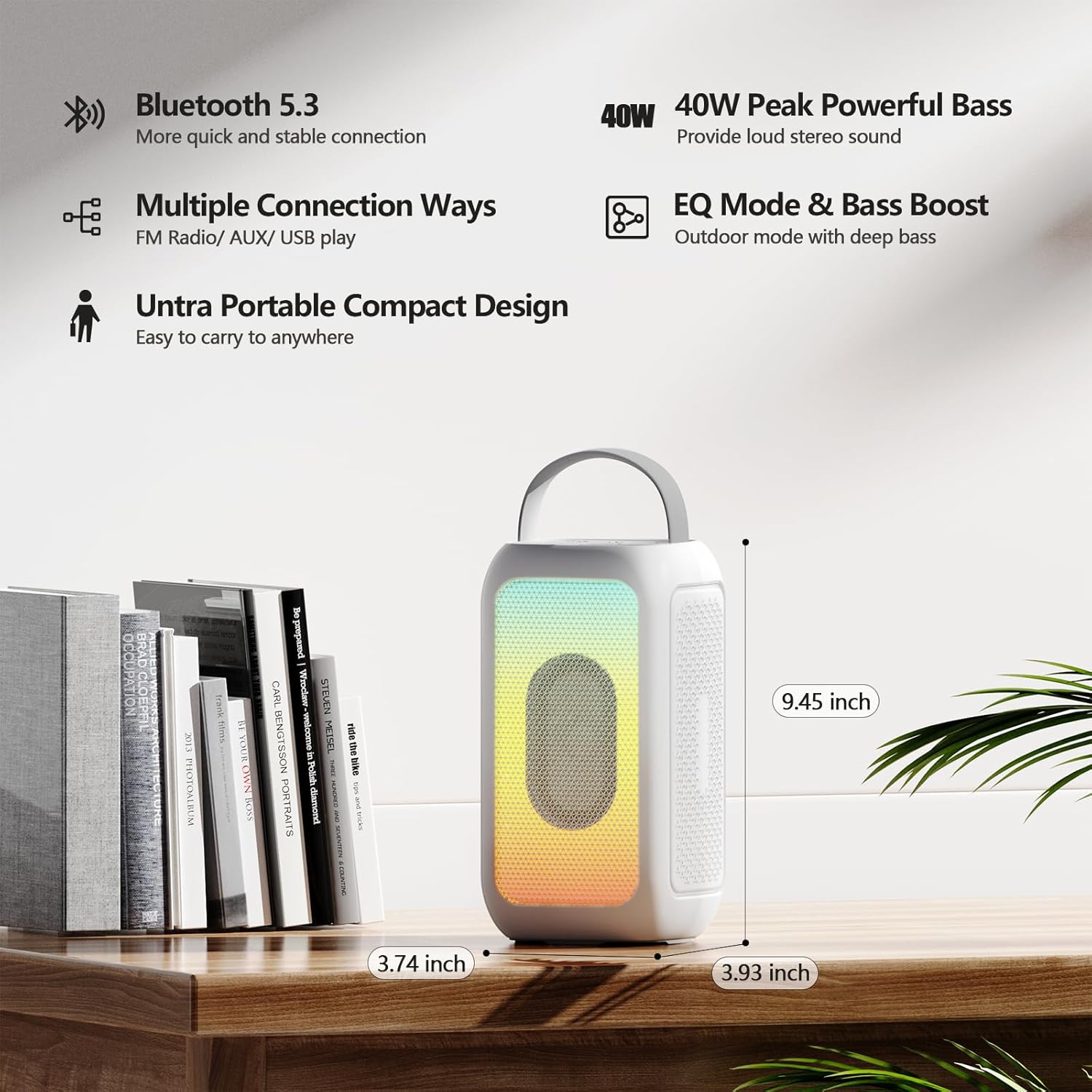
Image 8.1: Product Dimensions. This image provides a visual representation of the speaker's height, width, and depth.
9. உத்தரவாதம் மற்றும் ஆதரவு
For warranty information and customer support, please refer to the documentation included with your purchase or contact the retailer/manufacturer directly. Keep your proof of purchase for any warranty claims.
Manufacturer: MOSWS INTERNATIONAL LIMITED
Ask a question about this manual
Ask about setup, troubleshooting, compatibility, parts, safety, or missing instructions. Manuals+ will review the question and use this page’s manual context to help answer it.