
அறிமுகம்
Thank you for choosing the INIU P51L 20000mAh 45W Portable Charger. This device is designed to provide reliable and fast charging for your electronic devices on the go. Please read this manual carefully before use to ensure proper operation and to maximize the lifespan of your product.
தயாரிப்பு அம்சங்கள்
- அதிக திறன்: 20000mAh battery provides multiple charges for smartphones and tablets.
- 45W PD ஃபாஸ்ட் சார்ஜிங்: Supports Power Delivery (PD) and Quick Charge (QC) protocols for rapid charging of compatible devices, including the latest iPhone and Samsung Galaxy models.
- உள்ளமைக்கப்பட்ட USB-C கேபிள்: Features an integrated, durable USB-C cable for convenient charging without needing to carry extra cables.
- டிஜிட்டல் காட்சி: An LED screen accurately shows the remaining battery percentagஇ நிகழ்நேரத்தில்.
- ஒரே நேரத்தில் சார்ஜிங்: Equipped with multiple ports (USB-A, USB-C, and built-in USB-C cable) to charge up to three devices concurrently.
- கச்சிதமான மற்றும் இலகுரக: Utilizes high-density TinyCell battery technology for a smaller and lighter design, making it easy to carry.
- மேம்பட்ட பாதுகாப்பு பாதுகாப்பு: Incorporates an 18-layer smart protect system to safeguard against overcharge, over-discharge, over-current, short-circuit, and extreme temperatures.
தொகுப்பு உள்ளடக்கங்கள்
- INIU P51L 20000mAh 45W Portable Charger
- பயனர் கையேடு
தயாரிப்பு முடிந்துவிட்டதுview
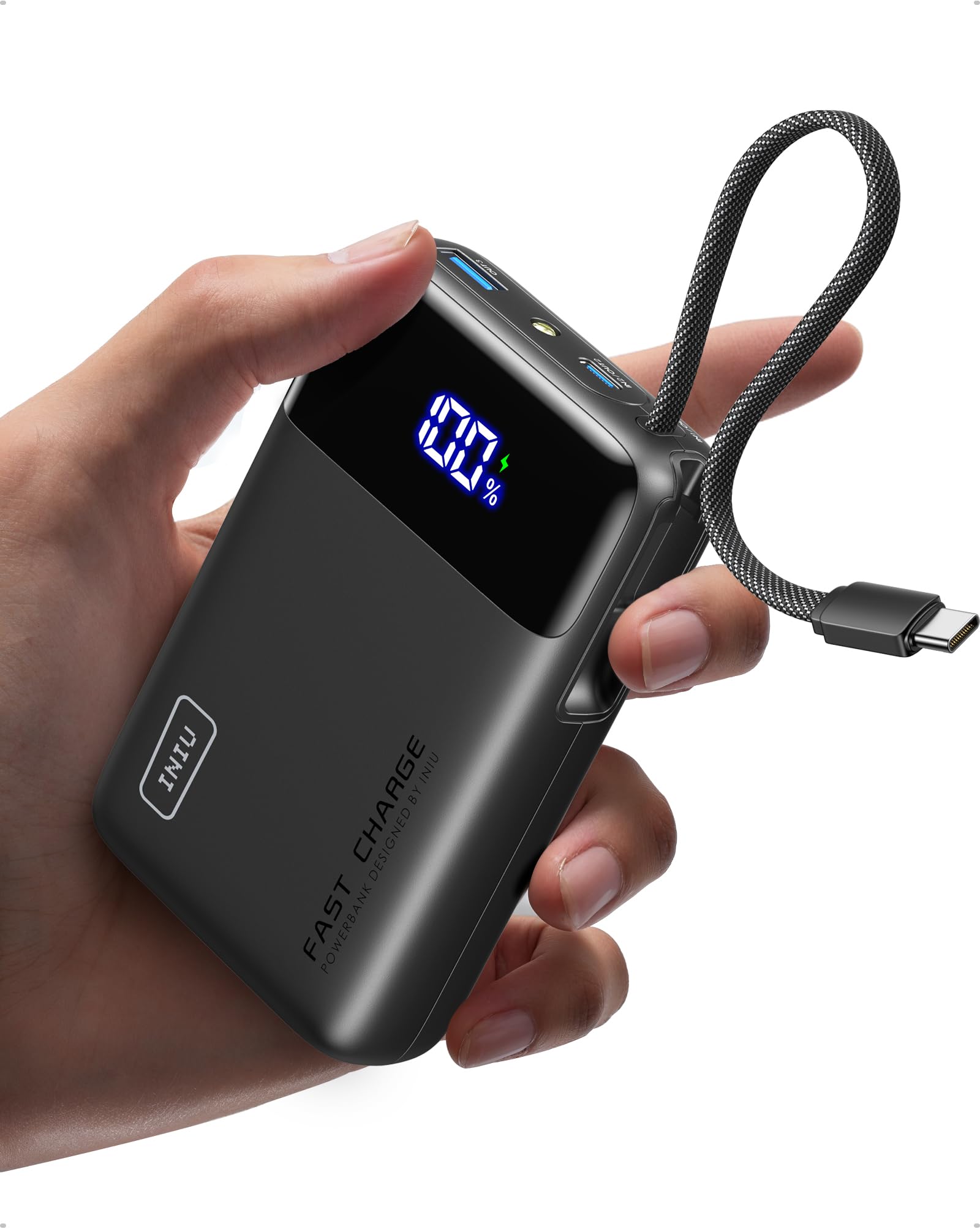


துறைமுகங்கள் மற்றும் குறிகாட்டிகள்:
- டிஜிட்டல் எல்இடி காட்சி: பேட்டரி சதவீதத்தைக் காட்டுகிறதுtagஇ (0-100%).
- உள்ளமைக்கப்பட்ட USB-C கேபிள்: For charging USB-C devices and recharging the power bank.
- USB-C போர்ட் (உள்ளீடு/வெளியீடு): Supports 45W Power Delivery for fast charging compatible devices or recharging the power bank.
- USB-A போர்ட் (வெளியீடு): For charging various USB-A compatible devices.
- பவர் பட்டன்: Press once to check battery level or initiate charging. Double-press to activate/deactivate the small flashlight.
- ஒளிரும் விளக்கு: A small LED light for emergency use.
அமைவு
பவர் பேங்கின் ஆரம்ப சார்ஜிங்:
- For optimal performance, fully charge your INIU P51L Portable Charger before first use.
- Connect the built-in USB-C cable or a separate USB-C cable to the USB-C port of the power bank.
- Connect the other end of the cable to a compatible wall charger (not included). A 45W PD charger is recommended for fastest recharging.
- The digital display will show the charging progress. The power bank is fully charged when the display shows 100%.
இயக்க வழிமுறைகள்
உங்கள் சாதனங்களை சார்ஜ் செய்தல்:


- உள்ளமைக்கப்பட்ட USB-C கேபிளைப் பயன்படுத்துதல்: Pull out the integrated USB-C cable and connect it directly to your USB-C compatible device. The power bank will automatically begin charging.
- USB-C போர்ட்டைப் பயன்படுத்துதல்: Connect a USB-C to USB-C cable (not included) from the power bank's USB-C port to your device.
- USB-A போர்ட்டைப் பயன்படுத்துதல்: Connect a USB-A to your device's charging cable (not included) from the power bank's USB-A port to your device.
- The digital display will illuminate, showing the remaining battery percentage.
- சார்ஜ் செய்வதை நிறுத்த, உங்கள் சாதனத்தைத் துண்டிக்கவும்.
பவர் பேங்க் ரீசார்ஜ் செய்தல்:


- Connect the built-in USB-C cable or a separate USB-C cable to the power bank's USB-C input/output port.
- Plug the other end into a USB wall charger.
- The digital display will show the charging status.
பாஸ்-த்ரூ சார்ஜிங்:
The INIU P51L supports pass-through charging, allowing you to charge your devices while the power bank itself is being recharged. Simply connect the power bank to a wall charger and then connect your devices to the power bank.
ஒளிரும் விளக்கைப் பயன்படுத்துதல்:
- Double-press the power button to turn the small LED flashlight ON.
- Double-press the power button again to turn the flashlight OFF.
பாதுகாப்பு முன்னெச்சரிக்கைகள்
- Do not expose the power bank to extreme temperatures (above 60°C/140°F or below 0°C/32°F), direct sunlight, or water.
- சாதனத்தை நீங்களே கீழே போடுவதையோ, பிரிப்பதையோ அல்லது பழுதுபார்க்க முயற்சிப்பதையோ தவிர்க்கவும்.
- குழந்தைகளுக்கு எட்டாத இடத்தில் வைக்கவும்.
- சான்றளிக்கப்பட்ட சார்ஜிங் கேபிள்கள் மற்றும் அடாப்டர்களை மட்டுமே பயன்படுத்தவும்.
- This product is PSE technical standard compliant, ensuring safety for use.
- விமானப் பயணம்: The 20000mAh capacity is generally allowed for carry-on luggage on airplanes. Always check current airline regulations before travel (rules as of June 2025).


சரிசெய்தல்
- சாதனம் சார்ஜ் ஆகவில்லை: Ensure the power bank has sufficient charge. Press the power button to activate output. Check if the cable is securely connected to both the power bank and your device. Try a different cable or port.
- மெதுவாக சார்ஜ் செய்தல்: Ensure your device supports fast charging protocols (PD/QC) and that you are using a compatible cable. Some devices may require specific charging sequences (e.g., plugging in the phone while the charger is off for superfast charging).
- பவர் பேங்க் ரீசார்ஜ் ஆகவில்லை: Ensure the wall charger is functioning correctly and the cable is properly connected. Try a different wall adapter or cable.
- If issues persist, please contact INIU customer support for assistance.
விவரக்குறிப்புகள்
| மாதிரி | பி 51 எல் |
| பேட்டரி திறன் | 20000 mAh |
| வெளியீட்டு சக்தி | அதிகபட்சம் 45W |
| உள்ளீடு தொகுதிtage | 5 வோல்ட் |
| இணைப்பான் வகைகள் | USB வகை A, USB வகை C |
| துறைமுகங்களின் எண்ணிக்கை | 3 (1x USB-A, 1x USB-C, 1x Built-in USB-C cable) |
| பேட்டரி செல் வகை | லித்தியம் பாலிமர் |
| தயாரிப்பு எடை | 326.1 கிராம் |
| பரிமாணங்கள் (L x W x T) | 11.5 செமீ x 7.3 செமீ x 2.9 செ.மீ |
| நிறம் | கருப்பு |
| அம்சங்கள் | Digital Display, Integrated USB-C Cable, Fast Charging |
| இணக்கமான சாதனங்கள் | iPhone (17/16/15/14/13/12/11/SE/X/8 series), Samsung Galaxy (S25/S24/S23/S22/S21/S20/S10/S9/S8/S7/S6 series), Google Pixel (10/9/8/7/6/5/4/3/2 series), iPad Pro, iPad Air, Apple Watch Series (9/8), AirPods Max, AirPods Pro, AirPods. |

உத்தரவாதம் மற்றும் ஆதரவு
INIU provides a 3 வருட தர உத்தரவாதம் for this product. If you encounter any quality issues within this period, please contact our customer support for a replacement.

For further assistance or inquiries, please visit the official INIU website or contact our customer service team through the contact information provided in your product packaging.