
அறிமுகம்
This manual provides detailed instructions for the installation, operation, and maintenance of your DEXTER PP120 Smart Digital Handle Lock. Please read this guide carefully before attempting to install or operate the lock to ensure proper functionality and safety. Keep this manual for future reference.
தயாரிப்பு அம்சங்கள்
The DEXTER PP120 Smart Digital Handle Lock offers multiple convenient and secure access methods:
- பயன்பாட்டுக் கட்டுப்பாடு: Unlock and manage your lock remotely via a dedicated smartphone application.
- கைரேகை அங்கீகாரம்: Fast and secure access using registered fingerprints.
- Key Access: Traditional mechanical key override for emergency situations.
- Numeric Passcode: Keypad entry with a customizable numeric code.
- Unlock Card: Convenient access using RFID unlock cards.
- IP53 நீர் எதிர்ப்பு: Designed to withstand splashes and dust, suitable for various environments.
- வைஃபை இணைப்பு: Seamless integration with your home network for remote management and monitoring.
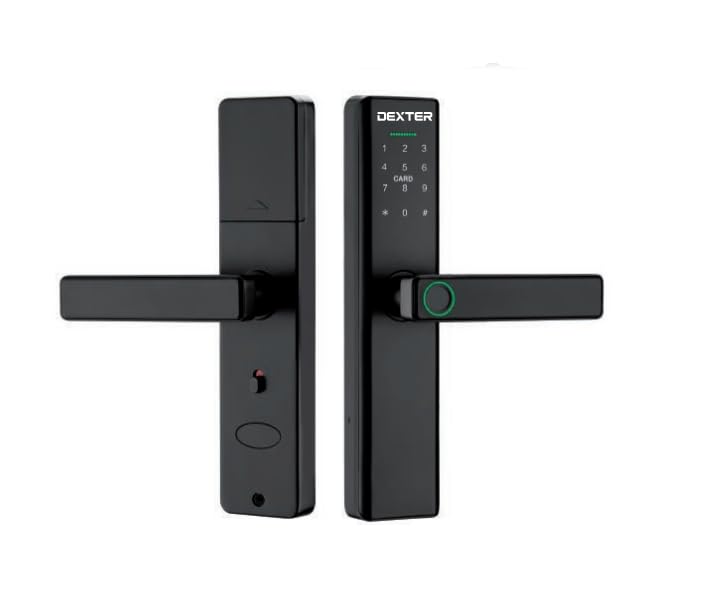
This image illustrates the DEXTER PP120 Smart Digital Handle Lock, highlighting its key features: App control, fingerprint recognition, key access, numeric passcode, unlock card functionality, IP53 water resistance, and Wi-Fi connectivity. The image also includes a table detailing model variations (PP120 and PP120 WIFI) with their article numbers, type (Embutir - Mortise), finish (Negro - Black), and master quantity.
தொகுப்பு உள்ளடக்கங்கள்
Before beginning installation, please verify that all the following components are included in your package:
- Front Handle Assembly (with keypad and fingerprint sensor)
- Rear Handle Assembly (with battery compartment)
- மோர்டைஸ் லாக் பாடி
- ஸ்ட்ரைக் பிளேட் மற்றும் ஸ்ட்ரைக் பாக்ஸ்
- பெருகிவரும் திருகுகள் மற்றும் பாகங்கள்
- Physical Keys (Emergency Override)
- Unlock Cards
- பயனர் கையேடு
அமைவு மற்றும் நிறுவல்
Proper installation is crucial for the lock's performance. If you are unsure about any step, consult a professional locksmith.
- கதவு தயாரிப்பு: Ensure your door meets the lock's specifications regarding thickness and backset. Use the provided template to drill necessary holes if your door is not pre-drilled for a smart lock.
- மோர்டைஸ் பூட்டு நிறுவல்: Insert the mortise lock body into the edge of the door. Secure it with the provided screws.
- Handle Assembly Installation: Connect the cable from the front handle assembly to the rear handle assembly. Carefully align and insert the spindle and mounting posts through the mortise lock. Secure both handle assemblies to the door using the provided screws.
- பேட்டரி நிறுவல்: Open the battery cover on the rear handle assembly. Insert four (4) AA alkaline batteries, ensuring correct polarity. Close the battery cover.
- ஆப் பதிவிறக்கம் மற்றும் இணைத்தல்:
- Download the DEXTER smart lock application from your device's app store.
- கணக்கை உருவாக்கி உள்நுழையவும்.
- Follow the in-app instructions to add your new lock. This typically involves activating Bluetooth on your phone and bringing it close to the lock.
- Once paired via Bluetooth, the app will guide you through connecting the lock to your home Wi-Fi network for remote access and advanced features.
- ஆரம்ப அமைப்பு: Set up an administrator passcode and fingerprint through the app immediately after pairing.
இயக்க வழிமுறைகள்
கதவைத் திறத்தல்
- பயன்பாட்டைப் பயன்படுத்துதல்: Open the DEXTER app, select your lock, and tap the unlock icon.
- கைரேகையைப் பயன்படுத்துதல்: Place a registered finger flat on the fingerprint sensor located on the handle. The lock will unlock if the fingerprint is recognized.
- Using Numeric Passcode: Touch the keypad to activate it. Enter your registered 6-10 digit passcode, followed by the '#' key.
- Using Unlock Card: Present a registered unlock card to the card reader area on the front handle. The lock will unlock upon successful recognition.
- Using Physical Key: In case of battery depletion or electronic malfunction, insert the physical key into the emergency keyhole (usually hidden) and turn to unlock.
கதவை பூட்டுதல்
- தானியங்கி பூட்டுதல்: The lock is designed to automatically re-lock after a preset time (configurable in the app) once the door is closed.
- கைமுறை பூட்டுதல் (உள்ளே இருந்து): Lift the handle upwards from the inside to engage the deadbolt.
- Manual Locking (via App): Use the DEXTER app to remotely lock the door.
User Management (via DEXTER App)
The DEXTER app allows you to manage access for various users:
- பயனர்களைச் சேர்த்தல்: Grant access to family members or guests by adding their fingerprints, creating unique passcodes, or assigning unlock cards.
- Modifying Access: Change existing passcodes, update fingerprints, or set time-limited access for specific users.
- பயனர்களை நீக்குதல்: Revoke access by deleting user profiles, fingerprints, passcodes, or unlock cards.
- அணுகல் பதிவுகள்: View a history of who entered and when (requires Wi-Fi connection).
பராமரிப்பு
To ensure the longevity and optimal performance of your DEXTER PP120 lock, follow these maintenance guidelines:
- பேட்டரி மாற்று: Replace all four AA batteries when the low battery warning is indicated by the lock or in the app. Always use new, high-quality alkaline batteries. Do not mix old and new batteries or different battery types.
- சுத்தம்: Wipe the lock's surface with a soft, dry cloth. Avoid using abrasive cleaners, solvents, or harsh chemicals, as these can damage the finish and electronic components.
- நிலைபொருள் புதுப்பிப்புகள்: Regularly check the DEXTER app for available firmware updates. Installing updates ensures your lock has the latest features, security enhancements, and bug fixes.
- இயந்திர சோதனை: Periodically check that all screws are tight and the handle operates smoothly. Do not force the handle if it feels stiff.
சரிசெய்தல்
If you encounter issues with your DEXTER PP120 lock, refer to the following common problems and solutions:
- பூட்டு பதிலளிக்கவில்லை:
- பேட்டரி அளவை சரிபார்த்து, தேவைப்பட்டால் மாற்றவும்.
- Ensure the lock is properly installed and all cables are connected.
- If using the app, ensure Bluetooth is enabled and you are within range.
- கைரேகை அடையாளம் காணப்படவில்லை:
- உங்கள் விரல் சுத்தமாகவும் உலர்ந்ததாகவும் இருப்பதை உறுதிப்படுத்தவும்.
- Try placing your finger in different positions on the sensor.
- If issues persist, delete and re-register your fingerprint in the app.
- Numeric passcode not working:
- Ensure you are entering the correct passcode followed by the '#' key.
- Check if the passcode has expired or been disabled in the app.
- வைஃபை இணைப்பு சிக்கல்கள்:
- உங்கள் வீட்டு வைஃபை நெட்வொர்க் செயலில் உள்ளதா மற்றும் நிலையானதா என்பதைச் சரிபார்க்கவும்.
- பூட்டு உங்கள் வைஃபை ரூட்டரின் வரம்பிற்குள் இருப்பதை உறுதிசெய்யவும்.
- Try reconnecting the lock to Wi-Fi through the DEXTER app settings.
- Lock is jammed or stiff:
- கைப்பிடியை கட்டாயப்படுத்த வேண்டாம்.
- Check for any obstructions in the door frame or mortise.
- Ensure the lock is correctly aligned and installed.
விவரக்குறிப்புகள்
| விவரக்குறிப்பு | விவரம் |
|---|---|
| பிராண்ட் | டெக்ஸ்டெர் |
| மாதிரி பெயர் | Dexter Pp120 |
| மாதிரி எண் | Dexter Pp120 |
| பூட்டு வகை | மின்னணு பூட்டு |
| கட்டுப்பாட்டு முறை | விண்ணப்பம் |
| இணைப்பு | புளூடூத், வைஃபை |
| நீர் எதிர்ப்பு | IP53 |
| GTIN / UPC | 633349060758 |
உத்தரவாதம் மற்றும் ஆதரவு
For detailed warranty information, product registration, and technical support, please visit the official DEXTER website or contact DEXTER customer service directly. Keep your purchase receipt as proof of purchase for warranty claims.