
1. அறிமுகம்
This manual provides essential information for the safe and efficient operation of your Pretul DESI-36P2 3.6V Cordless Screwdriver. Please read it thoroughly before first use and keep it for future reference. This compact cordless screwdriver is designed for light-duty fastening tasks, featuring a two-position handle and an integrated LED work light.

படம் 1: Pretul DESI-36P2 Cordless Screwdriver. This image shows the screwdriver in its straight configuration, highlighting its compact design and yellow and black color scheme.
2. பாதுகாப்பு தகவல்
தீ, மின்சார அதிர்ச்சி மற்றும் தனிப்பட்ட காயம் ஏற்படும் அபாயத்தைக் குறைக்க மின் கருவிகளைப் பயன்படுத்தும் போது எப்போதும் அடிப்படை பாதுகாப்பு முன்னெச்சரிக்கை நடவடிக்கைகளைக் கடைப்பிடிக்கவும்.
- வேலை பகுதி பாதுகாப்பு: உங்கள் பணியிடத்தை சுத்தமாகவும் நன்கு வெளிச்சமாகவும் வைத்திருங்கள். இரைச்சலான அல்லது இருண்ட பகுதிகள் விபத்துக்களை அழைக்கின்றன.
- மின் பாதுகாப்பு: மின் கருவிகளை மழை அல்லது ஈரமான நிலையில் வெளிப்படுத்த வேண்டாம். மின் கருவியில் தண்ணீர் நுழைவது மின்சார அதிர்ச்சியின் அபாயத்தை அதிகரிக்கும்.
- தனிப்பட்ட பாதுகாப்பு: விழிப்புடன் இருங்கள், நீங்கள் என்ன செய்கிறீர்கள் என்பதைப் பார்க்கவும் மற்றும் ஒரு சக்தி கருவியை இயக்கும்போது பொது அறிவைப் பயன்படுத்தவும். நீங்கள் சோர்வாக இருக்கும்போது அல்லது போதைப்பொருள், ஆல்கஹால் அல்லது மருந்துகளின் செல்வாக்கின் கீழ் ஒரு சக்தி கருவியைப் பயன்படுத்த வேண்டாம்.
- கருவி பயன்பாடு மற்றும் பராமரிப்பு: சக்தி கருவியை கட்டாயப்படுத்த வேண்டாம். உங்கள் பயன்பாட்டிற்கு சரியான ஆற்றல் கருவியைப் பயன்படுத்தவும். அது வடிவமைக்கப்பட்ட விகிதத்தில் பணியை சிறப்பாகவும் பாதுகாப்பாகவும் செய்யும்.
- பேட்டரி பராமரிப்பு: உற்பத்தியாளரால் குறிப்பிடப்பட்ட சார்ஜர் மூலம் மட்டுமே ரீசார்ஜ் செய்யவும். ஒரு வகை பேட்டரி பேக்கிற்கு ஏற்ற சார்ஜர், மற்றொரு பேட்டரி பேக்குடன் பயன்படுத்தும் போது தீ ஏற்படும் அபாயத்தை உருவாக்கலாம்.
3. தயாரிப்பு கூறுகள் மற்றும் அம்சங்கள்
Familiarize yourself with the parts of your Pretul DESI-36P2 cordless screwdriver.
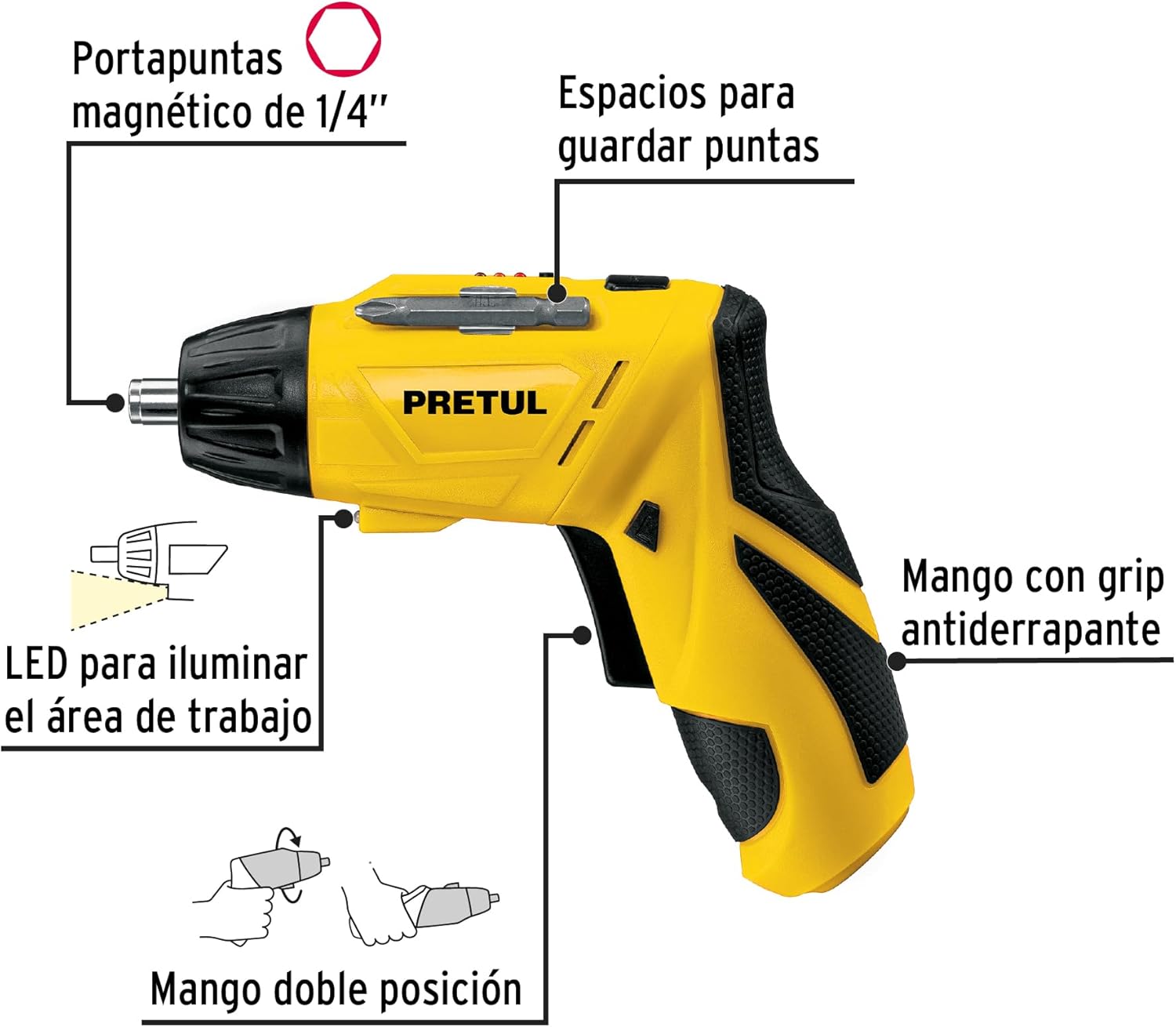
படம் 2: Key features of the Pretul DESI-36P2. This diagram illustrates the magnetic 1/4" bit holder, bit storage slots, anti-slip grip handle, LED work light, and the two-position handle mechanism.
- Magnetic 1/4" Hex Bit Holder: Securely holds screwdriver bits for quick changes.
- Bit Storage Slots: Conveniently located on the tool for storing extra bits.
- Anti-slip Grip Handle: செயல்பாட்டின் போது வசதியான மற்றும் பாதுகாப்பான கையாளுதலை வழங்குகிறது.
- LED வேலை விளக்கு: Illuminates the work area for improved visibility in dimly lit spaces.
- Two-Position Handle: Allows the screwdriver to be used in a straight or pistol-grip configuration for versatility and access in tight spaces.
- முன்னோக்கி/தலைகீழ் சுவிட்ச்: Controls the direction of rotation for tightening and loosening screws.
- பவர் பட்டன்: ஸ்க்ரூடிரைவரை இயக்குகிறது.
4 அமைவு
4.1 ஆரம்ப சார்ஜிங்
Before first use, fully charge the screwdriver's internal battery. Connect the charger to a standard electrical outlet and then to the charging port on the screwdriver. The charging indicator (if present) will show the charging status. Disconnect the charger once the battery is fully charged.
4.2 Attaching Screwdriver Bits
- Select the appropriate 1/4" hex screwdriver bit for your task.
- Insert the bit firmly into the magnetic bit holder at the front of the screwdriver until it is securely seated.
- To remove a bit, simply pull it out from the holder.
4.3 Adjusting Handle Position
The screwdriver features a two-position handle for enhanced versatility:
- Pistol Grip: Standard configuration for most tasks.
- Straight Grip: For reaching into confined spaces. To change the handle position, firmly grasp the handle and the body of the screwdriver, then pivot the handle until it locks into the desired position.
5. இயக்க வழிமுறைகள்
5.1 பவர் ஆன்/ஆஃப்
Press and hold the power button to activate the screwdriver. Release the button to stop operation. The LED work light will activate when the power button is pressed.
5.2 Selecting Rotation Direction
Use the forward/reverse switch, typically located near the trigger, to select the desired rotation direction:
- முன்னோக்கி சுழற்ற (திருகுகளை இறுக்க) சுவிட்சை இடது பக்கம் தள்ளவும்.
- தலைகீழ் சுழற்சிக்கு (திருகுகளைத் தளர்த்த) சுவிட்சை வலதுபுறமாக அழுத்தவும்.
- Ensure the switch is in the center position to lock the tool and prevent accidental activation.
5.3 Fastening Screws
- Ensure the correct bit is installed and the rotation direction is set to forward.
- Place the bit onto the screw head, applying gentle pressure.
- Press the power button to start driving the screw. Release the button once the screw is fully seated or the desired torque is reached.
5.4 தளர்த்தும் திருகுகள்
- Ensure the correct bit is installed and the rotation direction is set to reverse.
- Place the bit onto the screw head, applying gentle pressure.
- Press the power button to start loosening the screw. Release the button once the screw is free.
6. பராமரிப்பு
வழக்கமான பராமரிப்பு உகந்த செயல்திறனை உறுதிசெய்து உங்கள் கருவியின் ஆயுளை நீட்டிக்கிறது.
- சுத்தம்: கருவியின் காற்றோட்ட திறப்புகளை தெளிவாகவும் குப்பைகள் இல்லாமல் வைத்திருக்கவும். மென்மையான, டி-க்ளாஸ்கரைப் பயன்படுத்தவும்.amp வெளிப்புறத்தை சுத்தம் செய்ய துணி. கடுமையான இரசாயனங்கள் அல்லது சிராய்ப்பு கிளீனர்களைப் பயன்படுத்த வேண்டாம்.
- பிட் ஹோல்டர்: Periodically inspect the bit holder for wear or damage. Clean any accumulated dust or metal shavings.
- பேட்டரி சேமிப்பு: Store the screwdriver in a cool, dry place away from direct sunlight and extreme temperatures. For long-term storage, ensure the battery is partially charged (around 50%).
- ஆய்வு: Regularly check for loose screws, damaged cords (if applicable), or any other conditions that may affect safe operation.
7. சரிசெய்தல்
உங்கள் ஸ்க்ரூடிரைவரில் சிக்கல்கள் ஏற்பட்டால், பின்வரும் பொதுவான சிக்கல்கள் மற்றும் தீர்வுகளைப் பார்க்கவும்:
| பிரச்சனை | சாத்தியமான காரணம் | தீர்வு |
|---|---|---|
| ஸ்க்ரூடிரைவர் இயக்கப்படவில்லை. | பேட்டரி டிஸ்சார்ஜ் செய்யப்படுகிறது. | பேட்டரியை முழுமையாக சார்ஜ் செய்யுங்கள். |
| ஸ்க்ரூடிரைவருக்கு சக்தி இல்லை. | பேட்டரி குறைவாக உள்ளது. | பேட்டரியை ரீசார்ஜ் செய்யவும். |
| திருகு தலையிலிருந்து பிட் நழுவுகிறது. | தவறான பிட் அளவு அல்லது தேய்ந்த பிட். | Use the correct bit size; replace worn bits. |
| Handle does not lock into position. | Not fully pivoted. | Ensure the handle is fully pivoted until it clicks into place. |
இந்த தீர்வுகளை முயற்சித்த பிறகும் சிக்கல் தொடர்ந்தால், வாடிக்கையாளர் ஆதரவைத் தொடர்பு கொள்ளவும்.
8. விவரக்குறிப்புகள்
Technical specifications for the Pretul DESI-36P2 Cordless Screwdriver.

படம் 3: Dimensions of the Pretul DESI-36P2. This image shows the screwdriver with measurements indicating a length of 17.5 cm and a height of 13 cm.
| அம்சம் | விவரக்குறிப்பு |
|---|---|
| மாதிரி எண் | DESI-36P2 (26402) |
| பிராண்ட் | Pretul |
| சக்தி ஆதாரம் | பேட்டரி |
| பேட்டரி தொகுதிtage | 3.6 வோல்ட் |
| வேகம் | 230 ஆர்பிஎம் |
| முறுக்கு | 3E+1 Pound-inches (approximately 30 in-lbs) |
| பிட் ஹோல்டர் | 1/4" Hex Magnetic |
| பொருள் | பிளாஸ்டிக், உலோகம் |
| பரிமாணங்கள் (L x H) | 17.5 செ.மீ x 13 செ.மீ (தோராயமாக, படத்தைப் பொறுத்து) |
| எடை | 530 கிராம் (0.53 கிலோ) |
| உள்ளிட்ட கூறுகள் | 5 Phillips bits 1" (PH1, PH2, PH3), Charger, 2 Phillips bits 2" (PH1, PH2), 1/4" Magnetic extension |
9. உத்தரவாதம் மற்றும் ஆதரவு
The Pretul DESI-36P2 Cordless Screwdriver comes with a 1 வருட உத்தரவாதம் வாங்கிய தேதியிலிருந்து. உத்தரவாதக் கோரிக்கைகளுக்காக உங்கள் வாங்கியதற்கான ஆதாரத்தை வைத்திருங்கள்.

படம் 4: Product packaging showing the included components and a "1 year warranty" seal.
For technical support, service, or warranty inquiries, please contact Pretul customer service through their official channels or the retailer where the product was purchased.