
1. அறிமுகம்
நன்றி, நன்றி.asing the LONPOO Mini Hi-Fi Ampஆயுள் AMP-615B. This 2-channel stereo ampஉயர்தர ஆடியோவை வழங்க லிஃபையர் வடிவமைக்கப்பட்டுள்ளது. amplification for your passive speakers, offering versatile connectivity options including Bluetooth 5.3, Optical, Coaxial, USB, and AUX inputs. This manual provides detailed instructions for setup, operation, and maintenance to ensure optimal performance and longevity of your device.
2. பாதுகாப்பு வழிமுறைகள்
- சக்தி ஆதாரம்: உறுதி செய்யவும் amplifier is connected to a power supply within the specified voltage range (AC 100-240V ~ 50/60Hz).
- காற்றோட்டம்: காற்றோட்ட திறப்புகளைத் தடுக்க வேண்டாம். அதிக வெப்பமடைவதைத் தடுக்க அலகு சுற்றி போதுமான காற்றோட்டத்தை உறுதி செய்யவும்.
- ஈரப்பதம்: வைத்திருங்கள் amplifier away from water, moisture, and high humidity environments. Do not operate with wet hands.
- வெப்பம்: Avoid placing the unit near heat sources such as radiators, heat registers, stoves, or other heat-producing appliances.
- சுத்தம்: Disconnect the power cord before cleaning. Use a dry, soft cloth. Do not use liquid cleaners or aerosol cleaners.
- சேவை: இந்த தயாரிப்புக்கு நீங்களே சேவை செய்ய முயற்சிக்காதீர்கள். தகுதிவாய்ந்த சேவை ஊழியர்களுக்கு அனைத்து சேவைகளையும் பார்க்கவும்.
- இடம்: அலகு விழாமல் தடுக்க ஒரு நிலையான, தட்டையான மேற்பரப்பில் வைக்கவும்.
3. தொகுப்பு உள்ளடக்கங்கள்
Carefully unpack the box and ensure all items listed below are present and in good condition. If any item is missing or damaged, please contact your retailer.

The package includes the LONPOO Mini Hi-Fi Amplifier, a remote control for convenient operation, an AC power cord, an optical cable for digital audio, and a quick start guide.
- 1x LONPOO Mini Hi-Fi Ampஆயுள்AMP-615 பி)
- 1x ரிமோட் கண்ட்ரோல்
- 1x ஏசி பவர் கார்டு
- 1x ஆப்டிகல் கேபிள்
- 1x User Manual (Quick Start Guide)
4. தயாரிப்பு முடிந்துவிட்டதுview
4.1 முன் குழு

The front panel features Treble and Bass controls, a multi-function knob for volume and input selection, AUX IN, USB input, IR receiver, and an indicator light.
- ட்ரெபிள் கட்டுப்பாடு: Adjusts high-frequency audio levels.
- BASS கட்டுப்பாடு: Adjusts low-frequency audio levels.
- Multi-Function Knob (VOLUME +/- / MODE / POWER ON/OFF):
- Rotate: Adjusts volume.
- Short Press: Cycles through input modes (Bluetooth, AUX, USB, Coaxial, Optical).
- Long Press: Powers the unit On/Off.
- AUX IN (3.5மிமீ): Audio input for devices with a 3.5mm audio jack.
- யூ.எஸ்.பி உள்ளீடு: ஆடியோவை இயக்குவதற்கு files from a USB flash drive (supports MP3, WAV formats).
- IR (Infrared) Receiver: ரிமோட் கண்ட்ரோலில் இருந்து சிக்னல்களைப் பெறுகிறது.
- காட்டி ஒளி: Displays the current status/input mode:
- Red: Standby (Power Off)
- Blue: Bluetooth Input
- Green: AUX Input
- Yellow: Coaxial Input
- Light Blue: Optical Input
4.2 பின்புற பேனல்
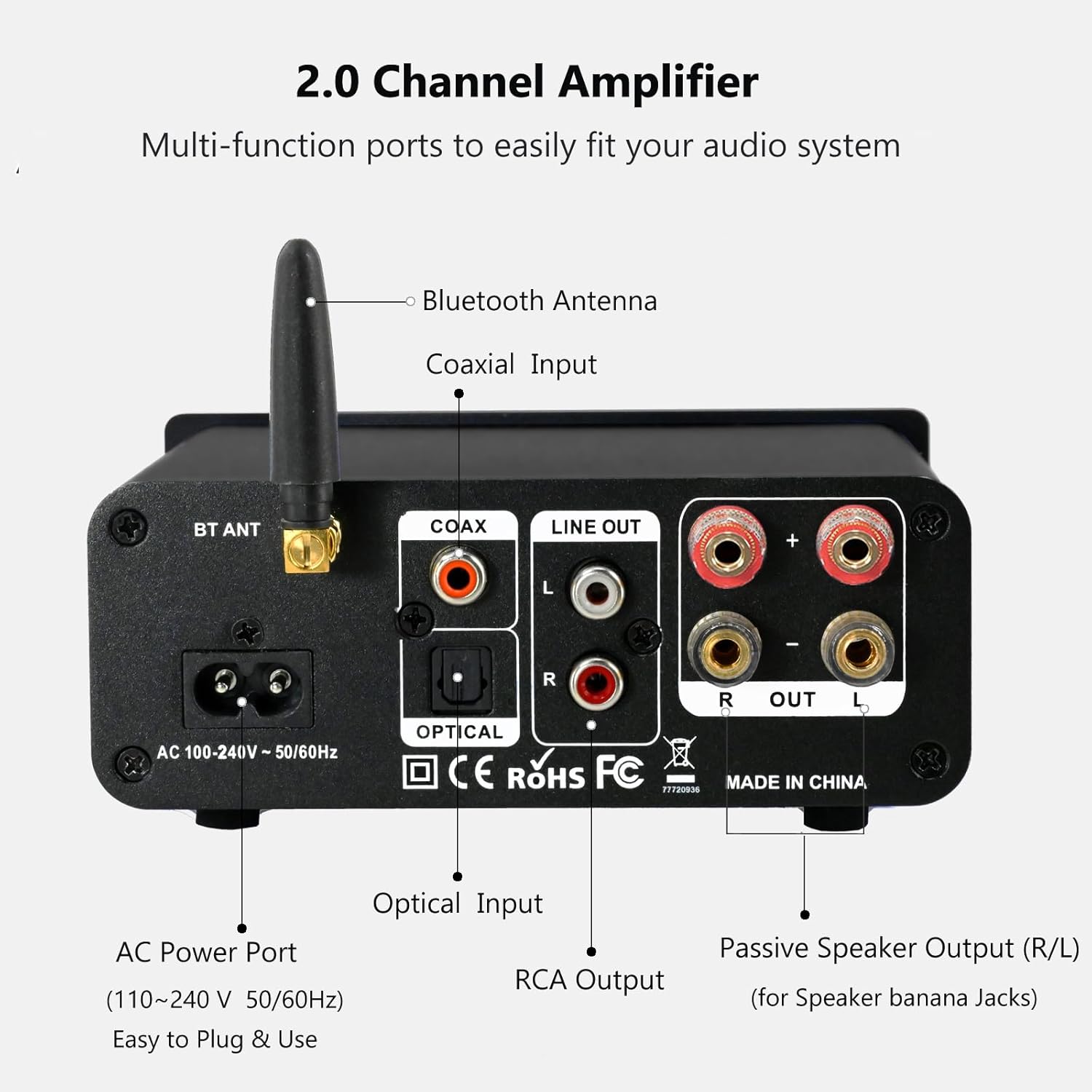
The rear panel provides connections for the Bluetooth antenna, Coaxial and Optical inputs, RCA Line Out, passive speaker outputs, and the AC power port.
- BT ANT (Bluetooth Antenna): Connect the included Bluetooth antenna for optimal wireless range and stability.
- COAX (Coaxial Input): Digital audio input for devices with a coaxial output.
- OPTICAL (Optical Input): Digital audio input for devices with an optical (Toslink) output.
- LINE OUT (RCA L/R): Analog audio output for connecting to powered speakers or a subwoofer.
- PASSIVE SPEAKER OUTPUT (R/L): Connect passive speakers using banana plugs or bare speaker wire.
- AC POWER PORT: Connect the supplied AC power cord (100-240V ~ 50/60Hz).
5 அமைவு
5.1 ஸ்பீக்கர்களை இணைக்கிறது

The LONPOO Mini Hi-Fi Amplifier seamlessly integrates with your home audio setup, providing clear sound to passive bookshelf speakers.
- செயலற்ற பேச்சாளர்கள்: Connect your passive bookshelf speakers to the PASSIVE SPEAKER OUTPUT (R/L) terminals on the rear panel. Ensure correct polarity (+ to + and - to -) for each speaker. You can use banana plugs or strip the speaker wire ends and insert them into the terminals.
- Powered Speakers/Subwoofer: If you wish to connect powered speakers or a subwoofer, use an RCA cable to connect them to the LINE OUT (RCA L/R) பின்புற பேனலில் துறைமுகங்கள்.
5.2 ஆடியோ மூலங்களை இணைத்தல்
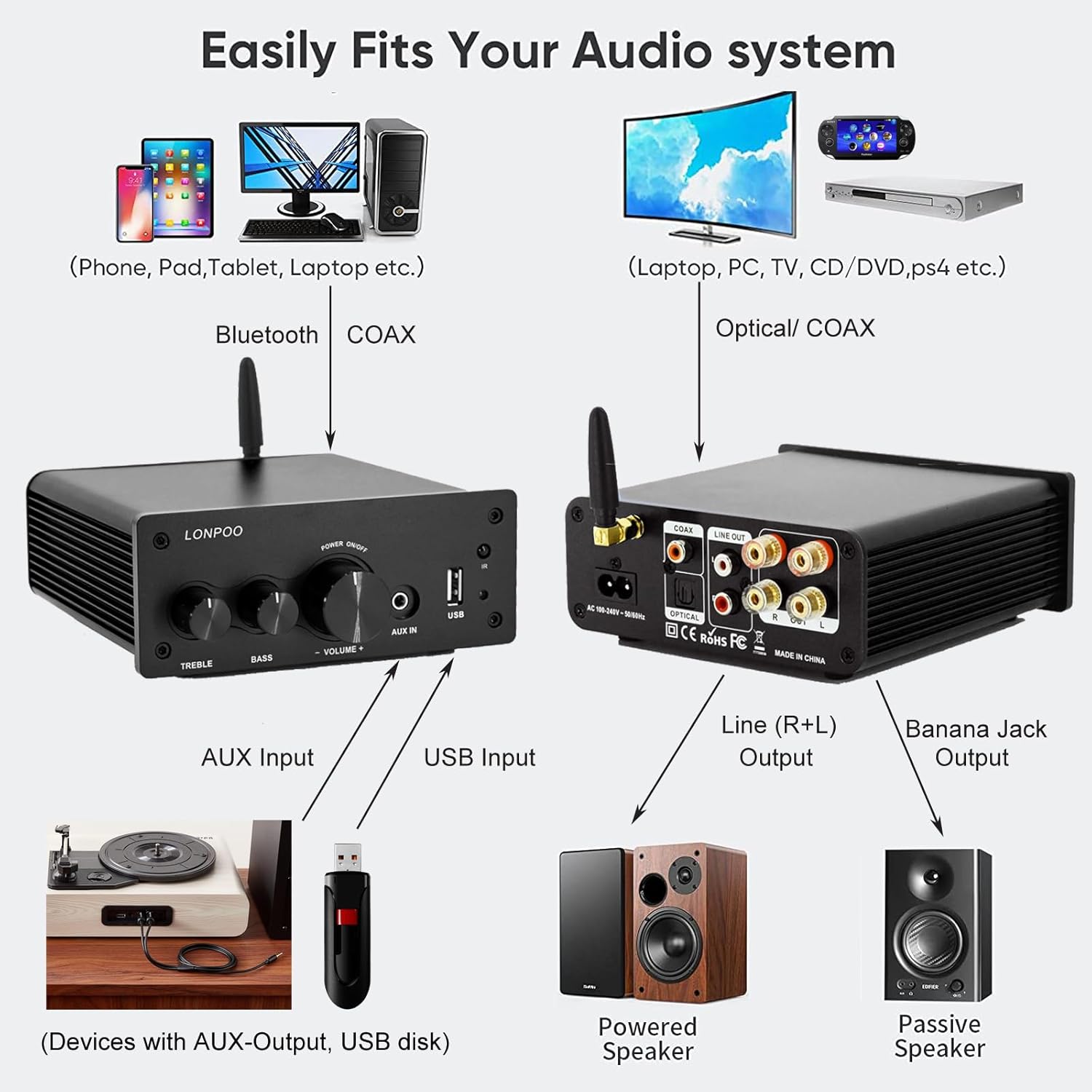
This diagram illustrates how the amplifier connects to a wide range of audio sources and output devices, including phones, PCs, TVs, CD players, powered speakers, and passive speakers.
- புளூடூத்: Ensure the Bluetooth antenna is connected to the BT ANT துறைமுகம்.
- AUX உள்ளீடு: Connect your smartphone, tablet, or other audio device using a 3.5mm audio cable to the AUX IN முன் பலகத்தில் போர்ட்.
- யூ.எஸ்.பி உள்ளீடு: Insert a USB flash drive containing MP3 or WAV audio fileகள் உள்ளே யூ.எஸ்.பி உள்ளீடு முன் பலகத்தில் போர்ட்.
- ஒளியியல் உள்ளீடு: Connect your TV, CD player, or game console with an optical output to the ஆப்டிகல் port on the rear panel using the provided optical cable.
- கோஆக்சியல் உள்ளீடு: Connect your TV, DVD player, or other audio source with a coaxial output to the COAX பின்புற பேனலில் துறைமுகம்.
5.3 மின் இணைப்பு
Connect the supplied AC power cord to the ஏசி பவர் போர்ட் on the rear panel of the amplifier, then plug the other end into a wall outlet.
6. இயக்க வழிமுறைகள்
6.1 பவர் ஆன்/ஆஃப்
அதிகாரத்திற்கு ampதூக்கிலிடுபவர், நீண்ட அழுத்தம் தி பல செயல்பாட்டு நாப் on the front panel. The indicator light will illuminate. To power off, நீண்ட அழுத்தம் the knob again.
6.2 உள்ளீடு தேர்வு
To select an audio input source, குறுகிய பத்திரிகை தி பல செயல்பாட்டு நாப். Each short press will cycle through the available inputs: Bluetooth, AUX, USB, Coaxial, and Optical. The காட்டி ஒளி will change color to reflect the active input mode (refer to Section 4.1 for color codes).
6.3 தொகுதி சரிசெய்தல்
சுழற்று பல செயல்பாட்டு நாப் clockwise to increase the volume and counter-clockwise to decrease it.
6.4 தொனி கட்டுப்பாடு
பயன்படுத்தவும் மரம் மற்றும் BASS knobs on the front panel to adjust the high and low frequencies of the audio output according to your preference.
6.5 ப்ளூடூத் இணைத்தல்

Connect your smartphone or other Bluetooth-enabled devices wirelessly to the amplifier for convenient audio streaming.
- Ensure the Bluetooth antenna is securely connected.
- சக்தி amplifier and select the Bluetooth input mode (the indicator light will turn blue).
- On your Bluetooth-enabled device (e.g., smartphone, tablet), search for available Bluetooth devices.
- Select "LONPOO AMP-615" from the list to pair.
- இணைந்தவுடன், தி amplifier will play a confirmation sound, and you can stream audio wirelessly.
6.6 USB பிளேபேக்

தி amplifier supports direct audio input via 3.5mm AUX and USB, allowing for plug-and-play functionality with various devices.
USB ஃபிளாஷ் டிரைவை அதில் செருகவும் யூ.எஸ்.பி உள்ளீடு துறைமுகம். தி amplifier will automatically detect and begin playing supported audio files (MP3, WAV). Use the remote control for playback functions like play/pause, next/previous track.
6.7 தொலை கட்டுப்பாடு
சேர்க்கப்பட்டுள்ள ரிமோட் கண்ட்ரோல் வசதியான செயல்பாட்டை அனுமதிக்கிறது amplifier from a distance. Functions include:
- பவர் ஆன்/ஆஃப்
- வால்யூம் அதிக/கீழ்
- முடக்கு
- Input Source Selection (BT, AUX, USB, COAX, OPT)
- USB Playback Controls (Play/Pause, Next/Previous Track)
7. சரிசெய்தல்
If you encounter any issues with your LONPOO Mini Hi-Fi Amplifier, please refer to the following troubleshooting guide:
| பிரச்சனை | சாத்தியமான காரணம் | தீர்வு |
|---|---|---|
| ஒலி வெளியீடு இல்லை |
|
|
| மோசமான ஒலி தரம் (சிதைவு, குறைந்த ஒலி அளவு) |
|
|
| புளூடூத் இணைப்பு சிக்கல்கள் |
|
|
| Optical/Coaxial audio dropouts or no sound |
|
|
| ஹம்மிங் அல்லது சலசலப்பு சத்தம் |
|
|
8. விவரக்குறிப்புகள்
| மாதிரி எண் | AMP-615 |
| வெளியீட்டு சக்தி | 100W + 100W (200W total) |
| சேனல்கள் | 2.0 ஸ்டீரியோ |
| புளூடூத் பதிப்பு | 5.3 |
| உள்ளீடுகள் | Bluetooth, Optical, Coaxial, USB, 3.5mm AUX |
| வெளியீடுகள் | RCA Line Out (L/R), Passive Speaker Output (Banana Jack compatible) |
| பவர் சப்ளை | AC 100-240V ~ 50 / 60Hz |
| பரிமாணங்கள் (W x H x D) | 132 மிமீ x 55 மிமீ x 140 மிமீ (தோராயமாக 5.19 x 2.16 x 5.51 அங்குலம்) |
| எடை | 1.09 கிலோ (தோராயமாக. 2.4 பவுண்ட்) |
| உள்ளிட்ட கூறுகள் | ஹை-ஃபை Amplifier, AC Cable, Remote Control, Optical Cable |
9. பராமரிப்பு
- சுத்தம்: Disconnect the power before cleaning. Use a soft, dry cloth to wipe the exterior of the ampலிஃபையர். சிராய்ப்பு கிளீனர்கள் அல்லது கரைப்பான்களைப் பயன்படுத்த வேண்டாம்.
- சேமிப்பு: சேமித்து வைத்தால் amplifier for an extended period, disconnect it from the power supply and store it in a cool, dry place.
- கேபிள் மேலாண்மை: Ensure all cables are neatly organized and not under tension to prevent damage.
10. உத்தரவாதம் மற்றும் ஆதரவு
This product comes with a standard manufacturer's warranty. For specific warranty details, please refer to the documentation provided with your purchase or contact your retailer. For technical support, troubleshooting assistance, or inquiries regarding spare parts, please contact LONPOO customer service or your authorized dealer. Information regarding spare parts availability is currently unavailable.