
அறிமுகம்
This instruction manual provides detailed guidance for the Anderic RR787T Replacement Remote Control. Designed as a direct replacement for RH787T and UC787T remotes, it offers comprehensive control for Casablanca DC motor ceiling fans and other compatible high-end models. Features include six fan speeds, reverse airflow, and dimmable light control (for incandescent bulbs). This remote is specifically engineered for ceiling fans utilizing receivers with 4 dip switches, including those originally paired with the RH786R receiver.
தொகுப்பு உள்ளடக்கங்கள்
உங்கள் தொகுப்பில் அனைத்து பொருட்களும் உள்ளதா என சரிபார்க்கவும்:
- Anderic RR787T Remote Control
- சுவர் மவுண்ட் அடைப்புக்குறி
- மவுண்டிங் திருகுகள் மற்றும் சுவர் நங்கூரங்கள்
- குறிப்பு: இரண்டு AAA பேட்டரிகள் தேவை, அவை சேர்க்கப்படவில்லை.

Image: Anderic RR787T remote control securely placed in its wall mount holder.
அமைவு
Follow these steps to set up your new remote control:
- பேட்டரிகளை நிறுவவும்: ரிமோட்டின் பின்புறத்தில் உள்ள பேட்டரி பெட்டியைத் திறக்கவும். இரண்டு AAA பேட்டரிகளைச் செருகவும் (சேர்க்கப்படவில்லை), சரியான துருவமுனைப்பை உறுதிசெய்யவும்.
- Set Dip Switches: Locate the 4 dip switches inside the battery compartment. Match the dip switch settings on your new Anderic RR787T remote to the settings on your existing ceiling fan receiver or old remote. This step is crucial for proper communication between the remote and the fan.
- மவுண்ட் சுவர் அடைப்புக்குறி: Use the provided screws and wall anchors to securely mount the wall bracket in a convenient location.
- Insert Remote: Slide the remote control into the mounted wall bracket.

படம்: பின்புறம் view of the Anderic RR787T remote, highlighting the battery compartment and dip switches for configuration.
செயல்விளக்க வீடியோவை அமைக்கவும்
Video: A demonstration of a similar Anderic remote (UC7225T) showing its features and operation, which can provide general guidance for setup and use. Note that this video is for a different model (UC7225T) but from the same brand.
இயக்க வழிமுறைகள்
The Anderic RR787T remote offers intuitive control over your ceiling fan and light:
- பவர் ஆன்/ஆஃப்: மின்விசிறியையும் விளக்கையும் இயக்க அல்லது அணைக்க பவர் பட்டனை அழுத்தவும்.
- மின்விசிறி வேகக் கட்டுப்பாடு: Use the fan speed buttons (typically marked I, II, III, IV, V, VI or Low, Med, High) to adjust the fan's rotation speed. The RR787T supports 6 fan speeds.
- தலைகீழ் காற்றோட்டம்: Press the reverse button to change the direction of the fan blades, allowing for seasonal comfort (downward airflow for cooling, upward for circulating warm air).
- ஒளி கட்டுப்பாடு:
- ஒளியை ஆன் அல்லது ஆஃப் செய்ய லைட் பட்டனை அழுத்தவும்.
- To dim the light (with incandescent bulbs), press and hold the light button. Release when the desired brightness is reached.
- Note: For LED, CFL, or other non-incandescent bulbs, the dimming function can be disabled inside the battery compartment to prevent issues.
- டைமர் செயல்பாடு: The remote includes timer buttons (e.g., 1H, 2H, 4H, 8H) to set the fan to operate for a specific duration before automatically turning off.
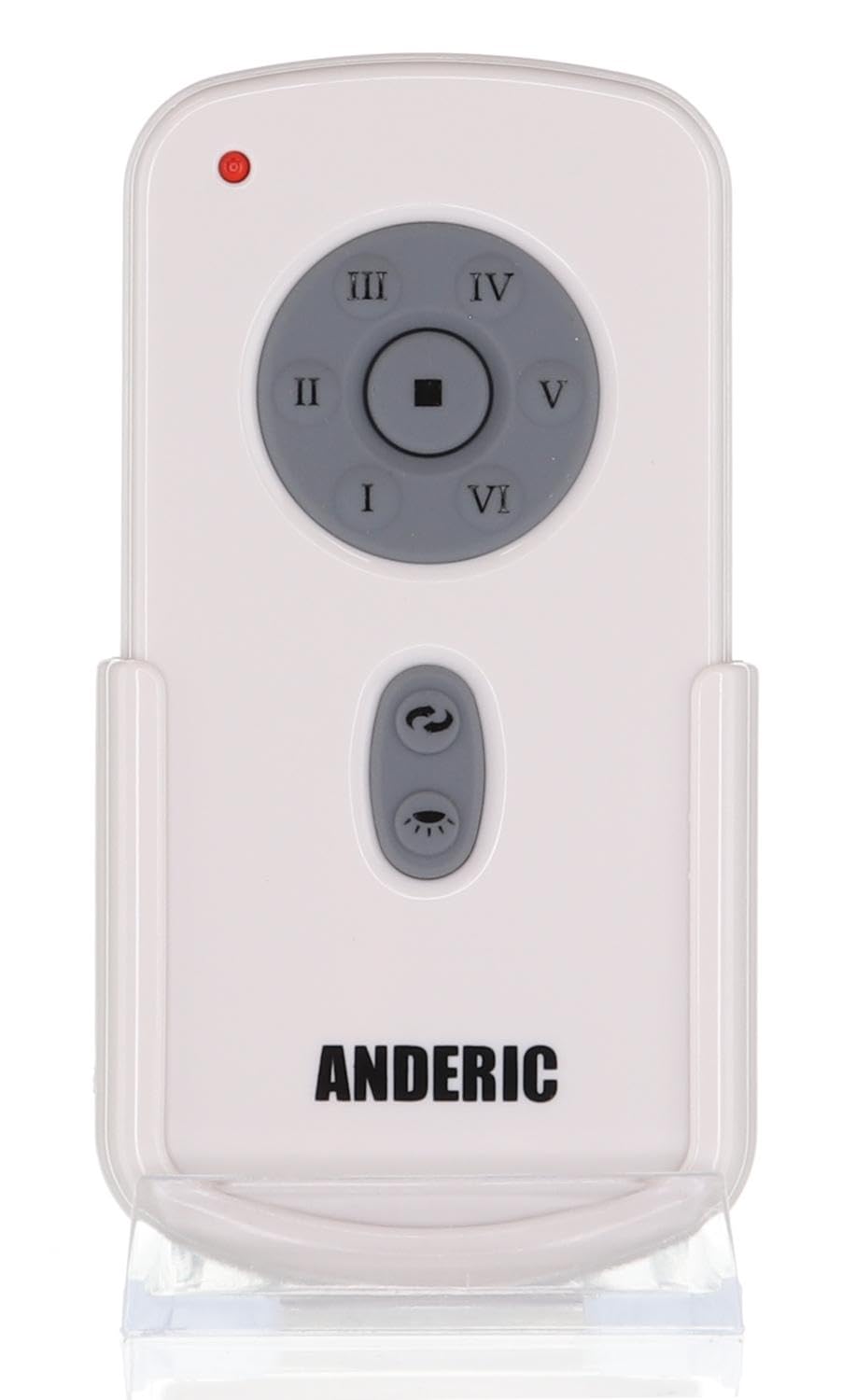
படம்: முன்பக்கம் view of the Anderic RR787T remote control, displaying its intuitive button layout for easy operation.
இணக்கத்தன்மை
The Anderic RR787T is designed for broad compatibility with specific ceiling fan systems:
- பெறுநர்கள்: Designed for ceiling fans that use receivers with 4 dip switches, including models originally paired with RH786R, RH787T, and UC787T remotes.
- Fan Brands: Compatible with high-end ceiling fans from brands such as Casablanca, Monte Carlo, Fanimation, Regency, and Home Decorators Collection.
- ஆதரிக்கப்படும் மாதிரிகள்: Includes Casablanca Panama, Stealth, Stingray, Fellini, and Monte Carlo Vision, Arcade, Hicks, and Dover series.
- முக்கிய குறிப்பு: Not compatible with Fanimation Slinger fans (especially newer models), fans requiring 5 dip switch receivers, or 315 MHz systems like Harbor Breeze ZJF-HH-YK-A008. Always verify your fan's receiver type before purchase.
பராமரிப்பு
உங்கள் ரிமோட் கண்ட்ரோலின் நீண்ட ஆயுளையும் உகந்த செயல்திறனையும் உறுதிசெய்ய, இந்த பராமரிப்பு வழிகாட்டுதல்களைப் பின்பற்றவும்:
- பேட்டரி மாற்று: Replace batteries when the remote's performance diminishes. Ensure correct battery type (2 AAA) and polarity.
- சுத்தம்: Wipe the remote with a soft, dry cloth. Avoid using harsh chemicals or abrasive cleaners.
- சேமிப்பு: நேரடி சூரிய ஒளி மற்றும் தீவிர வெப்பநிலையிலிருந்து விலகி, குளிர்ந்த, உலர்ந்த இடத்தில் ரிமோட்டை சேமிக்கவும்.
சரிசெய்தல்
If you encounter issues with your remote control, refer to the following common solutions:
- ரிமோட் பதிலளிக்கவில்லை:
- பேட்டரி அளவை சரிபார்த்து, தேவைப்பட்டால் மாற்றவும்.
- Ensure the dip switch settings on the remote match the receiver.
- Verify the fan's power supply is active.
- Light Not Dimming:
- Confirm that incandescent bulbs are being used.
- Check if the dimming function is enabled inside the battery compartment.
- Fan Not Changing Speed/Direction:
- ரிமோட் ரிசீவரின் வரம்பிற்குள் இருப்பதை உறுதிசெய்யவும்.
- Re-check dip switch settings.
விவரக்குறிப்புகள்
| பிராண்ட் | ஆண்டெரிக் |
| மாதிரி எண் | RR787T (replaces RH787T) |
| தொகுப்பு பரிமாணங்கள் | 4.96 x 4.92 x 2.8 அங்குலம் |
| பொருளின் எடை | 3.2 அவுன்ஸ் |
| பேட்டரிகள் | 2 AAA பேட்டரிகள் (சேர்க்கப்படவில்லை) |
| சிறப்பு அம்சம் | சுவர் மவுண்ட் சேர்க்கப்பட்டுள்ளது |
| நிறம் | வெள்ளை |
| ஆதரிக்கப்படும் சாதனங்களின் அதிகபட்ச எண்ணிக்கை | 1 |
| இணக்கமான சாதனங்கள் | மின்விசிறி |
உத்தரவாதம் மற்றும் ஆதரவு
For warranty information or technical support, please refer to the product packaging or contact Anderic customer service directly. Keep your proof of purchase for any warranty claims.