
1. அறிமுகம்
The DALY Smart Active Balance BMS is a sophisticated Battery Management System designed to protect and optimize the performance of Li-ion, LiFePO4, and LTO battery packs. This model supports 4 to 8 series cells (4S-8S) with a 400A charge/discharge current and features 1A active balancing. It includes built-in Bluetooth for monitoring and communication interfaces like RS485 and CAN, ensuring comprehensive battery management and data accessibility.
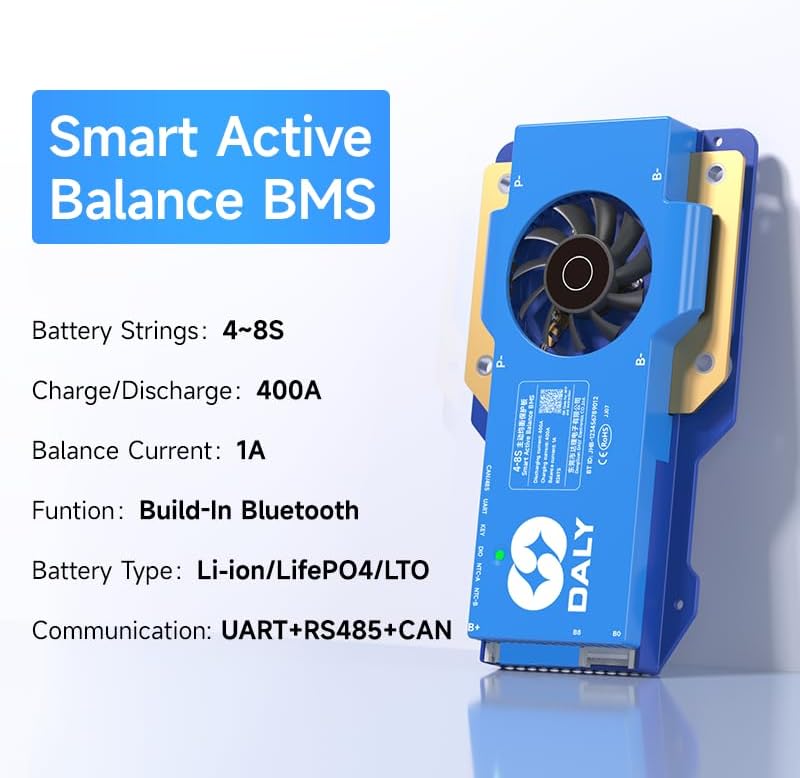
Image 1.1: DALY Smart Active Balance BMS highlighting 4S-8S, 400A, 1A balance, Bluetooth, UART+RS485+CAN.
2. பாதுகாப்பு தகவல்
Please read and understand all safety instructions before installing or operating the DALY Smart Active Balance BMS. Failure to follow these instructions may result in electric shock, fire, or serious injury.
- Always disconnect power from the battery pack before performing any installation, maintenance, or wiring changes.
- Ensure correct polarity when connecting the BMS to the battery pack. Incorrect wiring can cause severe damage to the BMS and battery.
- Do not short-circuit the battery terminals or the BMS connection points.
- Install the BMS in a well-ventilated area, away from flammable materials and direct sunlight.
- Avoid exposing the BMS to moisture, dust, or extreme temperatures.
- ஏதேனும் படிகள் குறித்து உங்களுக்குத் தெரியாவிட்டால், நிறுவலுக்கு ஒரு தகுதிவாய்ந்த நிபுணரை அணுகவும்.
- Use appropriate personal protective equipment (PPE) such as insulated gloves and safety glasses during installation.
3. தயாரிப்பு முடிந்துவிட்டதுview
The DALY Smart Active Balance BMS provides comprehensive protection and management for your battery system. Key features include:
- Cell Compatibility: Supports 4 to 8 series (4S-8S) Li-ion, LiFePO4, and LTO battery types.
- உயர் மின்னோட்டத் திறன்: Rated for 400A continuous charge and discharge current.
- செயலில் சமநிலைப்படுத்துதல்: Features 1A active balancing to equalize cell voltages, extending battery life and performance.
- ஸ்மார்ட் கண்காணிப்பு: Integrated Bluetooth for real-time monitoring via a mobile application.
- தொடர்பு இடைமுகங்கள்: Equipped with UART, RS485, and CAN ports for versatile system integration and data logging.
- பல பாதுகாப்புகள்: Includes overcharge, over-discharge, overcurrent, short circuit, and high-temperature shutdown protections.
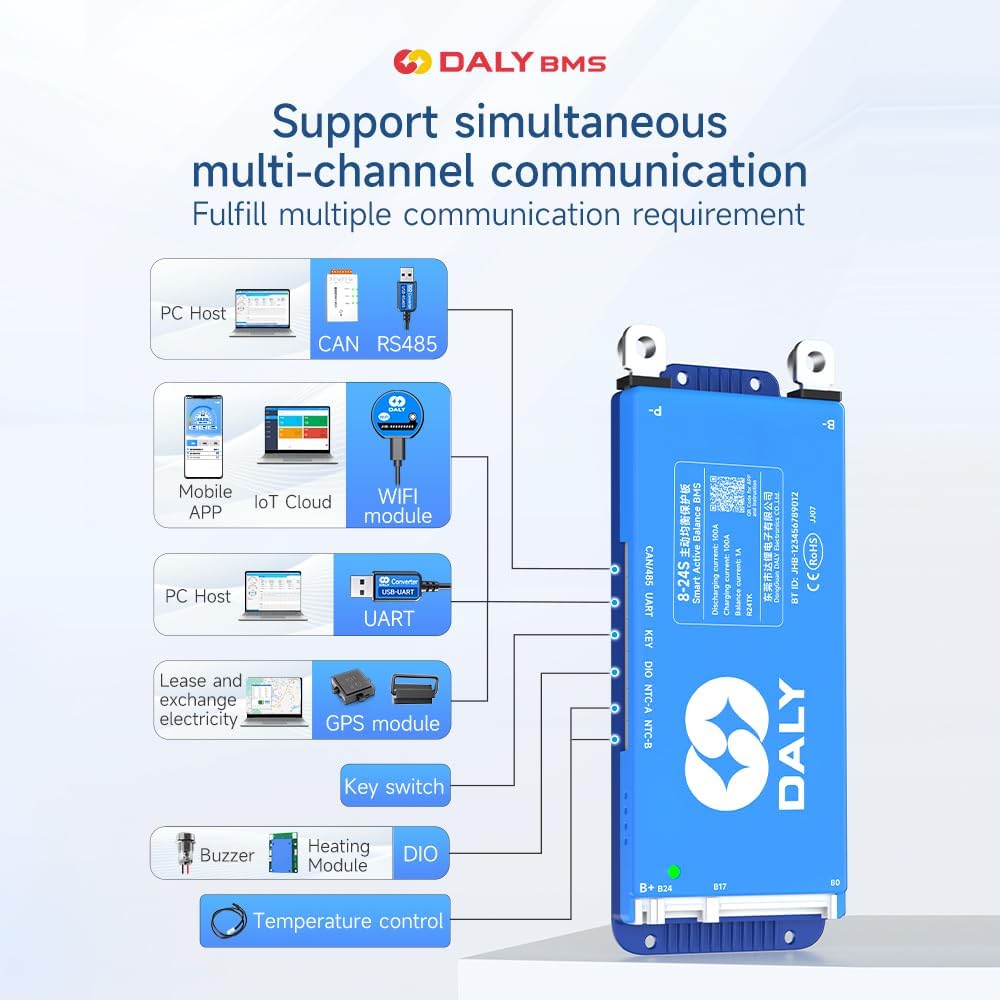
Image 3.1: Diagram illustrating the DALY BMS's support for multi-channel communication including PC Host (CAN, RS485, UART), Mobile APP (Bluetooth, WiFi module), GPS module, Key switch, Buzzer, Heating Module, and DIO for temperature control.
4. பேக்கிங் பட்டியல்
கீழே பட்டியலிடப்பட்டுள்ள அனைத்து பொருட்களும் உங்கள் தொகுப்பில் சேர்க்கப்பட்டுள்ளதா என்பதை சரிபார்க்கவும்:
- Smart Active Balance BMS (1 unit)
- P-&B- cable (1 set)
- Screws (2 Pcs)
- Sampling cable (1 set)
- B+ cable (1 unit)
- NTC Temperature Sensor (One standard, two optional)
- பயனர் கையேடு (1 நகல்)
- Packaging box (1 unit)
- RS485/CAN port cable (1 unit)

Image 4.1: Visual representation of the DALY BMS package contents, including the BMS unit, various cables, screws, NTC sensor, and user manual.
5. அமைவு மற்றும் நிறுவல்
Proper installation is crucial for the safe and efficient operation of your BMS. Follow these steps carefully:
5.1 முன் நிறுவல் சோதனைகள்
- Ensure your battery pack matches the BMS specifications (4S-8S, Li-ion/LiFePO4/LTO).
- Verify all battery cells are balanced and within a healthy voltage range before connecting the BMS.
- தேவையான அனைத்து கருவிகள் மற்றும் கூறுகளை சேகரிக்கவும்.
5.2 வயரிங் இணைப்புகள்
முக்கியமானது: Connect the balance wires first, then the main power cables. Disconnect in reverse order.
- Balance Wire Connection: களை இணைக்கவும்ampling cable to each cell's positive terminal, starting from B- (0V) up to B+ (total voltage). Ensure the sequence is correct.
- B- Connection: Connect the main negative terminal of the battery pack to the B- port on the BMS.
- P- Connection: Connect the negative terminal of your load/charger to the P- port on the BMS.
- B+ இணைப்பு: Connect the main positive terminal of the battery pack to the B+ port on the BMS.
- தொடர்பு துறைமுகங்கள்: Connect RS485, CAN, or UART cables as required for external communication or monitoring.
- NTC சென்சார்: Attach the NTC temperature sensor to a central cell or area within the battery pack to monitor temperature.

Image 5.1: Wiring diagram for BMS pre-charge protection, showing connections to the battery pack.

Image 5.2: Illustration of BMS misconnection protection, highlighting correct balance wire connections.

Image 5.3: Diagram showing how to connect multiple BMS units in parallel for increased capacity.

Image 5.4: Comprehensive wiring diagram for all-in protection, including main power and balance connections.
5.3 பயன்பாட்டு நிறுவல்
Download the "BalanceBMS" app from your device's app store (available on iOS and Android) to monitor and configure your BMS via Bluetooth.
6. இயக்க வழிமுறைகள்
Once installed, the DALY Smart Active Balance BMS operates automatically to protect your battery. For monitoring and advanced settings, use the mobile application or a PC connection.
6.1 Bluetooth Monitoring (Mobile App)
- உங்கள் ஸ்மார்ட்போனில் புளூடூத் இயக்கப்பட்டுள்ளதை உறுதிசெய்யவும்.
- Open the "BalanceBMS" application.
- The app will scan for nearby DALY BMS devices. Select your BMS from the list to connect.
- இணைக்கப்பட்டதும், உங்களால் முடியும் view real-time data such as individual cell voltages, total battery voltage, charge/discharge current, temperature, and battery state of charge (SOC).
- The app also allows for basic parameter adjustments and viewing of protection status.
6.2 PC Monitoring and Configuration (UART/RS485/CAN)
For detailed configuration and data logging, connect the BMS to a PC using a compatible UART, RS485, or CAN adapter. DALY provides dedicated PC software for these connections, allowing for:
- Advanced parameter settings (e.g., over-voltagமின், கீழ் தொகுதிtage thresholds, balancing current).
- Detailed data logging and analysis.
- நிலைபொருள் புதுப்பிப்புகள்.
7. பராமரிப்பு
Regular maintenance ensures the longevity and optimal performance of your DALY BMS and battery pack.
- காட்சி ஆய்வு: Periodically inspect all wiring and connections for signs of wear, corrosion, or looseness. Ensure all screws are tightened.
- கண்காணிப்பு: Regularly check battery parameters via the "BalanceBMS" app or PC software. Pay attention to cell voltage differences, temperatures, and any active protection alerts.
- சுத்தம்: Keep the BMS unit clean and free from dust and debris. Use a dry, soft cloth for cleaning. Do not use liquids or abrasive cleaners.
- சுற்றுச்சூழல்: Ensure the BMS is operating within its specified temperature range and in a dry environment.
8. சரிசெய்தல்
If you encounter issues with your DALY Smart Active Balance BMS, refer to the following common problems and solutions:
| பிரச்சனை | சாத்தியமான காரணம் | தீர்வு |
|---|---|---|
| BMS not powering on / No output | Main power cables incorrectly connected or loose. Battery voltagஇ மிகக் குறைவு. | Check B- and P- connections. Verify battery voltage is above the under-voltagஇ பாதுகாப்பு வாசல். |
| Cells are not balancing | Balance wires incorrectly connected or damaged. Balancing function disabled in settings. | Inspect balance wire connections for correct sequence and integrity. Check BMS settings via app/PC software to ensure active balancing is enabled. |
| புளூடூத் இணைப்பு சிக்கல்கள் | Bluetooth disabled on phone. App not installed correctly. BMS too far from device. | Ensure phone Bluetooth is on. Reinstall "BalanceBMS" app. Move closer to the BMS. Restart BMS (if possible) and phone. |
| Overcharge/Over-discharge protection triggered frequently | சார்ஜர் தொகுதிtage too high/low. Load drawing too much current. Battery capacity degradation. | Verify charger voltage and current settings. Reduce load. Check individual cell health. Adjust protection parameters via app/PC software if appropriate for your battery type. |
| BMS gets hot during operation | High current draw. Poor ventilation. Internal fault. | Ensure adequate ventilation around the BMS. Reduce continuous current if possible. If overheating persists at normal loads, contact support. |
If the problem persists after attempting these solutions, please contact DALY customer support for further assistance.
9. விவரக்குறிப்புகள்
Detailed technical specifications for the DALY Smart Active Balance BMS 400A (4S-8S):
| அம்சம் | விவரக்குறிப்பு |
|---|---|
| பிராண்ட் | DALY |
| மாதிரி எண் | R24TS-400A |
| Battery Series Support | 4 எஸ் -8 எஸ் |
| பேட்டரி வகை இணக்கத்தன்மை | Li-ion, LiFePO4, LTO |
| Continuous Charge/Discharge Current | 400A |
| Active Balance Current | 1A |
| உள்ளீடு தொகுதிtagமின் வரம்பு | 12V-24V (Nominal, dependent on cell configuration) |
| தொடர்பு இடைமுகங்கள் | Built-in Bluetooth, UART, RS485, CAN |
| பொருளின் பரிமாணங்கள் (L x W x H) | 7.72 x 4.29 x 1.02 அங்குலம் |
| பொருளின் எடை | 660 கிராம் |
| உற்பத்தியாளர் | Dongguan Daly Electronics Co., Ltd |

Image 9.1: Table showing various DALY BMS models with their current ratings, sizes, and cable specifications, applicable for 4S-24S configurations.
10. உத்தரவாதம் மற்றும் ஆதரவு
10.1 உற்பத்தியாளரின் உத்தரவாதம்
The DALY Smart Active Balance BMS 400A (4S-8S) comes with a 3 ஆண்டு உற்பத்தியாளர் உத்தரவாதம். இந்த உத்தரவாதமானது சாதாரண பயன்பாட்டின் கீழ் பொருட்கள் மற்றும் வேலைப்பாடுகளில் உள்ள குறைபாடுகளை உள்ளடக்கும். உத்தரவாதக் கோரிக்கைகளுக்கு உங்கள் வாங்கியதற்கான ஆதாரத்தை வைத்திருங்கள்.
10.2 வாடிக்கையாளர் ஆதரவு
For technical assistance, troubleshooting, or warranty inquiries, please refer to the following resources:
- மொபைல் பயன்பாடு: The "BalanceBMS" app often contains helpful guides and FAQs.
- ஆன்லைன் ஆதாரங்கள்: Visit the official DALY website for product documentation and support.
- வாடிக்கையாளர் சேவையை தொடர்பு கொள்ளவும்: For direct support, please reach out to DALY customer service. Contact information can typically be found on the product packaging or the official DALY webதளம்.