
அறிமுகம்
Thank you for choosing the BEBANG WX-A01-121A Detachable Kids Handheld Microscope Miniscope. This digital microscope is designed to provide an engaging and educational experience for young explorers, allowing them to observe the micro-world with up to 1000X magnification on a 2.0-inch HD screen. Its versatile design allows for both handheld and stand-mounted use, making it suitable for various indoor and outdoor scientific explorations. This manual provides essential information for the safe and effective operation and maintenance of your new microscope.

The BEBANG WX-A01-121A Detachable Kids Handheld Microscope Miniscope.
பெட்டியில் என்ன இருக்கிறது
உங்கள் தொகுப்பைத் திறக்கும்போது, பின்வரும் அனைத்து பொருட்களும் இருப்பதை உறுதிசெய்யவும்:
- BEBANG WX-A01-121A Digital Microscope Unit
- மைக்ரோஸ்கோப் ஸ்டாண்ட்
- Slides Set (10 prepared + 5 blank)
- 32 ஜிபி எஸ்டி கார்டு
- சார்ஜிங் கேபிள் (USB-C)
- சேகரிப்புப் பெட்டி
- பெட்ரி டிஷ்
- சாமணம்
- பயனர் கையேடு (இந்த ஆவணம்)
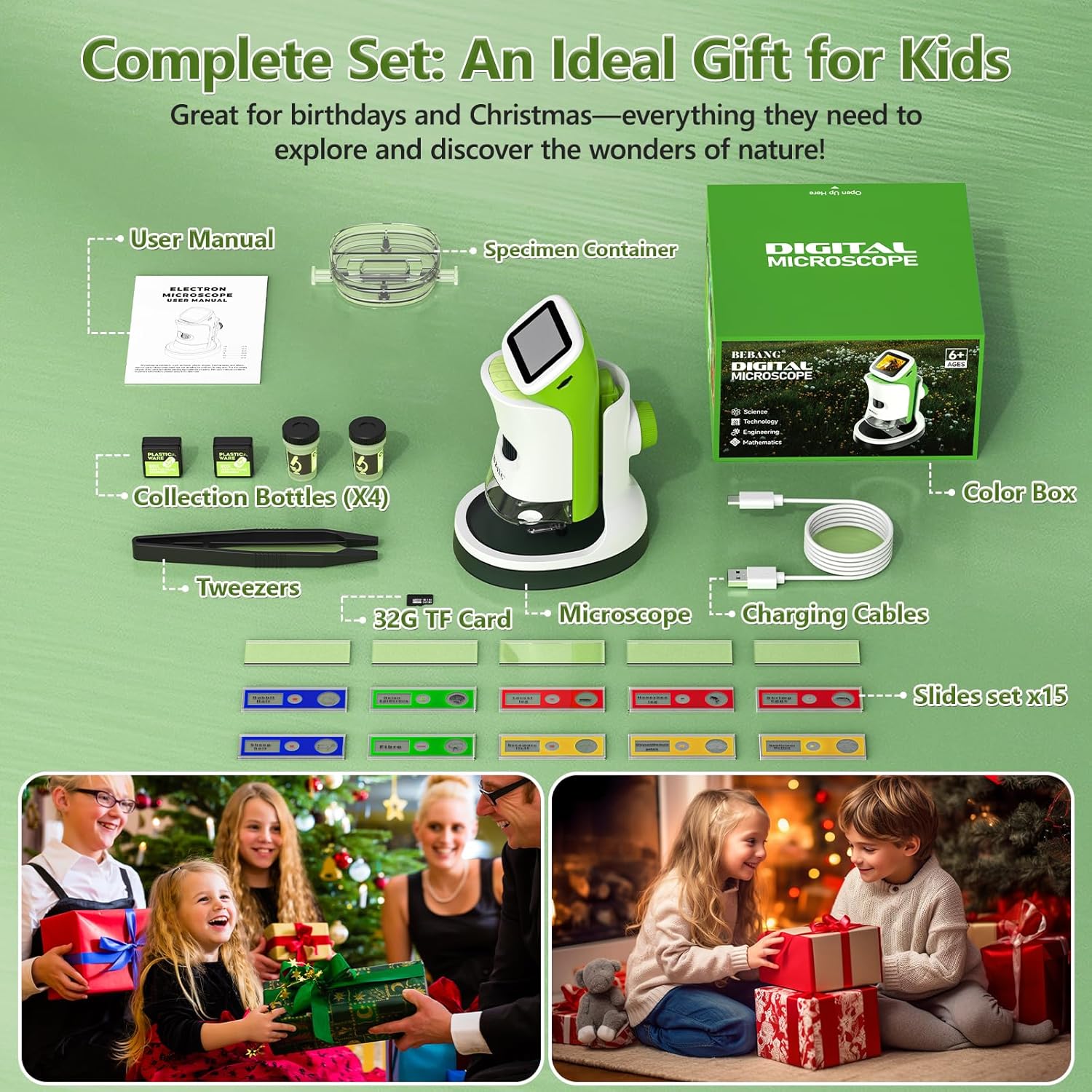
All components included in the BEBANG WX-A01-121A package.
தயாரிப்பு அம்சங்கள்
The BEBANG WX-A01-121A microscope offers a range of features designed for ease of use and comprehensive observation:
- 4K 2.0" HD Screen: Provides clear, high-definition viewing of magnified specimens.
- 1000X உருப்பெருக்கம்: Allows for detailed examination of small objects.
- பிரிக்கக்கூடிய வடிவமைப்பு: Use as a handheld device for outdoor exploration or attach to the stand for stable indoor observation.
- புகைப்படம் மற்றும் வீடியோ பிடிப்பு: Record discoveries directly onto the included 32GB SD card.
- PC Connectable: Transfer photos and videos to a computer for further analysis or sharing.
- LED வெளிச்சம்: Built-in LED lights ensure bright and even illumination of specimens.
- ரிச்சார்ஜபிள் பேட்டரி: Portable power for extended use.

The microscope offers up to 1000X magnification and can connect to a PC.
அமைவு
Follow these steps to set up your BEBANG microscope:
- Charge the Microscope: Connect the microscope to a USB power source using the provided USB-C charging cable. The charging indicator light will show the charging status.
- SD கார்டைச் செருகவும்: Locate the SD card slot (usually on the side or back of the microscope unit) and gently insert the included 32GB SD card until it clicks into place.
- Attach to Stand (Optional): நிலையானது viewing, align the microscope unit with the stand's base and slide it into position until it securely locks. Ensure the clips on the stand are ready to hold slides.
- பவர் ஆன்: Press and hold the power button (usually located on the side or front) for a few seconds until the screen illuminates.

The microscope unit securely attached to its stand for stable observation.
இயக்க வழிமுறைகள்
Operating your BEBANG microscope is straightforward:
1. Observing Specimens with the Stand
- Place a prepared slide or a specimen in the petri dish onto the stage of the microscope stand. Use the clips to secure slides if necessary.
- Adjust the focus knob (typically on the side of the microscope body) until the image on the screen is clear.
- Use the magnification adjustment to zoom in or out as desired.
- Adjust the LED illumination for optimal viewதெளிவு.

A child observing a specimen on a slide using the microscope with its stand.
2. Handheld Observation
- Detach the microscope unit from its stand by pressing the release button (if applicable) and sliding it off.
- Hold the microscope directly over the object you wish to observe.
- Adjust the focus knob to achieve a clear image on the screen.
- This mode is ideal for examining larger objects or exploring outdoors.

A child using the microscope in handheld mode to observe plants outdoors.
3. புகைப்படங்கள் மற்றும் வீடியோக்களைப் பிடித்தல்
- While observing a specimen, press the designated photo button to capture a still image.
- Press the video button to start recording. Press it again to stop recording.
- All captured media will be saved to the inserted 32GB SD card.

The microscope's 2.0-inch HD screen showing options for photo, video, and playback.
4. கணினியுடன் இணைக்கிறது
- Connect the microscope to your computer using the USB-C cable.
- The microscope should appear as a removable storage device.
- You can then access and transfer your photos and videos from the SD card to your computer.

The microscope connected to a computer, illustrating the PC connectable feature for transferring media.
Video Demonstration: Kids Handheld Microscope with Stand
This video demonstrates the use of the BEBANG Kids Handheld Microscope, showcasing its features and how children can interact with it for exploration and learning.
பராமரிப்பு
Proper care will ensure the longevity of your microscope:
- சுத்தம்: Use a soft, dry cloth to clean the exterior of the microscope. For the lens and screen, use a specialized lens cleaning cloth and solution. Avoid abrasive materials.
- சேமிப்பு: Store the microscope in a cool, dry place, away from direct sunlight and extreme temperatures. Use the provided EVA case for protection when not in use.
- பேட்டரி பராமரிப்பு: பேட்டரியின் ஆரோக்கியத்தைப் பராமரிக்க, அடிக்கடி பயன்படுத்தாவிட்டாலும், பேட்டரியை தொடர்ந்து சார்ஜ் செய்யவும். நீண்ட நேரம் பேட்டரியை முழுமையாக சார்ஜ் செய்வதைத் தவிர்க்கவும்.
- கவனத்துடன் கையாளவும்: This is an electronic device. Avoid dropping or subjecting it to strong impacts.
சரிசெய்தல்
நீங்கள் சிக்கல்களை எதிர்கொண்டால், இந்த பொதுவான தீர்வுகளை முயற்சிக்கவும்:
| பிரச்சனை | சாத்தியமான காரணம் | தீர்வு |
|---|---|---|
| மைக்ரோஸ்கோப் இயக்கப்படவில்லை. | குறைந்த பேட்டரி அல்லது பவர் பட்டனை சரியாக அழுத்தவில்லை. | Charge the microscope fully. Press and hold the power button for 3-5 seconds. |
| Image on screen is blurry. | Out of focus or incorrect working distance. | Adjust the focus knob. Ensure the microscope lens is close enough to the specimen. |
| புகைப்படங்கள்/வீடியோக்களை எடுக்க முடியவில்லை. | SD card full, not inserted correctly, or corrupted. | Check if the SD card is inserted properly. Delete old files or format the SD card (backup important data first). Replace SD card if corrupted. |
| திரை மிகவும் இருட்டாக/பிரகாசமாக உள்ளது. | LED illumination not adjusted. | Adjust the LED brightness control (if available) or reposition the specimen for better lighting. |
விவரக்குறிப்புகள்
Key technical specifications for the BEBANG WX-A01-121A microscope:
- மாதிரி பெயர்: WX-A01-121A
- பிராண்ட்: பீபாங்
- பெரிதாக்கம் அதிகபட்சம்: 1000x
- திரை: 2.0" HD Screen
- ஒளி மூல வகை: LED
- சக்தி ஆதாரம்: பேட்டரி மூலம் இயங்கும் (3.7 வோல்ட்)
- பொருள்: ஏபிஎஸ்
- நிறம்: பச்சை
- பொருளின் எடை: 0.5 கிலோகிராம்
- இணக்கமான சாதனங்கள்: Laptop, Personal Computer, Smartphone, Tablet (for data transfer)
- உள்ளமைக்கப்பட்ட ஊடகம்: 32 ஜி எஸ்டி கார்டு
உத்தரவாதம் மற்றும் ஆதரவு
Your BEBANG WX-A01-121A microscope comes with a 1 வருட உத்தரவாதம் வாங்கிய தேதியிலிருந்து, உற்பத்தி குறைபாடுகளை உள்ளடக்கியது. உத்தரவாதக் கோரிக்கைகளுக்கு உங்கள் வாங்கியதற்கான ஆதாரத்தை வைத்திருங்கள்.
For technical support, troubleshooting assistance, or warranty inquiries, please contact BEBANG customer service through the retailer where you purchased the product or visit the official BEBANG website for contact information. Our support team is dedicated to assisting you with any questions or concerns you may have.
We encourage you to register your product online to receive updates and ensure efficient service.