
அறிமுகம்
Thank you for choosing the Care Bears Wireless LED Headphones. These Bluetooth-enabled headphones are designed for a fun and interactive audio experience, featuring light-up ears and earcups, an adjustable headband, and convenient on-ear controls. This manual will guide you through the setup, operation, and maintenance of your new headphones.
தொகுப்பு உள்ளடக்கங்கள்
- Care Bears Wireless LED Headphones
- USB சார்ஜிங் கேபிள்
- பயனர் கையேடு
தயாரிப்பு முடிந்துவிட்டதுview
Familiarize yourself with the various components of your headphones:

படம் 1: முன் view of the Care Bears Wireless LED Headphones, showcasing the adjustable headband, soft ear pads, and light-up ear features.
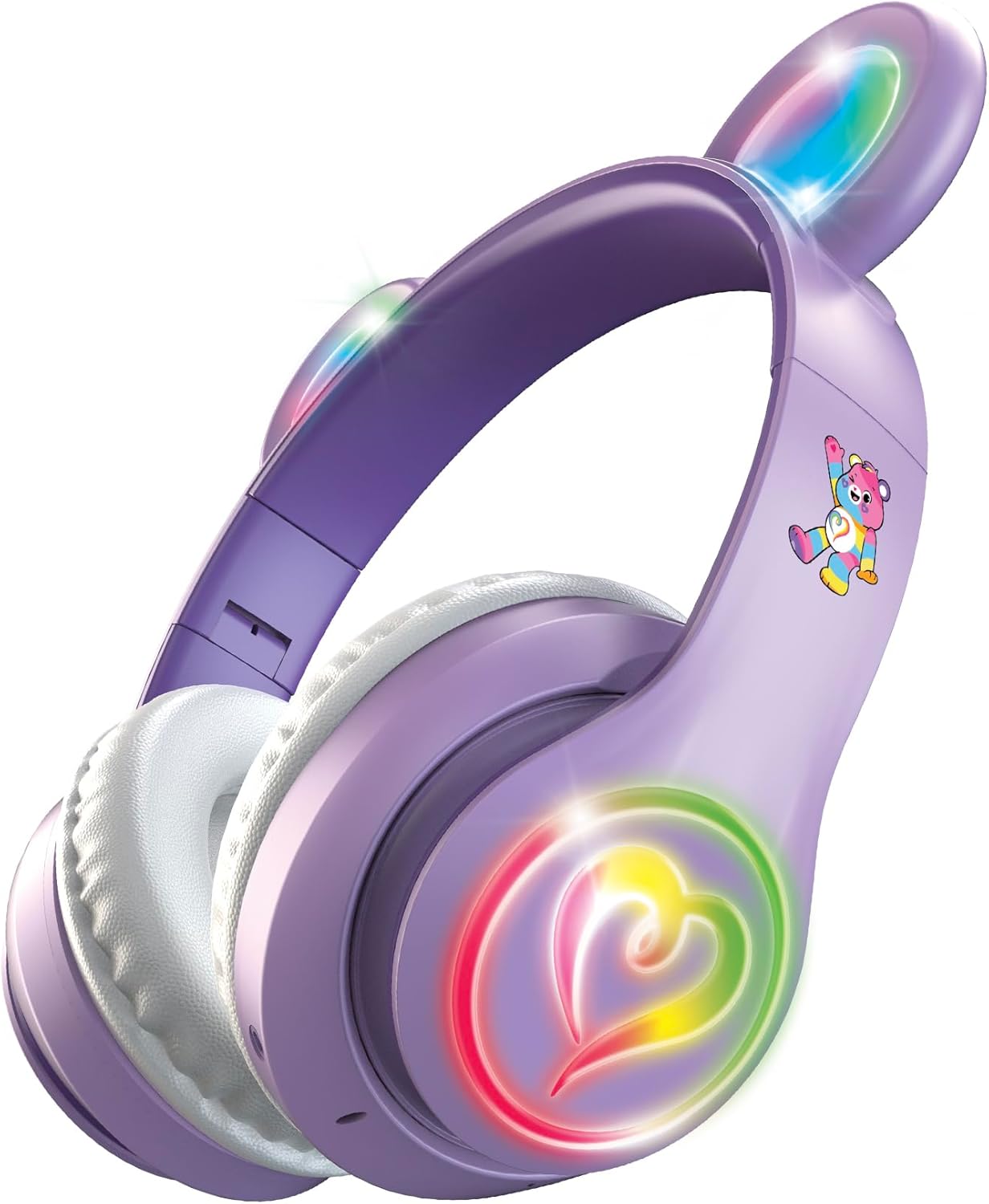
படம் 2: கோணல் view of the headphones with the multicolor LED lights activated on both the ears and the heart-shaped design on the earcups.
முக்கிய அம்சங்கள்:
- சரிசெய்யக்கூடிய ஹெட் பேண்ட்: வசதியான மற்றும் பாதுகாப்பான பொருத்தத்திற்கு.
- மென்மையான காது பட்டைகள்: Designed for extended listening comfort.
- Light-Up Ears and Earcups: Multicolor LED lights for a vibrant visual effect.
- On-Ear Control Panel: Buttons for power, play/pause, track navigation, and volume.
- ஒலிவாங்கி: ஹேண்ட்ஸ்-ஃப்ரீ அழைப்புகளுக்காக ஒருங்கிணைக்கப்பட்டது.
- சார்ஜிங் போர்ட்: Micro USB port for recharging the internal battery.
அமைவு
1. ஹெட்ஃபோன்களை சார்ஜ் செய்தல்
- Locate the Micro USB charging port on one of the earcups.
- Connect the provided USB charging cable to the headphones and a compatible USB power source (e.g., computer USB port, USB wall adapter).
- The LED indicator light will illuminate during charging and change color or turn off when fully charged.
- முழுமையாக சார்ஜ் செய்தால் சுமார் 8 மணிநேரம் தொடர்ந்து பயன்படுத்தலாம்.
2. புளூடூத் இணைத்தல்
- ஹெட்ஃபோன்கள் முழுமையாக சார்ஜ் செய்யப்பட்டுள்ளதா என்பதை உறுதிப்படுத்தவும்.
- Press and hold the Power button on the earcup until the LED indicator light flashes, indicating pairing mode.
- உங்கள் சாதனத்தில் (ஸ்மார்ட்போன், டேப்லெட், கணினி), புளூடூத்தை இயக்கி, கிடைக்கக்கூடிய சாதனங்களைத் தேடுங்கள்.
- Select "Care Bears Headphones" (or similar name) from the list of found devices.
- Once paired, the LED indicator light will stop flashing and remain solid, or turn off, depending on the model.
- ஹெட்ஃபோன்கள் இயக்கப்படும்போது கடைசியாக இணைக்கப்பட்ட சாதனத்துடன் தானாகவே மீண்டும் இணைக்க முயற்சிக்கும்.
இயக்க வழிமுறைகள்
பவர் ஆன்/ஆஃப்
- பவர் ஆன் செய்ய: LED காட்டி ஒளிரும் வரை பவர் பட்டனை அழுத்திப் பிடிக்கவும்.
- பவர் ஆஃப் செய்ய: LED காட்டி அணைக்கப்படும் வரை பவர் பட்டனை அழுத்திப் பிடிக்கவும்.
இசை பின்னணி
- விளையாடு/இடைநிறுத்தம்: ப்ளே/பாஸ் பட்டனை ஒருமுறை அழுத்தவும்.
- அடுத்த ட்ராக்: Press the 'Next Track' button (often marked with a forward arrow or '+').
- முந்தைய ட்ராக்: Press the 'Previous Track' button (often marked with a backward arrow or '-').
- ஒலியை பெருக்கு: Press and hold the 'Volume Up' button (often marked with '+').
- ஒலியை குறை: Press and hold the 'Volume Down' button (often marked with '-').
ஹேண்ட்ஸ்-ஃப்ரீ அழைப்பு
- பதில்/முடிவு அழைப்பு: Press the Play/Pause button once during an incoming call to answer, and once again to end the call.
- அழைப்பை நிராகரி: Press and hold the Play/Pause button for approximately 2 seconds during an incoming call.
- கடைசி எண்ணை மீண்டும் அனுப்பவும்: Double-press the Play/Pause button when not on a call.
LED ஒளி கட்டுப்பாடு
The headphones feature multicolor LED lights on the ears and earcups. Refer to the specific button on your headphones, often labeled 'Light' or a light bulb icon, to cycle through light modes or turn them off.
பராமரிப்பு
- சுத்தம்: ஹெட்ஃபோன்களை சுத்தம் செய்ய மென்மையான, உலர்ந்த துணியைப் பயன்படுத்தவும். சிராய்ப்பு கிளீனர்கள் அல்லது கரைப்பான்களைப் பயன்படுத்த வேண்டாம்.
- சேமிப்பு: ஹெட்ஃபோன்களை நேரடி சூரிய ஒளி மற்றும் அதிக வெப்பநிலையிலிருந்து விலகி குளிர்ந்த, உலர்ந்த இடத்தில் சேமிக்கவும்.
- தண்ணீரை தவிர்க்கவும்: இந்த ஹெட்ஃபோன்கள் நீர்ப்புகா அல்ல. தண்ணீர் அல்லது அதிகப்படியான ஈரப்பதத்திற்கு ஆளாகாமல் இருக்கவும்.
சரிசெய்தல்
- சக்தி இல்லை: ஹெட்ஃபோன்கள் முழுமையாக சார்ஜ் செய்யப்பட்டுள்ளதா என்பதை உறுதிப்படுத்தவும்.
- இணைக்க முடியாது: Make sure Bluetooth is enabled on your device and the headphones are in pairing mode. Move closer to your device.
- ஒலி இல்லை: Check the volume level on both the headphones and your connected device. Ensure the headphones are properly paired.
- விளக்குகள் வேலை செய்யவில்லை: Ensure the headphones are powered on and check if there is a dedicated button to activate the LED lights.
விவரக்குறிப்புகள்
- மாதிரி எண்: CBHPLEDGV101-MFN
- இணைப்பு: புளூடூத் 4.2
- காது வைப்பு: மேல் காது
- பேட்டரி ஆயுள்: 8 மணிநேரம் வரை (சராசரியாக)
- அதிர்வெண் வரம்பு: 20Hz - 20,000Hz
- கட்டுப்பாட்டு முறை: புஷ் பட்டன்
- பொருள்: Plastic, Fabric, Silicone
- பொருளின் எடை: 0.3 பவுண்டுகள்
- கூடுதல் அம்சங்கள்: Light-Up Ears and Earcups with Multicolor LED Lights
உத்தரவாத தகவல்
These headphones come with a 30 நாள் வரையறுக்கப்பட்ட உத்தரவாதம் from the manufacturer. Please retain your proof of purchase for any warranty claims. The warranty covers manufacturing defects but typically does not cover damage caused by misuse, accidents, or unauthorized modifications.
ஆதரவு
For further assistance, troubleshooting, or warranty inquiries, please refer to the contact information provided on the product packaging or visit the official Care Bears product support webதளம்.