
Vortex Blast
Vortex Blast Portable Bluetooth Speaker
பயனர் கையேடு
அறிமுகம்
Thank you for choosing the Vortex Blast Portable Bluetooth Speaker. This manual provides essential information for setting up, operating, and maintaining your speaker. Designed for home, outdoors, and parties, the Vortex Blast delivers powerful 30W sound with deep bass, features an IPX6 waterproof rating, Bluetooth 5.2 connectivity, TWS functionality for stereo sound, and dynamic LED light effects.
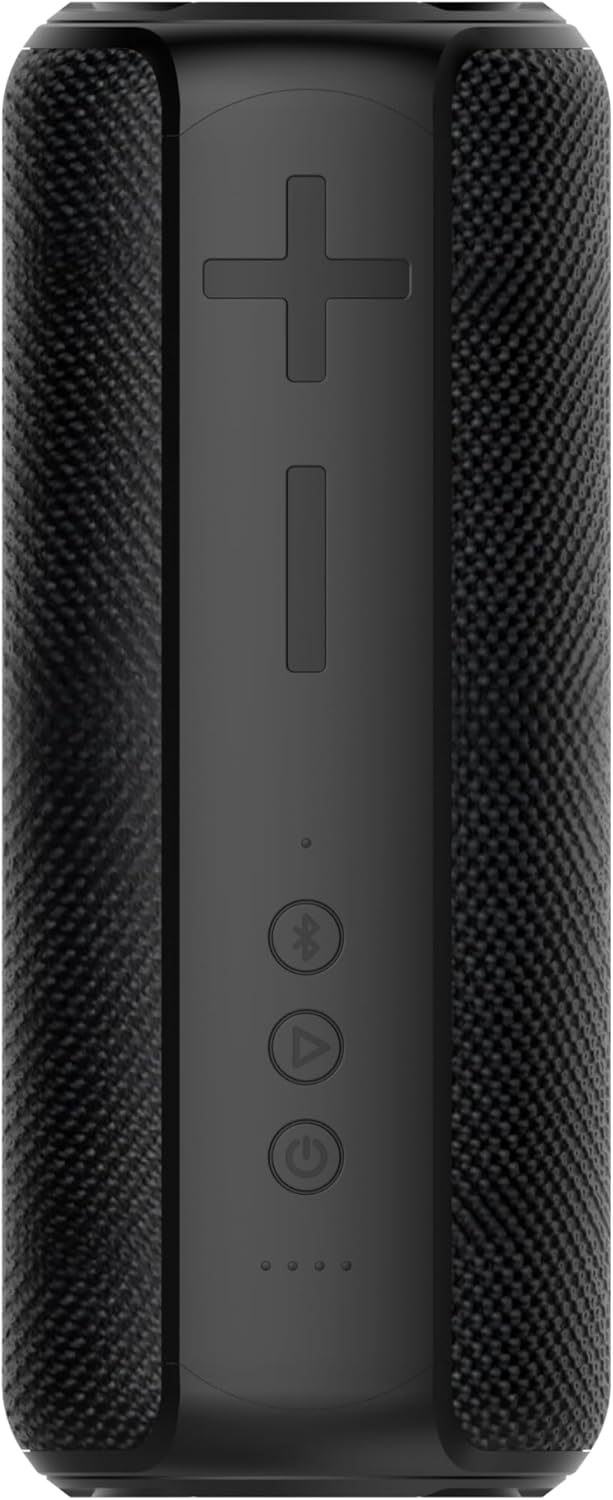
Image: The Vortex Blast Portable Bluetooth Speaker, showcasing its sleek black design and cylindrical shape.
தொகுப்பு உள்ளடக்கங்கள்
பின்வரும் உருப்படிகளுக்கு பெட்டியை சரிபார்க்கவும்:
- 1 x Vortex Blast Portable Bluetooth Speaker
- 1 x யூ.எஸ்.பி-சி சார்ஜிங் கேபிள்
- 1 x AUX ஆடியோ கேபிள்
- 1 x பவர் அடாப்டர்
- 1 x பயனர் கையேடு (இந்த ஆவணம்)
தயாரிப்பு முடிந்துவிட்டதுview
Familiarize yourself with the controls and ports of your Vortex Blast speaker:

படம்: மேலிருந்து கீழ் view of the Vortex Blast speaker, highlighting the control panel with power, play/pause, Bluetooth, and volume buttons.
கண்ட்ரோல் பேனல்:
- பவர் பட்டன் (⑂): Press and hold to power on/off. Short press to play/pause music.
- வால்யூம் அப் (+): ஒலியளவை அதிகரிக்க சிறிது நேரம் அழுத்தவும். அடுத்த டிராக்கிற்கு நீண்ட நேரம் அழுத்தவும்.
- வால்யூம் டவுன் (-): ஒலியைக் குறைக்க சிறிது நேரம் அழுத்தவும். முந்தைய டிராக்கைப் பார்க்க நீண்ட நேரம் அழுத்தவும்.
- Bluetooth Button (⑃): Short press to enter pairing mode. Double tap to toggle LED lights on/off.
- LED குறிகாட்டிகள்: Four small lights indicating battery level and charging status.

படம்: நெருக்கமான படம் view of the back of the Vortex Blast speaker, showing the charging port and auxiliary input port, protected by a rubber flap.
Ports (located under a protective flap):
- USB-C சார்ஜிங் போர்ட்: ஸ்பீக்கரை சார்ஜ் செய்ததற்காக.
- AUX உள்ளீடு: For connecting devices via a 3.5mm audio cable.
அமைவு
1. சபாநாயகரிடம் கட்டணம் வசூலித்தல்
Before first use, fully charge your Vortex Blast speaker. Connect the provided USB-C charging cable to the speaker's charging port and the power adapter to a wall outlet. The LED indicators will show charging progress and turn off when fully charged. A full charge provides approximately 10 hours of playtime.
2. பவர் ஆன்/ஆஃப்
- To power on: Press and hold the Power button (⑂) for 2-3 seconds until you hear an audible prompt and the LED lights illuminate.
- To power off: Press and hold the Power button (⑂) for 2-3 seconds until you hear an audible prompt and the LED lights turn off.
3. புளூடூத் இணைத்தல்
- Ensure the speaker is powered on and the Bluetooth indicator light is blinking, indicating it's in pairing mode.
- உங்கள் சாதனத்தில் (ஸ்மார்ட்போன், டேப்லெட், மடிக்கணினி), புளூடூத்தை இயக்கி, கிடைக்கும் சாதனங்களைத் தேடுங்கள்.
- Select "Vortex Blast" from the list.
- இணைக்கப்பட்டதும், உறுதிப்படுத்தல் ஒலியைக் கேட்பீர்கள், மேலும் புளூடூத் காட்டி விளக்கு திடமாக மாறும்.
குறிப்பு: இயக்கப்பட்டிருக்கும் போது, ஸ்பீக்கர் தானாகவே கடைசியாக இணைக்கப்பட்ட சாதனத்துடன் மீண்டும் இணைக்க முயற்சிக்கும்.
4. உண்மையான வயர்லெஸ் ஸ்டீரியோ (TWS) இணைத்தல்
To achieve a true stereo sound experience, you can pair two Vortex Blast speakers together:
- Ensure both Vortex Blast speakers are powered on and not connected to any other Bluetooth devices.
- On one speaker, short press the Bluetooth button (⑃). It will enter TWS pairing mode.
- The two speakers will automatically search for and connect to each other. You will hear a confirmation sound once paired.
- Once TWS paired, connect your device to one of the speakers via Bluetooth as described in step 3. Both speakers will now play audio in stereo.
இயக்க வழிமுறைகள்
இசை பின்னணி:
- விளையாடு/இடைநிறுத்தம்: Short press the Power button (⑂).
- தொகுதி சரிசெய்தல்: Short press the Volume Up (+) or Volume Down (-) buttons.
- அடுத்த ட்ராக்: வால்யூம் அப் (+) பட்டனை நீண்ட நேரம் அழுத்தவும்.
- முந்தைய ட்ராக்: ஒலியளவைக் குறைக்கும் (-) பொத்தானை நீண்ட நேரம் அழுத்தவும்.
LED லைட் டிஸ்ப்ளே:
The Vortex Blast speaker features dynamic LED light effects that enhance your music experience.

Image: The Vortex Blast speaker with its vibrant LED light ring illuminated, showcasing the dynamic light effects.
- To toggle the LED lights on or off: Double tap the Bluetooth button (⑃).
- The lights will cycle through various modes automatically.
ஆக்ஸ் பயன்முறை:
Connect an external audio device using the provided 3.5mm AUX audio cable. The speaker will automatically switch to AUX mode. In this mode, volume control can be managed via the speaker or the connected device, but track control must be done on the connected device.
பராமரிப்பு
- சுத்தம்: Use a soft, dry cloth to clean the speaker. Do not use harsh chemicals or abrasive materials.
- நீர் வெளிப்பாடு: While IPX6 waterproof, avoid prolonged submersion. Ensure the protective flap over the ports is securely closed before exposure to water.
- சேமிப்பு: தீவிர வெப்பநிலை மற்றும் நேரடி சூரிய ஒளி படாத குளிர்ந்த, உலர்ந்த இடத்தில் ஸ்பீக்கரை சேமிக்கவும்.
- பேட்டரி பராமரிப்பு: To prolong battery life, charge the speaker regularly, even if not in frequent use. Avoid completely draining the battery.
சரிசெய்தல்
| பிரச்சனை | தீர்வு |
|---|---|
| ஸ்பீக்கர் இயக்கப்படவில்லை. | Ensure the battery is charged. Connect the speaker to a power source using the provided cable and adapter. |
| புளூடூத் சாதனத்துடன் இணைக்க முடியாது. |
|
| ஒலி இல்லை அல்லது குறைந்த அளவு. |
|
| எல்இடி விளக்குகள் வேலை செய்யவில்லை. | Double tap the Bluetooth button (⑃) to toggle the LED lights on/off. |
| TWS இணைத்தல் தோல்வியடைந்தது. |
|
விவரக்குறிப்புகள்
| அம்சம் | விவரம் |
|---|---|
| மாதிரி பெயர் | குண்டு வெடிப்பு |
| பிராண்ட் | சுழல் |
| பேச்சாளர் வகை | போர்ட்டபிள் சபாநாயகர் |
| இணைப்பு தொழில்நுட்பம் | புளூடூத் 5.2 |
| பேச்சாளர் அதிகபட்ச வெளியீட்டு சக்தி | 30 வாட்ஸ் |
| ஆடியோ வெளியீட்டு முறை | ஸ்டீரியோ (TWS உடன்) |
| நீர் எதிர்ப்பு நிலை | IPX6 நீர்ப்புகா |
| பேட்டரி ஆயுள் | 10 மணிநேரம் வரை |
| சக்தி ஆதாரம் | பேட்டரி மூலம் இயங்கும் |
| தயாரிப்பு பரிமாணங்கள் | 3.34"டி x 3.34"அடி x 8.46"ஹெட் |
| பொருளின் எடை | 2.64 பவுண்டுகள் |
| கட்டுப்பாட்டு முறை | தொடவும் |
உத்தரவாதம் & ஆதரவு
The Vortex Blast Portable Bluetooth Speaker comes with a வரையறுக்கப்பட்ட உத்தரவாதம். Please refer to the warranty card included in your package for specific terms and conditions.
For technical support, troubleshooting assistance, or warranty claims, please contact Vortex customer service through the retailer's platform or visit the official Vortex webதளம்.
Ask a question about this manual
Ask about setup, troubleshooting, compatibility, parts, safety, or missing instructions. Manuals+ will review the question and use this page’s manual context to help answer it.