
1. தயாரிப்பு முடிந்துவிட்டதுview
The MiBOXER Y3 RGB+CCT Vertical Remote provides comprehensive control over compatible RGB+CCT LED lighting systems. This remote allows for precise adjustments of RGB colors, color temperature (CCT), and brightness. Utilizing 2.4GHz wireless technology, it ensures reliable communication with your lighting devices. Its ergonomic vertical design and intuitive interface are designed for ease of use, enabling users to effortlessly customize lighting for various environments.
முக்கிய அம்சங்கள்:
- RGB, CCT, and Brightness Control: Adjust colors, color temperature, and brightness with ease.
- 2.4GHz வயர்லெஸ் தொழில்நுட்பம்: Ensures reliable, long-range connectivity.
- Vertical Design: Ergonomic and easy-to-use layout for quick adjustments.
- Multi-Color and Dimmable: Create customized lighting scenes with vibrant colors and dimming options.
- பல்துறை பொருந்தக்கூடிய தன்மை: Works with MiBOXER RGB+CCT lighting products.
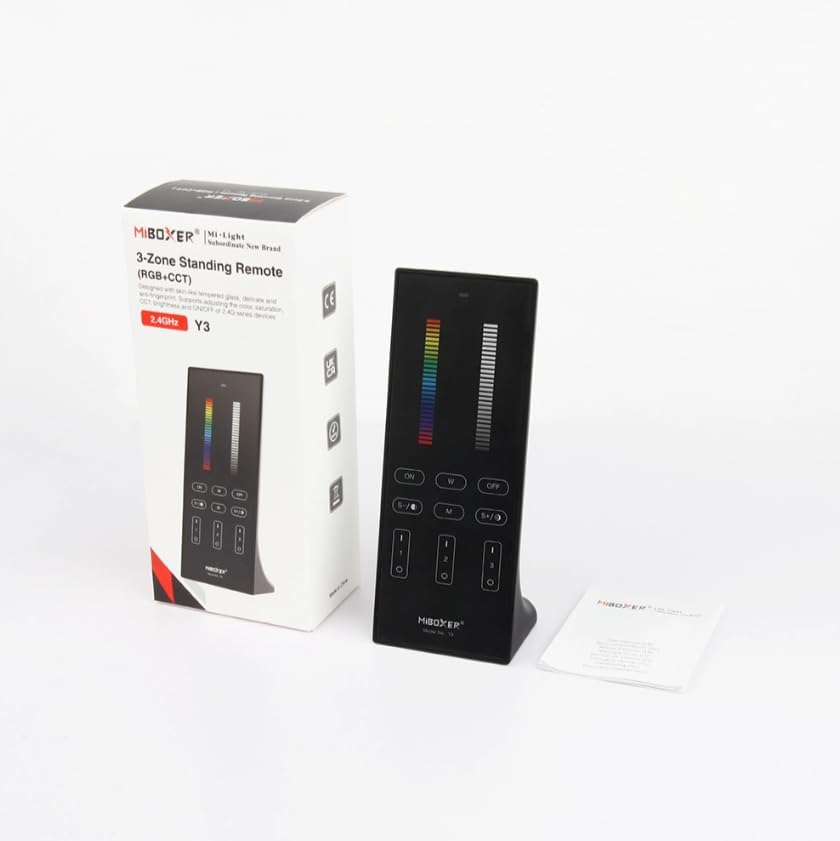
Figure 1: MiBOXER Y3 RGB+CCT Vertical Remote with its retail packaging.
2. அமைவு வழிமுறைகள்
2.1 பேட்டரி நிறுவல்
The MiBOXER Y3 remote requires two AAA batteries (not included). To install:
- ரிமோட்டின் பின்புறத்தில் பேட்டரி பெட்டியின் அட்டையைக் கண்டறியவும்.
- Slide the cover downwards to open.
- இரண்டு AAA பேட்டரிகளைச் செருகவும், சரியான துருவமுனைப்பை (+ மற்றும் -) உறுதி செய்யவும்.
- அது பாதுகாப்பாக கிளிக் செய்யும் வரை அட்டையை மீண்டும் இடத்திற்கு நகர்த்தவும்.
2.2 Linking the Remote to Lighting Devices
To control your MiBOXER RGB+CCT lighting devices, the remote must be linked to them. This process typically involves a specific sequence of actions on both the remote and the lighting device. Refer to your specific MiBOXER lighting product's manual for detailed linking instructions, as the procedure may vary slightly between different light models. A common linking procedure is as follows:
- Ensure the lighting device is powered off.
- Power on the lighting device.
- Within 3 seconds of powering on the light, press the "Zone ON" button (labeled "I" or "1") on the remote for the desired zone.
- The light should flash several times, indicating successful linking.
- If linking fails, repeat the process.
To unlink a device from a zone, power on the light and within 3 seconds, press the "Zone ON" button (labeled "I" or "1") five times rapidly for the corresponding zone. The light should flash multiple times to confirm unlinking.
3. இயக்க வழிமுறைகள்
The MiBOXER Y3 remote features an intuitive layout for controlling various lighting parameters. Familiarize yourself with the buttons and sliders as shown in Figure 2.

Figure 2: MiBOXER Y3 Remote Control button layout and functions.
3.1 பொத்தான் செயல்பாடுகள்:
| பொத்தான்/கட்டுப்பாடு | செயல்பாடு |
|---|---|
| காட்டி ஒளி | Flashes to confirm button presses. |
| RGB ஸ்லைடர் | Slide to select desired RGB color. |
| பிரகாசம் ஸ்லைடர் | Slide to adjust light brightness (0-100%). |
| Master ON (I/ON) | Turns all linked lights ON. |
| Master OFF (O/OFF) | Turns all linked lights OFF. |
| White Light (W) | தூய வெள்ளை ஒளி பயன்முறையை செயல்படுத்துகிறது. |
| Speed-/CCT-/Saturation- | Decreases speed in dynamic mode, decreases color temperature (warmer white), or decreases color saturation. |
| Speed+/CCT+/Saturation+ | Increases speed in dynamic mode, increases color temperature (cooler white), or increases color saturation. |
| Dynamic Mode (M) | Cycles through various dynamic lighting effects. Press repeatedly to change effects. |
| Zone ON (1, 2, 3 - "I") | Turns ON lights linked to the specific zone. Used for linking/unlinking. |
| Zone OFF (1, 2, 3 - "O") | Turns OFF lights linked to the specific zone. |
3.2 பொது செயல்பாடு:
- விளக்குகளை ஆன்/ஆஃப் செய்தல்: Use the "Master ON" or "Master OFF" buttons for all lights, or "Zone ON" / "Zone OFF" for specific zones.
- Adjusting Color: Slide your finger along the "RGB Slider" to select your desired color.
- பிரகாசத்தை சரிசெய்தல்: Slide your finger along the "Brightness Slider" to increase or decrease the light intensity.
- வண்ண வெப்பநிலையை சரிசெய்தல் (CCT): In white light mode, use the "CCT-" and "CCT+" buttons to make the white light warmer or cooler.
- டைனமிக் முறைகள்: Press the "M" button to activate dynamic lighting modes. Use "Speed-" and "Speed+" to adjust the speed of the current dynamic effect.
- Saturation Adjustment: In RGB mode, use "Saturation-" and "Saturation+" to adjust the intensity of the color.
4. பராமரிப்பு
Proper maintenance ensures the longevity and optimal performance of your MiBOXER Y3 remote.
- சுத்தம்: Wipe the remote with a soft, dry cloth. Do not use abrasive cleaners, solvents, or wet cloths, as these can damage the surface or internal components.
- பேட்டரி மாற்று: Replace batteries when the indicator light becomes dim or the remote's response becomes inconsistent. Always use new AAA batteries and dispose of old batteries responsibly.
- சேமிப்பு: Store the remote in a cool, dry place away from direct sunlight and extreme temperatures. If storing for extended periods, remove the batteries to prevent leakage.
- ஈரப்பதத்தைத் தவிர்க்கவும்: This remote is not waterproof. Keep it away from water and high humidity environments.
5. சரிசெய்தல்
If you encounter issues with your MiBOXER Y3 remote, refer to the following troubleshooting steps:
| பிரச்சனை | சாத்தியமான காரணம் | தீர்வு |
|---|---|---|
| Remote not responding to button presses. | இறந்த அல்லது குறைந்த பேட்டரிகள். Remote not linked to lights. எல்லைக்கு வெளியே. | பேட்டரிகளை மாற்றவும். Re-link the remote to the lighting devices (refer to Section 2.2). Move closer to the lighting devices. |
| Lights not changing color/brightness. | தவறான பயன்முறை தேர்ந்தெடுக்கப்பட்டது. Remote not linked to the specific zone. | Ensure you are in the correct mode (e.g., RGB for color, CCT for white temperature). Verify the remote is linked to the correct zone. |
| Indicator light not flashing. | இறந்த பேட்டரிகள். உள் தவறு. | பேட்டரிகளை மாற்றவும். பேட்டரியை மாற்றிய பிறகும் சிக்கல் தொடர்ந்தால், வாடிக்கையாளர் ஆதரவைத் தொடர்பு கொள்ளவும். |
| Interference with other 2.4GHz devices. | Proximity to other wireless devices. | Move the remote or other 2.4GHz devices further apart. |
6. விவரக்குறிப்புகள்
Technical specifications for the MiBOXER Y3 RGB+CCT Vertical Remote.
| அம்சம் | விவரம் |
|---|---|
| மாதிரி எண் | Y3 |
| பிராண்ட் | MiBOXER |
| கட்டுப்பாட்டு வகை | RGB+CCT Vertical Remote |
| வயர்லெஸ் தொழில்நுட்பம் | 2.4GHz |
| பவர் சப்ளை | 2x AAA பேட்டரிகள் (சேர்க்கப்படவில்லை) |
| சிறப்பு அம்சம் | RGB/CCT/brightness dimmable |
| பொருளின் எடை | 4.8 அவுன்ஸ் (தோராயமாக 136 கிராம்) |
| தொகுப்பு பரிமாணங்கள் | 6.5 x 3 x 2 அங்குலம் (தோராயமாக 16.5 x 7.6 x 5.1 செ.மீ) |


Figure 3: Dimensions of the MiBOXER Y3 Remote Control and its packaging.
7. உத்தரவாதம் மற்றும் ஆதரவு
For warranty information, please refer to the documentation provided with your specific MiBOXER lighting product or contact the retailer where the product was purchased. MiBOXER products typically come with a manufacturer's warranty covering defects in materials and workmanship.
For technical support or further assistance, please visit the official MiBOXER webதளத்தில் அல்லது அவர்களின் வாடிக்கையாளர் சேவைத் துறையைத் தொடர்பு கொள்ளவும். தொடர்பு விவரங்கள் பொதுவாக தயாரிப்பு பேக்கேஜிங் அல்லது பிராண்டின் அதிகாரப்பூர்வ ஆன்லைன் இருப்பில் கிடைக்கும்.