
ANFIER W10, W12
ANFIER W10/W12 Handheld Translator User Manual
அறிமுகம்
The ANFIER W10 and W12 Handheld Translators are advanced portable devices designed to facilitate communication across language barriers. These devices offer real-time voice translation, photo translation, and offline translation capabilities, making them ideal for travel, business, and learning. This manual provides detailed instructions for setup, operation, maintenance, and troubleshooting to ensure optimal use of your translator.
தயாரிப்பு முடிந்துவிட்டதுview
The ANFIER W10/W12 translator features a compact design with an intuitive touchscreen interface. Key functions are easily accessible from the main screen.
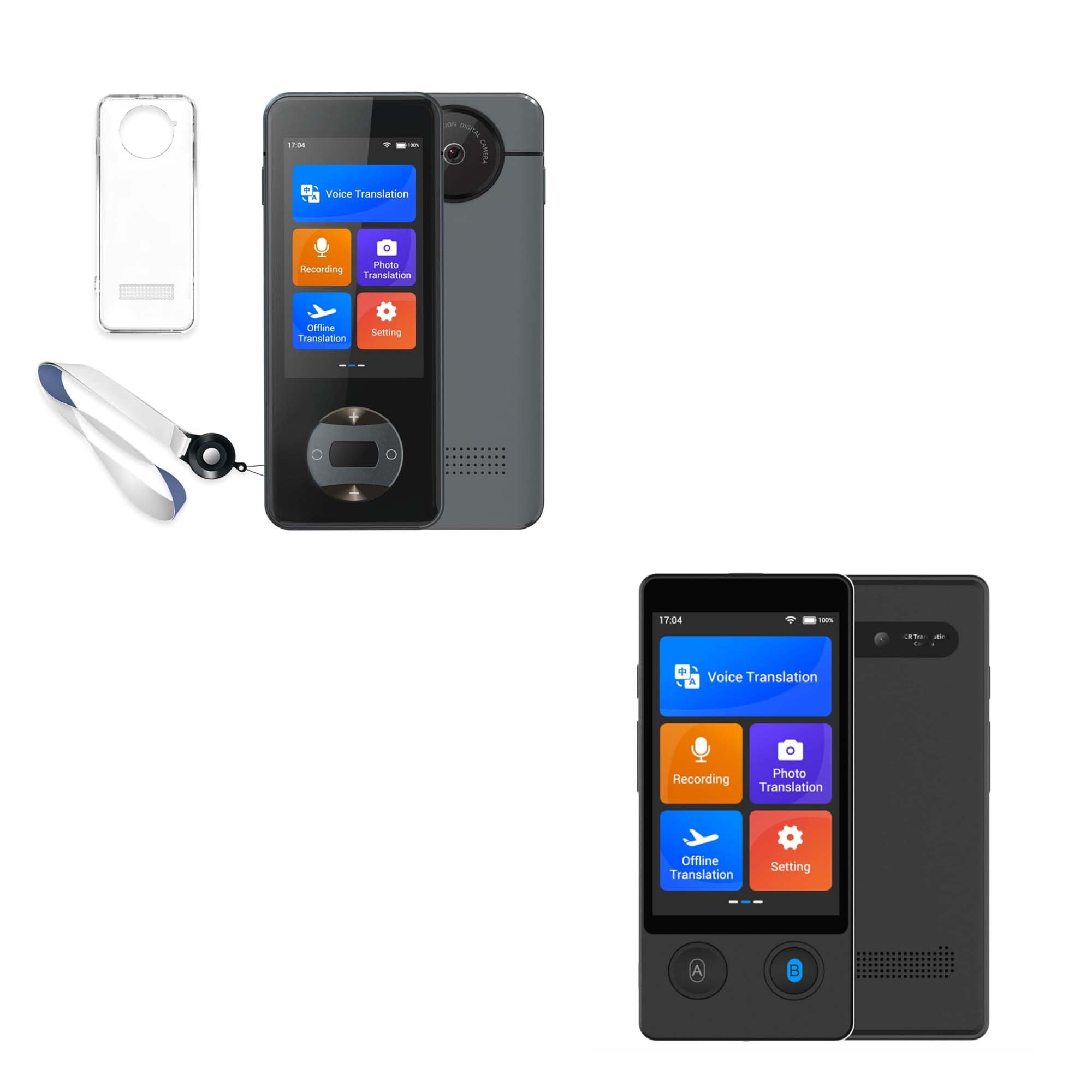
Image: Main screen interface displaying various translation functions.
முக்கிய அம்சங்கள்:
- பல மொழிபெயர்ப்பு முறைகள்: Voice, Photo, and Offline translation.
- விரிவான மொழி ஆதரவு: Up to 144 languages for online voice translation, 42 languages for photo translation, and 16 languages for offline voice translation.
- அதிக துல்லியம் மற்றும் வேகம்: Achieves approximately 98% accuracy with a rapid response time of 0.5 seconds.
- நீண்ட பேட்டரி ஆயுள்: 1500 mAh battery provides up to 8 hours of continuous translation or 7 days of standby time.
- குரல் பதிவு: Integrated recording function for capturing conversations.
- Adjustable Voice Broadcast: Option to switch between male and female voices for translation output.
அமைவு
1. சாதனத்தை சார்ஜ் செய்தல்
Before first use, fully charge the translator. Connect the device to a power source using the provided USB cable. The battery indicator on the screen will show charging status. A full charge typically takes a few hours.

Image: Device highlighting its 1500 mAh battery capacity and long battery life.
2. பவர் ஆன்/ஆஃப்
- பவர் ஆன் செய்ய: திரை ஒளிரும் வரை பவர் பட்டனை (பொதுவாக பக்கத்தில் இருக்கும்) அழுத்திப் பிடிக்கவும்.
- பவர் ஆஃப் செய்ய: Press and hold the power button, then select 'Power Off' on the screen.
3. ஆரம்ப மொழி மற்றும் Wi-Fi அமைப்பு
- Upon first power-on, you may be prompted to select a system language. Follow the on-screen instructions.
- பிரதான மெனுவிலிருந்து 'அமைப்புகள்' என்பதற்குச் செல்லவும்.
- Select 'WLAN' (Wi-Fi) and connect to an available network. A stable internet connection is required for online voice and photo translation.
இயக்க வழிமுறைகள்
1. குரல் மொழிபெயர்ப்பு (ஆன்லைன்)
This mode provides real-time two-way translation for up to 144 languages.
- From the main screen, tap 'Voice Translation'.
- Select the source language (your language) and target language (the language you want to translate to) from the options.
- Press and hold button 'A' (usually indicated on the device or screen) and speak clearly in your source language. Release the button when finished. The device will translate and speak the text in the target language.
- For the other person to speak, they should press and hold button 'B' and speak in their language. The device will translate and speak in your source language.

Image: Real-time two-way voice translation interface.
2. புகைப்பட மொழிபெயர்ப்பு
Translate text from images, supporting 42 languages.
- Tap 'Photo Translation' on the main screen.
- Select the source and target languages.
- Point the device's camera at the text you wish to translate. Ensure the text is well-lit and clear within the frame.
- Tap the capture button. The device will process the image and display the translated text on the screen.

Image: Photo translation feature in action, showing supported languages.
3. ஆஃப்லைன் மொழிபெயர்ப்பு
Translate without an internet connection for 16 supported languages. Language packs must be downloaded beforehand.
- Connect to Wi-Fi. Go to 'Settings' > 'Offline download'.
- Select and download the desired language packs.
- Once downloaded, tap 'Offline Translation' from the main screen.
- Select the downloaded source and target languages.
- Use buttons 'A' and 'B' as in online voice translation to perform offline translations.

Image: Demonstrating offline voice translation capability.
4. பதிவுசெய்தல்
The device can record audio for later playback or reference.
- Tap 'Recording' on the main screen.
- ரெக்கார்டிங்கைத் தொடங்க, ரெக்கார்டு பட்டனைத் தட்டவும்.
- Tap the stop button to end the recording.
- Recordings can be accessed and played back from within the 'Recording' menu.
5 அமைப்புகள்
Access various device configurations through the 'Settings' menu.
- WLAN: Manage Wi-Fi connections.
- கணினி மொழி: Change the device's interface language.
- நேரம் மற்றும் தேதி: நேரம் மற்றும் தேதி அமைப்புகளை சரிசெய்யவும்.
- Offline download: Download and manage offline language packs.
- குரல் ஒலிபரப்பு: Select between male and female voices for translated audio output.
- காட்சி: Adjust screen brightness and other display settings.

Image: Settings menu showing the voice broadcast option.
பராமரிப்பு
சுத்தம் செய்தல்
- சாதனத்தின் திரை மற்றும் உடலை சுத்தம் செய்ய மென்மையான, உலர்ந்த, பஞ்சு இல்லாத துணியைப் பயன்படுத்தவும்.
- Avoid using abrasive cleaners, solvents, or aerosol sprays, as these can damage the device.
சேமிப்பு
- நேரடி சூரிய ஒளி மற்றும் தீவிர வெப்பநிலையிலிருந்து விலகி, குளிர்ந்த, உலர்ந்த இடத்தில் மொழிபெயர்ப்பாளரை சேமிக்கவும்.
- நீண்ட காலத்திற்கு சேமித்து வைத்தால், அதன் ஆயுட்காலத்தை நீட்டிக்க பேட்டரி பகுதியளவு (சுமார் 50%) சார்ஜ் செய்யப்பட்டுள்ளதா என்பதை உறுதிப்படுத்திக் கொள்ளுங்கள்.
பேட்டரி பராமரிப்பு
- Do not expose the device to temperatures above 60°C (140°F).
- பேட்டரியை அடிக்கடி முழுமையாக சார்ஜ் செய்வதைத் தவிர்க்கவும்.
- வழங்கப்பட்ட சார்ஜிங் கேபிள் அல்லது அதற்கு சமமானதை மட்டும் பயன்படுத்தவும்.
சரிசெய்தல்
சாதனம் இயக்கப்படவில்லை
- பேட்டரியை சரிபார்க்கவும்: Ensure the device is charged. Connect it to a power source and wait a few minutes before attempting to power on again.
- கடின மீட்டமைப்பு: If unresponsive, try pressing and holding the power button for 10-15 seconds to perform a hard reset.
Translation Not Working / Inaccurate
- இணைய இணைப்பு: For online translation, verify that the device is connected to a stable Wi-Fi network.
- மொழி தேர்வு: Double-check that the correct source and target languages are selected.
- தெளிவாகப் பேசுங்கள்: Ensure you are speaking clearly and directly into the microphone. Avoid background noise.
- Offline Packs: For offline translation, confirm that the necessary language packs have been downloaded.
- Rephrase: If translation is inaccurate, try rephrasing your sentence.
திரை பதிலளிக்கவில்லை
- சாதனத்தை மறுதொடக்கம்: Power off and then power on the device.
- சுத்தமான திரை: திரை சுத்தமாகவும், குப்பைகள் அல்லது ஈரப்பதம் இல்லாமல் இருப்பதையும் உறுதிசெய்யவும்.
விவரக்குறிப்புகள்
| மாதிரி | ANFIER W10 / W12 |
| பேட்டரி திறன் | 1500 mAh |
| Continuous Translation Time | 8 மணி நேரம் வரை |
| காத்திருப்பு நேரம் | 7 நாட்கள் வரை |
| Online Voice Translation | 144 மொழிகள் |
| புகைப்பட மொழிபெயர்ப்பு | 42 மொழிகள் |
| Offline Voice Translation | 16 மொழிகள் |
| மொழிபெயர்ப்பு துல்லியம் | தோராயமாக. 98% |
| பதில் நேரம் | 0.5 வினாடிகள் |
| ASIN | B0DMFSPF52 |
| முதல் தேதி கிடைக்கும் | நவம்பர் 8, 2024 |
உத்தரவாதம் மற்றும் ஆதரவு
For detailed warranty information, technical support, or customer service inquiries regarding your ANFIER W10/W12 Handheld Translator, please refer to the official ANFIER website or contact their customer support directly. Contact details are typically available on the product packaging or the manufacturer's webதளம்.
Ask a question about this manual
Ask about setup, troubleshooting, compatibility, parts, safety, or missing instructions. Manuals+ will review the question and use this page’s manual context to help answer it.