
1. தயாரிப்பு முடிந்துவிட்டதுview
The TOWODE Light Bulb Security Camera (Model TAHEIS) is a versatile surveillance device designed for indoor use, primarily in areas like garages, homes, and offices. It features 3MP HD video, AI human detection, two-way audio, color night vision, and compatibility with Alexa. The camera is designed for easy installation into a standard E27 light socket.

Figure 1: Product components including the camera, mobile application interface, 64GB TF card, and power adapter.
முக்கிய அம்சங்கள்:
- 3MP HD Video: Provides clear 2K resolution video for detailed monitoring.
- 355° சுழல் கோணம் & 90° சாய்வு: Offers wide-angle viewing to cover large areas and reduce blind spots.
- AI Human Detection & Motion Tracking: Intelligently identifies human movement and tracks subjects.
- இருவழி ஆடியோ: Enables communication through the camera's built-in microphone and speaker.
- வண்ண இரவு பார்வை: Utilizes LED lights for full-color video in low-light conditions, with an infrared option.
- அலெக்சா இணக்கத்தன்மை: Integrates with Alexa-enabled devices for voice control and viewing.
- உள்ளூர் & மேகக்கணி சேமிப்பு: Supports up to 64GB TF card (included) and optional cloud storage for video recording.
- 30W 3000 Lumens LED Lighting: Functions as an adjustable LED light source.
2. அமைவு மற்றும் நிறுவல்
தொகுப்பு உள்ளடக்கம்:
- TOWODE Light Bulb Security Camera (Model TAHEIS)
- 64G TFcard
- Power Adapter (if applicable for non-E27 direct installation)
- Mounting Screws (if applicable for alternative mounting)
இயற்பியல் நிறுவல்:
- நிறுவல் இருப்பிடத்தை அடையாளம் காணவும்: Choose an indoor E27 light socket in your desired monitoring area (e.g., garage, living room, basement). Ensure the socket is powered off before installation.
- TF கார்டைச் செருகவும்: Locate the SD card slot on the camera body. Gently insert the included 64GB TF card until it clicks into place.
- Screw in Camera: Carefully screw the camera into the E27 light socket. Ensure it is securely fastened.
- பவர் ஆன்: Turn on the power to the light socket. The camera will initiate its startup sequence.

Video 1: Demonstrates the location of the SD card slot and reset button on the camera.

Figure 2: Visual guide for screwing the camera into a standard E27 light socket for power and mounting.
ஆப் பதிவிறக்கம் மற்றும் இணைப்பு:
- பயன்பாட்டைப் பதிவிறக்குக: Scan the QR code in the product packaging or search for the 'AJCloud' app in your smartphone's app store (iOS/Android).
- பதிவு கணக்கு: Open the AJCloud app and follow the on-screen instructions to register a new account. This typically requires an email address and phone number.
- சாதனத்தைச் சேர்: In the app, select 'Add Device' or the '+' icon. Choose 'Light Bulb Camera' from the device list.
- Wi-Fi உடன் இணைக்கவும்: The app will guide you through connecting the camera to your Wi-Fi network. Ensure your Wi-Fi is 2.4GHz, as 5GHz networks may not be supported. Enter your Wi-Fi password when prompted.
- இணைத்தல்: Follow the app's instructions for pairing. This may involve scanning a QR code displayed on your phone with the camera or listening for an audible prompt.
- சாதனத்தின் பெயர்: Once paired, name your camera (e.g., "Garage Camera", "Living Room").
Video 2: Demonstrates the process of connecting the light bulb camera to the mobile application, including Wi-Fi setup and device pairing.
3. இயக்க வழிமுறைகள்
வாழ்க View and Control:
- Access Live Feed: Open the AJCloud app and select your camera to view நேரடி வீடியோ ஊட்டம்.
- பான்/டில்ட் கட்டுப்பாடு: Use the on-screen joystick or swipe gestures to remotely control the camera's 355° pan and 90° tilt movements.
- இருவழி ஆடியோ: Tap the microphone icon in the app to speak through the camera's speaker, and listen through its microphone.
- ஒளி கட்டுப்பாடு: The camera features a 30W LED light. Use the app to turn the light on/off and adjust its brightness (stepless adjustment).
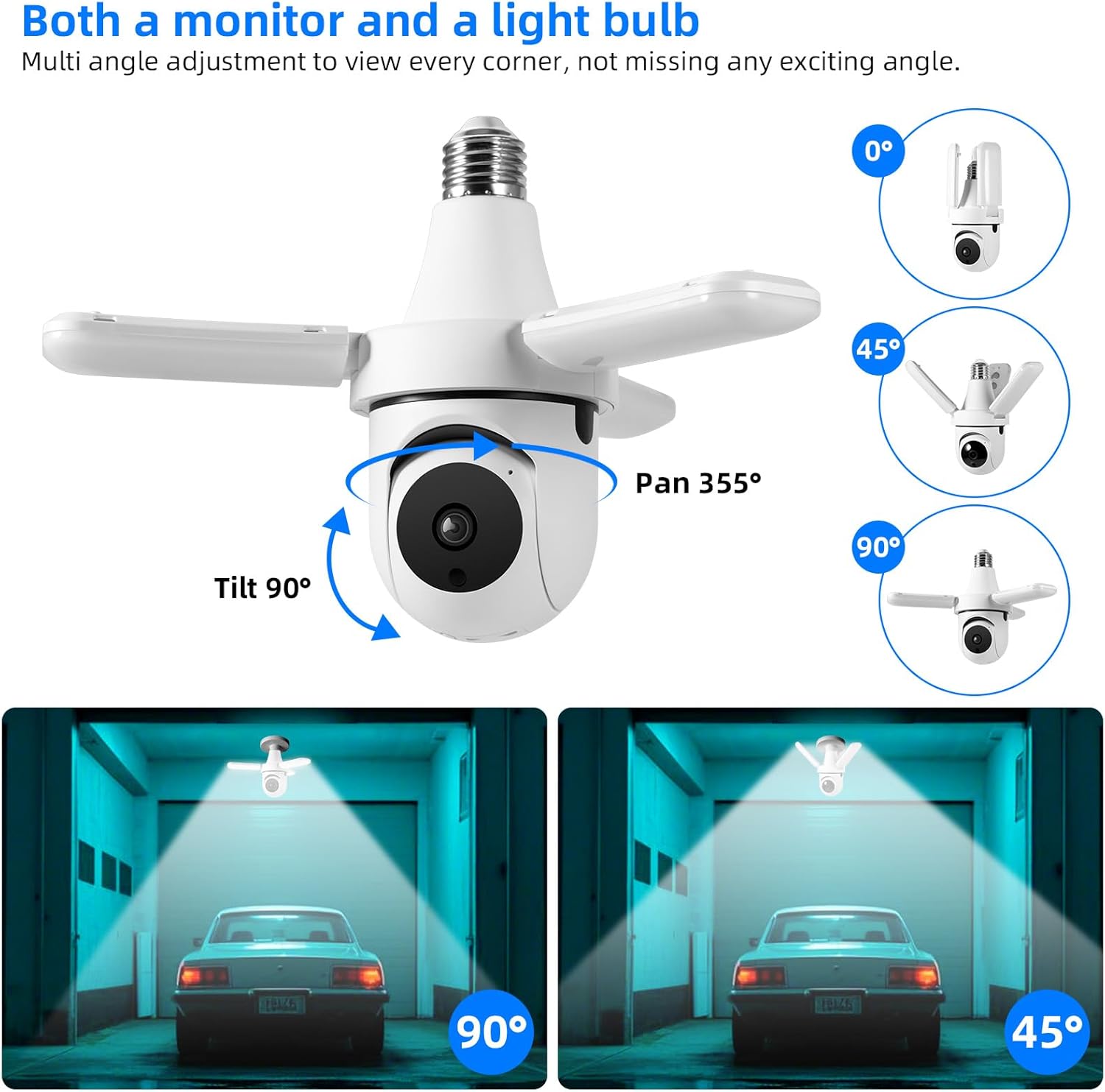
Figure 3: The camera offers extensive pan and tilt functionality to monitor a wide area.

Figure 4: Control the camera's integrated 30W LED light directly from the mobile application.
Recording and Alerts:
- இயக்கம் கண்டறிதல்: The camera is equipped with AI human detection. When motion is detected, the camera can automatically track the subject and send alerts to your phone.
- இரவு பார்வை: The camera offers both color night vision (with LED lights on) and infrared night vision (LED lights off) for clear visibility in the dark.
- வீடியோ சேமிப்பு: Recordings are saved to the installed 64GB TF card. You can review playback directly from the app. Cloud storage options may also be available through the app for an additional subscription.
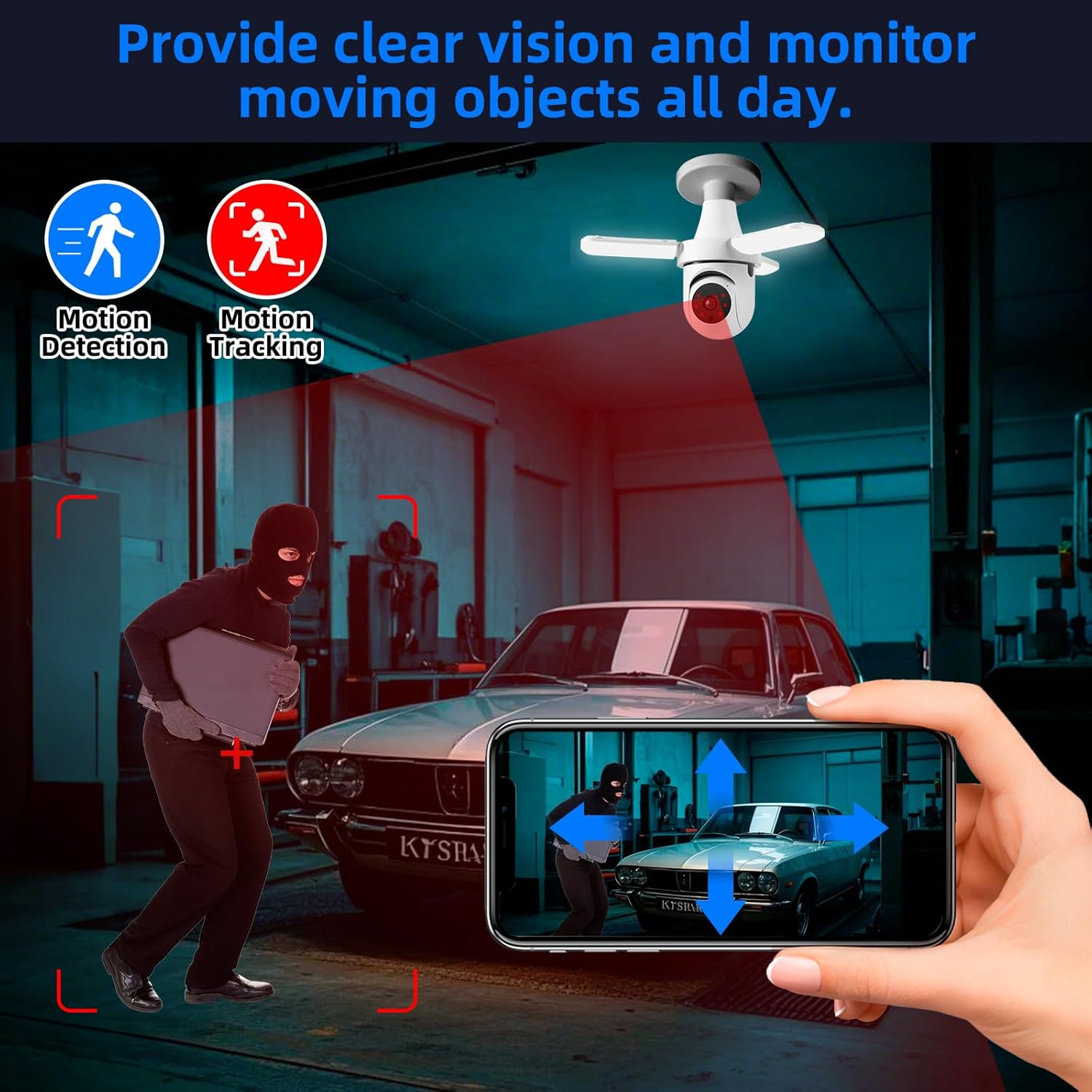
Figure 5: The camera's motion detection and tracking features provide real-time alerts and continuous monitoring.

Figure 6: Experience clear visibility day and night with 3MP HD video and color night vision capabilities.
ஸ்மார்ட் ஹோம் ஒருங்கிணைப்பு:
- அலெக்சா இணக்கத்தன்மை: The camera is compatible with Alexa. Link your AJCloud account to your Alexa app to enable voice commands for viewing the camera feed on compatible Alexa devices with screens.
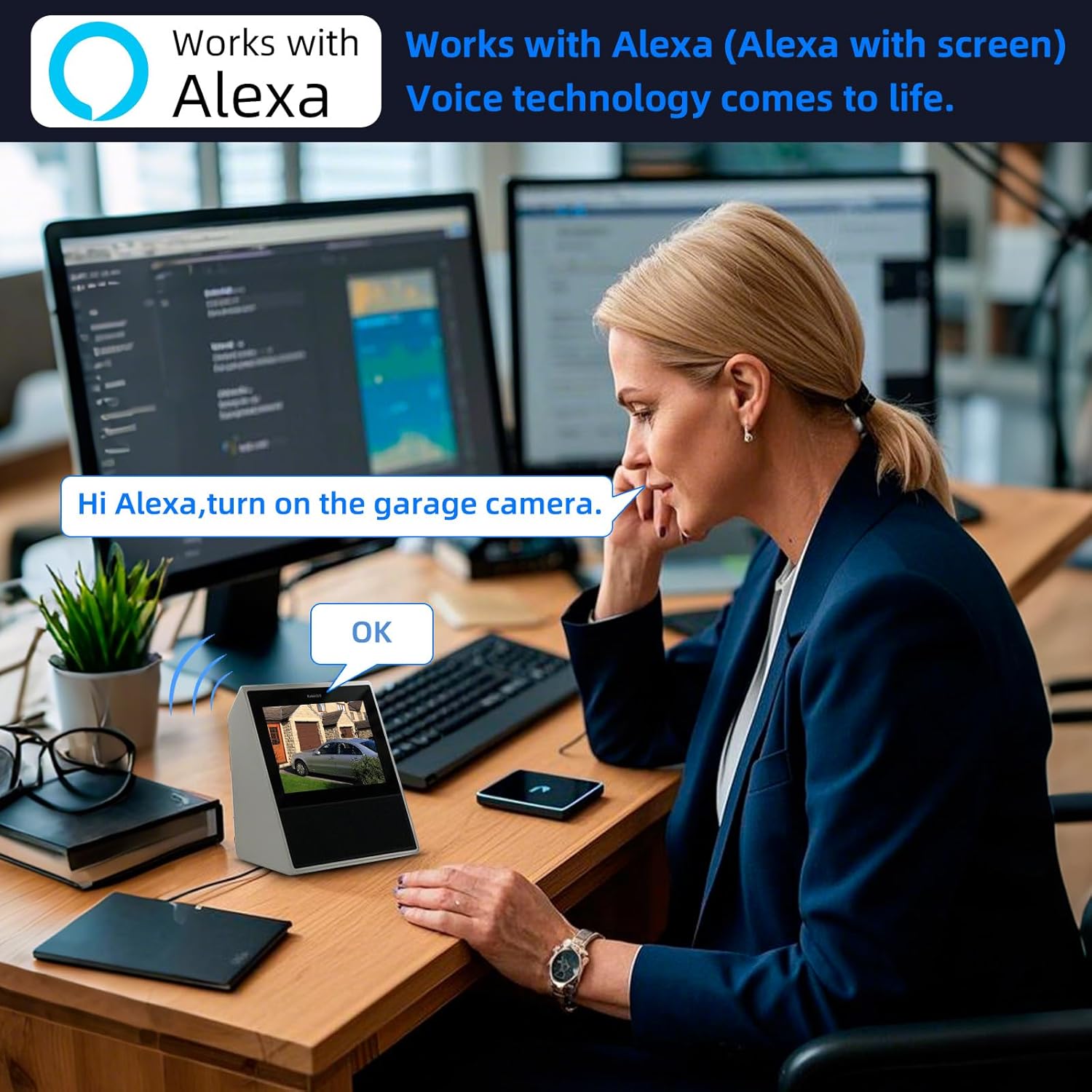
Figure 7: Control and view your camera feed using Alexa voice commands on compatible smart displays.
4. பராமரிப்பு
- சுத்தம்: தூசி மற்றும் கறைகளை அகற்ற, கேமரா லென்ஸ் மற்றும் உடலை மென்மையான, உலர்ந்த துணியால் தவறாமல் துடைக்கவும். கடுமையான இரசாயனங்கள் அல்லது சிராய்ப்பு கிளீனர்களைப் பயன்படுத்த வேண்டாம்.
- TF அட்டை மேலாண்மை: Periodically check the TF card storage status in the app. Format the card if necessary to ensure continuous recording. Back up important footage வடிவமைப்பதற்கு முன்.
- நிலைபொருள் புதுப்பிப்புகள்: Check the AJCloud app regularly for available firmware updates. Keeping the firmware updated ensures optimal performance and security.
- சக்தி சுழற்சி: If the camera experiences issues, try turning off the power to the light socket for a few seconds, then turning it back on to restart the device.
5. சரிசெய்தல்
- கேமரா Wi-Fi உடன் இணைக்கப்படவில்லை:
- உங்கள் வைஃபை நெட்வொர்க் 2.4GHz என்பதை உறுதிப்படுத்திக் கொள்ளுங்கள். கேமரா 5GHz வைஃபையை ஆதரிக்கவில்லை.
- வைஃபை கடவுச்சொல் சரியானதா என சரிபார்க்கவும்.
- Check the camera's proximity to the Wi-Fi router for a strong signal.
- Perform a factory reset on the camera by pressing the reset button (often located near the SD card slot) for several seconds until you hear a prompt. Then, attempt to pair again.
- மோஷன் எச்சரிக்கைகள் இல்லை:
- Check the motion detection settings in the AJCloud app. Ensure it is enabled and sensitivity is adjusted appropriately.
- உங்கள் ஸ்மார்ட்போனில் பயன்பாட்டு அறிவிப்புகள் இயக்கப்பட்டுள்ளனவா என்பதைச் சரிபார்க்கவும்.
- No Recording/Playback Issues:
- Ensure the 64GB TF card is correctly inserted and not full. Format the card if needed (this will erase all data).
- கிளவுட் சேமிப்பிடத்தைப் பயன்படுத்தினால், உங்கள் சந்தா செயலில் உள்ளதா எனச் சரிபார்க்கவும்.
- மோசமான வீடியோ தரம்:
- உங்கள் வைஃபை சிக்னல் வலிமையைச் சரிபார்க்கவும். பலவீனமான சிக்னல் வீடியோ ஸ்ட்ரீமிங் தரத்தைப் பாதிக்கலாம்.
- கேமரா லென்ஸ் சுத்தமாகவும், தடைகள் இல்லாமல் இருப்பதையும் உறுதி செய்யவும்.
- இருவழி ஆடியோ வேலை செய்யவில்லை:
- பயன்பாட்டில் மைக்ரோஃபோன் மற்றும் ஸ்பீக்கர் அமைப்புகளைச் சரிபார்க்கவும்.
- Ensure your phone's volume is up and the app has microphone permissions.
6. விவரக்குறிப்புகள்
| அம்சம் | விவரக்குறிப்பு |
|---|---|
| மாதிரி பெயர் | TAHEIS |
| எஃபெக்டிவ் ஸ்டில் ரெசல்யூஷன் | 3 எம்.பி |
| வீடியோ பிடிப்பு தீர்மானம் | 2K |
| Viewing கோணம் | 360 டிகிரி (355° பான், 90° சாய்வு) |
| நைட் விஷன் ரேஞ்ச் | 20 அடி |
| ஒளி மூல வகை | LED (30W, 3000 Lumens) |
| இணைப்பு தொழில்நுட்பம் | வயர்லெஸ் (வைஃபை 2.4GHz) |
| இணக்கமான சாதனங்கள் | iOS, Smartphone, Alexa |
| மவுண்டிங் வகை | Light Socket (E27) |
| உள்ளிட்ட கூறுகள் | 64G TFcard |
| சக்தி ஆதாரம் | கம்பியூட்டப்பட்ட மின்சாரம் |
| உட்புற/வெளிப்புற பயன்பாடு | உட்புறம் |
| பொருள் | பிளாஸ்டிக் |
| தயாரிப்பு பரிமாணங்கள் | 6 x 3 x 3 அங்குலம் |
| பொருளின் எடை | 11.7 அவுன்ஸ் |
7. உத்தரவாதம் மற்றும் ஆதரவு
உத்தரவாதத் தகவல்: For detailed warranty terms and conditions, please refer to the product packaging or the official TOWODE webஉத்தரவாதக் கோரிக்கைகளுக்கு உங்கள் கொள்முதல் ரசீதை வைத்திருங்கள்.
தொழில்நுட்ப ஆதரவு: If you encounter any issues not covered in this manual or require further assistance, please contact TOWODE customer service through their official webதயாரிப்பு வாங்கப்பட்ட தளம் அல்லது தளம்.