
1. அறிமுகம்
This manual provides essential information for the safe and efficient use of your MESWAO 15.6 Inch Pro Android 14 Tablet. Please read this manual thoroughly before operating the device and retain it for future reference.
2. பாதுகாப்பு தகவல்
- டேப்லெட்டை தீவிர வெப்பநிலை, நேரடி சூரிய ஒளி அல்லது அதிக ஈரப்பதத்திற்கு வெளிப்படுத்த வேண்டாம்.
- மாத்திரையை கீழே போடுவதையோ அல்லது கடுமையான தாக்கத்திற்கு ஆளாக்குவதையோ தவிர்க்கவும்.
- Use only the provided power adapter and Type-C cable for charging.
- மாத்திரையை தண்ணீர் மற்றும் பிற திரவங்களிலிருந்து விலக்கி வைக்கவும்.
- டேப்லெட்டை நீங்களே பிரிக்கவோ அல்லது சரிசெய்யவோ முயற்சிக்காதீர்கள். உதவிக்கு வாடிக்கையாளர் ஆதரவைத் தொடர்பு கொள்ளவும்.
- Ensure proper ventilation when using the tablet for extended periods.
3. தொகுப்பு உள்ளடக்கங்கள்
தொகுப்பில் அனைத்து பொருட்களும் உள்ளதா என சரிபார்க்கவும்:
- 1 x MESWAO 15.6 inch Android Tablet
- 1 x பவர் அடாப்டர்
- 1 x வகை C கேபிள்
- 1 x பயனர் கையேடு
- 1 x வகை-C முதல் USB அடாப்டர்
- 1 x Stuck pin
4. சாதனம் முடிந்ததுview
Familiarize yourself with the physical components of your MESWAO tablet.
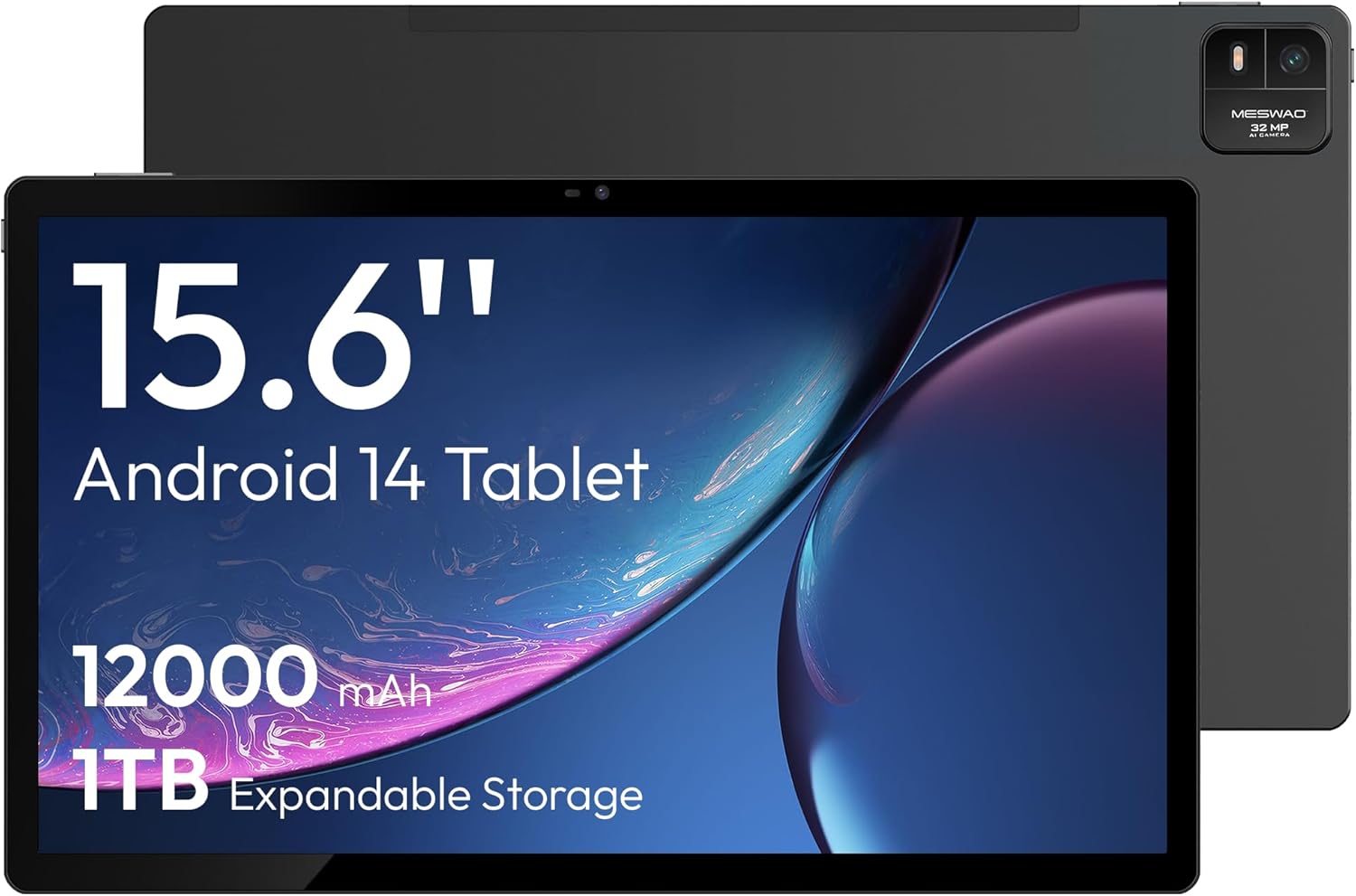
படம் 4.1: முன் view of the MESWAO 15.6-inch Android 14 Tablet, highlighting the large display and key specifications such as 12000mAh battery and 1TB expandable storage.
படம் 4.2: பக்கமும் பின்புறமும் view of the tablet, indicating the location of the quad speakers, Type-C port, TF card slot, power button, volume controls, and front/rear cameras.
முக்கிய கூறுகள்:
- 15.6-இன்ச் FHD IPS டிஸ்ப்ளே: Large screen for immersive viewing.
- முன் கேமரா: வீடியோ அழைப்புகள் மற்றும் செல்ஃபிகளுக்கு.
- பின்புற கேமரா (32MP): புகைப்படங்கள் மற்றும் வீடியோக்களை எடுப்பதற்கு.
- பவர் பட்டன்: To turn the tablet on/off or put it to sleep.
- தொகுதி பொத்தான்கள்: To adjust audio levels.
- டைப்-சி போர்ட்: சார்ஜிங் மற்றும் டேட்டா பரிமாற்றத்திற்கு.
- TF அட்டை ஸ்லாட்: For expandable storage (MicroSD card).
- குவாட் ஸ்பீக்கர்கள்: ஆடியோ வெளியீட்டிற்கு.
5 அமைவு
5.1 ஆரம்ப சார்ஜிங்
Before first use, fully charge the tablet. Connect the provided Type-C cable to the tablet's Type-C port and the power adapter to a wall outlet. The tablet supports 30W fast charging.

படம் 5.1: The tablet connected to its charger, showing the charging indicator on the screen.
5.2 பவர் ஆன்/ஆஃப்
- பவர் ஆன் செய்ய: திரை ஒளிரும் வரை பவர் பொத்தானை அழுத்திப் பிடிக்கவும்.
- பவர் ஆஃப் செய்ய: பவர் பட்டனை அழுத்திப் பிடிக்கவும், பின்னர் திரையில் உள்ள விருப்பங்களிலிருந்து 'பவர் ஆஃப்' என்பதைத் தேர்ந்தெடுக்கவும்.
- தூங்க/விழிக்க: பவர் பட்டனை சுருக்கமாக அழுத்தவும்.
5.3 ஆரம்ப கட்டமைப்பு
Upon first power-on, follow the on-screen prompts to set up your Android 14 operating system. This includes selecting your language, connecting to Wi-Fi, and signing in with your Google account.
5.4 வைஃபை இணைப்பு
- செல்க அமைப்புகள் > நெட்வொர்க் & இணையம் > Wi-Fi.
- வைஃபையை நிலைமாற்று On.
- பட்டியலிலிருந்து உங்களுக்கு விருப்பமான நெட்வொர்க்கைத் தேர்ந்தெடுக்கவும்.
- கேட்கப்பட்டால் கடவுச்சொல்லை உள்ளிட்டு தட்டவும் இணைக்கவும். The tablet supports dual-band Wi-Fi (2.4GHz and 5GHz).
5.5 மைக்ரோ எஸ்டி கார்டைச் செருகுதல்
To expand storage up to 1TB, insert a MicroSD card:
- Locate the TF card slot on the side of the tablet.
- Use the provided stuck pin to gently press into the small hole next to the slot to eject the tray.
- மைக்ரோ எஸ்டி கார்டை தட்டில் தங்க நிற காண்டாக்ட்கள் கீழே இருக்கும்படி வைக்கவும்.
- Carefully reinsert the tray into the tablet.

படம் 5.2: Illustration of the tablet's internal storage and the option for expandable storage via MicroSD card.
6. டேப்லெட்டை இயக்குதல்
6.1 அடிப்படை வழிசெலுத்தல்
The Android 14 operating system uses touch gestures for navigation:
- தட்டவும்: ஒரு பொருளைத் தேர்ந்தெடுக்கவும் அல்லது ஒரு பயன்பாட்டைத் திறக்கவும்.
- ஸ்வைப்: திரைகள் அல்லது பட்டியல்களை உருட்டவும்.
- கிள்ளுதல்: படங்களை பெரிதாக்கவும் அல்லது குறைக்கவும் மற்றும் web பக்கங்கள்.
- நீண்ட பத்திரிகை: சூழல் மெனுக்களை அணுகவும் அல்லது ஐகான்களை நகர்த்தவும்.
6.2 காட்சி அம்சங்கள்
The 15.6-inch FHD IPS display offers a resolution of 1920 x 1080 pixels, providing clear and vibrant visuals for various applications.

படம் 6.1: Comparison of the MESWAO 15.6-inch display size to an A4 sheet of paper and a smaller tablet, emphasizing its expansive viewஇங் பகுதி.
6.3 செயல்திறன்
Powered by the Helio G99 octa-core processor and 8GB RAM, the tablet delivers efficient performance for multitasking, gaming, and media consumption.

படம் 6.2: An illustration of the Helio G99 Octa-Core chipset, detailing its technical specifications and performance benefits.
6.4 கேமரா பயன்பாடு
The tablet features a 32MP rear camera and a 5MP front camera. Open the Camera app to capture photos and videos.
6.5 ஆடியோ
The quad speakers provide clear audio. You can connect Bluetooth headphones or use the Type-C port for audio output with a suitable adapter.
6.6 ஆண்ட்ராய்டு 14 அம்சங்கள்
The tablet runs on Android 14, offering features such as:
- Smooth Multitasking: Efficiently switch between applications.
- பெற்றோர் கட்டுப்பாடு: Manage content and usage for children.
- Enhanced Privacy & UI: Improved security and user interface experience.

படம் 6.3: The Android 14 operating system interface, showcasing various applications and system features.
7. பராமரிப்பு
7.1 சாதனத்தை சுத்தம் செய்தல்
டேப்லெட்டின் திரை மற்றும் உடலை சுத்தம் செய்ய மென்மையான, பஞ்சு இல்லாத துணியைப் பயன்படுத்தவும். கடுமையான இரசாயனங்கள் அல்லது சிராய்ப்புப் பொருட்களைப் பயன்படுத்துவதைத் தவிர்க்கவும்.
7.2 மென்பொருள் புதுப்பிப்புகள்
உகந்த செயல்திறன் மற்றும் பாதுகாப்பை உறுதிசெய்ய, கணினி புதுப்பிப்புகளை தொடர்ந்து சரிபார்க்கவும். செல்க அமைப்புகள் > அமைப்பு > கணினி மேம்படுத்தல்.
7.3 பேட்டரி பராமரிப்பு
பேட்டரி ஆயுளை நீட்டிக்க:
- பேட்டரியை அடிக்கடி முழுமையாக சார்ஜ் செய்வதைத் தவிர்க்கவும்.
- Do not expose the tablet to high temperatures.
- பேட்டரி நிரம்பியவுடன் சார்ஜரைத் துண்டிக்கவும்.
8. சரிசெய்தல்
8.1 டேப்லெட் இயக்கப்படவில்லை
- பேட்டரி சார்ஜ் செய்யப்பட்டுள்ளதா என்பதை உறுதிப்படுத்திக் கொள்ளுங்கள். சார்ஜரை இணைத்து, சில நிமிடங்கள் காத்திருந்து பவரை ஆன் செய்ய முயற்சிக்கவும்.
- மறுதொடக்கம் செய்ய கட்டாயப்படுத்த பவர் பட்டனை குறைந்தது 10-15 வினாடிகள் அழுத்திப் பிடிக்கவும்.
8.2 வைஃபை இணைப்புச் சிக்கல்கள்
- உங்கள் வைஃபை ரூட்டரை மறுதொடக்கம் செய்யுங்கள்.
- டேப்லெட் அமைப்புகளில் நெட்வொர்க்கை மறந்துவிட்டு மீண்டும் இணைக்கவும்.
- டேப்லெட் வைஃபை சிக்னலின் வரம்பிற்குள் இருப்பதை உறுதிசெய்யவும்.
8.3 மெதுவான செயல்திறன்
- தேவையற்ற பின்னணி பயன்பாடுகளை மூடு.
- பயன்பாடுகளுக்கான கேச் தரவை அழிக்கவும்.
- போதுமான இலவச சேமிப்பு இடத்தை உறுதி செய்யவும்.
8.4 திரை பதிலளிக்கவில்லை
- டேப்லெட்டை மறுதொடக்கம் செய்யுங்கள்.
- திரை சுத்தமாகவும் குப்பைகள் இல்லாமல் இருப்பதையும் உறுதிப்படுத்திக் கொள்ளுங்கள்.
9. விவரக்குறிப்புகள்
| அம்சம் | விவரக்குறிப்பு |
|---|---|
| மாதிரி பெயர் | எம்இஎஸ்-பி3 |
| இயக்க முறைமை | ஆண்ட்ராய்டு 14 |
| காட்சி அளவு | 15.6 அங்குலம் |
| திரை தெளிவுத்திறன் | 1920 x 1080 பிக்சல்கள் (FHD) |
| செயலி | MediaTek Helio G99 Octa-Core |
| கிராபிக்ஸ் கோப்ராசசர் | மாலி-ஜி75 |
| ரேம் | 8 ஜிபி |
| உள் சேமிப்பு (ROM) | 256 ஜிபி |
| விரிவாக்கக்கூடிய சேமிப்பு | மைக்ரோ எஸ்டி கார்டு வழியாக 1TB வரை |
| பின்புற கேமரா | 32 எம்.பி |
| முன் கேமரா | 5 எம்.பி |
| பேட்டரி திறன் | 12000mAh |
| சார்ஜ் செய்கிறது | 30W ஃபாஸ்ட் சார்ஜிங் |
| வயர்லெஸ் இணைப்பு | Dual-Band Wi-Fi (802.11a/b/ac/ad/ax), Bluetooth |
| பொருளின் எடை | 4.55 பவுண்டுகள் |
| தயாரிப்பு பரிமாணங்கள் | 14.49 x 8.66 x 0.39 அங்குலம் |
10. உத்தரவாதம் மற்றும் ஆதரவு
10.1 உத்தரவாதத் தகவல்
Your MESWAO tablet comes with a 12 மாத உத்தரவாதம் உற்பத்தி குறைபாடுகளை உள்ளடக்கியது. உத்தரவாதக் கோரிக்கைகளுக்கு உங்கள் வாங்கியதற்கான ஆதாரத்தை வைத்திருங்கள்.
10.2 வாடிக்கையாளர் ஆதரவு
For technical assistance, troubleshooting, or warranty inquiries, please contact MESWAO customer support. Our support team is available to assist you.
- 24 மணிநேர வாடிக்கையாளர் ஆதரவு: Assistance is available around the clock.
- Local After-sales Centers: Service centers are available in regions including the US, Germany, Japan, and more.
- Quick Response Flow: Issues reported receive a team response within 24 hours, aiming for prompt problem resolution or replacement.