
1. அறிமுகம்
Welcome to the user manual for your new XIAOMI Redmi Note 14 Pro+ 5G Smartphone. This guide provides essential information on setting up, operating, and maintaining your device. Please read it carefully to ensure optimal performance and longevity of your smartphone.
2. தொகுப்பு உள்ளடக்கங்கள்
உங்கள் தொகுப்பில் பின்வரும் உருப்படிகள் உள்ளதா என்பதைச் சரிபார்க்கவும்:
- XIAOMI Redmi Note 14 Pro+ 5G Smartphone
- USB கேபிள்
- விரைவு தொடக்க வழிகாட்டி (பிராந்தியத்தைப் பொறுத்து மாறுபடலாம்)
- சிம் வெளியேற்றும் கருவி (பிராந்தியத்தைப் பொறுத்து மாறுபடலாம்)
Note: A charger is not included in the package. Please use a compatible 120W HyperCharge adapter for optimal charging.
3. சாதனம் முடிந்ததுview
Familiarize yourself with the physical components of your Redmi Note 14 Pro+ 5G.
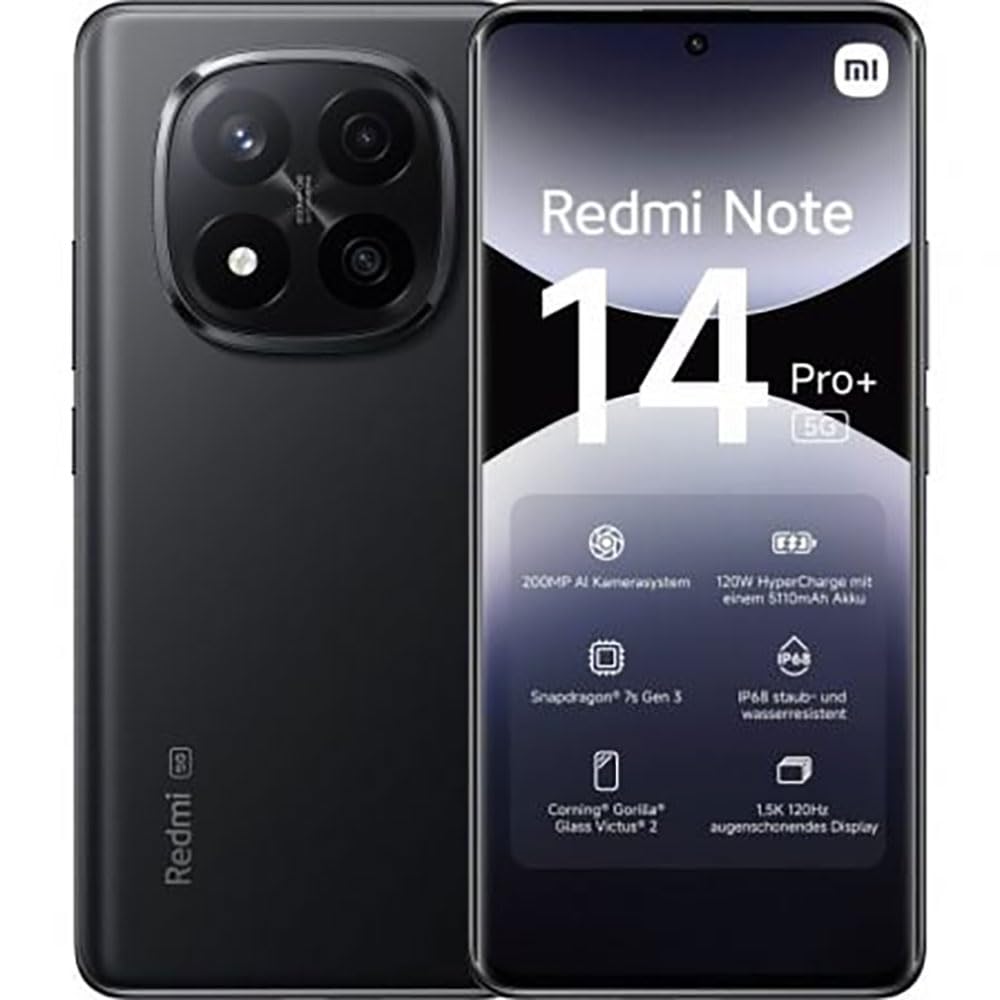
The image displays the front and back of the XIAOMI Redmi Note 14 Pro+ 5G smartphone. The front shows the display with 'Redmi Note 14 Pro+ 5G', '200 Megapixels', and '256 GB' text. The back features a prominent camera module with multiple lenses and the 'Redmi 5G' branding.
முக்கிய கூறுகள்:
- முன் காட்சி: 6.67-inch 1.5K 120Hz AMOLED display with Corning Gorilla Glass Victus 2.
- பின்புற கேமரா தொகுதி: Houses the 200MP Pro-Grade AI Camera system.
- பவர் பட்டன்: Located on the side, used to power on/off and wake/sleep the device.
- தொகுதி பொத்தான்கள்: பக்கத்தில் அமைந்துள்ளது, மீடியா மற்றும் அழைப்பு ஒலியளவை சரிசெய்யப் பயன்படுகிறது.
- USB டைப்-சி போர்ட்: சார்ஜிங் மற்றும் டேட்டா பரிமாற்றத்திற்கு.
- சிம் கார்டு ஸ்லாட்: Supports Dual SIM Nano SIM cards.
- பேச்சாளர்கள்: ஆடியோ வெளியீட்டிற்கான ஸ்டீரியோ ஸ்பீக்கர்கள்.
4 அமைவு
4.1. சிம் கார்டைச் செருகுதல்
- உங்கள் சாதனத்தின் பக்கவாட்டில் சிம் கார்டு ட்ரேயைக் கண்டறியவும்.
- தட்டுக்கு அடுத்துள்ள சிறிய துளைக்குள் சிம் வெளியேற்றும் கருவியைச் செருகவும், தட்டு வெளியே வரும் வரை உறுதியாக அழுத்தவும்.
- Place your Nano SIM card(s) into the tray with the gold contacts facing down. Ensure proper orientation.
- தட்டில் அது சரியான இடத்தில் கிளிக் ஆகும் வரை மெதுவாக அதை மீண்டும் ஸ்லாட்டுக்குள் தள்ளுங்கள்.
4.2. உங்கள் சாதனத்தை இயக்குதல்
அழுத்திப் பிடிக்கவும் பவர் பட்டன் on the side of the phone until the XIAOMI logo appears on the screen. Follow the on-screen instructions to complete the initial setup, including connecting to Wi-Fi, setting up your Google account, and configuring security features like fingerprint recognition.
4.3. ஆரம்ப கட்டணம்
It is recommended to fully charge your device before first use. Connect the USB Type-C cable to the phone and a compatible 120W HyperCharge adapter (not included) to a power outlet.
5. உங்கள் ஸ்மார்ட்போனை இயக்குதல்
5.1. அடிப்படை வழிசெலுத்தல்
- தொடுதிரை: தேர்ந்தெடுக்க தட்டவும், உருட்ட ஸ்வைப் செய்யவும், பெரிதாக்க பின்ச் செய்யவும்.
- முகப்புத் திரை: Your central hub for apps and widgets.
- அறிவிப்பு குழு: அறிவிப்புகள் மற்றும் விரைவு அமைப்புகளை அணுக திரையின் மேலிருந்து கீழ்நோக்கி ஸ்வைப் செய்யவும்.
- ஆப் டிராயர்: Swipe up from the bottom of the screen (or tap the app drawer icon) to view நிறுவப்பட்ட அனைத்து பயன்பாடுகளும்.
5.2. பவர் ஆன்/ஆஃப் செய்து மறுதொடக்கம் செய்யுங்கள்
- செய்ய பவர் ஆஃப்: Press and hold the Power Button until the power menu appears, then select "Power off."
- செய்ய மறுதொடக்கம்: Press and hold the Power Button until the power menu appears, then select "Restart."
5.3. பாதுகாப்பு அம்சங்கள்
Your device supports various security options:
- கைரேகை அங்கீகாரம்: விரைவான மற்றும் பாதுகாப்பான திறப்பிற்கு உங்கள் கைரேகைகளைப் பதிவு செய்யவும்.
- முகத்தைத் திறத்தல்: சாதனத்தைத் திறக்க உங்கள் முகத்தைப் பயன்படுத்தவும்.
- பின்/வடிவம்/கடவுச்சொல்: Standard security methods.
இந்த அமைப்புகளை இதன் மூலம் அணுகவும் அமைப்புகள் > பாதுகாப்பு & தனியுரிமை.
6. கேமரா அம்சங்கள்
The Redmi Note 14 Pro+ 5G features a powerful 200MP Pro-Grade AI Camera system designed to enhance your photography experience.
- 200MP பிரதான கேமரா: Capture highly detailed images with optical image stabilization (OIS).
- Multiple Camera Modes: Includes automatic, scene, portrait, and manual modes for versatile shooting.
- Dual LED Flash: Provides enhanced lighting in low-light conditions.
- முன் கேமரா: A 20MP front sensor for high-quality selfies and video calls.
- வீடியோ பதிவு: Supports up to 8K video capture at 120 fps.
7. AI அம்சங்கள்
Leverage the integrated AI functionalities for a smarter user experience:
- AI அழித்தல் புரோ: Intelligently remove unwanted objects or people from your photos.
- AI பட விரிவாக்கம்: Expand the boundaries of your images using AI.
- AI குறிப்புகள்: Smart note-taking capabilities.
- AI வசன வரிகள்: Generate subtitles for videos or audio in real-time.
- AI ரெக்கார்டர்: Enhanced voice recording with AI features.
- AI மொழிபெயர்ப்பாளர்: நிகழ்நேர மொழி மொழிபெயர்ப்பு.
- மிதுனம்: Integrated AI assistant.
- கூகிள் தேடலுக்கான வட்டம்: உங்கள் திரையில் உள்ள பொருட்களை வட்டமிடுவதன் மூலம் தகவல்களை விரைவாகத் தேடுங்கள்.
8. சார்ஜ்
Your Redmi Note 14 Pro+ 5G supports 120W HyperCharge technology for rapid charging.
- பேட்டரி திறன்: 5110mAh Lithium-polymer battery.
- சார்ஜ்: Use the provided USB Type-C cable with a compatible 120W power adapter (sold separately) for optimal charging speeds.
- பேட்டரி ஆயுள்: Expect up to 20 hours of talk time. Actual battery life may vary based on usage.
Always use certified charging accessories to prevent damage to your device.
9. பராமரிப்பு
9.1. நீர் மற்றும் தூசி எதிர்ப்பு
இந்த சாதனம் ஒரு IP68 மதிப்பீடு for dust and water resistance. This means it is protected against dust ingress and can withstand immersion in water up to 1.5 meters for 30 minutes. However, this resistance is not permanent and may decrease over time with normal wear. Avoid exposing the device to hot water, saltwater, or other liquids.
9.2. உங்கள் சாதனத்தை சுத்தம் செய்தல்
- திரையையும் உடலையும் சுத்தம் செய்ய மென்மையான, பஞ்சு இல்லாத துணியைப் பயன்படுத்தவும்.
- சிராய்ப்பு கிளீனர்கள், கரைப்பான்கள் அல்லது ஏரோசல் ஸ்ப்ரேக்களைப் பயன்படுத்துவதைத் தவிர்க்கவும்.
- If the device gets wet, wipe it thoroughly with a clean, dry cloth before charging or using ports.
9.3. மென்பொருள் புதுப்பிப்புகள்
உங்கள் சாதனத்தில் சமீபத்திய அம்சங்கள், பாதுகாப்பு இணைப்புகள் மற்றும் செயல்திறன் மேம்பாடுகள் இருப்பதை உறுதிசெய்ய, மென்பொருள் புதுப்பிப்புகளைத் தொடர்ந்து சரிபார்த்து நிறுவவும். செல்லவும் அமைப்புகள் > தொலைபேசி பற்றி > MIUI பதிப்பு புதுப்பிப்புகளைச் சரிபார்க்க.
10. சரிசெய்தல்
உங்கள் சாதனத்தில் சிக்கல்கள் ஏற்பட்டால், பின்வரும் பொதுவான தீர்வுகளை முயற்சிக்கவும்:
- சாதனம் இயக்கப்படவில்லை: பேட்டரி சார்ஜ் செய்யப்பட்டுள்ளதா என்பதை உறுதிப்படுத்திக் கொள்ளுங்கள். குறைந்தது 15 நிமிடங்களுக்கு சார்ஜருடன் இணைத்து, பின்னர் பவரை இயக்க முயற்சிக்கவும்.
- செயலிழப்பது அல்லது உறைவது போன்ற பயன்பாடுகள்: பிரச்சனைக்குரிய ஆப்ஸை மூடிவிட்டு மீண்டும் திறக்கவும். சிக்கல் தொடர்ந்தால், உங்கள் மொபைலை மீண்டும் தொடங்கவும்.
- மோசமான நெட்வொர்க் இணைப்பு: Check your SIM card is correctly inserted. Try toggling Airplane Mode on and off. If the issue persists, contact your network provider.
- பேட்டரி விரைவாக தீர்ந்துவிடும்: Reduce screen brightness, close unused apps, and disable unnecessary features like GPS or Bluetooth when not in use.
- திரை பதிலளிக்கவில்லை: Force restart your device by holding the Power Button for approximately 10-15 seconds.
மிகவும் சிக்கலான சிக்கல்களுக்கு, அதிகாரப்பூர்வ XIAOMI ஆதரவைப் பார்க்கவும். webதளம் அல்லது வாடிக்கையாளர் சேவையை தொடர்பு கொள்ளவும்.
11. விவரக்குறிப்புகள்
| அம்சம் | விவரக்குறிப்பு |
|---|---|
| பிராண்ட் | XIAOMI |
| மாதிரி பெயர் | Redmi Note 14 Pro+ 5G |
| இயக்க முறைமை | ஆண்ட்ராய்டு 14 |
| CPU மாதிரி | ஸ்னாப்டிராகன் 7 ஜெனரல் 3 |
| ரேம் | 8 ஜிபி |
| சேமிப்பு திறன் | 256 ஜிபி |
| திரை அளவு | 6.67 அங்குலம் |
| காட்சித் தீர்மானம் | 2712 x 1220 பிக்சல்கள் |
| புதுப்பிப்பு விகிதம் | 120 ஹெர்ட்ஸ் |
| பின்புற கேமரா தெளிவுத்திறன் | 200 Megapixels (with OIS) |
| முன் கேமரா தீர்மானம் | 20 மெகாபிக்சல்கள் |
| பேட்டரி திறன் | 5110 mAh |
| சார்ஜிங் தொழில்நுட்பம் | 120W ஹைப்பர்சார்ஜ் |
| நீர் எதிர்ப்பு | IP68 |
| செல்லுலார் தொழில்நுட்பம் | 5G |
| சிம் கார்டு வகை | நானோ சிம் (இரட்டை சிம்) |
| இணைப்பு | USB வகை-C |
12. உத்தரவாதம் மற்றும் ஆதரவு
12.1. உற்பத்தியாளரின் உத்தரவாதம்
Your XIAOMI Redmi Note 14 Pro+ 5G Smartphone comes with a 2 வருட உற்பத்தியாளரின் உத்தரவாதம். இந்த உத்தரவாதமானது சாதாரண பயன்பாட்டின் கீழ் பொருட்கள் மற்றும் வேலைப்பாடுகளில் உள்ள குறைபாடுகளை உள்ளடக்கும். உத்தரவாதக் கோரிக்கைகளுக்கு உங்கள் வாங்கியதற்கான ஆதாரத்தை வைத்திருங்கள்.
The warranty does not cover damage caused by accidents, misuse, unauthorized modifications, or normal wear and tear.
12.2. வாடிக்கையாளர் ஆதரவு
For technical assistance, warranty claims, or further information, please visit the official XIAOMI support website or contact their customer service department. Contact details can typically be found on the XIAOMI webதளத்தில் அல்லது உங்கள் தயாரிப்புடன் சேர்க்கப்பட்டுள்ள உத்தரவாத அட்டையில்.