
அறிமுகம்
This manual provides detailed instructions for the safe and effective operation of your YeeSite 36LEDs RGB DJ Light. This stage par light features 36 high-intensity RGB LEDs, offering a wide range of color combinations for various lighting effects. It supports multiple control modes, including DMX, sound-activated, auto, strobe, fade, RGB dimming, and master-slave. Please read this manual thoroughly before use and retain it for future reference.
பெட்டியில் என்ன இருக்கிறது
பிரித்தெடுத்தவுடன், கீழே பட்டியலிடப்பட்டுள்ள அனைத்து பொருட்களும் சேர்க்கப்பட்டுள்ளதா மற்றும் நல்ல நிலையில் உள்ளதா என்பதை சரிபார்க்கவும்:
- 2 x 36LED Par Lights
- 4 x அடைப்புக்குறிகள்
- 2 x ரிமோட் கன்ட்ரோலர்கள்
- 1 x பயனர் கையேடு

Image: Contents of the product package, including two par lights, two remote controllers, mounting brackets, and the user manual.
தயாரிப்பு முடிந்துவிட்டதுview
The YeeSite 36LEDs RGB DJ Light is designed for versatile lighting applications. Familiarize yourself with the components and controls for optimal use.
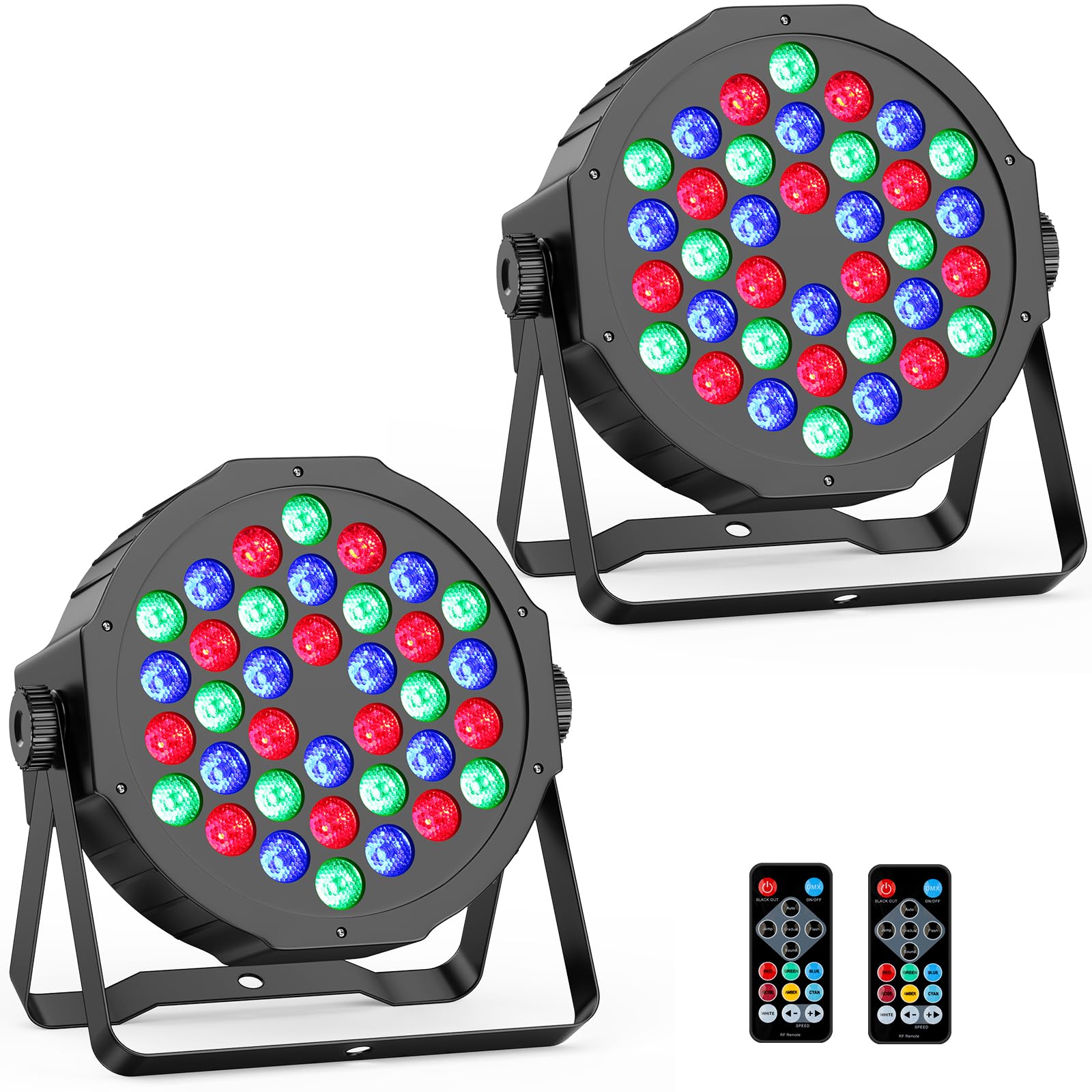
படம்: முன்பக்கம் view of the 36LEDs RGB DJ Light, highlighting the LED array.
Rear Panel and Remote Control
The rear panel provides essential connections and a digital display for mode selection. The included remote control offers convenient wireless operation.

Image: Rear panel of the light with DMX ports, digital display, and control buttons, alongside the remote control with its various function buttons.
பின்புற பேனல் கட்டுப்பாடுகள்:
- A: DMX IN - Input for DMX signal.
- B: DMX OUT - Output for linking to other DMX devices.
- C: MENU - Accesses the main menu and settings.
- D: UP - Navigates up through menu options or increases values.
- E: DOWN - Navigates down through menu options or decreases values.
- F: ENTER - Confirms selection or enters a submenu.
- G: MIC - Built-in microphone for sound-activated mode.
- H: DIGITAL DISPLAY - Shows current mode, DMX address, or parameter values.
ரிமோட் கண்ட்ரோல் செயல்பாடுகள்:
- 1: Black Out - Turns off all lights.
- 2: DMX Mode - Activates DMX control.
- 3: தானியங்கு முறை - Cycles through pre-programmed effects.
- 4: Hopping Mode - Jumps between colors.
- 5: Gradual - Smooth color transitions (Fade mode).
- 6: Flash Mode - Strobe effect.
- 7: Sound-active Mode - Lights react to sound.
- 8: Red Color - Activates red LEDs.
- 9: Green Color - Activates green LEDs.
- 10: Blue Color - Activates blue LEDs.
- 11: Rose Color - Activates rose color.
- 12: Amber Color - Activates amber color.
- 13: Cyan Color - Activates cyan color.
- 14: White Color - Activates white LEDs.
- 15: Speed - - Decreases effect speed.
- 16: Speed + - Increases effect speed.
அமைவு
- பேக்கிங்: Carefully remove the par lights and all accessories from the packaging. Inspect for any damage.
- மவுண்டிங்:
Each unit includes adjustable metal brackets for flexible placement. You can:
- Place the lights on the floor as uplights.
- Mount them to trusses or lighting bars using appropriate clampகள் (சேர்க்கப்படவில்லை).
- Attach them to a wall or ceiling using suitable hardware (not included).
Ensure the mounting surface or structure can safely support the weight of the light(s).
- மின் இணைப்பு: Connect the provided power cord to the light and then to a standard 110V AC power outlet. The lights are corded electric and do not require batteries.
- ஆரம்ப பவர் ஆன்: Once connected, the light will power on. Use the rear panel buttons or the remote control to select your desired operating mode.
இயக்க முறைகள்
The YeeSite 36LEDs RGB DJ Light offers multiple operating modes to suit various event requirements:
- ஆட்டோ பயன்முறை: The light cycles through pre-programmed effects automatically. This mode is ideal for continuous, dynamic lighting without manual intervention.
- ஒலி-செயல்படுத்தப்பட்ட பயன்முறை: The built-in microphone detects sound, and the light effects change in sync with the music or ambient audio. Adjust sensitivity if needed.
- DMX பயன்முறை: For professional control, connect the light to a DMX controller. This allows precise control over individual light parameters such as color, intensity, and effects. The light supports 6-channel DMX.
- ஸ்ட்ரோப் பயன்முறை: Produces rapid flashes of light. The speed of the strobe can often be adjusted.
- Fade Mode (Gradual): Colors transition smoothly from one to another, creating a gentle and continuous color change.
- RGB Dimming: Allows adjustment of the intensity of red, green, and blue LEDs independently to create custom colors and brightness levels.
- மாஸ்டர்-ஸ்லேவ் பயன்முறை: Link multiple lights together using DMX cables. One light acts as the "Master" (controlling unit), and the others act as "Slaves," synchronizing their effects with the Master. This is ideal for coordinated lighting across multiple units.

Image: Visual representation of the various operating modes available for the light.
ரிமோட் கண்ட்ரோல் ஆபரேஷன்
The included remote control provides convenient access to many functions. Ensure the remote has a clear line of sight to the light's sensor for optimal performance.
- பவர் ஆன்/ஆஃப்: Use the ON/OFF button to turn the light on or off.
- பயன்முறை தேர்வு: Press the dedicated buttons for Auto, DMX, Sound-active, Hopping, Gradual (Fade), or Flash modes.
- வண்ணத் தேர்வு: Directly select individual colors (Red, Green, Blue, Rose, Amber, Cyan, White) or combinations.
- வேக சரிசெய்தல்: Use the "Speed +" and "Speed -" buttons to increase or decrease the speed of dynamic effects (e.g., auto mode, fade, strobe).
- இருட்டடிப்பு: The "Black Out" button will temporarily turn off all light output.

Image: Two par lights with their remote controls, illustrating the ease of remote operation.
டிஎம்எக்ஸ் கட்டுப்பாடு
For advanced lighting control, the YeeSite 36LEDs RGB DJ Light can be integrated into a DMX system. It supports 6-channel DMX operation.
- Connecting DMX:
- Connect a DMX cable from your DMX controller's output to the DMX IN port (A) of the first light.
- To link multiple lights, connect a DMX cable from the DMX OUT port (B) of the first light to the DMX IN port of the next light, and so on.
- DMX முகவரியை அமைத்தல்:
Using the MENU, UP, DOWN, and ENTER buttons on the rear panel, navigate to the DMX address setting. Set a unique DMX starting address for each light in your chain. Refer to your DMX controller's manual for channel assignments.
- DMX Channel Functions (6-Channel Mode):
A typical 6-channel DMX setup might include:
சேனல் செயல்பாடு மதிப்பு வரம்பு CH1 மாஸ்டர் டிம்மர் 0-255 (0% to 100% brightness) CH2 சிவப்பு தீவிரம் 0-255 (0% to 100% red) CH3 பசுமை தீவிரம் 0-255 (0% to 100% green) CH4 நீல தீவிரம் 0-255 (0% to 100% blue) CH5 Strobe/Effect Speed 0-255 (Off to Fast) CH6 பயன்முறை தேர்வு Various values for Auto, Sound, Fade, etc. Note: Specific DMX channel functions and values may vary. Refer to the light's digital display for exact channel mapping if available, or experiment with your DMX controller.

Image: Multiple par lights connected to a DMX controller, illustrating DMX mode operation.
Video: A demonstration of the 36LED RGB Par Lights in action, showcasing various color changes and effects, likely controlled via DMX or auto mode. This video is provided by the seller, YeeSite.
பராமரிப்பு
Proper maintenance ensures the longevity and optimal performance of your YeeSite 36LEDs RGB DJ Light.
- சுத்தம்: Regularly clean the lens and exterior casing with a soft, dry cloth. Do not use abrasive cleaners or solvents. Ensure the light is unplugged before cleaning.
- காற்றோட்டம்: Ensure the ventilation openings are clear of dust and debris to prevent overheating. The unit has a built-in cooling fan.
- சேமிப்பு: When not in use for extended periods, store the lights in a dry, dust-free environment.
- ஆய்வு: மின் கேபிள்கள் மற்றும் DMX கேபிள்களில் தேய்மானம் அல்லது சேதம் ஏதேனும் உள்ளதா என அவ்வப்போது சரிபார்க்கவும். சேதமடைந்த கேபிள்களை உடனடியாக மாற்றவும்.
சரிசெய்தல்
If you encounter issues with your YeeSite 36LEDs RGB DJ Light, refer to the following common problems and solutions:
| பிரச்சனை | சாத்தியமான காரணம் | தீர்வு |
|---|---|---|
| ஒளி இயக்கவில்லை. | No power supply; faulty cable; unit malfunction. | Check power connection and outlet. Ensure power cable is not damaged. Try a different power source. |
| ரிமோட் கண்ட்ரோல் வேலை செய்யவில்லை. | Obstruction; remote battery low/dead; light not in remote mode. | Ensure clear line of sight to the light's sensor. Replace remote battery. Check if the light is in a mode that accepts remote input. |
| DMX கட்டுப்பாடு இல்லை. | Incorrect DMX address; faulty DMX cable; DMX controller issue; light not in DMX mode. | Verify DMX address setting on the light. Check DMX cable connections. Ensure the light is set to DMX mode. Test with a different DMX cable or controller if possible. |
| Sound-activated mode not responding. | Low sound input; microphone obstructed; sensitivity setting too low. | Increase music volume or place light closer to sound source. Ensure microphone (G) on rear panel is not obstructed. Adjust sound sensitivity via menu if available. |
| Lights are flickering or behaving erratically. | Loose connection; power fluctuations; DMX signal interference. | Check all power and DMX connections. Ensure stable power supply. If using DMX, check for proper termination and cable quality. |
விவரக்குறிப்புகள்
| அம்சம் | விவரம் |
|---|---|
| மாதிரி எண் | YS-073-36R25050 |
| ஒளி மூல வகை | ஒளி உமிழும் டையோடு (LED) |
| LED களின் எண்ணிக்கை | 36 (ஆர்ஜிபி) |
| ஒளி மூல வாட்tage | 36 வாட்ஸ் |
| சக்தி ஆதாரம் | கம்பியூட்டப்பட்ட மின்சாரம் |
| தொகுதிtage | 110 வோல்ட் |
| கட்டுப்பாட்டு முறைகள் | DMX (6-channel), Sound-Activated, Auto, Strobe, Fade, RGB Dimming, Master-Slave |
| மவுண்டிங் வகை | சீலிங் மவுண்ட், ஃப்ளோர் மவுண்ட், வால் மவுண்ட் |
| பொருள் | பிளாஸ்டிக் (அக்ரிலோனிட்ரைல் பியூட்டாடீன் ஸ்டைரீன்) |
| நிறம் | கருப்பு |
| பொருளின் பரிமாணங்கள் (L x W x H) | 8"லி x 7"அங்குலம் x 7"அங்குலம் |
| எடை (ஒவ்வொன்றும்) | தோராயமாக 0.96 பவுண்ட் |
உத்தரவாதம்
YeeSite provides a 12 மாத உத்தரவாதம் for this product. This warranty covers manufacturing defects and ensures the product functions as intended under normal use. Please retain your proof of purchase for warranty claims.
ஆதரவு
For technical assistance, troubleshooting beyond this manual, or warranty inquiries, please contact YeeSite customer support through the retailer where the product was purchased or visit the official YeeSite store page: