
1. அறிமுகம்
Thank you for choosing the Generic Ka-6660 Vertical Wireless and Bluetooth Mouse. This ergonomic mouse is designed to provide comfort and precision for extended use, reducing wrist strain. It offers versatile connectivity options (2.4GHz wireless and Bluetooth) and adjustable DPI settings for various tasks. Please read this manual carefully to ensure proper setup and operation.
2. தொகுப்பு உள்ளடக்கங்கள்
- 1 x Ka-6660 Vertical Wireless Mouse
- 1 x USB ரிசீவர்
- 1 x USB Charging Cable (not explicitly listed but implied by 'rechargeable')
3. தயாரிப்பு முடிந்துவிட்டதுview
Familiarize yourself with the mouse's components and their functions.

Figure 3.1: Ka-6660 Vertical Mouse with Labeled Buttons
- DPI ஸ்விட்ச் பட்டன்: Adjusts the cursor sensitivity (DPI).
- இடது பொத்தான்: நிலையான இடது கிளிக் செயல்பாடு.
- வலது பொத்தான்: நிலையான வலது கிளிக் செயல்பாடு.
- சுருள் சக்கரம்: ஆவணங்களை உருட்டிப் பாருங்கள் மற்றும் web பக்கங்கள்.
- முன்னோக்கி பொத்தான்: முன்னோக்கிச் செல்கிறது web உலாவிகள் அல்லது file ஆய்வாளர்கள்.
- பின்னோக்கி பட்டன்: பின்னோக்கிச் செல்கிறது web உலாவிகள் அல்லது file ஆய்வாளர்கள்.

படம் 3.2: பொது View of the Ka-6660 Vertical Mouse

Figure 3.3: Ka-6660 Vertical Mouse and USB Receiver
4 அமைவு
4.1. மவுஸை சார்ஜ் செய்தல்
The Ka-6660 mouse features a rechargeable battery. Connect the mouse to a USB power source (e.g., computer USB port, USB wall adapter) using the provided USB charging cable. The mouse can be used while charging.
4.2. 2.4GHz வயர்லெஸ் வழியாக இணைத்தல்
- மவுஸின் அடிப்பகுதியில் உள்ள பெட்டியில் சேமிக்கப்பட்டுள்ள USB ரிசீவரைக் கண்டறியவும்.
- உங்கள் கணினியில் கிடைக்கும் USB போர்ட்டில் USB ரிசீவரைச் செருகவும்.
- கீழே அமைந்துள்ள ON/OFF சுவிட்சைப் பயன்படுத்தி சுட்டியை இயக்கவும்.
- சுட்டி தானாகவே உங்கள் சாதனத்துடன் இணைக்கப்பட வேண்டும்.
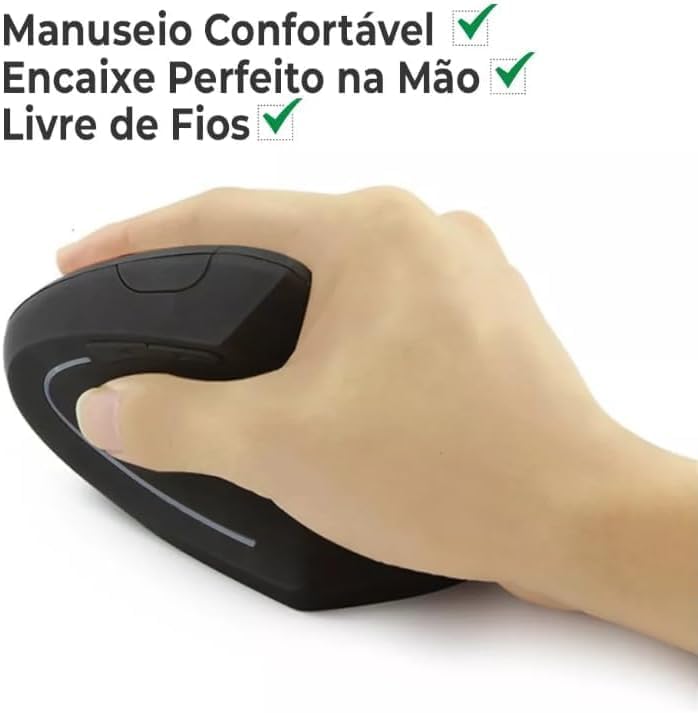
Figure 4.1: Nano Receiver Storage
4.3. புளூடூத் வழியாக இணைக்கிறது
- ஆன்/ஆஃப் சுவிட்சைப் பயன்படுத்தி சுட்டியை இயக்கவும்.
- Switch the connectivity mode to Bluetooth (refer to the mouse's mode switch, if available, or consult device-specific pairing instructions).
- உங்கள் சாதனத்தில் (லேப்டாப், டேப்லெட், ஸ்மார்ட்போன்), புளூடூத் அமைப்புகளுக்குச் சென்று புளூடூத்தை இயக்கவும்.
- தேடுங்கள் new devices. The mouse should appear as "Ka-6660" or similar.
- இணைக்க சுட்டியைத் தேர்ந்தெடுக்கவும். திரையில் தோன்றும் ஏதேனும் வழிமுறைகளைப் பின்பற்றவும்.
5. இயக்க வழிமுறைகள்
5.1. DPI சரிசெய்தல்
Press the DPI switch button (located on the top of the mouse) to cycle through different sensitivity levels. The mouse supports up to 2400 DPI, allowing you to adjust cursor speed for various tasks, from precise graphic design to fast-paced gaming.
5.2. பொத்தான் செயல்பாடுகள்
The mouse features 6 buttons: Left, Right, Scroll Wheel, DPI Switch, Forward, and Backward. The Forward and Backward buttons are typically used for navigation in web உலாவிகள் அல்லது file explorers. Some operating systems or applications may allow for customization of these buttons.
5.3. Ergonomic Use
The vertical design of the Ka-6660 mouse promotes a natural handshake position, which can help reduce wrist pronation and muscle strain associated with traditional mice. Maintain a relaxed grip and allow your arm to move freely from the shoulder.

Figure 5.1: Ergonomic Grip on the Vertical Mouse
5.4. சைலண்ட் கிளிக் அம்சம்
The mouse is designed with silent click buttons, minimizing noise during use. This feature is beneficial in quiet environments or for users who prefer a less audible click.
6. பராமரிப்பு
6.1. சுத்தம் செய்தல்
மவுஸை சுத்தம் செய்ய, அதன் மேற்பரப்பை மென்மையான, டி-துணியால் மெதுவாக துடைக்கவும்.amp cloth. Avoid using harsh chemicals or abrasive materials, as these can damage the finish. Ensure no liquid enters the mouse's internal components.
6.2. பேட்டரி பராமரிப்பு
To prolong battery life, avoid fully discharging the mouse frequently. Charge the mouse when the low battery indicator appears. Store the mouse in a cool, dry place when not in use for extended periods.
7. சரிசெய்தல்
7.1. சுட்டி பதிலளிக்கவில்லை
- சுட்டி இயக்கப்பட்டிருப்பதை உறுதிசெய்யவும்.
- பேட்டரி அளவை சரிபார்த்து, தேவைப்பட்டால் சார்ஜ் செய்யவும்.
- For 2.4GHz wireless, ensure the USB receiver is securely plugged into a working USB port. Try a different USB port.
- For Bluetooth, ensure Bluetooth is enabled on your device and the mouse is properly paired. Try re-pairing.
- உங்கள் கணினி அல்லது சாதனத்தை மறுதொடக்கம் செய்யுங்கள்.
7.2. இடைப்பட்ட இணைப்பு
- Ensure the mouse is within the operating range (up to 10 meters).
- பிற வயர்லெஸ் சாதனங்களிலிருந்து வரும் குறுக்கீட்டைக் குறைக்கவும்.
- பேட்டரி அளவை சரிபார்க்கவும்.
7.3. Cursor Movement is Erratic
- சுட்டியின் அடிப்பகுதியில் உள்ள ஆப்டிகல் சென்சாரை சுத்தம் செய்யவும்.
- சுட்டியை சுத்தமான, பிரதிபலிப்பு இல்லாத மேற்பரப்பில் அல்லது சுட்டி அட்டையில் பயன்படுத்தவும்.
- Adjust DPI settings to a lower sensitivity if needed.
8. விவரக்குறிப்புகள்
| அம்சம் | விவரம் |
|---|---|
| பிராண்ட் | பொதுவான |
| மாதிரி | Ka-6660 |
| இணைப்பு தொழில்நுட்பம் | 2.4GHz வயர்லெஸ், புளூடூத் |
| இயக்கம் கண்டறிதல் தொழில்நுட்பம் | ஆப்டிகல் |
| அதிகபட்ச உணர்திறன் | 2400 DPI (ஒரு அங்குலத்திற்கு புள்ளிகள்) |
| பொத்தான்களின் எண்ணிக்கை | 6 |
| செயல்பாட்டு வரம்பு | 10 மீட்டர் வரை |
| சக்தி ஆதாரம் | ரிச்சார்ஜபிள் பேட்டரி |
| உடை | Vertical, Ergonomic |
| பொருள் | ஏபிஎஸ் |
| இணக்கமான சாதனங்கள் | Personal Computer (Windows, macOS, Linux), Laptops, Tablets, Smartphones (Android, iOS) |
| பரிந்துரைக்கப்பட்ட பயன்பாடுகள் | அலுவலகம், விளையாட்டு |
9. தயாரிப்பு வீடியோ
Watch this video for a visual demonstration of the mouse's ergonomic design and silent click feature.
Video: Demonstration of the Ka-6660 Vertical Mouse's ergonomic benefits and quiet operation.
10. உத்தரவாதம் மற்றும் ஆதரவு
This product comes with a 30-day warranty from the date of purchase. For any issues or support inquiries, please contact your retailer or the manufacturer directly. Keep your purchase receipt as proof of warranty.