
1. அறிமுகம்
This manual provides comprehensive instructions for the Mycket portable DAB/DAB+/FM radio, Model D009. It covers setup, operation, maintenance, and troubleshooting to ensure optimal performance and longevity of your device. Please read this manual carefully before using the product.
The Mycket D009 radio features advanced signal reception technology for clear audio, Bluetooth 5.0 for wireless streaming, USB playback, AUX-in connectivity, a dual alarm clock, and a sleep timer. Its integrated rechargeable battery offers portability for use in various environments.
2. பாதுகாப்பு வழிமுறைகள்
- மழை, ஈரப்பதம் அல்லது அதிக வெப்பநிலைக்கு சாதனத்தை வெளிப்படுத்த வேண்டாம்.
- வலுவான தாக்கங்களுக்கு சாதனத்தை கைவிடுவதையோ அல்லது உட்படுத்துவதையோ தவிர்க்கவும்.
- சாதனத்தை நீங்களே பிரிக்கவோ அல்லது சரிசெய்ய முயற்சிக்கவோ வேண்டாம். அனைத்து சேவைகளையும் தகுதிவாய்ந்த பணியாளர்களிடம் பரிந்துரைக்கவும்.
- Keep the device away from heat sources such as radiators, heat registers, stoves, or other apparatus (including ampலிஃபையர்ஸ்) வெப்பத்தை உற்பத்தி செய்யும்.
- Use only the specified charging cable and power adapter (5V via USB) to charge the device.
- இயக்கத்தின் போதும் சார்ஜ் செய்யும் போதும் சாதனத்தைச் சுற்றி சரியான காற்றோட்டத்தை உறுதி செய்யவும்.
- உள்ளூர் விதிமுறைகளின்படி பேட்டரிகள் மற்றும் மின்னணு கூறுகளை பொறுப்புடன் அப்புறப்படுத்துங்கள்.
3. தயாரிப்பு முடிந்துவிட்டதுview
3.1 தொகுப்பு உள்ளடக்கம்
- 1 x Mycket Portable DAB Radio (Model D009)
- 1 x USB சார்ஜிங் கேபிள்
- 1 x பயனர் கையேடு
3.2 சாதன அமைப்பு மற்றும் கட்டுப்பாடுகள்
Familiarize yourself with the main components and controls of your Mycket radio.

படம் 1: முன் view of the Mycket D009 portable DAB radio, showing the speaker grille, LCD display, control buttons (MODE, OK, O/M, FAV, 1-4), and the telescopic antenna extended. The right side shows the DC 5V USB-C port, reset button, and headphone jack.
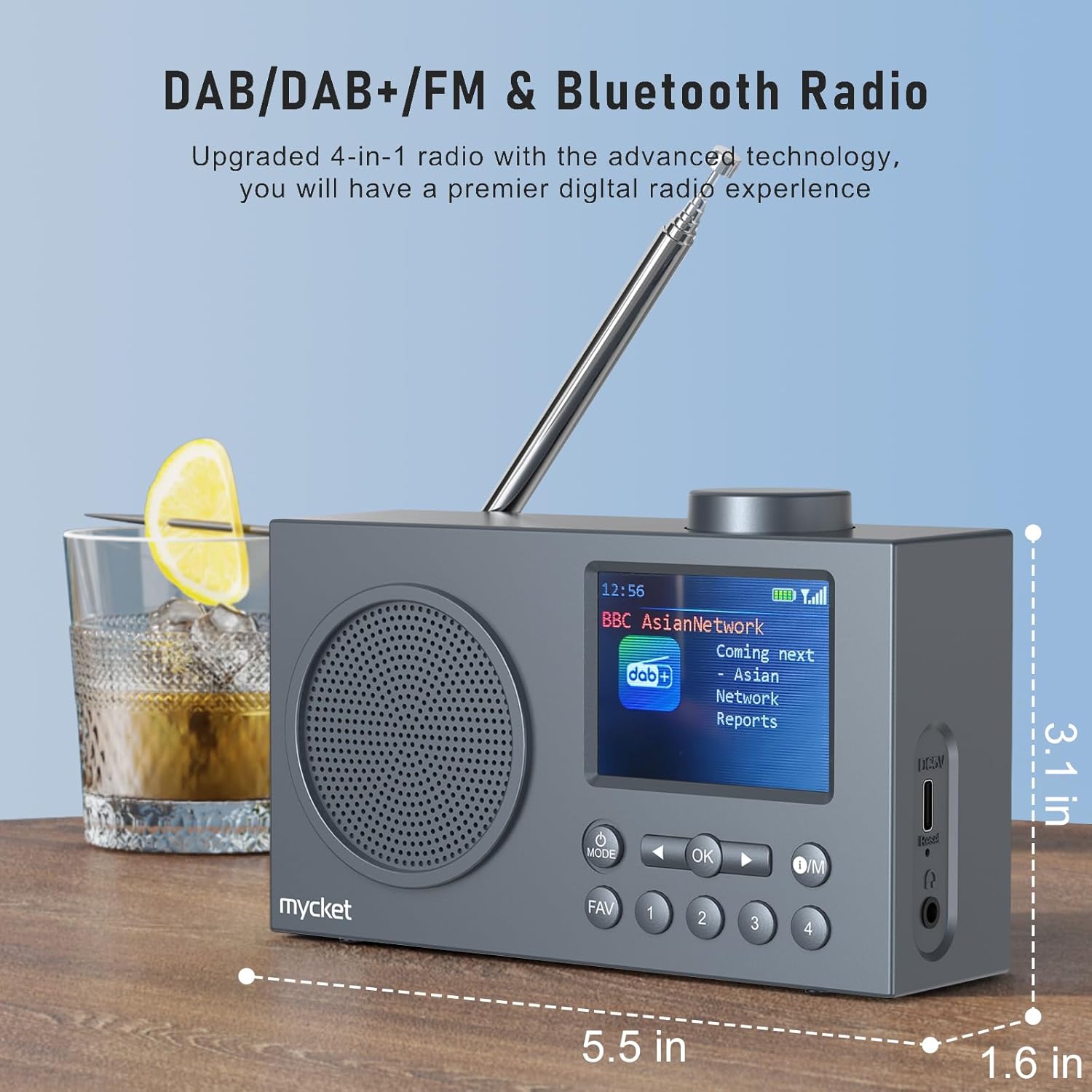
படம் 2: பக்கம் view of the Mycket D009 radio illustrating its compact dimensions: approximately 5.5 inches (length), 1.6 inches (width), and 3.1 inches (height). The image also highlights its DAB/DAB+/FM and Bluetooth capabilities.
- காட்சி: 2.4-inch TFT color display for station information, time, and settings.
- பேச்சாளர்: Integrated Hi-Fi speaker for audio output.
- தொலைநோக்கி ஆண்டெனா: உகந்த ரேடியோ சிக்னல் வரவேற்புக்காக.
- பயன்முறை பொத்தான்: Switches between DAB, FM, Bluetooth, USB, and AUX modes.
- சரி பொத்தான்: தேர்வுகளை உறுதிப்படுத்துகிறது அல்லது மெனுக்களில் நுழைகிறது.
- O/M பொத்தான்: Power On/Off and Menu access.
- FAV பட்டன்: Accesses favorite presets.
- எண் பொத்தான்கள் (1-4): Direct access to stored presets.
- வழிசெலுத்தல் பொத்தான்கள் (இடது/வலது): Navigates menus or tunes stations.
- தொகுதி நாப்: ஆடியோ ஒலியளவைச் சரிசெய்கிறது.
- DC 5V USB-C Port: உள் பேட்டரியை சார்ஜ் செய்வதற்கு.
- மீட்டமை பொத்தான்: Resets the device (use a thin object to press).
- 3.5 மிமீ ஹெட்ஃபோன் ஜாக்: தனிப்பட்ட முறையில் கேட்பதற்கு.
4 அமைவு
4.1 பேட்டரியை சார்ஜ் செய்தல்
The radio is equipped with a built-in 2200mAh lithium battery. Before first use, fully charge the device.
- Connect the provided USB charging cable to the DC 5V USB-C port on the side of the radio.
- USB கேபிளின் மறுமுனையை இணக்கமான USB பவர் அடாப்டருடன் (சேர்க்கப்படவில்லை) அல்லது கணினி USB போர்ட்டுடன் இணைக்கவும்.
- The charging indicator on the display will show the charging status. A full charge typically takes approximately 2.5 hours and provides up to 12 hours of playback time at 70% volume.

படம் 3: The Mycket D009 radio display showing a full battery indicator, emphasizing its long playback time on a single charge.
4.2 ஆண்டெனா சரிசெய்தல்
சிறந்த ரேடியோ வரவேற்புக்காக, தொலைநோக்கி ஆண்டெனாவை முழுமையாக நீட்டிக்கவும். சிறந்த சிக்னல் தரத்திற்காக அதன் நிலையை சரிசெய்யவும்.
4.3 ஆரம்ப பவர் ஆன்
அழுத்திப் பிடிக்கவும் O/M button to power on the radio. The display will light up, and the device will typically start in the last used mode or initiate a DAB scan if it's the first use.
5. இயக்க வழிமுறைகள்
5.1 மாறுதல் முறைகள்
அழுத்தவும் பயன்முறை button repeatedly to cycle through available modes: DAB, FM, Bluetooth, USB, and AUX.
5.2 DAB/DAB+ ரேடியோ செயல்பாடு
- இதைப் பயன்படுத்தி DAB பயன்முறைக்கு மாறவும் பயன்முறை பொத்தான்.
- The radio will automatically perform a full scan for available DAB/DAB+ stations upon first use or if no stations are found. To initiate a manual scan, press and hold the OK button, then select "Full Scan" from the menu.
- Once the scan is complete, use the navigation buttons (Left/Right) to browse through the list of available stations.
- அழுத்தவும் OK to select and listen to a station.

படம் 4: The Mycket D009 radio display showing a DAB station and highlighting the auto-scan and 40 preset features (20 DAB & 20 FM).
5.2.1 Storing DAB Presets
The radio supports up to 20 DAB presets.
- Tune to the desired DAB station.
- Press and hold one of the number buttons (1-4) அல்லது FAV button to save the current station to a preset slot. Follow the on-screen prompts to select a slot if using the FAV button.
- To recall a preset, briefly press the corresponding number button or the FAV button and select from the list.
5.3 FM வானொலி செயல்பாடு
- பயன்படுத்தி FM பயன்முறைக்கு மாறவும் பயன்முறை பொத்தான்.
- To auto-scan for FM stations, press and hold the OK button. The radio will scan and store available stations.
- To manually tune, use the navigation buttons (Left/Right) to adjust the frequency.
- அழுத்தவும் OK to confirm the station.
5.3.1 Storing FM Presets
The radio supports up to 20 FM presets, similar to DAB presets.
- விரும்பிய FM நிலையத்திற்கு டியூன் செய்யவும்.
- Press and hold one of the number buttons (1-4) அல்லது FAV button to save the current station.
- To recall a preset, briefly press the corresponding number button or the FAV button and select from the list.
5.4 Bluetooth 5.0 Pairing
Connect your smartphone or tablet to the radio via Bluetooth for wireless audio streaming.
- இதைப் பயன்படுத்தி புளூடூத் பயன்முறைக்கு மாறவும் பயன்முறை button. The radio display will show "Bluetooth Pairing" or similar.
- உங்கள் மொபைல் சாதனத்தில், புளூடூத்தை இயக்கி, கிடைக்கும் சாதனங்களைத் தேடவும்.
- Select "Mycket D009" from the list of devices.
- Once paired, the radio will confirm the connection, and you can play audio from your device through the radio.

படம் 5: The Mycket D009 radio displaying "Playing" in Bluetooth mode, next to a smartphone showing "Mycket D009" as a connected Bluetooth device.
5.5 USB பிளேபேக்
MP3 ஆடியோவை இயக்கவும் fileநேரடியாக USB டிரைவிலிருந்து.
- MP3 கொண்ட USB டிரைவைச் செருகவும் fileUSB போர்ட்டில் கள்.
- இதைப் பயன்படுத்தி USB பயன்முறைக்கு மாறவும் பயன்முறை பொத்தான்.
- ரேடியோ தானாகவே MP3 ஐக் கண்டறிந்து இயக்கத் தொடங்கும். files. Use the navigation buttons to skip tracks.
5.6 AUX-இன் இணைப்பு
Connect external audio devices using a 3.5mm audio cable (not included).
- Connect one end of a 3.5mm audio cable to the AUX-in port on the radio.
- மறுமுனையை உங்கள் வெளிப்புற சாதனத்தின் ஹெட்ஃபோன் ஜாக் அல்லது ஆடியோ வெளியீட்டில் இணைக்கவும்.
- இதைப் பயன்படுத்தி AUX பயன்முறைக்கு மாறவும் பயன்முறை பொத்தான்.
- உங்கள் வெளிப்புற சாதனத்திலிருந்து இயக்கத்தைக் கட்டுப்படுத்தவும்.
5.7 அலாரம் கடிகார செயல்பாடு
Set up to two independent alarms.
- அழுத்திப் பிடிக்கவும் O/M மெனுவை உள்ளிட பொத்தான்.
- Navigate to "Alarm Settings" using the navigation buttons and press OK.
- அலாரம் 1 அல்லது அலாரத்தைத் தேர்ந்தெடுக்கவும்.
- Set the alarm time, source (DAB, FM, or Buzzer), and volume.
- அழுத்துவதன் மூலம் அமைப்புகளை உறுதிப்படுத்தவும் OK.
5.8 ஸ்லீப் டைமர் செயல்பாடு
Set the radio to automatically turn off after a specified period.
- அழுத்திப் பிடிக்கவும் O/M மெனுவை உள்ளிட பொத்தான்.
- Navigate to "Sleep Timer" and press OK.
- Select the desired duration (e.g., 15, 30, 60 minutes).
- The radio will automatically power off after the set time.
5.9 ஹெட்ஃபோன் பயன்பாடு
Connect 3.5mm headphones to the headphone jack for private listening. The internal speaker will be muted automatically.
6. பராமரிப்பு
- சுத்தம்: வானொலியின் வெளிப்புறத்தை சுத்தம் செய்ய மென்மையான, உலர்ந்த துணியைப் பயன்படுத்தவும். சிராய்ப்பு கிளீனர்கள் அல்லது கரைப்பான்களைப் பயன்படுத்த வேண்டாம்.
- பேட்டரி பராமரிப்பு: பேட்டரி ஆயுளை நீட்டிக்க, அடிக்கடி பேட்டரியை முழுமையாக டிஸ்சார்ஜ் செய்வதைத் தவிர்க்கவும். நீண்ட நேரம் பயன்படுத்தப்படாவிட்டாலும், சாதனத்தை தொடர்ந்து சார்ஜ் செய்யவும்.
- சேமிப்பு: நேரடி சூரிய ஒளி மற்றும் அதிக வெப்பநிலையிலிருந்து விலகி குளிர்ந்த, உலர்ந்த இடத்தில் ரேடியோவை சேமிக்கவும்.
7. சரிசெய்தல்
| பிரச்சனை | சாத்தியமான காரணம் | தீர்வு |
|---|---|---|
| மின்சாரம் இல்லை / ரேடியோ இயக்கப்படவில்லை. | பேட்டரி தீர்ந்து விட்டது. | Charge the radio using the provided USB cable. |
| மோசமான வானொலி வரவேற்பு (DAB/FM). | Antenna not fully extended or positioned correctly. Weak signal area. | Fully extend and adjust the telescopic antenna. Try moving the radio to a different location. Perform a full scan for stations. |
| புளூடூத் இணைத்தல் தோல்வியடைகிறது. | Radio not in Bluetooth mode. Device too far. Bluetooth not enabled on external device. | Ensure the radio is in Bluetooth mode. Keep devices within range (approx. 10 meters). Enable Bluetooth on your external device and search for "Mycket D009". |
| ஸ்பீக்கரிலிருந்து சத்தம் இல்லை. | ஒலி மிகவும் குறைவாக உள்ளது. ஹெட்ஃபோன்கள் இணைக்கப்பட்டுள்ளன. | Increase the volume. Disconnect headphones if not intended for private listening. |
| USB பிளேபேக் வேலை செய்யவில்லை. | USB drive not inserted correctly. Incompatible file வடிவம். | USB டிரைவ் முழுமையாக செருகப்பட்டுள்ளதா என்பதை உறுதிப்படுத்தவும். fileகள் எம்பி 3 வடிவத்தில் உள்ளன. |
| சாதனம் செயல்படவில்லை. | தற்காலிக மென்பொருள் கோளாறு. | Press the reset button on the side of the radio using a thin object (e.g., a paperclip). |
8. விவரக்குறிப்புகள்
| பிராண்ட் | மிகவும் |
| மாதிரி | D009 |
| ரேடியோ முறைகள் | DAB, DAB+, FM |
| புளூடூத் பதிப்பு | 5.0 |
| பின்னணி விருப்பங்கள் | FM, DAB, DAB+, Bluetooth, USB MP3, AUX-in |
| ஸ்பீக்கர் வெளியீட்டு சக்தி | 5 வாட்ஸ் |
| பேச்சாளர் அலகு | 4 Ω10 W 78 mm x 1 |
| காட்சி | 2.4-இன்ச் டிஎஃப்டி கலர் எல்சிடி |
| முன்னமைவுகள் | 40 (20 DAB, 20 FM) |
| பேட்டரி வகை | Built-in Lithium-ion (18650) |
| பேட்டரி திறன் | 2200 mAh (3.7V - 2.2 Ah) |
| பின்னணி நேரம் | Approx. 8-9 hours at 70% volume (up to 12 hours) |
| சார்ஜிங் நேரம் | தோராயமாக 2.5 மணி நேரம் |
| ஆற்றல் உள்ளீடு | USB வழியாக 5V |
| பரிமாணங்கள் (தயாரிப்பு) | தோராயமாக 14 செ.மீ (L) x 4 செ.மீ (W) x 7.8 செ.மீ (H) |
| வெளியீடு இணைப்புகள் | 3.5மிமீ ஹெட்ஃபோன் ஜாக் |
9. உத்தரவாதம் மற்றும் ஆதரவு
Mycket products are designed for reliability and performance. This product comes with:
- 12-மாத உத்தரவாதம்: Enjoy a hassle-free 12-month warranty from the date of purchase.
- வாடிக்கையாளர் ஆதரவு: For any questions, issues, or support needs, please contact Mycket customer service.
உத்திரவாதக் கோரிக்கைகளுக்காக உங்கள் வாங்கியதற்கான ஆதாரத்தை வைத்துக் கொள்ளவும்.