
தயாரிப்பு முடிந்துவிட்டதுview
The JUOVI CLIP J1 is a compact and durable wireless portable Bluetooth speaker designed for versatile use. Featuring an integrated carabiner, IP68 waterproof and dustproof rating, and up to 24 hours of playtime, it delivers premium HD sound for both indoor and outdoor environments. This speaker also includes a unique Beat Mode and supports wireless stereo pairing for an immersive audio experience.
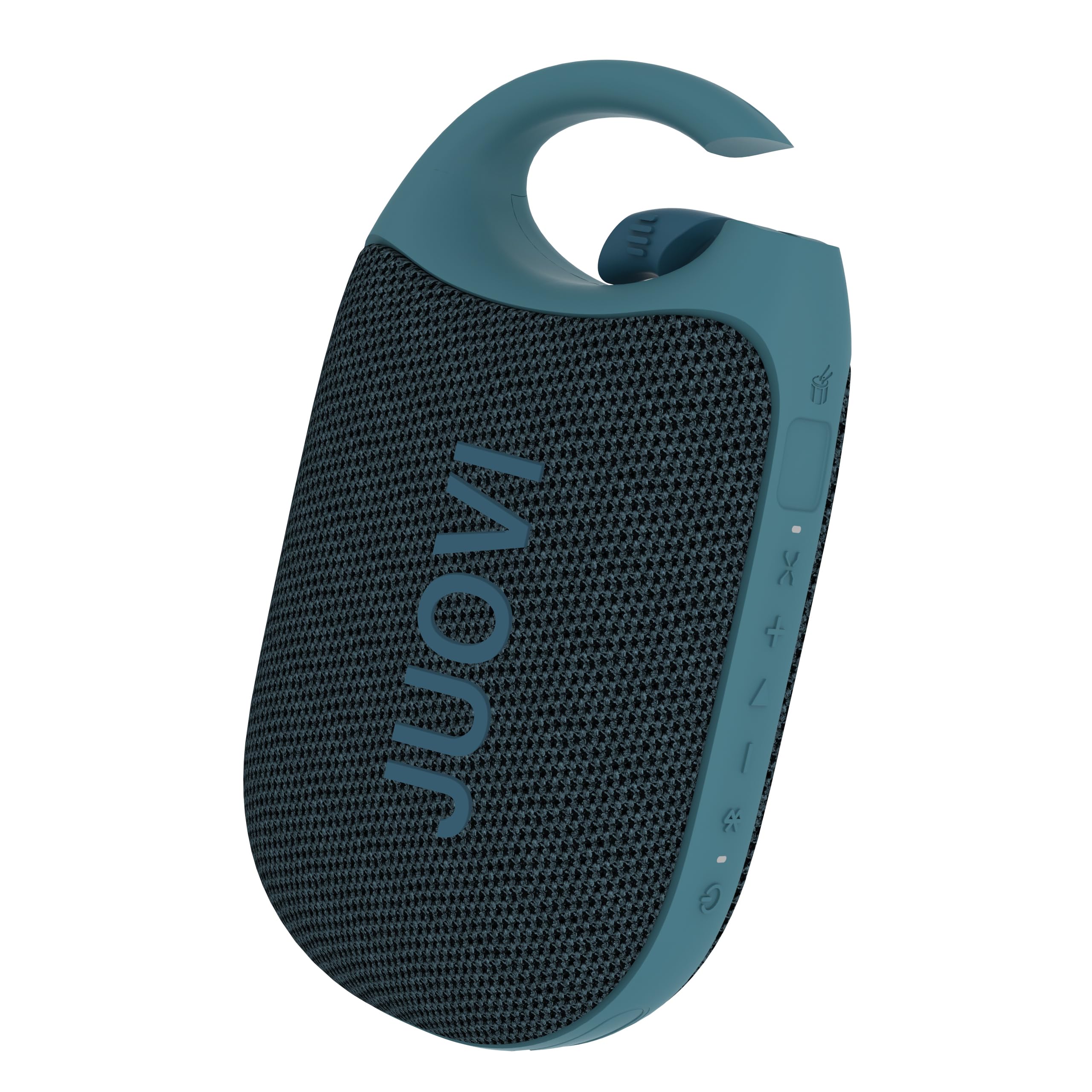
Figure 1: JUOVI CLIP J1 Bluetooth Speaker (Blue)
பெட்டியில் என்ன இருக்கிறது
- புளூடூத் ஸ்பீக்கர் x 1
- 3A Type-A to Type-C charging cable (30cm) x 1
- அறிவுறுத்தல் கையேடு x 1
அமைவு
1. சபாநாயகரிடம் கட்டணம் வசூலித்தல்
Before first use, fully charge the speaker using the provided USB-C charging cable. Connect the USB-A end to a compatible power adapter (not included) and the USB-C end to the speaker's charging port. The Power/Bluetooth indicator light will show charging status.

Figure 2: Speaker highlighting 24-hour playtime.
2. பவர் ஆன்/ஆஃப்
- பவர் ஆன் செய்ய: Press and hold the Power button (1) for 2 seconds. The Power/Bluetooth indicator (8) will light up.
- பவர் ஆஃப் செய்ய: Press and hold the Power button (1) for 2 seconds. The indicator light will turn off.
3. புளூடூத் இணைத்தல்
- Ensure the speaker is powered on and the Power/Bluetooth indicator (8) is blinking, indicating it's in pairing mode.
- உங்கள் சாதனத்தில் (ஸ்மார்ட்போன், டேப்லெட், முதலியன), புளூடூத்தை இயக்கி, கிடைக்கக்கூடிய சாதனங்களைத் தேடவும்.
- Select "JUOVI CLIP J1" from the list. The indicator light will turn solid blue once connected.
- The speaker has a wireless range of up to 10 meters (33 feet).
4. வயர்லெஸ் ஸ்டீரியோ இணைத்தல் (TWS)
To achieve powerful, multidimensional sound, you can connect two JUOVI CLIP J1 speakers together:
- இரண்டு ஸ்பீக்கர்களும் இயக்கப்பட்டிருப்பதையும், வேறு எந்த புளூடூத் சாதனத்துடனும் இணைக்கப்படவில்லை என்பதையும் உறுதிசெய்யவும்.
- On one speaker, press and hold the Bluetooth button (2) for 2 seconds to activate TWS pairing mode. The speaker will emit a tone.
- The two speakers will automatically search for and connect to each other. Once connected, one speaker will act as the primary (left channel) and the other as the secondary (right channel).
- Connect your device to the primary speaker via Bluetooth as described in step 3.

Figure 3: Two speakers connected for Wireless Stereo Pairing.
இயங்குகிறது
1. பொத்தான் செயல்பாடுகள்
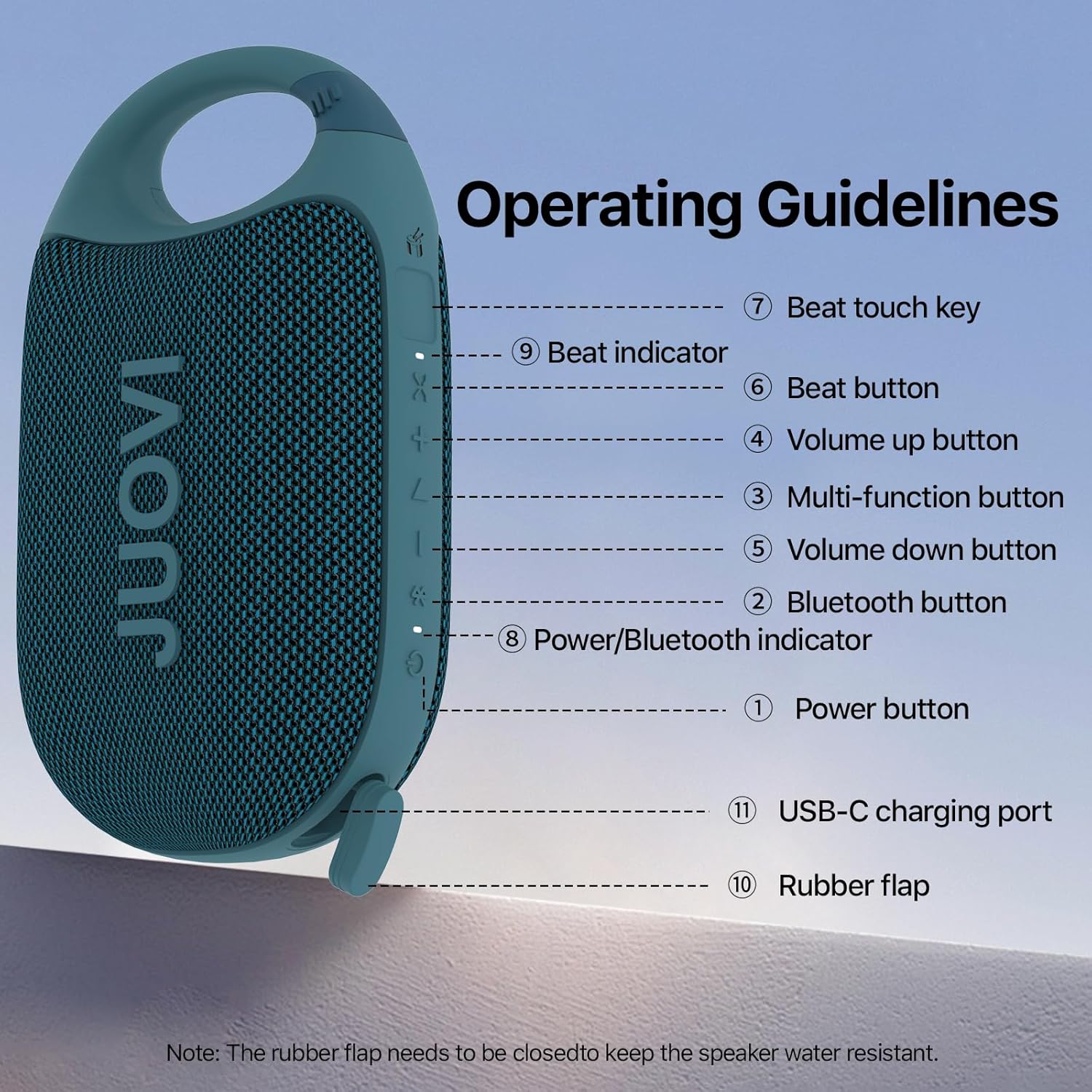
Figure 4: Operating Guidelines and Button Layout.
| பொத்தான்/செயல் | செயல்பாடு |
|---|---|
| Power Button (1) - Long Press (2s) | பவர் ஆன்/ஆஃப் |
| Bluetooth Button (2) - Short Press | Pairing Connected/Disconnected |
| Bluetooth Button (2) - Long Press (2s) | Stereo Link Function On/Off |
| Multi-function Button (3) - Short Press | மியூசிக் பிளே/இடைநிறுத்தம் |
| Multi-function Button (3) - Twice Press | அடுத்த பாடல் |
| Multi-function Button (3) - Third Press | முந்தைய பாடல் |
| Volume Up Button (4) - Short Press | ஒலியளவை அதிகரிக்கவும் |
| Volume Down Button (5) - Short Press | ஒலியளவைக் குறைக்கவும் |
| Beat Button (6) - Short Press | Beat On/Off |
| Beat Button (6) - Long Press (1s) | Beat Mode Switching |
| Beat Touch Key (7) | Activates Beat Sound |
2. Beat Mode and App Control
The JUOVI CLIP J1 features a unique Beat Mode that generates dynamic sound variations. You can sync beats to your music or create standalone rhythms. For enhanced customization, download the JUOVI GO app. The app allows you to:
- Access 20 high-fidelity instrument sounds.
- Freely layer sounds with beat modes.
- Customize your listening experience through the app's smart EQ, adjusting for crisp, mellow, rich, or personalized sound.

Figure 5: Customize sound and beats via the JUOVI GO app.
பராமரிப்பு
1. Waterproof and Dustproof Care
The speaker is IP68-rated, meaning it withstands splashes, submersion, and heavy rain. To maintain its waterproof integrity, ensure the rubber flap covering the USB-C charging port is securely closed at all times when not charging.

Figure 6: Speaker demonstrating IP68 waterproof capability.
2. சுத்தம் செய்தல்
ஸ்பீக்கரை மென்மையாக துடைக்கவும், டிamp துணி. கடுமையான இரசாயனங்கள் அல்லது சிராய்ப்பு கிளீனர்களைப் பயன்படுத்த வேண்டாம்.
3. சேமிப்பு
Store the speaker in a cool, dry place away from direct sunlight and extreme temperatures. If storing for an extended period, charge the battery periodically to prolong its lifespan.
சரிசெய்தல்
- Speaker not powering on: பேட்டரி சார்ஜ் செய்யப்பட்டுள்ளதா என்பதை உறுதிப்படுத்திக் கொள்ளுங்கள். USB-C கேபிளைப் பயன்படுத்தி ஒரு மின் மூலத்துடன் இணைக்கவும்.
- புளூடூத் வழியாக இணைக்க முடியவில்லை: Make sure the speaker is in pairing mode (blinking indicator). Check that Bluetooth is enabled on your device and it's within 10 meters of the speaker. Try restarting both the speaker and your device.
- ஒலி இல்லை: Check the volume levels on both the speaker and your connected device. Ensure the speaker is successfully paired.
- மோசமான ஒலி தரம்: குறுக்கீட்டைக் குறைக்க ஸ்பீக்கரை உங்கள் சாதனத்திற்கு அருகில் நகர்த்தவும். ஸ்பீக்கருக்கும் உங்கள் சாதனத்திற்கும் இடையில் எந்த தடைகளும் இல்லை என்பதை உறுதிப்படுத்தவும்.
- Stereo pairing not working: Ensure both speakers are not connected to any other device before attempting TWS pairing. Follow the TWS pairing instructions carefully.
விவரக்குறிப்புகள்
| அம்சம் | விவரம் |
|---|---|
| மாதிரி பெயர் | J6301 |
| பிராண்ட் | ஜூவோவி |
| இணைப்பு தொழில்நுட்பம் | புளூடூத் |
| வயர்லெஸ் கம்யூனிகேஷன் டெக்னாலஜி | புளூடூத் |
| புளூடூத் வரம்பு | 10 மீட்டர் |
| பேச்சாளர் வகை | வெளிப்புற & உட்புற |
| சிறப்பு அம்சங்கள் | Dustproof, Portable, Shockproof, Stereo Pairing, Waterproof |
| நீர் எதிர்ப்பு நிலை | நீர்ப்புகா (IP68) |
| சக்தி ஆதாரம் | பேட்டரி மூலம் இயங்கும் |
| பேட்டரி திறன் | 1800 மில்லிamp மணிநேரம் |
| சார்ஜிங் நேரம் | 3.5 மணிநேரம் |
| விளையாட்டு நேரம் | 24 மணிநேரம் வரை |
| பேச்சாளர் அதிகபட்ச வெளியீட்டு சக்தி | 8 வாட்ஸ் |
| ஆடியோ வெளியீட்டு முறை | Mono (Stereo with TWS) |
| சிக்னல்-டு-சத்தம் விகிதம் | 90 டி.பி |
| அதிர்வெண் பதில் | 20 KHz |
| பொருளின் எடை | 250.7 கிராம் (8.8 அவுன்ஸ்) |
| தயாரிப்பு பரிமாணங்கள் | 5.43"டி x 3.17"அடி x 2.07"ஹெட் |
| பொருள் | பிளாஸ்டிக் |
| கட்டுப்பாட்டு முறை | பயன்பாடு, தொடுதல் |
உத்தரவாதம் & ஆதரவு
This product comes with a Limited Warranty. For detailed warranty information or technical support, please refer to the contact information provided in the packaging or visit the official JUOVI webதளம்.
அதிகாரப்பூர்வ தயாரிப்பு வீடியோ
வீடியோ 1: அதிகாரப்பூர்வ தயாரிப்பு முடிந்ததுview of the JUOVI Clip Wireless Portable Bluetooth Speaker, showcasing அதன் அம்சங்கள் மற்றும் வடிவமைப்பு.