
Gravity C26
Gravity C26 Smartwatch User Manual
மாதிரி: சி 26
அறிமுகம்
Welcome to the Gravity C26 Smartwatch user manual. This guide provides detailed instructions on how to set up, operate, and maintain your new smartwatch. The Gravity C26 features a 1.96-inch AMOLED display, Bluetooth calling, over 100 sports modes, comprehensive health monitoring, and an AI voice assistant. Its robust design ensures durability for various environments.
தொகுப்பு உள்ளடக்கங்கள்
பின்வரும் உருப்படிகளுக்கு பெட்டியை சரிபார்க்கவும்:
- Gravity C26 Smartwatch
- சார்ஜிங் கேபிள்
- பயனர் கையேடு (இந்த ஆவணம்)
தயாரிப்பு முடிந்துவிட்டதுview
Familiarize yourself with the components and key features of your Gravity C26 Smartwatch.

படம்: முன் view of the Gravity C26 Smartwatch, showcasing its square AMOLED display, two side buttons labeled "POWER" and "SPORT", and a durable black strap.
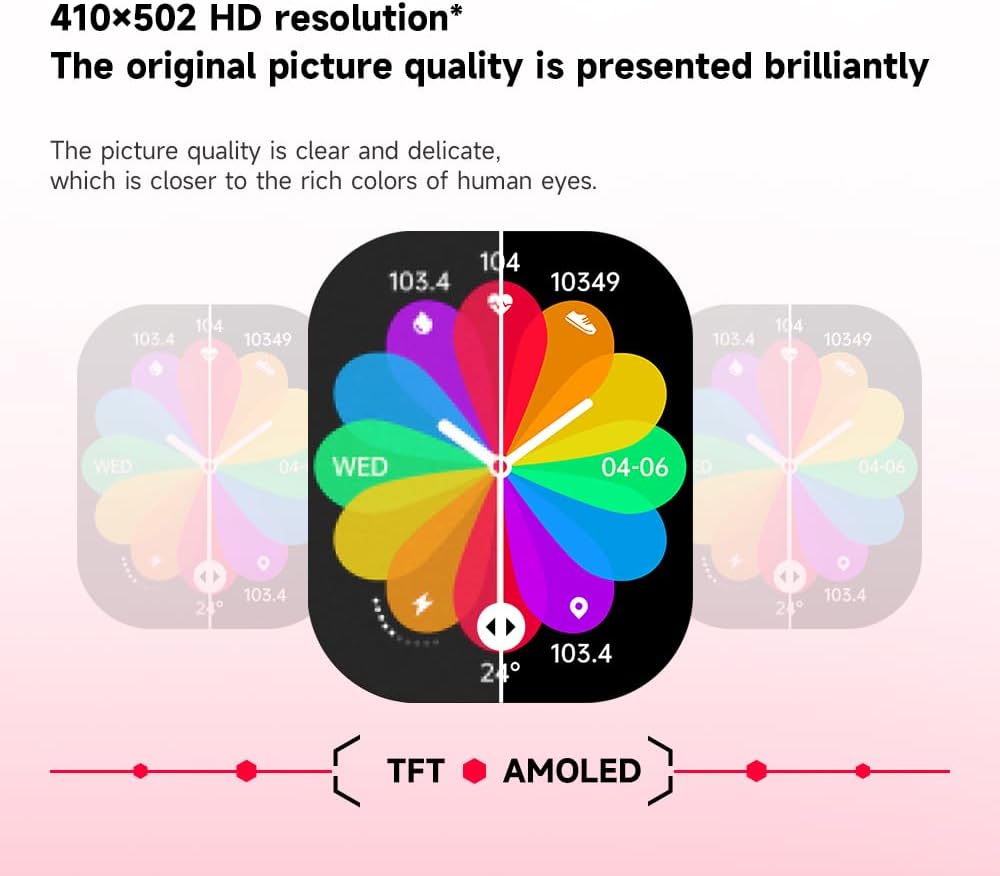
படம்: Illustration demonstrating the superior visual quality of the 410x502 HD AMOLED display compared to a TFT screen, highlighting vibrant colors and clarity.

படம்: நெருக்கமான காட்சி view of the 1.96-inch AMOLED screen, emphasizing its explosion-proof and drop-proof tempered glass, thermal shock resistance, anti-corrosion, and anti-scratch properties.
அமைவு
1. ஸ்மார்ட்வாட்சை சார்ஜ் செய்தல்
Before first use, fully charge your Gravity C26 Smartwatch. Connect the magnetic charging cable to the charging points on the back of the watch and plug the USB end into a power adapter (not included) or a computer's USB port.
- முழு சார்ஜ் பொதுவாக தோராயமாக 2 மணிநேரம் ஆகும்.
- The watch features a 350mAh battery, providing up to 25 days of standby time.

படம்: Visual representation of the Gravity C26 Smartwatch's 350mAh battery, highlighting intelligent battery life upgrade, over-temperature protection, overvoltage protection, and intelligent optimization of application scenarios.
2. Pairing with Your Smartphone (FitCloudPro App)
To unlock the full potential of your Gravity C26, download and install the FitCloudPro app on your iOS or Android smartphone.
- பயன்பாட்டைப் பதிவிறக்கவும்: தேடுங்கள் "FitCloudPro" in the Apple App Store (for iOS) or Google Play Store (for Android), or scan the QR code provided in the watch's quick start guide.
- கணக்கை உருவாக்கவும்: FitCloudPro பயன்பாட்டைத் திறந்து, திரையில் உள்ள வழிமுறைகளைப் பின்பற்றி ஒரு கணக்கை உருவாக்கவும் அல்லது உள்நுழையவும்.
- புளூடூத்தை இயக்கு: உங்கள் ஸ்மார்ட்போனில் புளூடூத் இயக்கப்பட்டுள்ளதை உறுதிசெய்யவும்.
- சாதனத்தைச் சேர்: In the FitCloudPro app, navigate to the "Device" or "Add Device" section. The app will search for nearby smartwatches. Select "Gravity C26" from the list.
- இணைவதை உறுதிப்படுத்தவும்: A pairing request will appear on both your phone and the smartwatch. Confirm the pairing on both devices.
- அனுமதிகளை வழங்கவும்: பயன்பாடு சரியாகச் செயல்பட தேவையான அனுமதிகளை (எ.கா. அறிவிப்புகள், இருப்பிடம், தொடர்புகள்) அனுமதிக்கவும்.
Once paired, the watch will synchronize data with your phone, and you can customize settings, view health data, and manage notifications through the app.
இயக்க வழிமுறைகள்
1. இடைமுகத்தை வழிநடத்துதல்
The Gravity C26 features a touch-sensitive AMOLED display and two physical buttons for navigation.
- தொடுதிரை: Swipe left/right, up/down to navigate through menus and widgets. Tap to select an option.
- "POWER" Button (Top Right): திரையை எழுப்ப/தூங்க அழுத்தவும், வாட்ச் முகப்பிற்குத் திரும்பவும் அல்லது பவர் விருப்பங்களை அணுக நீண்ட நேரம் அழுத்தவும்.
- "SPORT" Button (Bottom Right): Press to quickly access the sports modes menu.

படம்: Display of four different menu styles available on the Gravity C26 Smartwatch, including grid views and list views for accessing various functions like settings, dialer, contacts, call records, and voice assistant.
2. அழைப்புகளைச் செய்தல் மற்றும் பெறுதல்
With Bluetooth calling enabled, you can manage calls directly from your wrist.
- அழைப்பைச் செய்தல்: அழைப்பைத் தொடங்க உங்கள் கடிகாரத்தில் உள்ள டயல் பேடை அல்லது தொடர்புகள் பட்டியலை அணுகவும்.
- அழைப்பைப் பெறுதல்: அழைப்பு வரும்போது, வாட்ச் அழைப்பாளர் ஐடியைக் காண்பிக்கும். பதிலளிக்க பச்சை ஐகானையோ அல்லது நிராகரிக்க சிவப்பு ஐகானையோ தட்டவும்.

படம்: Depiction of the Gravity C26 Smartwatch's Bluetooth calling feature showing an incoming call screen and message notifications. Also illustrates the AI voice assistant responding to commands like "How is the weather tomorrow?" and "Call my mom."
3. Using AI Voice Assistant
The built-in AI voice assistant allows for hands-free control. Simply raise your hand to activate the voice assistant and speak your commands.
- செயல்படுத்தல்: Raise your wrist or use a specific gesture/button press (refer to app settings for customization).
- கட்டளைகள்: Ask about weather, play music, set alarms, make calls, and more.
4. Tracking Sports Modes
The Gravity C26 supports over 100 sports modes for accurate workout tracking.
- அணுகல் முறைகள்: Press the "SPORT" button or navigate through the menu to find the sports modes.
- ஒரு பயிற்சியைத் தொடங்குதல்: Select your desired activity (e.g., running, cycling, walking) and tap to start. The watch will track duration, heart rate, calories burned, and other relevant metrics.
- ஒரு உடற்பயிற்சியை முடித்தல்: Swipe or press the appropriate button to pause or end the workout. Data will be synced to the FitCloudPro app.

படம்: Illustration showing the Gravity C26 Smartwatch tracking various sports activities such as walking, running, climbing, and cycling, with real-time data display for duration, heart rate, and calories.
5. Health Monitoring (Heart Rate, Sleep)
The smartwatch continuously monitors your health metrics.
- இதயத் துடிப்பு: The watch automatically monitors your heart rate throughout the day. You can also initiate a manual measurement from the heart rate widget.
- தூக்க கண்காணிப்பு: Wear the watch to bed for automatic sleep analysis, including sleep stages (deep, light, REM) and duration.
- நீரேற்றம் நினைவூட்டல்கள்: Set up hydration reminders in the FitCloudPro app to ensure you stay hydrated.
6. வாட்ச் முகப்புகளைத் தனிப்பயனாக்குதல்
Personalize your smartwatch with over 200 cool visual watch faces available through the FitCloudPro app.
- Changing Faces: Open the FitCloudPro app, navigate to the watch face section, and select your preferred design. You can also long-press the watch face on the device to quickly switch between pre-loaded faces.
- Custom Faces: Some watch faces allow for customization with your own photos.

படம்: A collage of various watch faces available for the Gravity C26 Smartwatch, demonstrating the wide range of visual styles and customization options.
பராமரிப்பு
1. சுத்தம் செய்தல்
- மென்மையான, பஞ்சு இல்லாத துணியால் வாட்ச் திரையையும் உடலையும் துடைக்கவும்.
- பட்டைக்கு, விளம்பரத்தைப் பயன்படுத்தவும்amp cloth and mild soap if necessary, then rinse thoroughly and dry completely before wearing.
- கடுமையான இரசாயனங்கள் அல்லது சிராய்ப்புப் பொருட்களைப் பயன்படுத்துவதைத் தவிர்க்கவும்.
2. நீர் எதிர்ப்பு
The Gravity C26 is 1 ATM waterproof, meaning it can withstand splashes, rain, and brief immersion in shallow water. It is suitable for daily use and light water activities.
- Do not use the watch for diving, hot showers, or saunas, as steam and hot water can compromise the seals.
- தண்ணீருக்கு, குறிப்பாக உப்புநீருக்கு ஆளான பிறகு, கடிகாரத்தை புதிய தண்ணீரில் கழுவி நன்கு உலர வைக்கவும்.
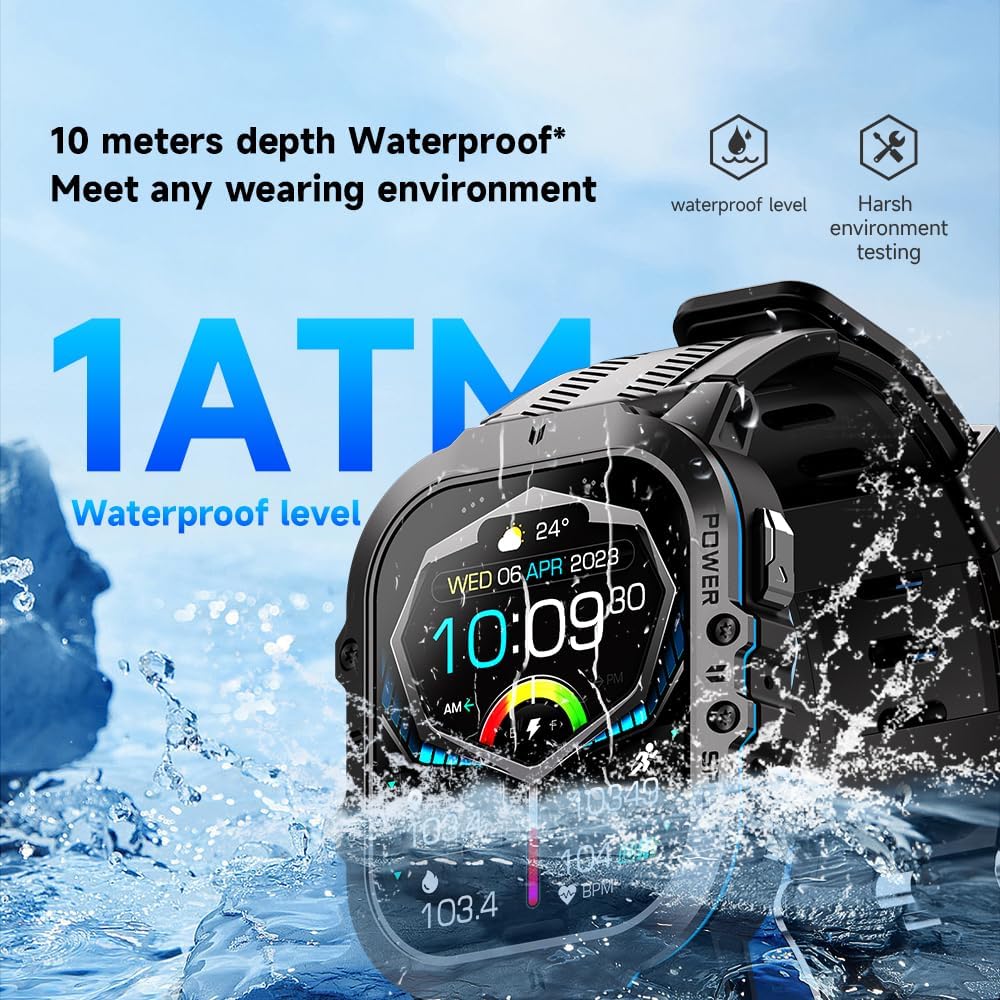
படம்: The Gravity C26 Smartwatch partially submerged in water, illustrating its 1 ATM waterproof rating and ability to meet various wearing environments.
3. பேட்டரி பராமரிப்பு
- Avoid extreme temperatures (below -24°C or above 60°C) as they can affect battery life and performance.
- பேட்டரியின் ஆரோக்கியத்தைப் பராமரிக்க, பயன்பாட்டில் இல்லாவிட்டாலும், கடிகாரத்தை தொடர்ந்து சார்ஜ் செய்யவும்.
சரிசெய்தல்
| பிரச்சனை | சாத்தியமான தீர்வு |
|---|---|
| வாட்ச் ஆன் ஆகவில்லை. | கடிகாரம் முழுமையாக சார்ஜ் செய்யப்பட்டுள்ளதா என்பதை உறுதிப்படுத்திக் கொள்ளுங்கள். அதை சார்ஜிங் கேபிள் மற்றும் ஒரு மின் மூலத்துடன் குறைந்தது 30 நிமிடங்களுக்கு இணைக்கவும். |
| ஸ்மார்ட்போனுடன் இணைக்க முடியாது |
|
| அறிவிப்புகள் பெறப்படவில்லை |
|
| தவறான சுகாதாரத் தரவு |
|
| குறுகிய பேட்டரி ஆயுள் |
|
விவரக்குறிப்புகள்
| அம்சம் | விவரம் |
|---|---|
| மாதிரி | C26 |
| காட்சி | 1.96-இன்ச் AMOLED, 410x502 தெளிவுத்திறன் |
| பேட்டரி திறன் | 350 mAh |
| காத்திருப்பு நேரம் | 25 நாட்கள் வரை |
| நீர் எதிர்ப்பு | 1 ATM (suitable for splashes, rain, brief immersion) |
| இணைப்பு | புளூடூத் |
| இணக்கத்தன்மை | iOS and Android (via FitCloudPro app) |
| இயக்க வெப்பநிலை | -24°C முதல் 60°C வரை |
| பொருளின் எடை | 1 பவுண்டுகள் |
| பரிமாணங்கள் | 9 x 4 x 1 அங்குலங்கள் (தொகுப்பு பரிமாணங்கள்) |
உத்தரவாதம் மற்றும் ஆதரவு
For warranty information and technical support, please refer to the official Gravity webதளத்தில் அல்லது உங்கள் சில்லறை விற்பனையாளரைத் தொடர்பு கொள்ளவும். வாங்கியதற்கான சான்றாக உங்கள் கொள்முதல் ரசீதை வைத்திருங்கள்.
For further assistance, you may also refer to the FitCloudPro app's help section or frequently asked questions.
Ask a question about this manual
Ask about setup, troubleshooting, compatibility, parts, safety, or missing instructions. Manuals+ will review the question and use this page’s manual context to help answer it.