
அறிமுகம்
Thank you for choosing the DOYO 270 Degree Wireless Gaming Steering Wheel with Pedals. This manual provides essential information for setting up, operating, and maintaining your racing wheel. Please read these instructions carefully before use to ensure optimal performance and longevity of your device.
தயாரிப்பு முடிந்துவிட்டதுview
The DOYO Gaming Steering Wheel is designed for a realistic racing experience across multiple platforms. It features a 270-degree rotation, dual-vibration motors, and includes a set of pedals for acceleration and braking.

படம் 1: முன் view of the DOYO Wireless Gaming Steering Wheel with Pedals.
கட்டுப்பாடுகள் மற்றும் குறிகாட்டிகள்

படம் 2: Detailed diagram of the steering wheel's buttons, D-Pad, triggers, and indicators.
- பட்டனைத் தேர்ந்தெடு: Used for various in-game selections.
- டி-பேட்: Directional input for menu navigation and in-game controls.
- A/B/X/Y பொத்தான்கள்: நிலையான செயல் பொத்தான்கள்.
- இடைநிறுத்தம்/தொடக்க பொத்தான்: For pausing games or starting new sessions.
- முகப்பு பொத்தான்: Returns to the system's home screen.
- ZR/ZL Triggers: Analog triggers for acceleration and braking (functionality may vary by platform, e.g., ZR = A, ZL = B on Switch).
- M Indicator: Settings indicator.
- Indicators 1/2/3/4: Display current dead zone and sensitivity settings.
அமைவு
Follow these steps to set up your DOYO Gaming Steering Wheel.
சாதனத்தை இயக்குதல்
- The steering wheel requires 3 AAA batteries (not included) for operation. Insert them into the battery compartment located on the underside of the unit, ensuring correct polarity.
ஸ்டீயரிங் வீலை ஏற்றுதல்
The steering wheel features a stable fixture clamp design compatible with various desktop thicknesses.

படம் 3: சரிசெய்யக்கூடிய clamp mechanism for securing the steering wheel to a surface.
- Place the steering wheel on a stable, flat surface.
- cl ஐ சரிசெய்யவும்amp screw to fit your desktop thickness (compatible with thicknesses between 3mm and 49mm).
- cl ஐ இறுக்கவும்amp securely to prevent movement during use.
Connecting the Pedals
- Connect the pedal unit cable to the designated port on the steering wheel.
பிளாட்ஃபார்ம் இணைப்பு
The steering wheel supports both wireless Bluetooth and wired connections.
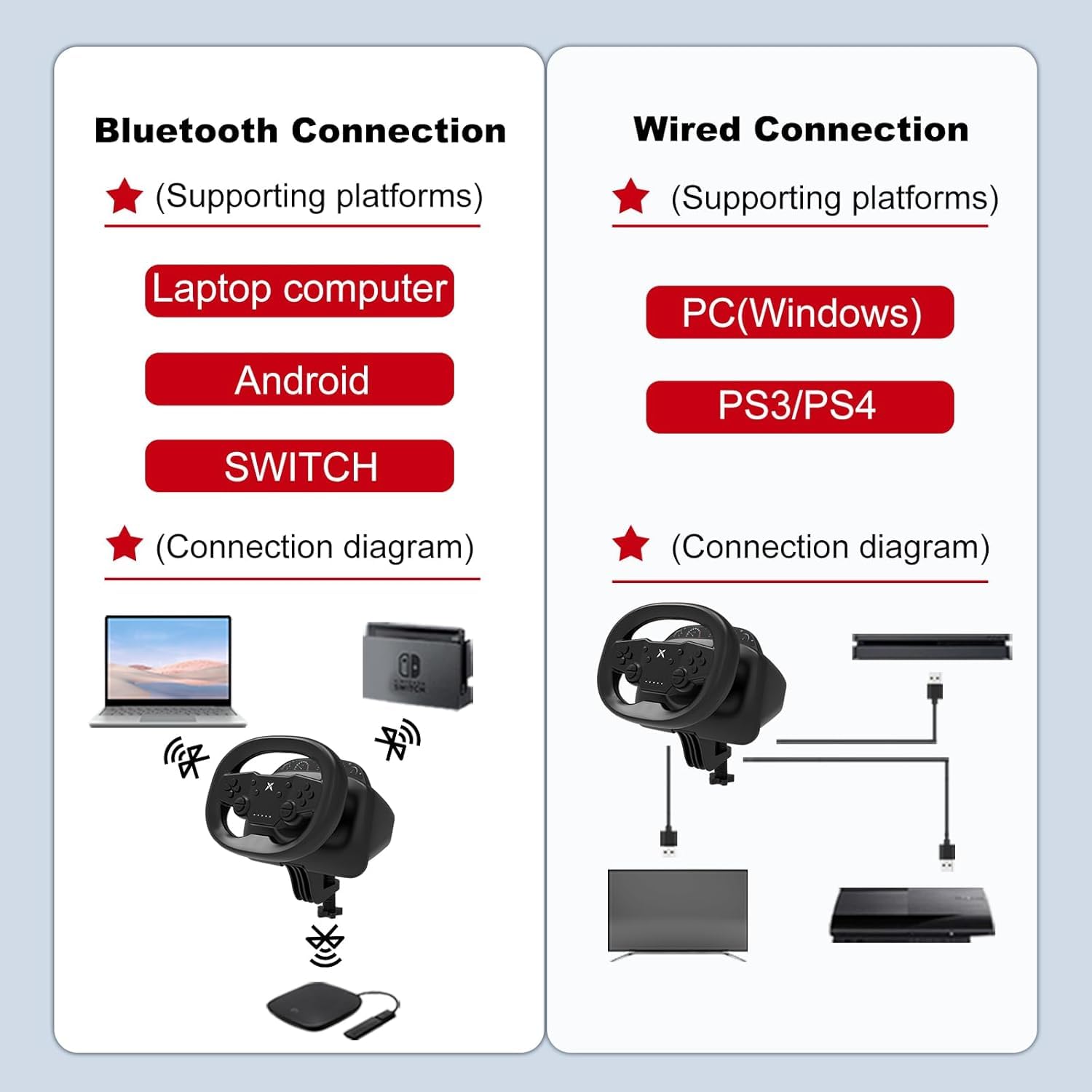
படம் 4: Connection diagrams for wireless (Bluetooth) and wired setups.
Wireless Bluetooth Connection (Switch, PC, iOS, Android)
- Ensure the steering wheel has sufficient battery power.
- Activate Bluetooth on your device (Nintendo Switch, PC, iOS/Android mobile phone or tablet).
- Put the steering wheel into pairing mode (refer to the device's specific pairing instructions, usually by holding a specific button combination).
- Select the steering wheel from the list of available Bluetooth devices on your platform to pair.

படம் 5: Wireless connection to a mobile device, enhancing mobile gaming.
Wired Connection (PC, PS3, PS4)
- Connect the steering wheel directly to your PC, PS3, or PS4 console using a USB cable.
- The system should automatically detect the device. Follow any on-screen prompts for driver installation if necessary (for PC).
இயக்க வழிமுறைகள்
Once connected, you can begin using your DOYO Gaming Steering Wheel for an immersive racing experience.
Steering and Rotation
The steering wheel offers a 270-degree rotation for precise control in racing games.

படம் 6: The steering wheel supports 135 degrees of rotation to both the left and right, totaling 270 degrees.
அதிர்வு கருத்து
- The dual-vibration motors provide realistic feedback during gameplay, enhancing immersion. Vibration intensity may be adjustable in game settings or through specific wheel functions.
Dead Zone and Sensitivity Adjustment
- The steering wheel allows for adjustment of dead zone and sensitivity settings. Refer to the indicators (1/2/3/4) and the 'M' indicator for current settings. Specific adjustment methods are typically detailed in the quick start guide or product packaging.
Platform-Specific Features
- நிண்டெண்டோ சுவிட்ச்: Optimized for games like Mario Kart, offering adjustable vibration feedback and easy screenshot capture.
- பிசி: Customizable settings for accuracy and enhanced control in PC racing titles.
பராமரிப்பு
Proper maintenance ensures the longevity and performance of your steering wheel.
- சுத்தம்: Use a soft, dry cloth to wipe down the steering wheel and pedals. Avoid using harsh chemicals or abrasive cleaners.
- சேமிப்பு: நேரடி சூரிய ஒளி மற்றும் தீவிர வெப்பநிலையிலிருந்து விலகி, குளிர்ந்த, உலர்ந்த இடத்தில் சாதனத்தை சேமிக்கவும்.
- பேட்டரி பராமரிப்பு: If the device will not be used for an extended period, remove the AAA batteries to prevent leakage.
- கேபிள் மேலாண்மை: சேதத்தைத் தடுக்க கேபிள்களில் கூர்மையான வளைவுகள் அல்லது கின்க்ஸைத் தவிர்க்கவும்.
சரிசெய்தல்
If you encounter issues with your DOYO Gaming Steering Wheel, refer to the following common solutions.
- சாதனம் இயங்கவில்லை:
- Ensure fresh AAA batteries are correctly inserted with proper polarity.
- Check if the power button (if applicable) is pressed.
- Connection Issues (Wireless):
- Verify Bluetooth is enabled on your gaming platform.
- Ensure the steering wheel is in pairing mode.
- Move the steering wheel closer to the gaming platform to reduce interference.
- Remove any other active Bluetooth devices that might cause interference.
- Try restarting both the steering wheel and the gaming platform.
- Connection Issues (Wired):
- Ensure the USB cable is securely connected to both the steering wheel and the gaming platform.
- Try a different USB port on your console or PC.
- வேறு USB கேபிள் கிடைத்தால் அதைப் பயன்படுத்தி சோதிக்கவும்.
- அதிர்வு கருத்து இல்லை:
- அதிர்வு பின்னூட்டம் இயக்கப்பட்டுள்ளதா என்பதை உறுதிப்படுத்த, விளையாட்டு அமைப்புகளைச் சரிபார்க்கவும்.
- Verify that the game supports vibration functionality.
- Steering Input Not Responding:
- Recalibrate the steering wheel if your platform offers this option.
- Ensure the device is correctly recognized by the system.
இந்தப் படிகள் சிக்கலைத் தீர்க்கவில்லை என்றால், வாடிக்கையாளர் ஆதரவைத் தொடர்பு கொள்ளவும்.
விவரக்குறிப்புகள்
| பிராண்ட் | DOYO |
| மாதிரி எண் | B0DXPJZ396 |
| இணக்கமான சாதனங்கள் | Android, Nintendo Switch, PC, PlayStation 3, PlayStation 4, iOS Mobile Phones |
| கட்டுப்படுத்தி வகை | Steering Wheel, Pedals |
| இணைப்பு தொழில்நுட்பம் | Bluetooth (Bluetooth 5.0) |
| கூடுதல் அம்சங்கள் | Ergonomic Design, Multi-use, Wireless, Dual-Vibration Motors, 270-Degree Rotation |
| சக்தி ஆதாரம் | Battery Powered (3 AAA batteries, not included) |
| பொருளின் எடை | 2.04 கிலோகிராம் |
| நிறம் | கருப்பு |
உத்தரவாதம் மற்றும் ஆதரவு
DOYO is committed to providing a smooth and enjoyable gaming experience. For any questions, technical assistance, or warranty inquiries, please contact our dedicated customer support team.
- வாடிக்கையாளர் ஆதரவு: Refer to the contact information provided with your product packaging or visit the official DOYO webஆதரவு விருப்பங்களுக்கான தளம்.
- உத்தரவாதத் தகவல்: Specific warranty terms and conditions may vary by region and retailer. Please retain your proof of purchase for warranty claims. Contact customer support for detailed warranty information.