
1. அறிமுகம்
This manual provides essential information for the safe and efficient use of your Motorola Razr 60 Ultra smartphone. Please read this guide thoroughly before operating your device to ensure optimal performance and longevity. The Motorola Razr 60 Ultra is a foldable smartphone designed for advanced mobile computing and communication.
2. பெட்டியில் என்ன இருக்கிறது
உங்கள் தயாரிப்பு பேக்கேஜிங்கில் அனைத்து பொருட்களும் இருப்பதை உறுதிசெய்யவும்:
- Motorola Razr 60 Ultra Smartphone
- USB கேபிள்
- தொலைபேசி பெட்டி
- சிம் எஜெக்டர் கருவி
3. சாதனம் முடிந்ததுview
The Motorola Razr 60 Ultra features an iconic foldable design with premium materials and advanced technology.
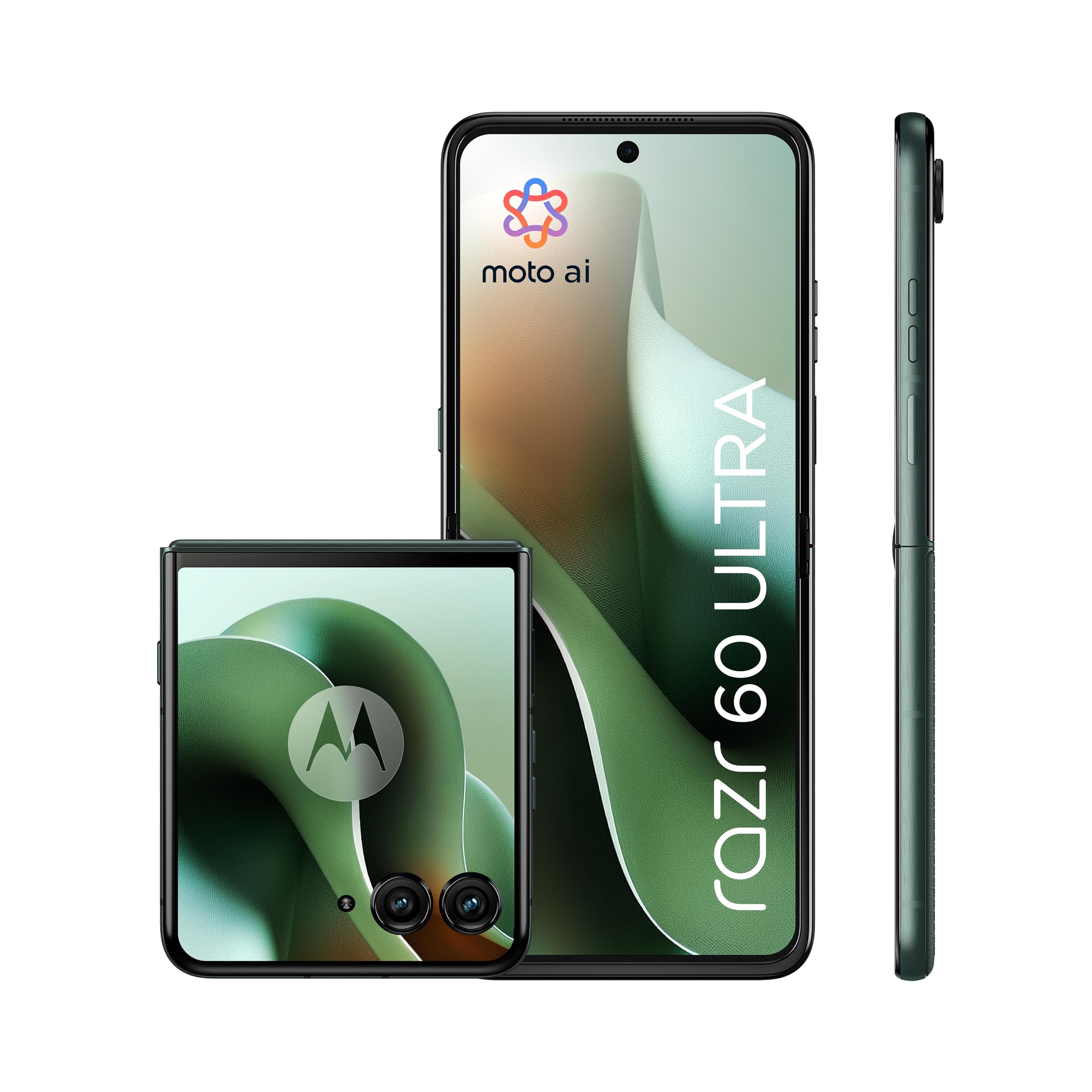
Figure 3.1: Motorola Razr 60 Ultra, folded view.
3.1 காட்சிகள்
- வெளிப்புற காட்சி: A 4.0-inch pOLED display with up to 165Hz refresh rate, allowing access to functions without unfolding the phone.
- Internal Display: A 7.0-inch Super HD pOLED display with 165Hz refresh rate, Dolby Vision, and HDR10+ for an immersive visual experience.

Figure 3.2: External display functionality.

Figure 3.3: Internal display view.
3.2 வடிவமைப்பு மற்றும் ஆயுள்
The device features a high-quality Alcantara finish and a durable titanium hinge. It is rated IP48 for dust and water resistance.

Figure 3.4: Design elements and durability features.
4 அமைவு
4.1 சிம் கார்டைச் செருகுதல்
- சாதனத்தின் பக்கத்தில் சிம் கார்டு ட்ரேயைக் கண்டறியவும்.
- தட்டுக்கு அடுத்துள்ள சிறிய துளைக்குள் சிம் எஜெக்டர் கருவியைச் செருகி, தட்டு வெளியே வரும் வரை மெதுவாக அழுத்தவும்.
- Place your Nano SIM card(s) into the tray with the gold contacts facing down. This device supports Dual SIM.
- தட்டில் அது சரியான இடத்தில் கிளிக் ஆகும் வரை கவனமாக ஸ்லாட்டுக்குள் தள்ளவும்.
4.2 ஆரம்ப பவர்-ஆன் மற்றும் அமைப்பு
- மோட்டோரோலா லோகோ தோன்றும் வரை பவர் பட்டனை அழுத்திப் பிடிக்கவும்.
- உங்கள் மொழியைத் தேர்ந்தெடுக்க, வைஃபை நெட்வொர்க்குடன் இணைக்க மற்றும் உங்கள் Google கணக்கை அமைக்க, திரையில் தோன்றும் வழிமுறைகளைப் பின்பற்றவும்.
- You will be guided through setting up security features such as fingerprint recognition and a screen lock (PIN, pattern, or password).
5. உங்கள் சாதனத்தை இயக்குதல்
5.1 அடிப்படை வழிசெலுத்தல்
- விரிதல்/மடித்தல்: Gently unfold the device to access the main internal display. Fold it to use the external display for quick interactions.
- External Display Usage: The 4.0-inch external display allows you to check notifications, control media, take quick photos, and interact with certain apps without opening the phone.
5.2 Moto AI Features
Your Motorola Razr 60 Ultra is enhanced with Moto AI, offering intelligent assistance and optimized performance. This includes features like Google Gemini for content creation and personalized smartphone experiences.

Figure 5.1: Interacting with Moto AI (Google Gemini) on the external display.
5.3 Quick Gestures
- விரைவான பிடிப்பு: Twist your wrist twice quickly to open the camera from any screen.
- வேகமான ஒளிரும் விளக்கு: Make two chopping motions with your phone to turn the flashlight on or off.
6. கேமரா அம்சங்கள்
The Motorola Razr 60 Ultra is equipped with a versatile camera system for high-quality photography and videography.

படம் 6.1: மேல்view of the camera system.
- இரட்டை பின்புற கேமராக்கள்: Two 50MP sensors, including a main camera with OIS (Optical Image Stabilization) and an ultrawide/macro lens.
- முன் கேமரா: A 50MP selfie camera with Quad Pixel technology for enhanced low-light performance.
- Moto AI Integration: Utilizes AI for improved image processing, dynamic range, and detail capture, even in challenging lighting conditions.
- நெகிழ்வு View & Camcorder: Use the foldable design to position the phone for unique shooting angles and hands-free video recording.
7. பேட்டரி மற்றும் சார்ஜிங்
The device is powered by a 4700mAh battery, supporting multiple charging methods.

Figure 7.1: Battery and charging capabilities.
- பேட்டரி திறன்: 4700 மில்லிamper-hour (mAh).
- டர்போபவர் சார்ஜிங்: Supports ultra-fast 68W wired charging, providing significant power in minutes.
- வயர்லெஸ் சார்ஜிங்: Supports 30W wireless charging.
- தலைகீழ் வயர்லெஸ் சார்ஜிங்: Capable of 5W reverse wireless charging to power compatible accessories.
- சராசரி பேட்டரி ஆயுள்: Up to 36 hours of usage on a single charge, depending on usage patterns.
8 செயல்திறன்
The Motorola Razr 60 Ultra delivers robust performance for demanding applications and multitasking.

Figure 8.1: Performance specifications.
- செயலி: Qualcomm Snapdragon 8 Elite, providing high-speed processing and intelligent performance.
- ரேம்: 16GB installed RAM for smooth multitasking.
- உள் சேமிப்பு: 512GB of internal memory for applications, media, and files.
- இயக்க முறைமை: Android 15.0, offering the latest features and security updates.
- இணைப்பு: Supports 5G for fast downloads and seamless streaming.
9. பராமரிப்பு மற்றும் பராமரிப்பு
9.1 உங்கள் சாதனத்தை சுத்தம் செய்தல்
- தொலைபேசியின் திரை மற்றும் உடலை சுத்தம் செய்ய மென்மையான, பஞ்சு இல்லாத துணியைப் பயன்படுத்தவும்.
- Avoid using harsh chemicals or abrasive materials, which can damage the finish or screen.
- பிடிவாதமான கறைகளுக்கு, லேசாக dampen the cloth with water or a screen-specific cleaner.
9.2 Screen Care for Foldable Display
- Avoid pressing hard on the screen, especially near the crease.
- Keep the screen free from sharp objects or debris when folding the device.
- Do not apply screen protectors not specifically designed for foldable displays.
9.3 நீர் மற்றும் தூசி எதிர்ப்பு
The device has an IP48 rating, indicating resistance to dust and splashes. It is not designed for submersion in water. Avoid exposing the device to pressurized water or liquids.
9.4 மென்பொருள் புதுப்பிப்புகள்
Regularly check for and install software updates to ensure your device has the latest features, security patches, and performance improvements. You can usually find this option in the device's Settings menu under "System" or "Software Update."
10. சரிசெய்தல்
10.1 பொதுவான சிக்கல்கள் மற்றும் தீர்வுகள்
- சாதனம் இயக்கப்படவில்லை: Ensure the battery is charged. Connect the device to the charger for at least 15 minutes, then try powering it on.
- திரை பதிலளிக்கவில்லை: Restart the device by pressing and holding the Power button for about 10-15 seconds until it reboots.
- பேட்டரி விரைவாக தீர்ந்துவிடும்: பின்னணி பயன்பாட்டு பயன்பாட்டைச் சரிபார்க்கவும், திரையின் பிரகாசத்தைக் குறைக்கவும், பயன்பாட்டில் இல்லாதபோது GPS அல்லது புளூடூத் போன்ற தேவையற்ற அம்சங்களை முடக்கவும். மென்பொருள் புதுப்பித்த நிலையில் இருப்பதை உறுதிசெய்யவும்.
- இணைப்புச் சிக்கல்கள் (வைஃபை/5ஜி): Toggle Wi-Fi or mobile data off and on. Restart the device. For Wi-Fi, try forgetting the network and reconnecting.
- செயலிழந்த பயன்பாடுகள்: அமைப்புகள் > ஆப்ஸ் என்பதற்குச் சென்று, பிரச்சனைக்குரிய ஆப்ஸின் தற்காலிக சேமிப்பையும் தரவையும் அழிக்கவும். சிக்கல் தொடர்ந்தால், ஆப்ஸை நிறுவல் நீக்கி மீண்டும் நிறுவவும்.
10.2 தொழிற்சாலை மீட்டமைப்பு
If persistent software issues occur, a factory reset may be necessary. எச்சரிக்கை: This will erase all data on your device. Back up important data before proceeding. Navigate to Settings > System > Reset options > Erase all data (factory reset).
11. விவரக்குறிப்புகள்
Key technical specifications for the Motorola Razr 60 Ultra:
| அம்சம் | விவரக்குறிப்பு |
|---|---|
| பிராண்ட் | மோட்டோரோலா |
| மாதிரி பெயர் | Razr 60 Ultra |
| இயக்க முறைமை | ஆண்ட்ராய்டு 15.0 |
| செயலி வகை | Qualcomm Snapdragon 8 Elite |
| CPU வேகம் | 4320 மெகா ஹெர்ட்ஸ் |
| நிறுவப்பட்ட ரேம் | 16 ஜிபி |
| தரவு சேமிப்பு திறன் | 512 ஜிபி |
| முதன்மைத் திரை அளவு | 7.0 அங்குலம் |
| External Screen Size | 4.0 அங்குலம் |
| திரை வகை | pOLED |
| புதுப்பிப்பு விகிதம் | 165 ஹெர்ட்ஸ் |
| பேட்டரி திறன் | 4700 mAh |
| வேகமாக சார்ஜிங் | 68W டர்போபவர் |
| வயர்லெஸ் சார்ஜிங் | 30W |
| Reverse Wireless Charging | 5W |
| பின்புற கேமரா தெளிவுத்திறன் | 50 MP (Main) + 50 MP (Ultrawide/Macro) |
| முன் கேமரா தீர்மானம் | 50 எம்.பி |
| சிம் கார்டு இடங்கள் | இரட்டை சிம் |
| இணைப்பு தொழில்நுட்பம் | 5G, GSM, LTE, Wi-Fi |
| நீர் எதிர்ப்பு நிலை | IP48 (நீர் எதிர்ப்பு) |
| பயோமெட்ரிக் அடையாளம் | கைரேகை அங்கீகாரம் |
| பொருளின் எடை | 200 கிராம் |
| பொருளின் பரிமாணங்கள் | 17.1 x 0.7 x 7.4 செமீ (அவிழ்க்கப்பட்டது) |
12. உத்தரவாதம் மற்றும் ஆதரவு
12.1 தயாரிப்பு உத்தரவாதம்
The Motorola Razr 60 Ultra comes with a 2 வருட உற்பத்தியாளரின் உத்தரவாதம். இந்த உத்தரவாதமானது சாதாரண பயன்பாட்டின் கீழ் பொருட்கள் மற்றும் வேலைப்பாடுகளில் உள்ள குறைபாடுகளை உள்ளடக்கும். உத்தரவாதக் கோரிக்கைகளுக்கு உங்கள் வாங்கியதற்கான ஆதாரத்தை வைத்திருங்கள்.
12.2 உதிரி பாகங்கள் கிடைக்கும் தன்மை
Spare parts for this device are available for a duration of 3 ஆண்டுகள் within the EU, ensuring long-term support for repairs and maintenance.
12.3 வாடிக்கையாளர் ஆதரவு
மேலும் உதவி, தொழில்நுட்ப ஆதரவு அல்லது உத்தரவாதக் கோரிக்கைகளுக்கு, அதிகாரப்பூர்வ மோட்டோரோலா ஆதரவைப் பார்வையிடவும். website or contact their customer service. Refer to the documentation included with your device for specific contact details in your region.
You can also visit the Motorola store on Amazon for additional product information and support resources: மோட்டோரோலா ஸ்டோர்