
1. அறிமுகம்
Thank you for choosing the Gritin 10.2-inch Rechargeable Under Cabinet Lighting. This product is designed to provide versatile and efficient illumination for various indoor spaces. It features multiple lighting modes, adjustable color temperatures, and brightness levels, along with a motion sensor for convenience and energy saving. Please read this manual thoroughly before use to ensure proper operation and maintenance.
2. தொகுப்பு உள்ளடக்கங்கள்
- 2 x Gritin 10.2-inch Under Cabinet Lights
- 2 x USB-C சார்ஜிங் கேபிள்கள்
- ஒட்டும் இரும்புத் தகடுகள் (உலோகம் அல்லாத மேற்பரப்புகளுக்கு)
- 1 x பயனர் கையேடு
3. தயாரிப்பு அம்சங்கள்
- மேம்பட்ட LED தொழில்நுட்பம்: Equipped with 84 super bright LEDs for optimal illumination.
- நீடித்த கட்டுமானம்: Crafted from aluminum alloy and durable ABS plastic.
- ஸ்மார்ட் மோஷன் சென்சார்: Features a 120° wide sensing angle and a 3M/10FT detection distance. Automatically turns off after 20 seconds of no motion detected in sensing modes.
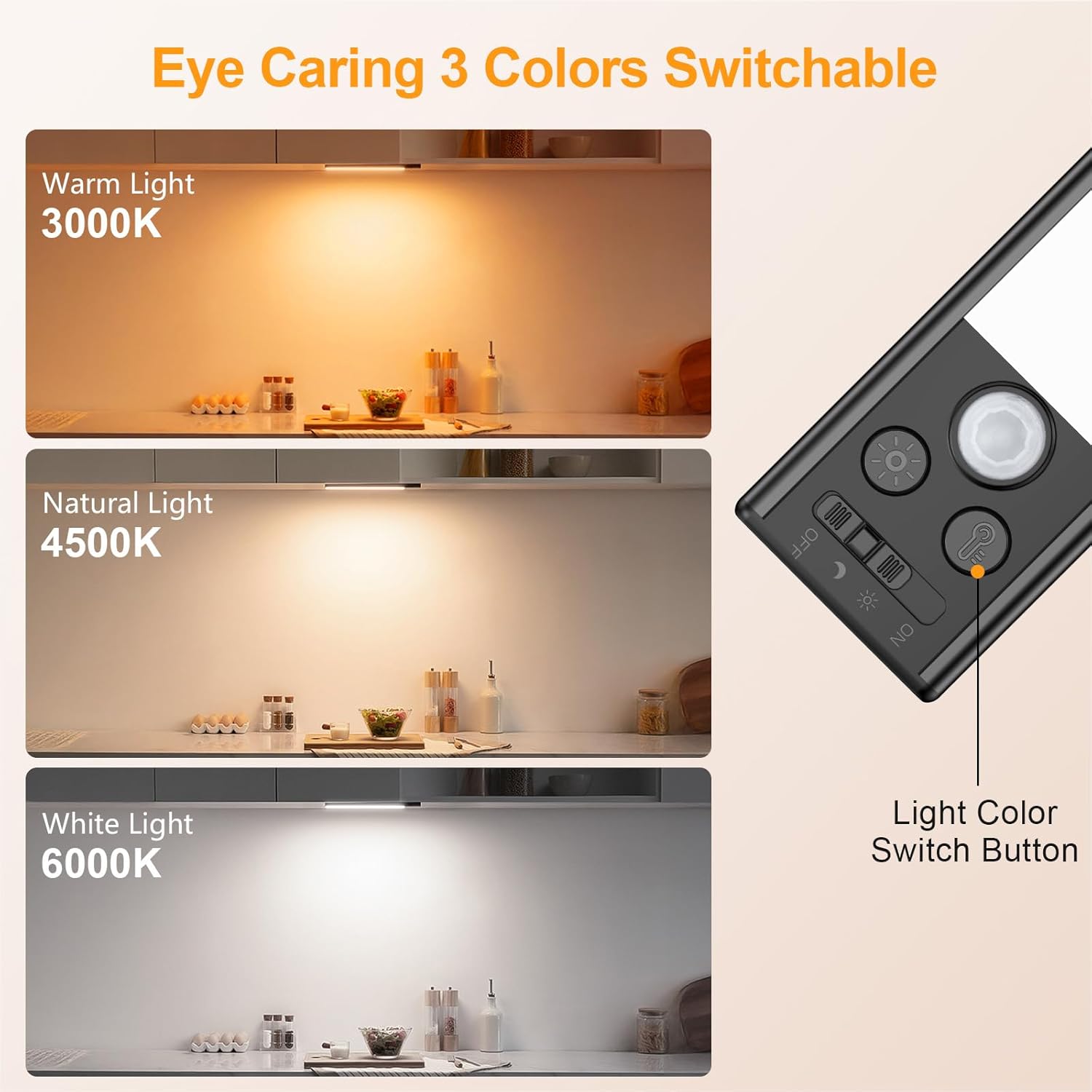
- சரிசெய்யக்கூடிய வண்ண வெப்பநிலை: Three color options: Warm (3000K), Mixed (4500K), and Cool (6000K).
- பல பிரகாச நிலைகள்: Five preset brightness levels (10%, 25%, 50%, 75%, 100%) and stepless dimming capability.
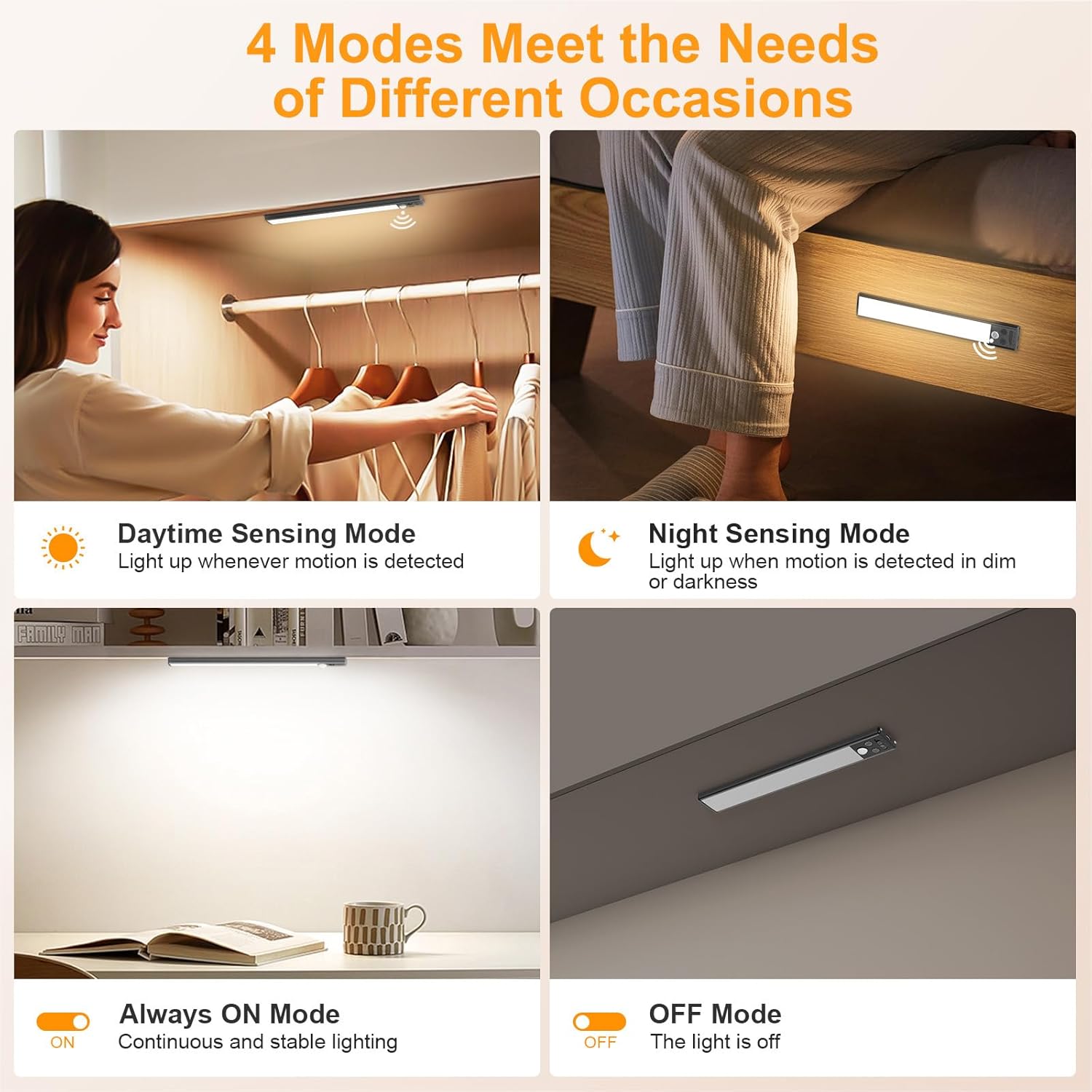
- நான்கு விளக்கு முறைகள்: OFF, Night Sensing, Daytime Sensing, and Always On.
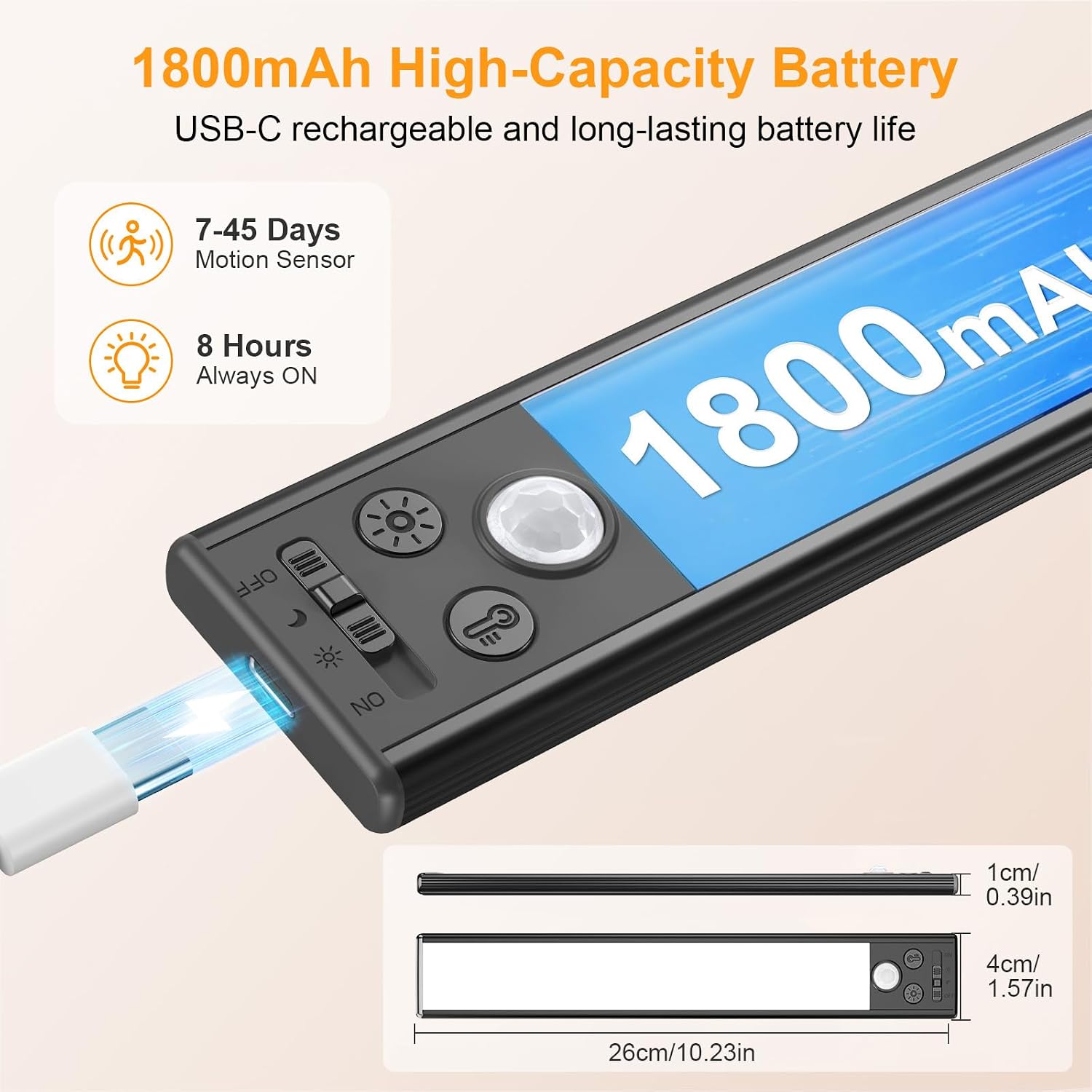
- ரிச்சார்ஜபிள் பேட்டரி: Built-in 1800mAh high-capacity battery, rechargeable via USB-C.
- எளிதான நிறுவல்: Strong built-in magnets for iron surfaces; includes adhesive iron plates for non-metallic surfaces.

4. அமைவு மற்றும் நிறுவல்
- மேற்பரப்பைத் தயாரிக்கவும்: நிறுவல் மேற்பரப்பு சுத்தமாகவும், உலர்ந்ததாகவும், மென்மையாகவும் இருப்பதை உறுதிசெய்யவும்.
- உலோகம் அல்லாத மேற்பரப்புகளுக்கு: Peel off the protective film from one side of the adhesive iron plate and firmly press it onto the desired installation location. Repeat for the second plate, ensuring proper spacing for the light bar.
- விளக்கை இணைக்கவும்: The light bar has built-in magnets. Simply align the light with the iron plates (or directly to an iron surface) and allow the magnets to secure it in place. This allows for easy removal for charging.
5. இயக்க வழிமுறைகள்
The Gritin under cabinet light features intuitive controls for power, color temperature, and brightness.
5.1 சக்தி மற்றும் பயன்முறை தேர்வு
Use the slide switch on the side of the light to select one of the four operating modes:
- முடக்கு: விளக்கு முழுவதுமாக அணைந்துவிட்டது.
- இரவு உணர்தல் முறை (சந்திரன் ஐகான்): The light will activate only when motion is detected in a dark environment. It will turn off automatically after 20 seconds of no motion.
- பகல்நேர உணர்தல் முறை (சூரிய ஐகான்): The light will activate when motion is detected, regardless of ambient light conditions. It will turn off automatically after 20 seconds of no motion.
- எப்போதும் இயக்கத்தில் (ஆன்): விளக்கு தொடர்ந்து எரிகிறது.
5.2 வண்ண வெப்பநிலையை சரிசெய்தல்
அழுத்தவும் Light Color Switch Button (indicated by a light bulb icon) to cycle through the three color temperature options:
- சூடான ஒளி (3000K)
- கலப்பு ஒளி (4500K)
- கூல் லைட் (6000K)
5.3 பிரகாசத்தை சரிசெய்தல்
பயன்படுத்தவும் மங்கலான பொத்தான் (indicated by a sun icon) to control the light's intensity:
- குறுகிய பத்திரிக்கை: Cycles through five preset brightness levels: 10%, 25%, 50%, 75%, and 100%.
- லாங் பிரஸ் (3 வினாடிகள்): Activates stepless dimming, allowing you to fine-tune the brightness to any level between minimum and maximum. Release the button when the desired brightness is reached.

6. சார்ஜ்
The Gritin under cabinet light is equipped with a high-capacity 1800mAh rechargeable battery. When the battery is low, the light indicator will signal the need for charging.
- Connect the provided USB-C cable to the charging port on the light and the other end to a standard USB power adapter (not included) or a computer's USB port.
- A red indicator light will illuminate during charging.
- The indicator light will turn green when charging is complete.
A full charge provides approximately 8 hours of continuous use in high brightness mode or 7-45 days in motion sensor mode, depending on usage frequency.

7. பராமரிப்பு
- சுத்தம்: Wipe the light with a soft, dry cloth. Do not use abrasive cleaners or solvents.
- சார்ஜ்: Recharge the battery regularly to prolong its lifespan, even if not in frequent use. Avoid fully depleting the battery for extended periods.
- சேமிப்பு: If storing the light for a long time, charge it to about 50% and store in a cool, dry place. Recharge every 3-6 months.
- சுற்றுச்சூழல்: Avoid exposing the light to extreme temperatures, direct sunlight, or high humidity.
8. சரிசெய்தல்
| பிரச்சனை | சாத்தியமான காரணம் | தீர்வு |
|---|---|---|
| ஒளி இயக்கவில்லை. | பேட்டரி தீர்ந்து விட்டது. | வழங்கப்பட்ட USB-C கேபிளைப் பயன்படுத்தி விளக்கை சார்ஜ் செய்யவும். |
| தவறான பயன்முறை தேர்ந்தெடுக்கப்பட்டது. | Ensure the slide switch is set to 'ON' or a sensing mode. | |
| மோஷன் சென்சார் வேலை செய்யவில்லை. | தவறான பயன்முறை தேர்ந்தெடுக்கப்பட்டது. | Ensure the slide switch is set to 'Night Sensing' or 'Daytime Sensing' mode. |
| Ambient light too bright (in Night Sensing mode). | Night Sensing mode only activates in dark environments. Switch to Daytime Sensing mode if light is needed in brighter conditions. | |
| குறுகிய பேட்டரி ஆயுள். | Frequent activation or 'Always On' mode usage. | Battery life is shorter in 'Always On' mode or with very frequent motion activations. Consider using sensing modes for longer battery life. |
| பேட்டரி முழுமையாக சார்ஜ் செய்யப்படவில்லை. | Ensure the light is fully charged until the indicator light turns green. |
9. விவரக்குறிப்புகள்
| அம்சம் | விவரம் |
|---|---|
| பிராண்ட் | கிரிடின் |
| மாதிரி எண் | G1358 |
| பரிமாணங்கள் (L x W x H) | 10.23" x 1.57" x 0.39" (26செ.மீ x 4செ.மீ x 1செ.மீ) |
| எடை | 245 கிராம் |
| பொருள் | அலுமினியம், பிளாஸ்டிக் |
| ஒளி மூல | 84 எல்.ஈ |
| பிரகாசம் | 180 லுமன்ஸ் (அதிகபட்சம்) |
| வண்ண வெப்பநிலை | 3000K (Warm), 4500K (Mixed), 6000K (Cool) |
| சக்தி ஆதாரம் | பேட்டரி மூலம் இயங்கும் (1800mAh) |
| சுவிட்ச் வகை | Motion sensor, Manual switch |
| மவுண்டிங் வகை | Magnetic and adhesive |
| உட்புற/வெளிப்புற பயன்பாடு | உட்புறம் |
10. உத்தரவாதம் மற்றும் ஆதரவு
This Gritin product comes with a 1 வருட உற்பத்தியாளரின் உத்தரவாதம். For warranty claims, technical support, or any inquiries regarding your product, please contact Gritin customer service through the retailer where the product was purchased or visit the official Gritin webதொடர்பு தகவலுக்கான தளம்.