1. தயாரிப்பு முடிந்துவிட்டதுview
The TABWEE T20 is a versatile 10-inch Android tablet designed for both productivity and entertainment. It features a high-resolution Incell display, a powerful Octa-Core processor, and ample memory and storage, making it suitable for a wide range of applications from content creation to multimedia consumption.
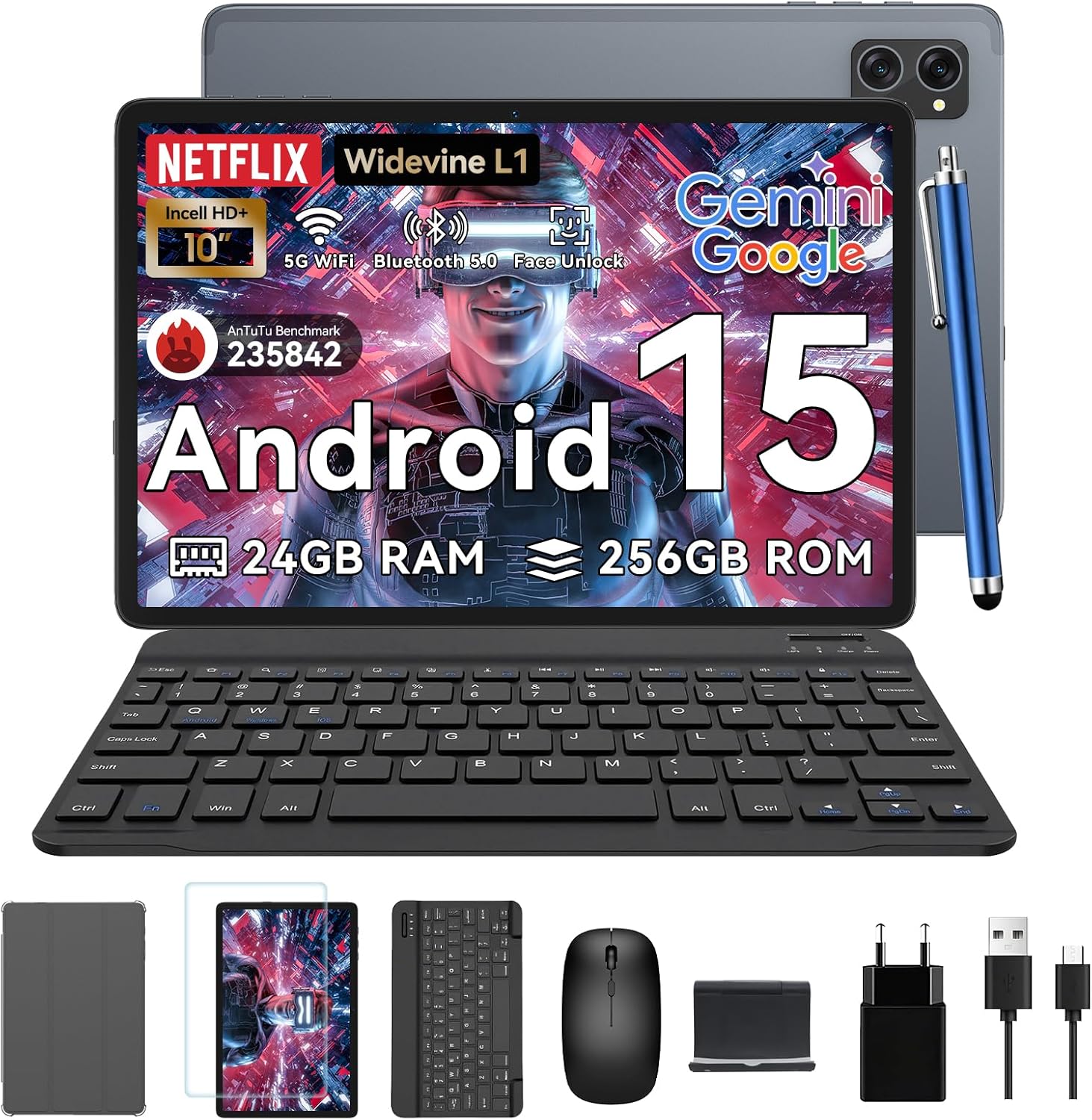
Figure 1.1: TABWEE T20 Tablet and its complete accessory package, including a Bluetooth keyboard, mouse, stylus, protective case, screen protector, charger, and USB cable.
பெட்டியில் என்ன இருக்கிறது
Upon unboxing your TABWEE T20 Tablet, verify that all components are present:

Figure 1.2: Contents of the TABWEE T20 Tablet retail package.
- 1x TABWEE T20 Tablet
- 1x புளூடூத் விசைப்பலகை
- 1x சுட்டி
- 1x Stylus
- 1x பாதுகாப்பு கேஸ்
- 1x திரை பாதுகாப்பான்
- 1x டேப்லெட் ஸ்டாண்ட்
- 1x சார்ஜர்
- 1x USB கேபிள்
2. அமைப்பு மற்றும் ஆரம்ப பயன்பாடு
டேப்லெட்டை சார்ஜ் செய்கிறது
Before first use, fully charge the tablet using the provided charger and USB cable. Connect the charger to a power outlet and the USB cable to the tablet's charging port. The charging indicator will illuminate.
ஆன்/ஆஃப்
- பவர் ஆன் செய்ய: Press and hold the Power button until the TABWEE logo appears on the screen.
- பவர் ஆஃப் செய்ய: பவர் ஆப்ஷன்கள் மெனு தோன்றும் வரை பவர் பட்டனை அழுத்திப் பிடிக்கவும். "பவர் ஆஃப்" என்பதைத் தேர்ந்தெடுத்து உறுதிப்படுத்தவும்.
- மறுதொடக்கம் செய்ய: பவர் ஆப்ஷன்கள் மெனுவிலிருந்து, "மறுதொடக்கம்" என்பதைத் தேர்ந்தெடுத்து உறுதிப்படுத்தவும்.
ஆரம்ப அமைவு வழிகாட்டி
முதல் முறையாக பவர்-ஆன் செய்யும்போது, டேப்லெட் ஒரு ஆரம்ப அமைவு வழிகாட்டி மூலம் உங்களை வழிநடத்தும். திரையில் தோன்றும் வழிமுறைகளைப் பின்பற்றவும்:
- உங்கள் மொழியைத் தேர்ந்தெடுக்கவும்.
- வைஃபை நெட்வொர்க்குடன் இணைக்கவும்.
- உங்கள் Google கணக்கில் உள்நுழையவும் அல்லது புதிய ஒன்றை உருவாக்கவும்.
- திரைப் பூட்டை அமைக்கவும் (பின், பேட்டர்ன், கடவுச்சொல் அல்லது முகத்தைத் திறத்தல்).
- Review மற்றும் விதிமுறைகள் மற்றும் நிபந்தனைகளை ஏற்றுக்கொள்ளுங்கள்.
துணைக்கருவிகள் இணைக்கிறது
The TABWEE T20 comes with a Bluetooth keyboard and mouse for enhanced productivity.
- Bluetooth Keyboard:
- விசைப்பலகை சார்ஜ் செய்யப்பட்டு இயக்கப்பட்டிருப்பதை உறுதிசெய்யவும்.
- டேப்லெட்டில், செல்லவும் அமைப்புகள் > இணைக்கப்பட்ட சாதனங்கள் > புளூடூத்.
- Turn on Bluetooth and tap "Pair new device".
- Select the keyboard from the list of available devices and follow pairing instructions.
- Bluetooth Mouse:
- சுட்டி இயக்கப்பட்டிருப்பதையும், இணைத்தல் பயன்முறையில் இருப்பதையும் உறுதிசெய்யவும்.
- டேப்லெட்டில், செல்லவும் அமைப்புகள் > இணைக்கப்பட்ட சாதனங்கள் > புளூடூத்.
- Tap "Pair new device" and select the mouse from the list.
- ஸ்டைலஸ்: The included stylus can be used directly on the screen for navigation, drawing, and note-taking. It features palm-rejection precision.
3. டேப்லெட்டை இயக்குதல்
ஆண்ட்ராய்டு 15 ஆப்பரேட்டிங் சிஸ்டம்
The TABWEE T20 runs on Android 15, offering enhanced privacy controls, seamless cross-device collaboration, and improved multitasking capabilities.

Figure 3.1: Key features of the Android 15 operating system.
Gemini AI Integration
The tablet integrates Google Gemini AI, which intelligently optimizes tasks, from photo editing to document formatting, while prioritizing security with a dedicated encrypted privacy space.

படம் 3.2: மேல்view of Gemini AI capabilities on the tablet.
Display and Multimedia
The 10.1-inch Incell HD+ display (1280x800 resolution) provides vivid colors and crisp details. With Widevine L1 certification, you can enjoy 1080P streaming on platforms like Netflix, Disney+, and Hulu.

Figure 3.3: Display features and eye-friendly modes.
The tablet also features Dual Smart-K Box Speakers for an immersive audio experience.

Figure 3.4: Dual Smart-K Box Speakers for enhanced audio.
கேமரா அம்சங்கள்
Equipped with an 8MP rear camera and a 5MP front camera, the tablet supports Google Lens integration for smart scanning and object recognition. Face Unlock is also supported for convenient security.

Figure 3.5: Camera specifications and features.

Figure 3.6: Smart Google Lens functionalities.
இணைப்பு
The TABWEE T20 supports dual-band 5G WiFi and Bluetooth 5.0 for fast and stable connections.
- வைஃபை: Connect to 2.4GHz or 5GHz networks for seamless streaming and quick downloads.
- புளூடூத் 5.0: Pair with wireless earbuds, speakers, or other Bluetooth-enabled devices with 20% faster data transfer speed.
- OTG ஆதரவு: Allows for easy transfer of files to and from external storage devices.

Figure 3.7: Advanced Bluetooth 5.0 connectivity.

Figure 3.8: Lightning Fast WiFi 5 Technology.
4. பராமரிப்பு மற்றும் பராமரிப்பு
Proper maintenance ensures the longevity and optimal performance of your TABWEE T20 Tablet.
பேட்டரி மேலாண்மை
The 5000mAh battery provides extended usage times. To maximize battery life:
- தீவிர வெப்பநிலையைத் தவிர்க்கவும்.
- வழங்கப்பட்ட சார்ஜரைப் பயன்படுத்தவும்.
- Enable smart power-saving modes in settings.
- பின்னணியில் இயங்கும் பயன்படுத்தப்படாத பயன்பாடுகளை மூடு.

Figure 4.1: 5000mAh Mega Battery performance metrics.
டேப்லெட்டை சுத்தம் செய்தல்
- திரையையும் உடலையும் சுத்தம் செய்ய மென்மையான, பஞ்சு இல்லாத துணியைப் பயன்படுத்தவும்.
- பிடிவாதமான கறைகளுக்கு, சிறிது dampen தண்ணீர் அல்லது திரை துப்புரவாளர் கொண்ட துணி.
- கடுமையான இரசாயனங்கள் அல்லது சிராய்ப்புப் பொருட்களைப் பயன்படுத்துவதைத் தவிர்க்கவும்.
சேமிப்பு மற்றும் நினைவக மேலாண்மை
The tablet comes with 256GB of internal storage and supports up to 2TB TF card expansion. It also features 24GB RAM (8GB physical + 16GB virtual) for smooth multitasking.

Figure 4.2: Storage and RAM expansion capabilities.
To optimize performance and storage:
- Regularly clear cache and temporary files.
- பயன்படுத்தப்படாத பயன்பாடுகளை நிறுவல் நீக்கவும்.
- Utilize the 2TB TF card slot for large files like 4K videos and design documents.
5. சரிசெய்தல்
This section addresses common issues you might encounter with your TABWEE T20 Tablet.
| பிரச்சனை | சாத்தியமான காரணம் | தீர்வு |
|---|
| டேப்லெட் இயக்கப்படவில்லை. | பேட்டரி குறைவு; சிஸ்டம் செயலிழப்பு. | Charge the tablet for at least 30 minutes. If still unresponsive, press and hold the Power button for 10-15 seconds to force a restart. |
| வைஃபை இணைப்புச் சிக்கல்கள். | Incorrect password; router issues; out of range. | Verify Wi-Fi password. Restart your router. Ensure tablet is within Wi-Fi range. Forget the network and reconnect. |
| Bluetooth accessories not pairing. | Accessory not in pairing mode; Bluetooth off on tablet. | Ensure accessory is in pairing mode. Turn Bluetooth off and on again on the tablet. Restart both devices. |
| மெதுவான செயல்திறன் அல்லது பயன்பாட்டு செயலிழப்புகள். | அதிக எண்ணிக்கையிலான செயலிகள் இயங்குகின்றன; குறைந்த சேமிப்பிடம்; காலாவதியான மென்பொருள். | Close background apps. Clear app caches. Free up storage space. Check for system updates in அமைப்புகள் > சிஸ்டம் > சிஸ்டம் புதுப்பிப்பு. |
| திரை செயல்படவில்லை. | தற்காலிக மென்பொருள் கோளாறு. | Force restart the tablet by holding the Power button for 10-15 seconds. |
இந்த தீர்வுகளை முயற்சித்த பிறகும் சிக்கல் தொடர்ந்தால், வாடிக்கையாளர் ஆதரவைத் தொடர்பு கொள்ளவும்.
7. உத்தரவாதம் மற்றும் ஆதரவு
TABWEE is committed to providing excellent customer service and support for your T20 Tablet.
உத்தரவாத தகவல்
Your TABWEE T20 Tablet is covered by a 2 ஆண்டு உத்தரவாதம் from the date of purchase. This warranty covers manufacturing defects and ensures risk-free ownership.
வாடிக்கையாளர் ஆதரவு
For any technical assistance, troubleshooting, or warranty claims, please contact our support team:
- மின்னஞ்சல் ஆதரவு: serviceplus.linda@gmail.com
- Online Call Support: Available 24/7 for US/CA customers.
- Repair Support: 2-Year Repair Support is provided.

Figure 7.1: TABWEE Customer Support Services.
Please have your purchase details and tablet model number ready when contacting support to expedite the process.

