
1. தயாரிப்பு முடிந்துவிட்டதுview
The Hisense 65E7Q QLED Smart TV offers a premium viewing experience with its 65-inch QLED display. This television integrates advanced technologies such as Dolby Vision and Dolby Atmos for immersive audio-visuals, AI Smooth Motion for fluid images, and dedicated modes for gaming and sports. Powered by the VIDAA operating system, it provides easy access to a wide range of streaming content and smart features, including voice control.

முன் view of the Hisense 65E7Q QLED Smart TV.
முக்கிய அம்சங்கள்:
- QLED நிறம்: Experience rich, vibrant, and realistic colors.
- AI மென்மையான இயக்கம்: Advanced MEMC and 3D Noise Reduction for fluid, blur-free images.
- டால்பி விஷன் & டால்பி அட்மோஸ்: Cinematic picture and immersive sound for an enhanced entertainment experience.
- கேம் மோட் பிளஸ்: Reduces input lag to 16ms, with 60Hz VRR and ALLM for ultra-fluid gaming.
- AI விளையாட்டு முறை: Optimizes picture and sound for sports content, reducing motion blur and enhancing stadium-like audio.
- AI 4K அப்ஸ்கேலர்: Enhances blurry images to near-4K quality.
- VIDAA Smart TV OS: Fast, secure, and intuitive operating system with access to popular streaming applications.
- குரல் கட்டுப்பாடு: Integrated Alexa and VIDAA Voice for convenient operation.
2. பாதுகாப்பு தகவல்
Please read all safety instructions carefully before using your TV. Keep this manual for future reference. Always ensure the TV is placed on a stable surface to prevent tipping. Do not expose the TV to rain or moisture. Refer to the full safety guidelines in the included safety manual.
3. தொகுப்பு உள்ளடக்கங்கள்
பெட்டியில் அனைத்து பொருட்களும் இருப்பதை உறுதிசெய்யவும்:
- ஹைசென்ஸ் 65E7Q QLED ஸ்மார்ட் டிவி
- பவர் கேபிள்
- Remote Control (with 1 AAAA battery included)
- டிவி ஸ்டாண்ட் (2 துண்டுகள்)
- ஸ்டாண்ட் அசெம்பிளிக்கான திருகுகள்
- பயனர் கையேடு (இந்த ஆவணம்)
- உத்தரவாத அட்டை
4 அமைவு
4.1 ஸ்டாண்டை அசெம்பிள் செய்தல்
- சேதத்தைத் தடுக்க, டிவி திரையை மென்மையான, தட்டையான மேற்பரப்பில் கவனமாக வைக்கவும்.
- டிவியின் அடிப்பகுதியில் உள்ள தொடர்புடைய ஸ்லாட்டுகளுடன் ஸ்டாண்ட் துண்டுகளை சீரமைக்கவும்.
- கொடுக்கப்பட்டுள்ள திருகுகளைப் பயன்படுத்தி ஸ்டாண்ட் துண்டுகளைப் பாதுகாக்கவும். அவை உறுதியாக இறுக்கப்பட்டுள்ளதா என்பதை உறுதிப்படுத்திக் கொள்ளுங்கள்.

Diagram illustrating TV dimensions and stand installation points.
4.2 சுவர் ஏற்றுதல்
If you plan to wall mount your TV, ensure you use a VESA-compatible wall mount kit (not included). The Hisense 65E7Q supports a VESA mounting standard of 600 x 400 mm. Follow the instructions provided with your wall mount kit for safe installation.
4.3 பெரிஃபெரல்களை இணைக்கிறது
Connect your external devices to the TV's ports as needed. Refer to the port diagram below:

பின்புறம் view showing available ports and connections.
- HDMI போர்ட்கள் (x3): Connect Blu-ray players, game consoles, and other HDMI devices. One port supports eARC for enhanced audio return.
- USB போர்ட்கள் (x2): Connect USB flash drives for media playback. (1x USB 3.0, 1x USB 2.0)
- Antenna Inputs (x2): உங்கள் நிலப்பரப்பு அல்லது கேபிள் ஆண்டெனாவை இணைக்கவும்.
- ஈதர்நெட் (LAN): கம்பி நெட்வொர்க் இணைப்புக்கு.
- ஆப்டிகல் ஆடியோ அவுட்: டிஜிட்டல் ஆடியோவிற்காக ஒரு சவுண்ட்பார் அல்லது ஆடியோ ரிசீவருடன் இணைக்கவும்.
- தலையணி ஜாக்: தனிப்பட்ட முறையில் கேட்பதற்கு.
- AV உள்ளீடுகள்: கூட்டு வீடியோ மற்றும் ஸ்டீரியோ ஆடியோ கேபிள்களைப் பயன்படுத்தி பழைய சாதனங்களை இணைப்பதற்கு.
4.4 ஆரம்ப பவர் ஆன்
- பவர் கேபிளை டிவியுடனும் பின்னர் பவர் அவுட்லெட்டுடனும் இணைக்கவும்.
- ரிமோட் கண்ட்ரோல் அல்லது டிவியில் உள்ள பவர் பட்டனை அழுத்தவும்.
- மொழித் தேர்வு, நெட்வொர்க் இணைப்பு மற்றும் சேனல் ஸ்கேனிங் உள்ளிட்ட ஆரம்ப அமைப்பை முடிக்க திரையில் உள்ள வழிமுறைகளைப் பின்பற்றவும்.
5. உங்கள் டிவியை இயக்குதல்
5.1 தொலை கட்டுப்பாடு
The included remote control allows you to navigate the TV's features. Insert the provided AAAA battery into the remote. The remote supports voice control for convenient operation.
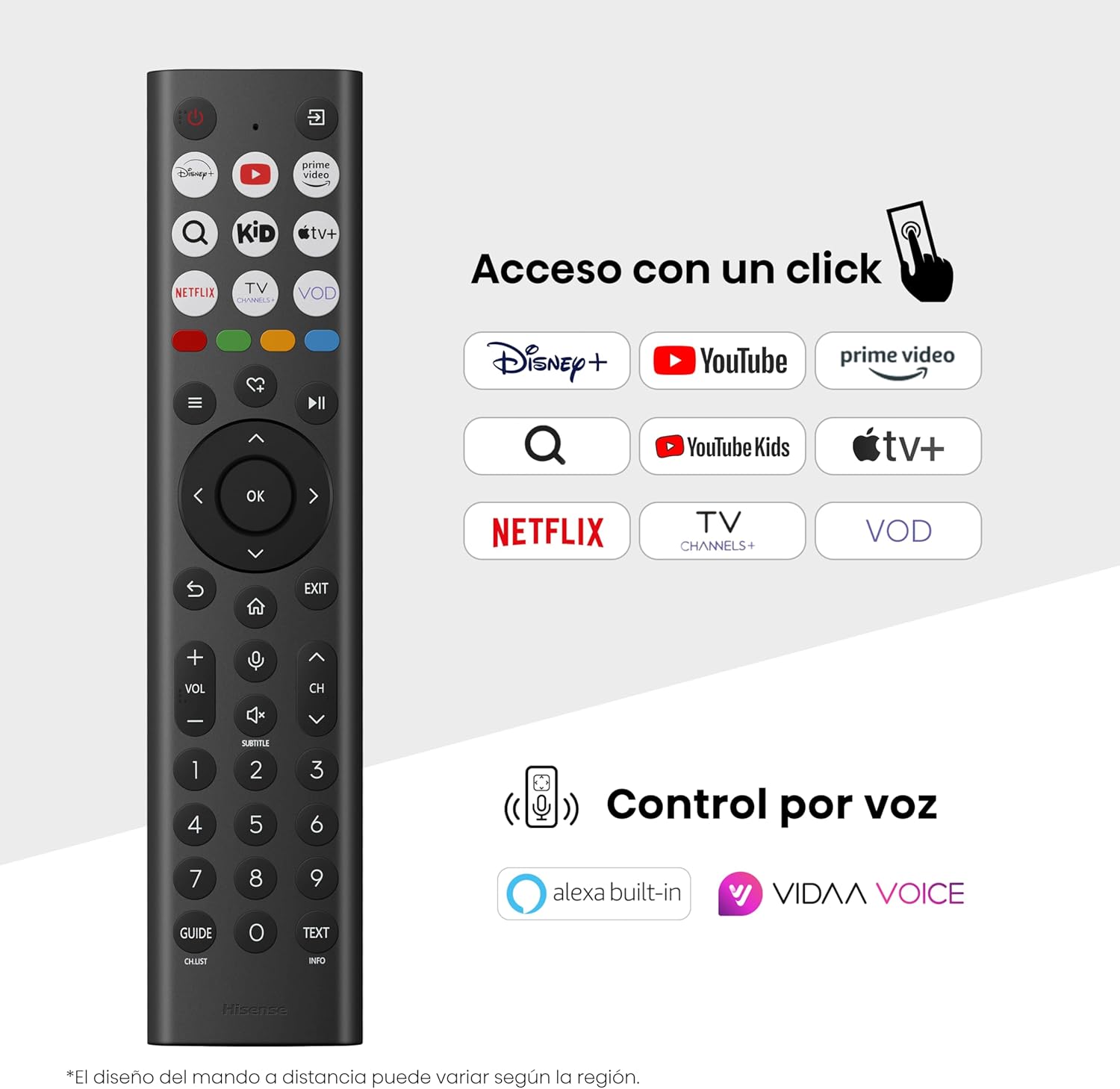
Hisense Smart TV remote control with dedicated app buttons and voice control.
5.2 ஸ்மார்ட் டிவி அம்சங்கள் (VIDAA OS)
Your Hisense TV runs on the VIDAA operating system, offering a user-friendly interface for accessing various applications and services.

The VIDAA Smart TV interface with popular streaming applications.
- பயன்பாடுகள்: Access pre-installed apps like Netflix, YouTube, Prime Video, and more.
- குரல் கட்டுப்பாடு: Use the remote's voice function to search for content, adjust settings, or interact with Alexa built-in and VIDAA Voice.
- Screen Mirroring (AirPlay): Share content from your Apple devices directly to the TV.
- டிவியில் பகிரவும்: Easily send content from your mobile devices to the TV.
5.3 பட அமைப்புகள்
உங்கள் viewing experience with various picture enhancement technologies:
- QLED நிறம்: Delivers over a billion shades of vibrant, lifelike colors.
- AI 4K அப்ஸ்கேலர்: குறைந்த தெளிவுத்திறன் கொண்ட உள்ளடக்கத்தை 4K தரத்திற்கு தானாகவே மேம்படுத்துகிறது.
- AI மென்மையான இயக்கம்: Reduces motion blur in fast-paced scenes, ensuring clear and fluid visuals.
- டால்பி விஷன்: Provides stunning brightness, contrast, and color for a dramatic visual experience.
- திரைப்பட தயாரிப்பாளர் பயன்முறை: Preserves the original aspect ratio, colors, and frame rates to display movies as intended by the director.
- AI ஒளி உணரி: Intelligently adjusts screen brightness based on ambient light for optimal viewமின் உற்பத்தி மற்றும் ஆற்றல் திறன்.
- கண் பராமரிப்பு முறை: கண் அழுத்தத்தைக் குறைக்க நீல ஒளி உமிழ்வைக் குறைக்கிறது.
- எரிசக்தி சேமிப்பு முறை: Optimizes power consumption without significantly compromising picture quality.

QLED technology delivers over a billion vibrant color tones.

AI 4K Upscaler enhances lower resolution content to near 4K clarity.

AI Smooth Motion ensures fluid images without blur, especially in fast-moving scenes.

Filmmaker Mode presents content exactly as the director intended.
5.4 ஒலி அமைப்புகள்
Enhance your audio experience with:
- டால்பி அட்மோஸ்: Immersive, multi-dimensional sound that fills your room.
- ஒருங்கிணைந்த பேச்சாளர்: Built-in speakers with a maximum output of 1 Watt per channel.
- எஸ்ப்ளே: Seamlessly control compatible Hisense soundbars directly from your TV screen.

Dolby Vision and Dolby Atmos combine for a spectacular audio-visual experience.
5.5 கேமிங் அம்சங்கள்
For gamers, the TV offers:
- கேம் மோட் பிளஸ்: Reduces input lag to 16ms, ensuring responsive gameplay.
- 60Hz VRR (மாறி புதுப்பிப்பு வீதம்): Synchronizes the TV's refresh rate with the game console's output to prevent screen tearing.
- ALLM (தானியங்கு குறைந்த தாமத பயன்முறை): Automatically switches the TV to low-latency mode when a game is detected.
- விளையாட்டுப் பட்டி: An integrated control center for quick access to game settings and real-time performance monitoring.

Game Mode Plus provides ultra-fluid, lag-free gaming.

The Game Bar offers centralized control for game settings.
5.6 Sports Features
- AI விளையாட்டு முறை: Automatically detects sports content and optimizes picture and sound settings for a stadium-like experience, enhancing clarity and audio effects.
6. பராமரிப்பு
6.1 டிவியை சுத்தம் செய்தல்
- சுத்தம் செய்வதற்கு முன்பு எப்போதும் டிவியை அவிழ்த்து விடுங்கள்.
- திரை மற்றும் டிவி உடலை மெதுவாகத் துடைக்க மென்மையான, உலர்ந்த, பஞ்சு இல்லாத துணியைப் பயன்படுத்தவும்.
- பிடிவாதமான குறிகளுக்கு, லேசான dampதுணியில் தண்ணீர் அல்லது சிறப்பு திரை துப்புரவாளர் (திரையில் நேரடியாக தெளிக்க வேண்டாம்).
- சிராய்ப்பு கிளீனர்கள், ஆல்கஹால், பென்சீன் அல்லது தின்னர்களைப் பயன்படுத்துவதைத் தவிர்க்கவும், ஏனெனில் இவை டிவியின் மேற்பரப்பை சேதப்படுத்தும்.
6.2 மென்பொருள் புதுப்பிப்புகள்
உங்கள் டிவியின் செயல்திறனை மேம்படுத்தவும் புதிய அம்சங்களைச் சேர்க்கவும் அவ்வப்போது மென்பொருள் புதுப்பிப்புகள் வரக்கூடும். இந்தப் புதுப்பிப்புகளைப் பெற உங்கள் டிவி இணையத்துடன் இணைக்கப்பட்டுள்ளதா என்பதை உறுதிப்படுத்திக் கொள்ளுங்கள். வழக்கமாக டிவியின் அமைப்புகள் மெனுவில் புதுப்பிப்புகளை கைமுறையாகச் சரிபார்க்கலாம்.
7. சரிசெய்தல்
உங்கள் டிவியில் சிக்கல்கள் ஏற்பட்டால், பின்வரும் பொதுவான தீர்வுகளைப் பார்க்கவும்:
- சக்தி இல்லை: மின் கேபிள் பாதுகாப்பாக இணைக்கப்பட்டுள்ளதா மற்றும் மின் அவுட்லெட் செயல்படுகிறதா எனச் சரிபார்க்கவும். வேறு அவுட்லெட்டை முயற்சிக்கவும்.
- படம்/ஒலி இல்லை: சரியான உள்ளீட்டு மூலத்தைத் தேர்ந்தெடுத்துள்ளதை உறுதிசெய்யவும். அனைத்து கேபிள் இணைப்புகளையும் (HDMI, ஆண்டெனா) சரிபார்க்கவும்.
- ரிமோட் கண்ட்ரோல் வேலை செய்யவில்லை: Check the battery (1 AAAA battery). Ensure there are no obstructions between the remote and the TV.
- நெட்வொர்க் இணைப்பு சிக்கல்கள்: Verify your Wi-Fi password or Ethernet cable connection. Restart your router.
- மோசமான படத் தரம்: பட அமைப்புகளை (பிரகாசம், மாறுபாடு, கூர்மை) சரிசெய்யவும். உள்ளீட்டு மூலமானது உயர்தர சமிக்ஞையை வழங்குவதை உறுதிசெய்யவும்.
- ஒலி சிதைவு: Check audio settings. If using external speakers, ensure they are connected correctly.
For more detailed troubleshooting, consult the full electronic user manual or contact Hisense customer support.
8. விவரக்குறிப்புகள்
Hisense 65E7Q QLED ஸ்மார்ட் டிவிக்கான விரிவான தொழில்நுட்ப விவரக்குறிப்புகள்:
| அம்சம் | விவரக்குறிப்பு |
|---|---|
| மாதிரி எண் | 65E7Q |
| திரை அளவு | 65 அங்குலம் |
| காட்சி தொழில்நுட்பம் | QLED |
| தீர்மானம் | 4K (3840 x 2160) |
| புதுப்பிப்பு விகிதம் | 60 ஹெர்ட்ஸ் |
| HDR வடிவமைப்பு ஆதரவு | டால்பி விஷன் |
| Motion Enhancement Technology | AI மென்மையான இயக்கம் |
| படத் தர மேம்பாடு | AI 4K Upscaler, AI Smooth Motion, QLED Colour |
| பதில் நேரம் | 100 மில்லி விநாடிகள் |
| பின்னொளி கட்டமைப்பு | Direct Illumination, Dimming |
| பேச்சாளர் விளக்கம் | Integrated speaker with Dolby Atmos |
| அதிகபட்ச ஸ்பீக்கர் வெளியீட்டு சக்தி | 1 வாட் |
| ஆடியோ சேனல்கள் | மல்டிசனல் |
| Surround Sound Format | டால்பி அட்மோஸ் |
| இயக்க முறைமை | விடா |
| நினைவக சேமிப்பு திறன் | 1 ஜிபி |
| கட்டுப்பாட்டு முறை | குரல் |
| இணைப்பு தொழில்நுட்பம் | ப்ளூடூத், HDMI, வைஃபை |
| Internet Applications | Netflix, YouTube, Prime Video, AirPlay 2 |
| HDMI போர்ட்கள் | 3 (including HDMI 2.1 with eARC) |
| USB போர்ட்கள் | 2 (1x USB 3.0, 1x USB 2.0) |
| வயர்லெஸ் தொழில்நுட்பம் | Wi-Fi |
| Screen Mirroring Technology | ஏர்ப்ளே |
| VESA மவுண்டிங் ஸ்டாண்டர்ட் | 600 x 400 மிமீ |
| தயாரிப்பு பரிமாணங்கள் (DxWxH) | 7.6 x 145.3 x 83.8 செ.மீ |
| தயாரிப்பு எடை | 15.2 கிலோ (நிலையுடன்) |
| ஆற்றல் திறன் வகுப்பு | E |
| வருடாந்திர ஆற்றல் நுகர்வு | 84 kWh/1000h (SDR), 160 kWh/1000h (HDR) |
| சக்தி | 1 வாட் (காத்திருப்பு) |
| தொகுதிtage | 100-240 VCA 50-60 Hz |
| உள்ளிட்ட கூறுகள் | பவர் கேபிள், ரிமோட் கண்ட்ரோல், ஸ்டாண்ட் |
| மாதிரி ஆண்டு | 2025 |
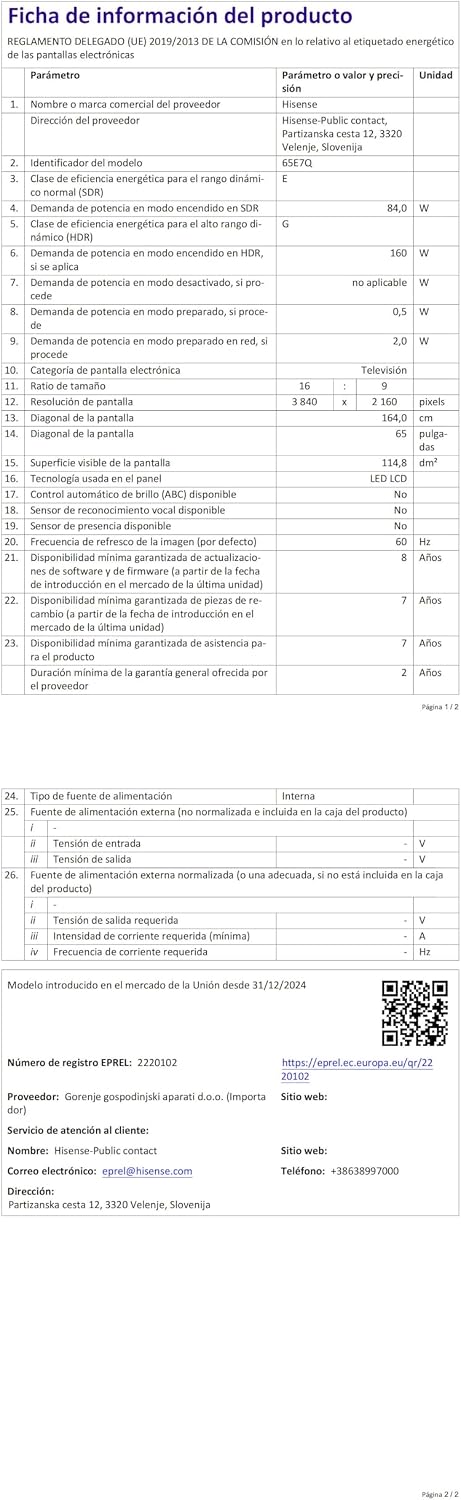
Energy label for the Hisense 65E7Q TV.
மேலும் விரிவான தயாரிப்பு தகவலுக்கு, தயவுசெய்து EPREL தரவுத்தளத்தைப் பார்க்கவும்: https://eprel.ec.europa.eu/qr/2220102
9. உத்தரவாதம் மற்றும் ஆதரவு
9.1 தயாரிப்பு உத்தரவாதம்
இந்த ஹைசென்ஸ் டிவி ஒரு உடன் வருகிறது 3 வருட தயாரிப்பு உத்தரவாதம்உத்தரவாதக் கோரிக்கைகளுக்கு உங்கள் வாங்கியதற்கான ஆதாரத்தை வைத்திருங்கள்.
9.2 உதிரி பாகங்கள் கிடைக்கும் தன்மை
Spare parts for this model are guaranteed to be available in the EU for a duration of 10 ஆண்டுகள் from the product's market introduction.
9.3 வாடிக்கையாளர் ஆதரவு
For technical assistance, troubleshooting, or warranty service, please contact Hisense customer support. Refer to the contact information provided in your warranty card or visit the official Hisense webஉங்கள் பிராந்தியத்திற்கான தளம்.