
1. அறிமுகம்
This manual provides essential information for the proper use and care of your Epico Mag+ Mobile Phone Case. Designed for mobile phones with a 17.5 cm (6.9") display, this case offers reliable protection and magnetic compatibility for enhanced functionality. Please read this manual thoroughly to ensure optimal performance and longevity of your product.
2. தயாரிப்பு முடிந்துவிட்டதுview
The Epico Mag+ Mobile Phone Case is crafted from durable plastic with integrated magnets, providing both protection and compatibility with magnetic accessories. Its slim profile ensures your device remains comfortable to handle while being shielded from daily wear.
முக்கிய அம்சங்கள்:
- இணக்கத்தன்மை: Specifically designed for mobile phones with a 17.5 cm (6.9") display size.
- காந்த ஒருங்கிணைப்பு: Features integrated magnetic technology for secure attachment to compatible accessories.
- Protective Construction: Durable material shields against scratches and minor impacts.
- மெல்லிய வடிவமைப்பு: Maintains the phone's sleek form factor without adding unnecessary bulk.
- துல்லியமான கட்அவுட்கள்: Ensures full access to all ports, buttons, and camera functions.

படம் 2.1: முன் view of the Epico Mag+ Mobile Phone Case. This image displays the case's front, highlighting the camera module cutout and the overall brown finish.
3. அமைவு மற்றும் நிறுவல்
Follow these steps to correctly install your mobile phone into the Epico Mag+ case:
- உங்கள் சாதனத்தை சுத்தம் செய்யவும்: Before installation, ensure your mobile phone is clean and free of dust or debris.
- வழக்கை சீரமைக்கவும்: உங்கள் தொலைபேசியின் கேமரா தொகுதியுடன் கேமரா கட்அவுட் சீரமைக்கப்பட்ட நிலையில் கேஸைப் பிடிக்கவும்.
- மேல் விளிம்பைச் செருகவும்: Gently insert the top edge of your phone into the top edge of the case.
- கீழே அழுத்தவும்: Apply gentle pressure to the remaining edges of the phone, working your way around until the phone is fully seated within the case. Ensure all corners are securely covered.
- பொருத்தத்தைச் சரிபார்க்கவும்: Check that all buttons and ports are accessible and that the case fits snugly around your device.
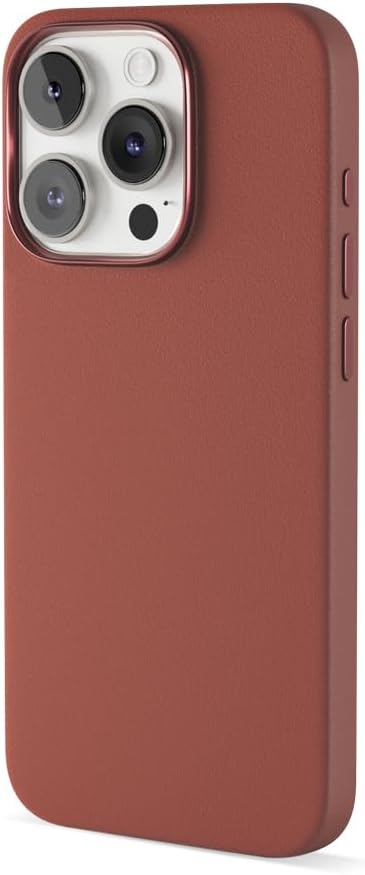
படம் 3.1: பக்கம் view of the Epico Mag+ Mobile Phone Case. This image illustrates the slim design and the precise button covers on the side of the case.
4. Usage and Magnetic Features
The Epico Mag+ case is designed for everyday use and features integrated magnets for enhanced functionality.
பொதுவான பயன்பாடு:
- The case provides a comfortable grip and protects your phone from minor drops, scratches, and daily wear.
- The precise cutouts ensure that all phone functions, including charging, audio, and camera, remain fully accessible.
காந்த இணக்கத்தன்மை:
- The integrated magnets allow for secure attachment to compatible magnetic accessories, such as car mounts, wireless chargers, and wallets.
- To use, simply align the back of your cased phone with the magnetic accessory. The magnets will provide a firm hold.
- Ensure the magnetic accessory is strong enough to support the weight of your phone with the case.
5. பராமரிப்பு மற்றும் பராமரிப்பு
To keep your Epico Mag+ Mobile Phone Case in optimal condition, follow these simple cleaning guidelines:
- வழக்கமான சுத்தம்: மென்மையான, டி-துணியால் உறையைத் தொடர்ந்து துடைக்கவும்.amp தூசி மற்றும் கைரேகைகளை அகற்ற துணி.
- பிடிவாதமான கறைகள்: For more stubborn stains, use a small amount of mild soap diluted in water. Apply with a soft cloth and gently wipe the affected area.
- கடுமையான இரசாயனங்களைத் தவிர்க்கவும்: Do not use abrasive cleaners, solvents, or harsh chemicals, as these can damage the case material and finish.
- உலர்த்துதல்: உங்கள் தொலைபேசியில் மீண்டும் இணைப்பதற்கு முன், கேஸை காற்றில் முழுமையாக உலர விடவும்.
6. சரிசெய்தல்
If you encounter any issues with your Epico Mag+ Mobile Phone Case, consider the following:
- Case Not Fitting Correctly: Ensure your phone model matches the specified compatibility (17.5 cm / 6.9" display). Remove any screen protectors or skins that might interfere with the fit. Re-install the case carefully, ensuring all edges are properly seated.
- காந்த இணைப்பு சிக்கல்கள்: Verify that the accessory you are using is indeed magnetic-compatible. Ensure there are no obstructions between the case and the accessory. The strength of the magnetic hold can vary depending on the accessory.
- பொத்தான்கள் பதிலளிக்கவில்லை: Check that the case is correctly aligned and not obstructing the phone's buttons. Remove and re-install the case to ensure proper alignment.
சிக்கல்கள் தொடர்ந்தால், பிரிவு 8 இல் வழங்கப்பட்டுள்ள ஆதரவுத் தகவலைப் பார்க்கவும்.
7. விவரக்குறிப்புகள்
| அம்சம் | விவரம் |
|---|---|
| மாதிரி எண் | மேக்+ |
| பிராண்ட் | எபிகோ |
| இணக்கமான சாதனங்கள் | Smartphone (Generic 6.9 Inch Smartphones) |
| பொருள் | Plastic, Magnet |
| நிறம் | பழுப்பு |
| தயாரிப்பு பரிமாணங்கள் | 6.89 x 6.89 x 0.59 அங்குலம் |
| பொருளின் எடை | 2.6 அவுன்ஸ் |
| உற்பத்தியாளர் | எபிகோ |
8. உத்தரவாதம் மற்றும் ஆதரவு
For warranty information and customer support, please refer to the documentation provided with your purchase or visit the official Epico webஎந்தவொரு உத்தரவாதக் கோரிக்கைகளுக்கும் உங்கள் வாங்கியதற்கான ஆதாரத்தை வைத்திருங்கள்.