
1. அறிமுகம்
This manual provides comprehensive instructions for the installation and operation of your LIGHTAILING LED lighting kit, specifically designed for the LEGO 21356 River Steamboat model. This kit enhances the visual appeal of your LEGO creation with integrated lighting. Please note that the LEGO model itself is சேர்க்கப்படவில்லை with this lighting kit.
For optimal results, carefully follow all steps outlined in this guide. Additional support and video tutorials are available online.
2. தொகுப்பு உள்ளடக்கங்கள்
Before beginning installation, verify that all components listed below are present in your package. If any parts are missing or damaged, please contact customer support.
- All-in-One USB LED light kit
- Customized wire lengths
- Connecting cables and expansion boards
- Adhesive squares/strips
- Paper instruction manual
- யூ.எஸ்.பி பவர் கேபிள்

Image: Key components of the LIGHTAILING LED lighting kit, showing the USB power cable, various light components, and customized wire lengths.
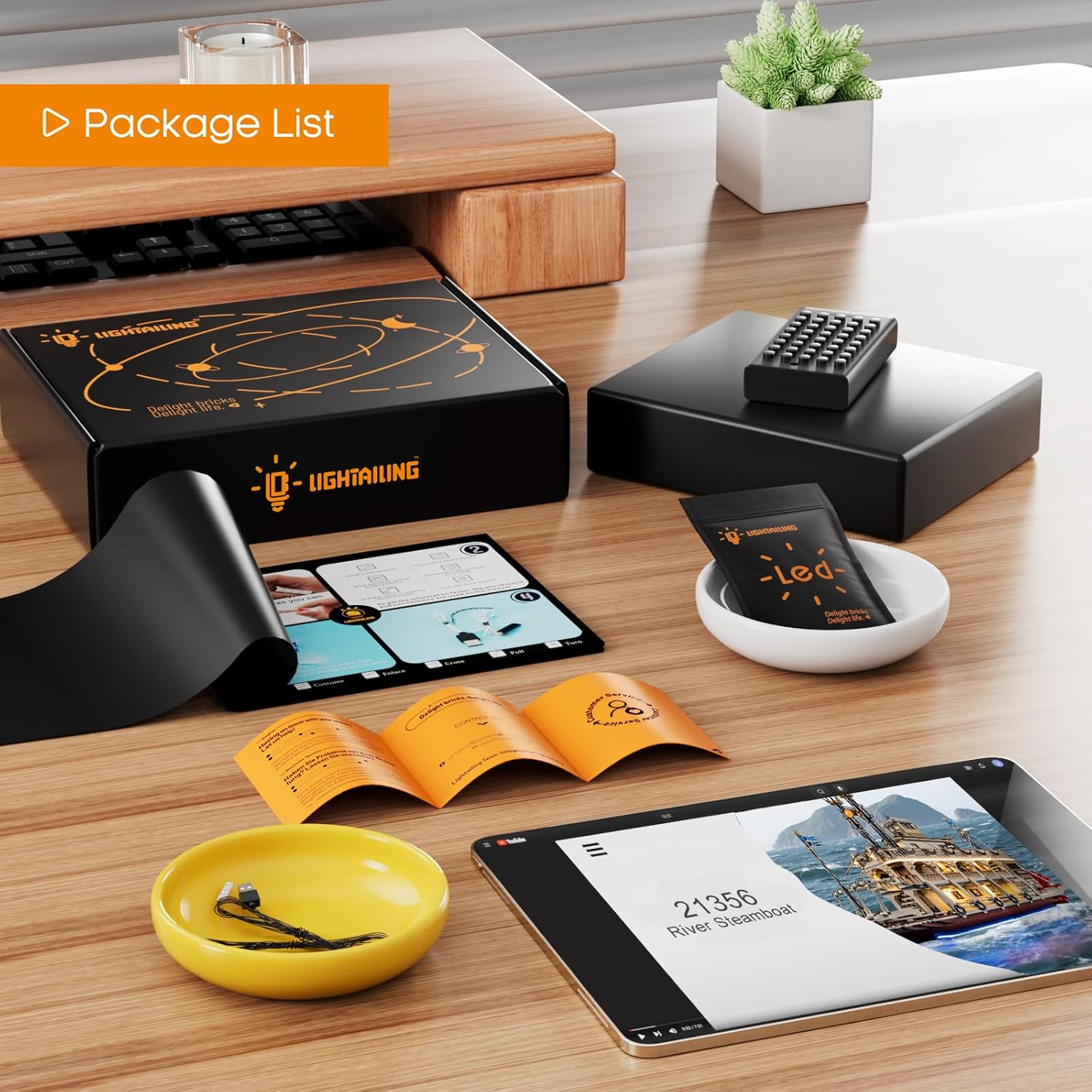
படம்: ஏ view of the complete package contents, including the instruction manual, USB power cable, and various lighting elements.
3. அமைவு மற்றும் நிறுவல்
The LIGHTAILING LED lighting kit is designed for easy installation with pre-measured spacing and hidden wiring to maintain the aesthetic integrity of your LEGO model. Refer to the detailed paper instructions included in your package or the online video tutorials for step-by-step guidance.
3.1 தயாரிப்பு
- Ensure your LEGO 21356 River Steamboat model is fully assembled.
- Gather all lighting kit components and the instruction manual.
- Prepare a power source: either a USB power bank, a USB wall adapter, or 3x AA batteries (not included) for the battery box (if supplied).
3.2 நிறுவல் படிகள்
- Disassemble Sections: Carefully remove specific sections of your LEGO model as indicated in the instruction manual to access internal areas for wire routing.
- விளக்குகளை இணைக்கவும்: Place the LED lights onto the designated LEGO studs or under specific bricks as shown in the diagrams. Ensure a secure fit.
- பாதை கம்பிகள்: Route the thin wires between LEGO bricks and plates. The kit is designed for hidden wiring, so take care to tuck wires neatly to avoid pinching or damage.
- கூறுகளை இணைக்கவும்: Connect the LED lights to the expansion boards, and then connect the expansion boards to the main control board using the provided connecting cables.
- பவர் இணைக்கவும்: Attach the USB power cable to the main control board. If using a battery box, connect it to the main control board and insert 3x AA batteries.
- Reassemble Model: Carefully reassemble the LEGO sections, ensuring no wires are caught or damaged during the process.

படம்: நெருக்கமான படம் views illustrating the easy installation process, the concept of hidden wiring, and the precision of the components when integrated with the LEGO model.

Image: A summary of the kit's features, highlighting that it includes LED lights, is USB powered, requires separate batteries, and comes with a paper instruction manual.
3.3 Online Installation Video
For visual guidance, an official installation video is available. This video demonstrates the step-by-step process of integrating the lighting kit with your LEGO 21356 River Steamboat model.
Video: Official LIGHTAILING installation guide for the LEGO 21356 River Steamboat LED lighting kit, demonstrating the complete setup and final illuminated model.
4. இயக்க வழிமுறைகள்
Once the lighting kit is fully installed and connected to a power source, operation is straightforward:
- பவர் ஆன்: Connect the USB cable to a powered USB port (e.g., computer, USB wall adapter, power bank). If using a battery box, ensure batteries are correctly inserted and the switch is in the "ON" position.
- பவர் ஆஃப்: Disconnect the USB cable from the power source or switch the battery box to the "OFF" position.

Image: A visual comparison showing the LEGO River Steamboat model unlit on the left and illuminated by the LIGHTAILING LED kit on the right, demonstrating the effect of the lighting.

படம்: பல views of the LEGO River Steamboat model fully illuminated by the LIGHTAILING LED kit, showcasing the detailed lighting effects.
5. பராமரிப்பு
To ensure the longevity and optimal performance of your LIGHTAILING LED lighting kit, consider the following maintenance tips:
- தூசுதல்: Regularly dust your LEGO model and the lighting components using a soft, dry brush or compressed air. Avoid using wet cloths directly on electrical components.
- கம்பி பராமரிப்பு: Handle wires gently. Avoid sharp bends or excessive pulling, which can damage the delicate wiring.
- சக்தி ஆதாரம்: If using a battery box, remove batteries if the kit will not be used for an extended period to prevent leakage.
- சேமிப்பு: If disassembling the model for storage, carefully disconnect and store the lighting components in their original packaging or a protective container.
6. சரிசெய்தல்
If you encounter any issues with your lighting kit, please refer to the following common troubleshooting steps:
| பிரச்சனை | சாத்தியமான காரணம் | தீர்வு |
|---|---|---|
| விளக்குகள் எரிவதில்லை. |
|
|
| Some lights are flickering or dim. |
|
|
| Wires are visible or not neatly hidden. |
|
|
If these steps do not resolve the issue, please contact LIGHTAILING customer support for further assistance.
7. விவரக்குறிப்புகள்
| அம்சம் | விவரம் |
|---|---|
| தயாரிப்பு பரிமாணங்கள் (பேக்கேஜிங்) | 6.5 x 4.72 x 1.57 அங்குலம் |
| பொருளின் எடை | 6.3 அவுன்ஸ் |
| மாதிரி எண் | 21356 (for LEGO River Steamboat) |
| சக்தி ஆதாரம் | USB Powered (Batteries not included) |
| பரிந்துரைக்கப்பட்ட வயது | 3 years and up (for LEGO model) |
8. உத்தரவாதம் மற்றும் ஆதரவு
LIGHTAILING is committed to providing a high-quality product and a positive customer experience. If you have any questions, require assistance with installation, or encounter any issues with your lighting kit, please do not hesitate to contact our customer support team.
For support, please visit the official LIGHTAILING store on Amazon or refer to the contact information provided in your product packaging.

Image: LIGHTAILING branding, a QR code for accessing online installation videos, and symbols indicating compliance with product safety standards (RoHS, CE, CPC).