
1. அறிமுகம்
This manual provides essential information for the safe installation, operation, and maintenance of your TOMZN TOB9-VAP 63A 1P+N WiFi Smart Switch Energy Meter. This device is a miniature circuit breaker (MCB) with integrated energy metering (Kwh, Voltage, Amperage, வாட்tage), monitoring, and timer relay functions, compatible with TUYA Smartlife applications. It is designed to protect electrical circuits from overloads and short circuits while offering smart control and energy consumption insights.
2. பாதுகாப்பு தகவல்
எச்சரிக்கை: மின்சார அதிர்ச்சி ஆபத்து.
- நிறுவல் மற்றும் பராமரிப்பு தகுதிவாய்ந்த பணியாளர்களால் மட்டுமே செய்யப்பட வேண்டும்.
- சாதனத்தை நிறுவுவதற்கு அல்லது சேவை செய்வதற்கு முன், பிரதான சர்க்யூட் பிரேக்கரில் எப்போதும் மின்சாரத்தைத் துண்டிக்கவும்.
- அனைத்து வயரிங் இணைப்புகளும் பாதுகாப்பானவை மற்றும் உள்ளூர் மின் குறியீடுகளுக்கு இணங்குவதை உறுதிசெய்யவும்.
- சாதனம் சேதமடைந்ததாகத் தோன்றினால் அதை இயக்க வேண்டாம்.
- This device is designed for indoor use in dry environments unless otherwise specified for specific outdoor enclosures.
- The device is rated for 1P+N (Single Phase + Neutral) systems. Ensure correct polarity during installation.
3. தயாரிப்பு முடிந்துவிட்டதுview
The TOMZN TOB9-VAP is a versatile smart circuit breaker offering protection and advanced monitoring capabilities.
3.1 முக்கிய அம்சங்கள்
- Overload and Short Circuit Protection: Prevents damage caused by excessive current.
- Energy Metering (Kwh, V, A, W): Monitors real-time and historical energy consumption.
- வைஃபை இணைப்பு: Remote control and monitoring via smartphone app.
- Timer Relay Function: Schedule on/off times for connected loads.
- VA Protection: அனுசரிப்பு தொகுதிtagஇ மற்றும் Amperage protection settings.
- TUYA Smartlife Compatible: Integrates with popular smart home platforms.
- நீடித்த கட்டுமானம்: Made with high-quality insulating, flame-retardant, and UV-resistant materials.
- பாதுகாப்பான இணைப்புகள்: Screw-type terminals for stable electrical connections.
3.2. கூறுகள் மற்றும் குறிகாட்டிகள்

Figure 1: TOMZN TOB9-VAP WiFi Smart Switch Energy Meter (Metering VA Protection, 1-63A Adjustable). This image shows the device with its input (Power) and output (Load) terminals, WiFi indicator, CE mark, signal light, and the main power button. The display indicates 'Metering VA protection In: 1-63A'.

Figure 2: TOMZN TOB9-63M WiFi Smart Switch Energy Meter (Metering). This variant includes energy metering capabilities (kW·h, W, V, A) but may not have the adjustable VA protection of the TOB9-VAP.
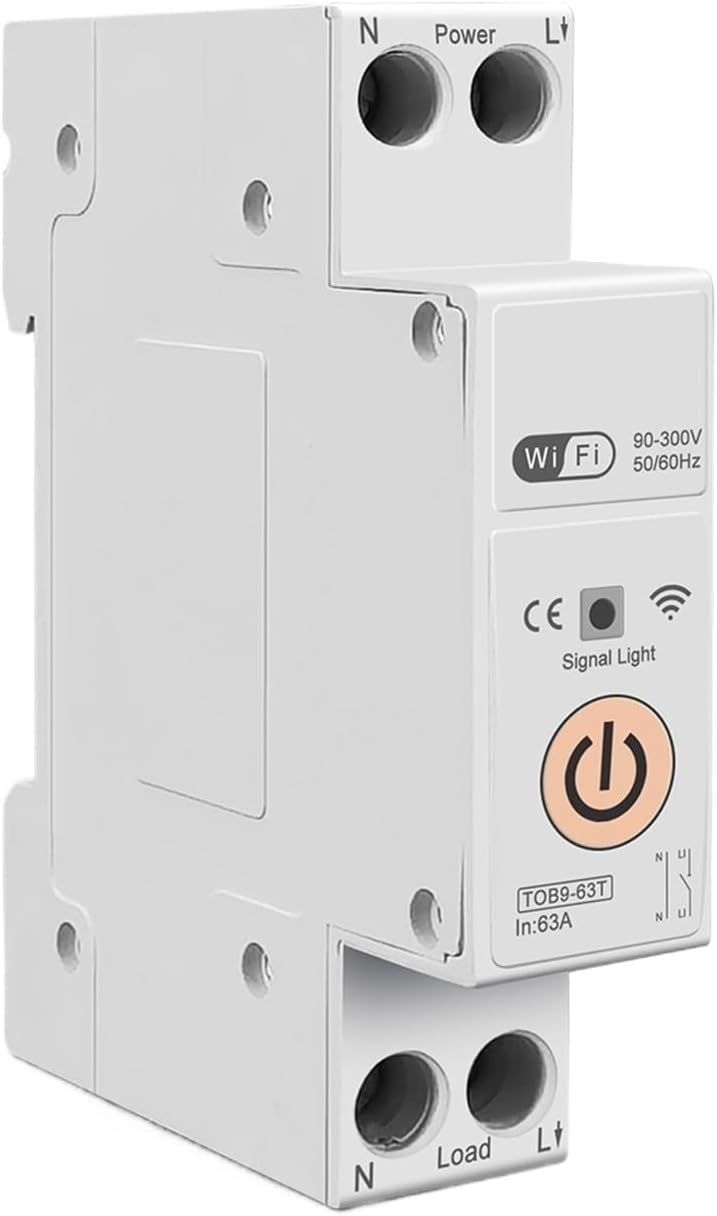
Figure 3: TOMZN TOB9-63T WiFi Smart Switch (No Metering). This basic variant provides WiFi control and circuit protection without energy metering functions.
- Power Terminals (N, L): Input connections for neutral and live wires.
- Load Terminals (N, L): Output connections for neutral and live wires to the load.
- வைஃபை காட்டி: Shows the status of the WiFi connection.
- சமிக்ஞை விளக்கு: சாதனத்தின் நிலையைக் குறிக்கிறது.
- முக்கிய ஆற்றல் பொத்தான்: Manual ON/OFF control for the circuit breaker.
- Display (TOB9-VAP/TOB9-63M): Shows real-time energy data (Kwh, W, V, A) and protection settings.
4 அமைவு
4.1. நிறுவல் மற்றும் வயரிங்
- மின் துண்டிப்பு: Before starting, ensure the main power supply to the installation area is completely disconnected.
- மவுண்டிங்: Mount the TOB9-VAP on a standard DIN rail within an appropriate electrical enclosure.
- உள்ளீட்டு வயரிங்: Connect the incoming neutral wire to the 'N' terminal under 'Power' and the incoming live wire to the 'L' terminal under 'Power'. Ensure secure screw-type connections.
- அவுட்புட் வயரிங்: Connect the neutral wire to your load to the 'N' terminal under 'Load' and the live wire to your load to the 'L' terminal under 'Load'.
- சரிபார்ப்பு: இறுக்கம் மற்றும் சரியான துருவமுனைப்புக்காக அனைத்து இணைப்புகளையும் இருமுறை சரிபார்க்கவும்.
- சக்தியை மீட்டமை: Once installation is complete and verified, restore power to the main circuit.
4.2. App Pairing (TUYA Smartlife)
- பயன்பாட்டைப் பதிவிறக்குக: Download the 'TUYA Smart' or 'Smart Life' app from your smartphone's app store.
- பதிவு/உள்நுழைவு: ஒரு கணக்கை உருவாக்கவும் அல்லது ஏற்கனவே உள்ள உங்கள் கணக்கில் உள்நுழையவும்.
- சாதனத்தைச் சேர்: In the app, tap '+' to add a new device. Select 'Electrical' > 'Circuit Breaker (Wi-Fi)'.
- இணைத்தல் முறை: Ensure the TOB9-VAP's WiFi indicator is blinking rapidly. If not, press and hold the main power button for 5-10 seconds until it blinks rapidly to enter pairing mode.
- வைஃபையுடன் இணைக்கவும்: Follow the in-app instructions to connect the device to your 2.4GHz WiFi network. (5GHz networks are not supported).
- சாதன மறுபெயரிடுதல்: Once paired, you can rename the device for easy identification in the app.
5. இயக்க வழிமுறைகள்
5.1. கையேடு செயல்பாடு
- ஆன்/ஆஃப்: Press the main power button on the device to manually switch the circuit breaker ON or OFF.
5.2. App Control and Monitoring
- ரிமோட் ஆன்/ஆஃப்: Use the TUYA Smartlife app to remotely switch the circuit breaker ON or OFF.
- ஆற்றல் கண்காணிப்பு: View real-time and historical data for Kwh consumption, current (A), voltage (V), and power (W) directly in the app.
- டைமர்/அட்டவணை: Set up schedules or countdown timers for automatic ON/OFF operations.
- VA Protection Settings: Adjust the over-voltagமின், கீழ் தொகுதிtage, over-current, and over-power protection thresholds within the app. The device will automatically trip if these thresholds are exceeded.
- காட்சி ஆட்டோமேஷன்: Integrate the device into smart scenes with other TUYA-compatible devices.
6. பராமரிப்பு
- வழக்கமான ஆய்வு: Periodically inspect the device and its wiring for any signs of damage, loose connections, or overheating.
- சுத்தம்: Clean the exterior of the device with a dry, soft cloth. Do not use liquid cleaners or solvents.
- நிலைபொருள் புதுப்பிப்புகள்: Check the TUYA Smartlife app for any available firmware updates to ensure optimal performance and security.
- தொழில்முறை சரிபார்ப்பு: For any internal issues or complex repairs, consult a qualified electrician.
7. சரிசெய்தல்
| பிரச்சனை | சாத்தியமான காரணம் | தீர்வு |
|---|---|---|
| சாதனம் இயங்கவில்லை. | மின்சாரம் இல்லை; தளர்வான வயரிங்; உள் கோளாறு. | Check main power supply. Verify all wiring connections. If problem persists, contact support. |
| WiFi indicator not blinking/connecting. | Incorrect pairing mode; weak WiFi signal; 5GHz network. | Ensure device is in rapid blinking pairing mode. Move device closer to router. Ensure router is 2.4GHz. |
| Device trips frequently. | Overload/short circuit; incorrect VA protection settings. | Reduce load on the circuit. Check for short circuits. Adjust VA protection thresholds in the app if necessary. |
| Inaccurate energy readings. | Incorrect wiring; device malfunction. | Verify wiring connections. If problem persists, contact support. |
8. விவரக்குறிப்புகள்
| அம்சம் | விவரம் |
|---|---|
| மாதிரி | TOB9-VAP |
| மதிப்பிடப்பட்ட மின்னோட்டம் | 1-63A (சரிசெய்யக்கூடியது) |
| மதிப்பிடப்பட்ட தொகுதிtage | 90-300 வி ஏ.சி. |
| அதிர்வெண் | 50/60Hz |
| துருவங்கள் | 1P+N |
| இணைப்பு | வைஃபை (2.4GHz மட்டும்) |
| பயன்பாட்டு இணக்கத்தன்மை | TUYA ஸ்மார்ட் / ஸ்மார்ட் லைஃப் |
| பாதுகாப்பு அம்சங்கள் | Overload, Short Circuit, Over-Voltagஇ, கீழ்-தொகுதிtage, Over-Current, Over-Power |
| தொகுப்பு பரிமாணங்கள் | 0.39 x 0.39 x 0.39 அங்குலம் |
| பொருளின் எடை | 3.53 அவுன்ஸ் |
| உற்பத்தியாளர் | Generic (TOMZN) |
| பொருள் மாதிரி எண் | JCZWUUZZB-DFE767306BB9FC909ED20C115B9 |
9. உத்தரவாதம் மற்றும் ஆதரவு
For warranty information, technical support, or service inquiries, please refer to the documentation provided with your purchase or contact the seller directly. Keep your purchase receipt as proof of purchase.