
E-ACE DMMRUTXB
E-ACE 4.3-Inch Dual Lens Car DVR Rearview மிரர் டாஷ் கேம் பயனர் கையேடு
Model: DMMRUTXB
1. தயாரிப்பு முடிந்துவிட்டதுview
The E-ACE 4.3-inch Dual Lens Car DVR Rearview Mirror Dash Cam is designed to enhance driving safety by providing comprehensive video recording of your journeys. This device integrates a front-facing camera and supports an optional rear-facing camera, offering a wide field of view and continuous recording capabilities. Its sleek design replaces your existing rearview mirror, providing a discreet and integrated solution for vehicle surveillance.
Key features include a 4.3-inch high-definition display, dual-lens recording, night vision, loop recording, and a G-sensor for automatic incident detection.

Image: The E-ACE rearview mirror dash cam displaying both front and rear camera feeds on its integrated screen.
2. தொகுப்பு உள்ளடக்கங்கள்
பின்வரும் பொருட்களுக்கு தொகுப்பைச் சரிபார்க்கவும்:
- E-ACE Rearview Mirror Dash Cam Unit
- கார் சார்ஜர்
- Fixed Bandages (for mounting)
- பயனர் கையேடு
- கார்டு ரீடர்
- Optional: Rear View Camera + Cable (6M or 10M, depending on variant)
- Optional: Buck Line (for parking monitoring power)
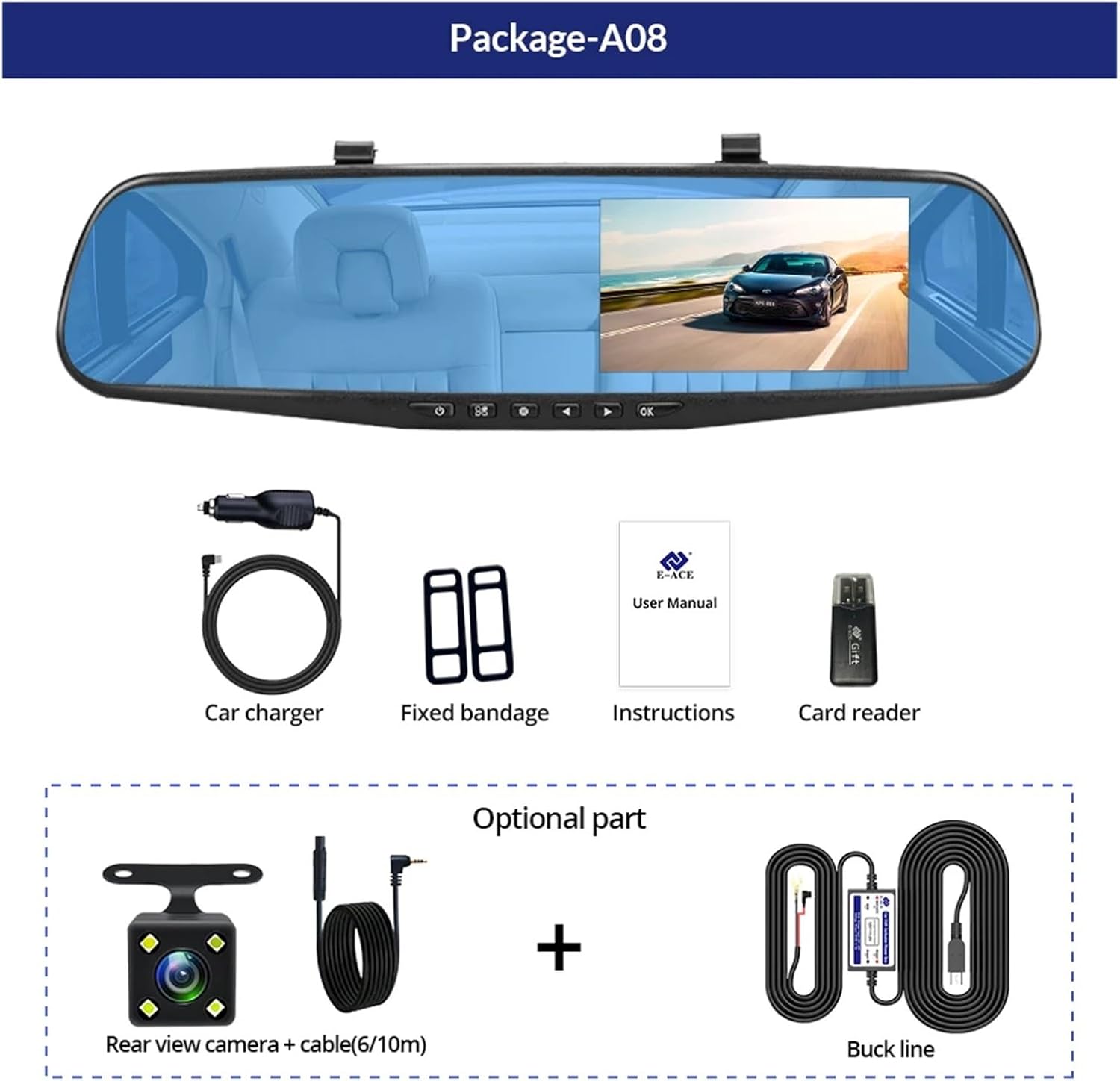
Image: A visual representation of the items included in the E-ACE dash cam package, showing the main unit and accessories.
3. தயாரிப்பு அம்சங்கள்
- 4.3-inch High-Definition Display: Provides clear visibility for real-time monitoring and playback.
- Dual Lens Design: Captures both front and rear footage simultaneously for comprehensive coverage.
- Built-in Night Vision Technology: Ensures clear recordings in low-light conditions.
- பயனர் நட்பு நிறுவல்: Sleek rearview mirror design integrates seamlessly into your vehicle.
- லூப் ரெக்கார்டிங்: பழைய foo-வை தானாகவே மேலெழுதும்.tagமெமரி கார்டு நிரம்பியிருக்கும் போது, தொடர்ச்சியான பதிவு உறுதி செய்யப்படுகிறது.
- G-Sensor Feature: Detects sudden movements or impacts and automatically locks the current video file மேலெழுதப்படுவதைத் தடுக்க வேண்டும்.
- பார்க்கிங் கண்காணிப்பு: Records video when motion or impact is detected while the vehicle is parked (requires buck line connection).
- 170-டிகிரி வைட் ஆங்கிள்: பரந்த அளவில் வழங்குகிறது view முன்னால் உள்ள பாதை.
- தலைகீழ் படம்: Displays the rear camera view திரும்பும்போது பார்க்கிங் வழிகாட்டுதல்களுடன்.
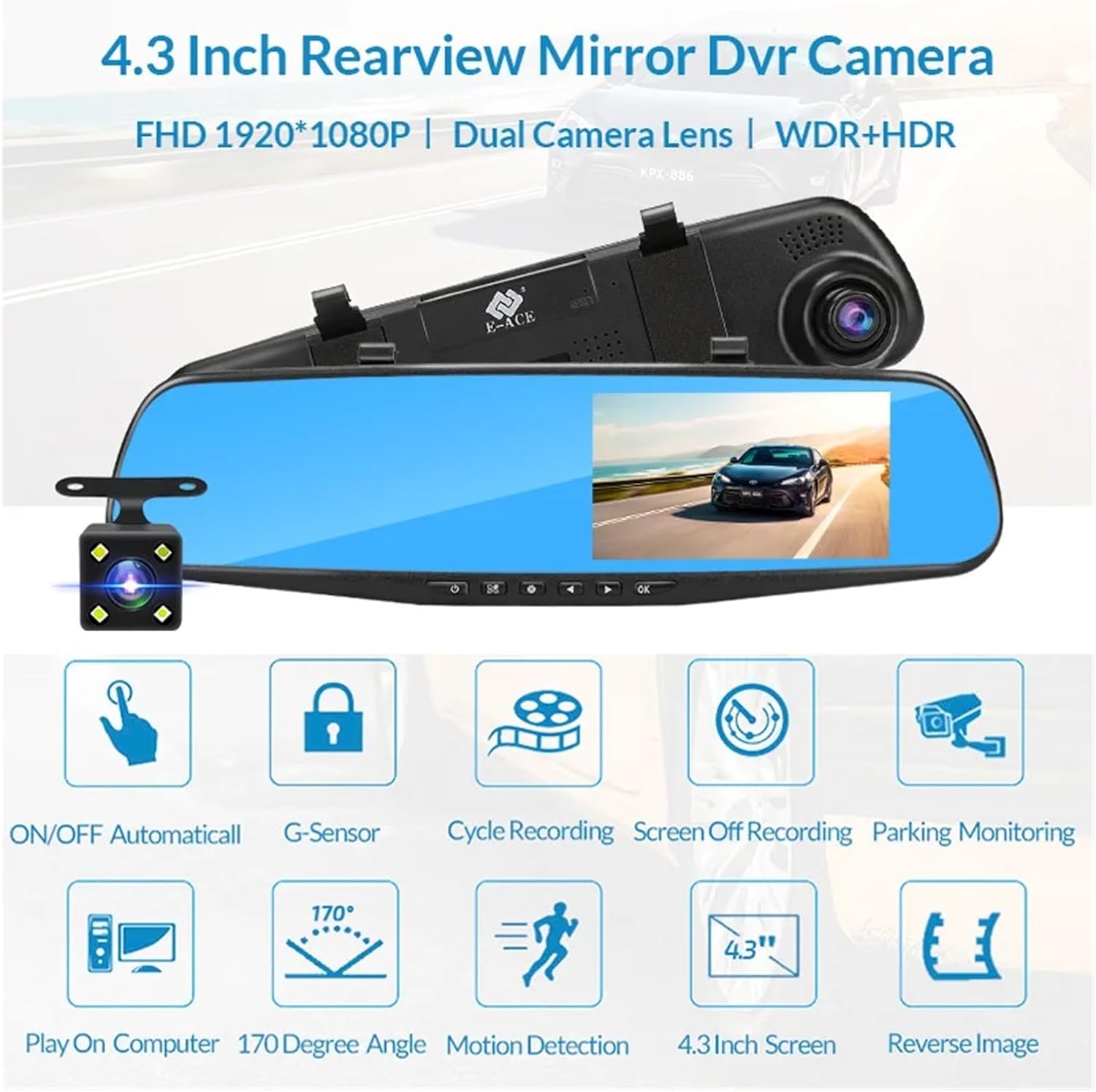
Image: An illustration highlighting the various functional features of the E-ACE dash cam.
4. கூறு அடையாளம்
Familiarize yourself with the various parts and controls of your E-ACE dash cam:

Image: A detailed diagram identifying the buttons, ports, and features on the E-ACE dash cam unit.
- ஆன்/ஆஃப் பட்டன்: சாதனத்தை இயக்குகிறது அல்லது முடக்குகிறது.
- மெனு பட்டன்: அமைப்புகள் மற்றும் விருப்பங்களை அணுகுகிறது.
- பயன்முறை பொத்தான்: Switches between video recording, photo, and playback modes.
- UP பொத்தான்: Navigates up in menus or adjusts settings.
- டவுன் பட்டன்: Navigates down in menus or adjusts settings.
- சரி பொத்தான்: Confirms selections or starts/stops recording.
- TF அட்டை ஸ்லாட்: Insert your MicroSD (TF) card here.
- AV-IN போர்ட்: Connects the rear camera.
- USB போர்ட்: மின்சாரம் மற்றும் தரவு பரிமாற்றத்திற்கு.
- மீட்டமை பொத்தான்: Resets the device to factory settings (use a thin pin).
- ஒலிவாங்கி: வாகனத்தின் உள்ளே இருக்கும் ஆடியோவைப் பதிவு செய்கிறது.
5. அமைவு மற்றும் நிறுவல்
5.1 மெமரி கார்டைச் செருகுவது
Before installation, insert a high-speed MicroSD (TF) card (Class 10 or higher, up to 64GB recommended) into the TF Card Slot (7) with the contacts facing the screen. Ensure the card is inserted correctly until it clicks into place.
5.2 டேஷ் கேமை பொருத்துதல்
- Attach the fixed bandages to the back of the dash cam unit.
- Securely strap the dash cam over your vehicle's existing rearview mirror using the fixed bandages. Ensure it is centered and stable.
5.3 மின்சார விநியோகத்தை இணைத்தல்
- Connect the car charger to the USB Port (9) on the dash cam.
- கார் சார்ஜரின் மறுமுனையை உங்கள் வாகனத்தின் சிகரெட் லைட்டர் சாக்கெட்டில் செருகவும்.
- Route the power cable neatly along the windshield trim to avoid obstructing your view.
5.4 Installing the Rear Camera (Optional)
- Connect the rear camera cable to the AV-IN Port (8) on the dash cam.
- Route the rear camera cable from the dash cam to the rear of your vehicle. This typically involves tucking the cable under the headliner and along the side pillars.
- Mount the rear camera on the rear windshield or near the license plate using its adhesive or screws. Ensure it has a clear view பின்னால் சாலையின்.
- If using the reverse image function, connect the red wire from the rear camera cable to your vehicle's reverse light power supply.
6. இயக்க வழிமுறைகள்
6.1 பவர் ஆன்/ஆஃப்
- தானியங்கி: The dash cam will automatically power on and start recording when your vehicle's ignition is turned on (if connected to a switched power source).
- கையேடு: Press and hold the ON/OFF Button (1) to manually power the device on or off.
6.2 அடிப்படை செயல்பாடு
- மாறுதல் முறைகள்: Press the Mode Button (3) to cycle between Video Recording, Photo, and Playback modes.
- அணுகல் மெனு: In any mode, press the Menu Button (2) to enter the settings menu. Use the UP (4) and Down (5) buttons to navigate, and OK (6) to select.
- பதிவைத் தொடங்கு/நிறுத்து: In Video Recording mode, press the OK Button (6) to manually start or stop recording.
6.3 காட்சி முறைகள்
While recording, you can typically switch between different display views by pressing the UP or Down buttons:
- Front Camera Only
- Rear Camera Only
- Picture-in-Picture (Front main, Rear sub-window)
- Picture-in-Picture (Rear main, Front sub-window)
6.4 லூப் ரெக்கார்டிங்
Set the loop recording duration (e.g., 1, 3, or 5 minutes) in the settings menu. When the memory card is full, the oldest unlocked fileபுதிய பதிவுகளால் கள் மேலெழுதப்படும்.
6.5 ஜி-சென்சார்
The G-sensor automatically detects collisions or sudden braking. When triggered, it locks the current video file, preventing it from being overwritten by loop recording. Adjust sensitivity in the settings.
6.6 Parking Monitoring (Optional)
If the buck line is installed, the dash cam can monitor your vehicle while parked. When motion or impact is detected, it will automatically record a short video. Enable this feature in the settings.
6.7 தேதி மற்றும் நேர அமைப்பு
It is important to set the correct date and time in the system settings for accurate timestampஉங்கள் பதிவுகளில் கள்.
7. பராமரிப்பு
- சுத்தம்: Use a soft, dry cloth to clean the lens and screen. Avoid abrasive cleaners or solvents.
- நினைவக அட்டை: Format the MicroSD card regularly (e.g., once a month) within the dash cam's settings to maintain optimal performance and prevent data corruption. Back up important fileவடிவமைப்பதற்கு முன் கள்.
- வெப்பநிலை: Avoid exposing the device to extreme temperatures, as this can affect battery life and component integrity.
- நிலைபொருள் புதுப்பிப்புகள்: உற்பத்தியாளரைச் சரிபார்க்கவும் website periodically for firmware updates that may improve performance or add features.
8. சரிசெய்தல்
| பிரச்சனை | சாத்தியமான காரணம் | தீர்வு |
|---|---|---|
| டேஷ் கேமரா இயங்கவில்லை. | No power supply; faulty charger; loose connection. | Check car charger connection and vehicle's cigarette lighter. Try a different USB cable/charger. |
| பதிவு தானாக நின்றுவிடும். | Memory card full; slow memory card; G-sensor sensitivity too high. | Format the memory card. Use a Class 10 or higher MicroSD card. Lower G-sensor sensitivity in settings. |
| வீடியோ footage மங்கலாக உள்ளது. | லென்ஸில் பாதுகாப்பு படலம்; அழுக்கு லென்ஸ்; தவறான ஃபோகஸ். | Remove any protective film. Clean the lens with a soft cloth. |
| பின்புற கேமரா தெரியவில்லை. | தளர்வான இணைப்பு; கேபிள்/கேமரா பழுதடைந்துள்ளது. | Check the AV-IN connection. Ensure the rear camera is properly installed. |
| சாதனம் உறைகிறது அல்லது செயலிழக்கிறது. | மென்பொருள் சிக்கல்; மெமரி கார்டு பிழை. | Press the Reset Button (10) with a thin pin. Format the memory card. |
9. விவரக்குறிப்புகள்
- மாதிரி பெயர்: DMMRUTXB
- காட்சி: 4.3 அங்குலம்
- கேமரா: Dual Lens (Front & Rear support)
- வீடியோ தீர்மானம்: FHD 1920x1080P (Front)
- அம்சங்கள்: Loop Recording, G-Sensor, Night Vision, Parking Monitoring, 170-degree wide angle
- சேமிப்பு: Supports MicroSD (TF) card, Class 10 or higher (up to 64GB)
- இணைப்பு: USB, AV-IN (for rear camera)
- பொருளின் எடை: தோராயமாக 1.76 அவுன்ஸ் (50 கிராம்)
- தொகுப்பு அளவுகள்: தோராயமாக 0.39 x 0.39 x 0.39 அங்குலம்
- உற்பத்தியாளர்: DMMRUTXB
10. உத்தரவாதம் மற்றும் ஆதரவு
For warranty information and technical support, please refer to the documentation provided with your purchase or contact the retailer/manufacturer directly. Keep your purchase receipt as proof of purchase.
Ask a question about this manual
Ask about setup, troubleshooting, compatibility, parts, safety, or missing instructions. Manuals+ will review the question and use this page’s manual context to help answer it.