
COREGENIX GQ-03
COREGENIX GQ-03 Truly Wireless Earbuds User Manual
Brand: COREGENIX | Model: GQ-03
1. அறிமுகம்
Welcome to your new COREGENIX GQ-03 Truly Wireless Earbuds. This manual provides detailed instructions for the setup, operation, and maintenance of your device to ensure optimal performance and a satisfying user experience. Please read this manual thoroughly before using the earbuds.
2. தொகுப்பு உள்ளடக்கங்கள்
உங்கள் தொகுப்பில் அனைத்து பொருட்களும் உள்ளதா என்பதை சரிபார்க்கவும்:
- COREGENIX GQ-03 Truly Wireless Earbuds
- வயர்லெஸ் சார்ஜிங் கேஸ்
- யூ.எஸ்.பி டைப்-சி சார்ஜிங் கேபிள்
- காது மெத்தைகள் (பல்வேறு அளவுகள்)
- பயனர் கையேடு (இந்த ஆவணம்)
3. தயாரிப்பு முடிந்துவிட்டதுview
The COREGENIX GQ-03 earbuds are designed for high-quality audio and versatile functionality. Key features include Active Noise Cancellation (ANC), Environmental Noise Cancellation (ENC) for calls, low latency gaming mode, and a charging case with a time/week display and breathing LED lights.

Image: The COREGENIX GQ-03 Truly Wireless Earbuds with their charging case, featuring a digital display.
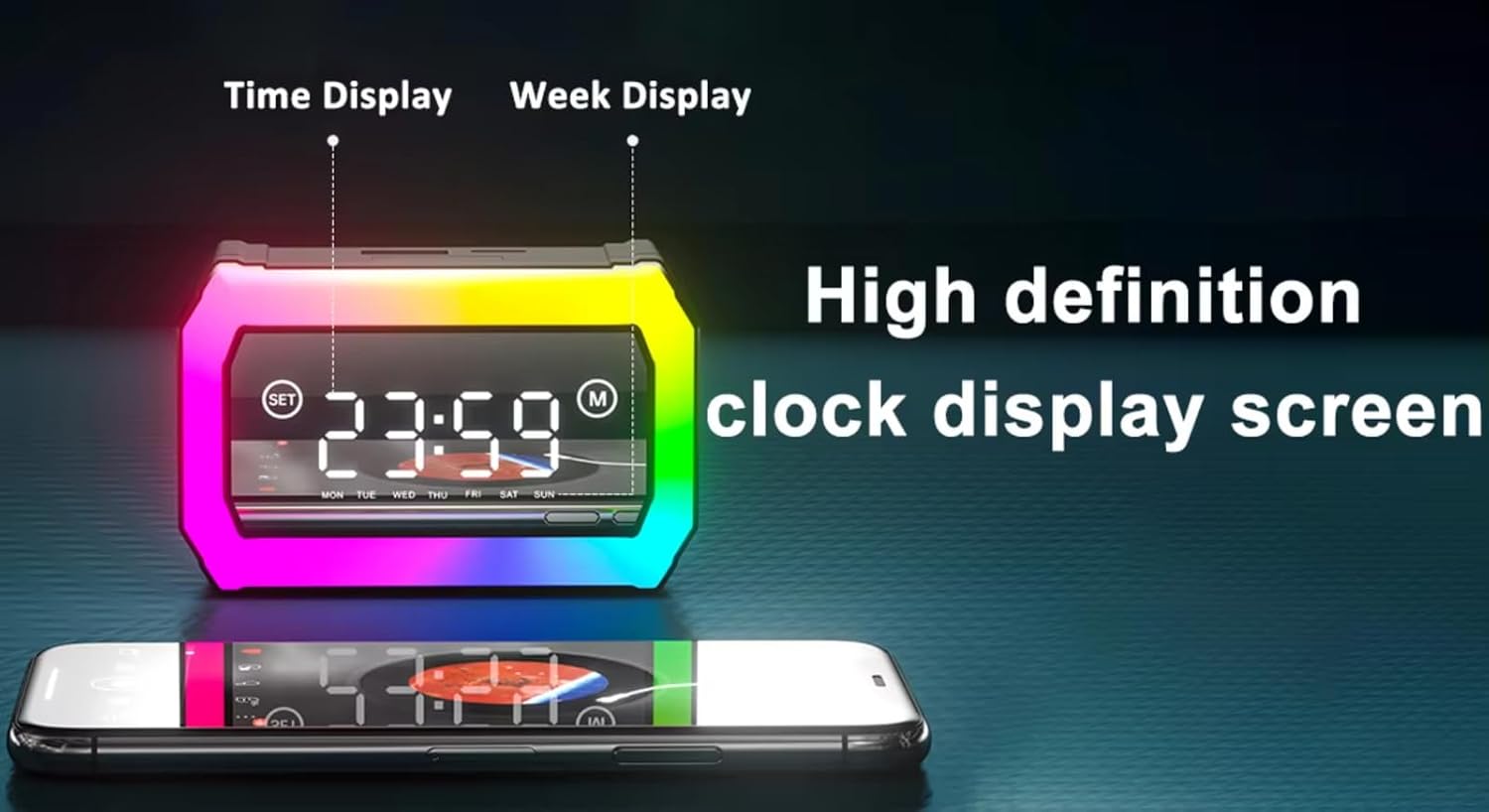
Image: Close-up of the charging case display showing time and day of the week.

Image: The earbuds and charging case positioned next to a smartphone, highlighting the innovative design.
4 அமைவு
4.1. இயர்பட்ஸ் மற்றும் கேஸை சார்ஜ் செய்தல்
Before first use, fully charge the charging case and earbuds. The charging case features a Type-C port for fast charging.
- Connect the provided USB Type-C cable to the charging port on the case.
- கேபிளின் மறுமுனையை USB பவர் அடாப்டருடன் (சேர்க்கப்படவில்லை) அல்லது கணினியின் USB போர்ட்டுடன் இணைக்கவும்.
- The digital display on the case will indicate the charging status.
- இயர்பட்களை சார்ஜிங் கேஸில் வைக்கவும். அவை தானாகவே சார்ஜ் ஆகத் தொடங்கும்.
குறிப்பு: A 10-minute charge provides approximately 100 minutes of playtime. The charging case can also reverse charge your phone in emergency situations.
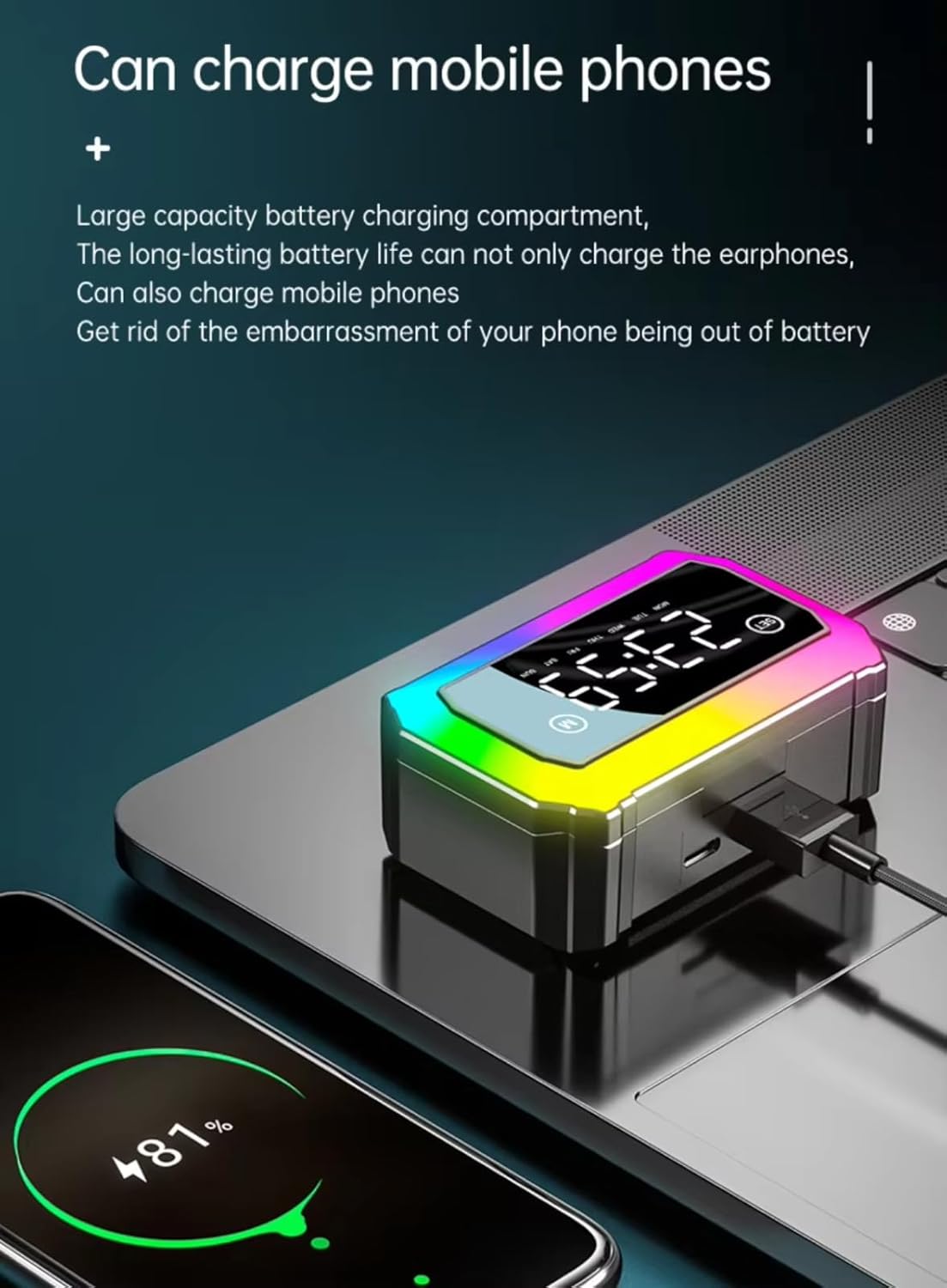
Image: The charging case connected via cable to a smartphone, demonstrating its reverse charging capability.

Image: The charging case display showing battery life information, including 120 hours of standby time and 3-8 hours of single use.
4.2. ஆரம்ப இணைத்தல்
The earbuds are designed for automatic connection once paired.
- சார்ஜிங் கேஸைத் திறக்கவும். இயர்பட்கள் தானாகவே ஆன் ஆகி, இணைத்தல் பயன்முறைக்குச் செல்லும்.
- உங்கள் சாதனத்தில் (ஸ்மார்ட்போன், டேப்லெட், மடிக்கணினி), புளூடூத்தை இயக்கவும்.
- தேடுங்கள் available Bluetooth devices and select "GQ-03" from the list.
- இணைக்கப்பட்டதும், உறுதிப்படுத்தல் தொனியைக் கேட்பீர்கள், மேலும் இயர்பட்கள் பயன்படுத்தத் தயாராக இருக்கும்.
குறிப்பு: After the initial pairing, the earbuds will automatically connect to the last paired device when removed from the case, provided Bluetooth is enabled on the device.

Image: Earbuds next to a smartphone screen showing Bluetooth settings, indicating automatic connection without manual pairing.
5. இயக்க வழிமுறைகள்
5.1. தொடுதல் கட்டுப்பாடுகள்
The COREGENIX GQ-03 earbuds feature intuitive touch controls on each earbud.
| செயல் | செயல்பாடு |
|---|---|
| Tap once (either earbud) | Play/Pause music, Answer/Hang up call |
| Double click left earbud | முந்தைய பாடல் |
| Double click right earbud | அடுத்த பாடல் |
| Long press for 2 seconds (either earbud) | அழைப்பை நிராகரி |
| Long press for 5 seconds (either earbud) | பவர் ஆன்/ஆஃப் |
| Triple tap (either earbud) | குரல் உதவியாளரை இயக்கு (Siri, Google Assistant) |

Image: Visual representation of touch control functions on the earbud.
5.2. ஆக்டிவ் இரைச்சல் ரத்து (ANC)
The earbuds feature up to 32dB Active Noise Cancellation to minimize ambient sounds. To activate or deactivate ANC, perform a specific touch gesture (refer to the touch control table or experiment with long presses/triple taps if not explicitly listed above, as this feature is often toggled via a specific touch command not detailed in the provided image).
5.3. Environmental Noise Cancellation (ENC) for Calls
The integrated Quad Mics with AI-ENC technology automatically reduce environmental noise during phone calls, ensuring clear communication for both parties. This feature is active during calls and does not require manual activation.
5.4. குறைந்த தாமத கேமிங் பயன்முறை
For an optimized gaming and streaming experience, activate the 40ms low latency mode. This ensures minimal delay between audio and visuals. To activate/deactivate low latency mode, perform a specific touch gesture (often a triple tap or long press on one earbud, refer to product packaging or official app for exact command if not listed in general touch controls).

Image: Earbuds shown with a smartphone displaying a game, illustrating seamless audio and video synchronization.
5.5. Time and Week Display
The charging case features a high-definition digital display that shows the current time and day of the week. This display is always active when the case is open or when interacting with it.
5.6. Breathing LED Lights
The charging case is equipped with dynamic breathing LED lights, which provide a visual aesthetic. These lights typically activate during charging or when the case is opened.
6. பராமரிப்பு
6.1. சுத்தம் செய்தல்
உகந்த செயல்திறன் மற்றும் சுகாதாரத்தை பராமரிக்க:
- இயர்பட்ஸ் மற்றும் சார்ஜிங் கேஸை மென்மையான, உலர்ந்த, பஞ்சு இல்லாத துணியால் மெதுவாக துடைக்கவும்.
- சிராய்ப்பு பொருட்கள், ஆல்கஹால் அல்லது ரசாயன கிளீனர்களைப் பயன்படுத்த வேண்டாம்.
- இயர்பட்கள் மற்றும் கேஸ் இரண்டிலும் உள்ள சார்ஜிங் காண்டாக்ட்கள் சுத்தமாகவும் உலர்ந்ததாகவும் இருப்பதை உறுதிசெய்யவும்.
6.2. நீர் எதிர்ப்பு
The COREGENIX GQ-03 earbuds are rated IPX5 water resistant. This means they are protected against low-pressure water jets from any direction. They are suitable for workouts and light rain exposure but should not be submerged in water or exposed to strong water streams.
7. சரிசெய்தல்
If you encounter issues with your earbuds, please refer to the following common solutions:
- ஒலி இல்லை: இயர்பட்கள் சார்ஜ் செய்யப்பட்டுள்ளதா, சரியாக இணைக்கப்பட்டுள்ளதா, இயர்பட்களிலும் உங்கள் இணைக்கப்பட்ட சாதனத்திலும் ஒலியளவு சரிசெய்யப்பட்டுள்ளதா என்பதை உறுதிப்படுத்திக் கொள்ளுங்கள்.
- இணைத்தல் சிக்கல்கள்: Turn off Bluetooth on your device, place earbuds back in the case, then remove them and try pairing again. Ensure no other devices are trying to connect.
- இயர்பட்ஸ் சார்ஜ் ஆகவில்லை: Check that the charging cable is securely connected and the charging contacts on both the earbuds and case are clean and dry.
- ஒரு இயர்பட் வேலை செய்யவில்லை: Try resetting the earbuds (refer to product packaging for specific reset instructions if not detailed here). Ensure both earbuds are charged.
- Low Latency Not Activating: Ensure you are performing the correct touch gesture to activate gaming mode.
சிக்கல் தொடர்ந்தால், வாடிக்கையாளர் ஆதரவைத் தொடர்பு கொள்ளவும்.
8. விவரக்குறிப்புகள்
| அம்சம் | விவரம் |
|---|---|
| மாதிரி பெயர் | ஜிக்யூ-03 |
| இணைப்பு தொழில்நுட்பம் | வயர்லெஸ் (புளூடூத் V5.3) |
| புளூடூத் பதிப்பு | 5.3 |
| சத்தம் கட்டுப்பாட்டு அம்சங்கள் | Active Noise Cancellation (up to 32dB), Environmental Noise Cancellation for Calls |
| குறைந்த தாமதம் | 40மி.வி (கேமிங் பயன்முறை) |
| ஆடியோ டிரைவர் வகை | Dynamic Driver (13mm Bass Drivers with BoomX Technology) |
| பேட்டரி ஆயுள் | 120 மணிநேரம் வரை (சார்ஜிங் கேஸுடன்) |
| சார்ஜ் செய்கிறது | Type-C Fast Charging, Reverse Charging capability |
| கட்டுப்பாட்டு முறை | தொடு கட்டுப்பாடு |
| நீர் எதிர்ப்பு நிலை | IPX5 நீர் எதிர்ப்பு |
| அதிகபட்ச இயக்க தூரம் | 15 மீட்டர் |
| பொருளின் எடை | 100 கிராம் |
| தயாரிப்பு பரிமாணங்கள் | 9 x 7 x 5 செ.மீ |
| பொருள் | பிளாஸ்டிக் |
| காதணி வடிவம் | காதுக்குள் |
| மின்மறுப்பு | 80 ஓம்ஸ் |
9. உத்தரவாதம் மற்றும் ஆதரவு
For warranty information and customer support, please refer to the warranty card included in your package or visit the official COREGENIX webஎந்தவொரு உத்தரவாதக் கோரிக்கைகளுக்கும் வாங்கியதற்கான சான்றாக உங்கள் கொள்முதல் ரசீதை வைத்திருங்கள்.
Ask a question about this manual
Ask about setup, troubleshooting, compatibility, parts, safety, or missing instructions. Manuals+ will review the question and use this page’s manual context to help answer it.