
Dyurwa Smart Watch T60 User Manual
மாடல்: T60
1. அறிமுகம்
Thank you for choosing the Dyurwa Smart Watch T60. This manual provides essential information for setting up, operating, and maintaining your new smartwatch. Please read it thoroughly to ensure proper use and to maximize your device's potential.
2. பெட்டியில் என்ன இருக்கிறது
Upon opening your Dyurwa Smart Watch T60 package, you should find the following items:
- Dyurwa Smart Watch T60
- சார்ஜிங் கேபிள்
- பயனர் கையேடு (இந்த ஆவணம்)

Image: Package contents showing the Dyurwa Smart Watch T60, an extra strap, a charging cable, and the user manual.
3 அமைவு
3.1 பயன்பாட்டு நிறுவல்
- Scan the QR code provided in the quick start guide or search for the "GloryFit" app in your smartphone's app store (Apple App Store for iOS, Google Play Store for Android).
- Download and install the "GloryFit" app.
- Open the app and follow the on-screen instructions to create an account and set up your personal profile.
3.2 Device Pairing (Bluetooth Connection)
To connect your Dyurwa Smart Watch T60 to your smartphone:
- Ensure your smartphone's Bluetooth is turned on.
- Open the "GloryFit" app.
- In the app, navigate to the device section and select "Add Device" or "தேடுங்கள் Device."
- The app will search for available devices. Select "T60" from the list to initiate pairing.
- கேட்கப்பட்டால், உங்கள் ஸ்மார்ட்போன் மற்றும் ஸ்மார்ட்வாட்ச் இரண்டிலும் இணைத்தல் கோரிக்கையை உறுதிப்படுத்தவும்.
For iOS 13.0 and above, and Android 5.0 and above, a single connection through the GloryFit app is usually sufficient for all functions. For older iOS versions (13.0 and below), an additional Bluetooth connection for audio functions (answer/make calls) may be required:
- After successful binding in the GloryFit app, go to your phone's Bluetooth settings.
- Find "T60" in the list of available devices and tap to connect.
- Once connected, you can use the watch to answer and make calls.

Image: Visual guide for connecting the smartwatch to your phone, showing app download, Bluetooth activation, device search, and binding confirmation.
4. இயக்க வழிமுறைகள்
4.1 Display and Dials
The Dyurwa Smart Watch T60 features a 1.91-inch HD full touch screen. You can customize your watch face:
- வாட்ச் முகங்களை மாற்றுதல்: Access over 200 designs through the "GloryFit" app.
- தனிப்பயன் டயல்கள்: Upload your favorite picture via the app to set it as your watch face.
- ஒளிர்வு சரிசெய்தல்: Manually adjust the screen brightness through the watch settings (4 levels available) for optimal visibility in various lighting conditions.

Image: The smartwatch showcasing its large 1.91-inch HD display and several customizable watch face options, including data like steps, heart rate, and weather.

Image: A user customizing their watch face with a personal photo through the companion app, demonstrating the DIY dial feature.
4.2 Calling and Messaging
With Bluetooth 5.3, the watch offers stable connectivity for communication features:
- புளூடூத் அழைப்புகள்: Make and receive calls directly from your watch using the built-in microphone and Hi-Fi speaker.
- செய்தி அறிவிப்புகள்: Receive alerts for text messages and notifications from social media applications (e.g., Facebook, WhatsApp, Twitter) directly on your watch.

Image: The smartwatch displaying its Bluetooth call features, including a dial pad, contact list, incoming call screen, and call history.

Image: The smartwatch displaying notifications from various social media platforms and other apps, indicating its smart notification capabilities.
4.3 சுகாதார கண்காணிப்பு
The Dyurwa Smart Watch T60 provides comprehensive health tracking features:
- இதய துடிப்பு மானிட்டர்: Continuously monitors your heart rate 24/7. Data is for reference only and not for medical diagnosis.
- ஸ்லீப் டிராக்கர்: Automatically measures your sleep patterns, including awake, light, and deep sleep stages, to help you understand and improve your sleep habits.
- இரத்த ஆக்ஸிஜன் கண்காணிப்பு: உங்கள் இரத்த ஆக்ஸிஜன் அளவை அளவிடுகிறது.
- பெண் ஆரோக்கிய கண்காணிப்பு: Manage and track menstrual cycles and predict fertile periods through the app.
- சுவாசப் பயிற்சிகள்: Guided breathing sessions to help with relaxation.

Image: A split image showing the smartwatch's sleep monitoring function with sleep duration, and heart rate and blood oxygen monitoring displays.

Image: A woman exercising while wearing the smartwatch, with a close-up of the watch displaying heart rate data and a corresponding app screen.

Image: Demonstrates breathing exercises and blood oxygen monitoring features of the smartwatch, showing users engaging with these functions.
4.4 விளையாட்டு முறைகள்
The watch supports over 110 built-in sports modes. During exercise, it records data such as steps, calories burned, distance, and heart rate.

Image: A cyclist wearing the smartwatch, with an overlay showing various sports icons and the watch displaying real-time exercise data like calories, steps, distance, and heart rate.

Image: A collage of people participating in various sports like running, cycling, yoga, and tennis, illustrating the wide range of supported sport modes.
4.5 மற்ற செயல்பாடுகள்
The Dyurwa Smart Watch T60 includes several practical features:
- குரல் உதவியாளர்: Access your phone's voice assistant directly from the watch.
- இசை கட்டுப்பாடு: உங்கள் ஸ்மார்ட்போனில் மியூசிக் பிளேபேக்கைக் கட்டுப்படுத்தவும்.
- கேமரா கட்டுப்பாடு: உங்கள் ஸ்மார்ட்போனின் கேமரா ஷட்டரை தொலைவிலிருந்து இயக்கவும்.
- வானிலை முன்னறிவிப்பு: View தற்போதைய வானிலை மற்றும் முன்னறிவிப்புகள்.
- அலாரம் கடிகாரம் & டைமர்: அலாரங்களை அமைத்து டைமர் செயல்பாட்டைப் பயன்படுத்தவும்.
- ஸ்டாப்வாட்ச்: நேர செயல்பாடுகளுக்கு.
- உங்கள் தொலைபேசியைக் கண்டறியவும்: Locate your misplaced smartphone by making it ring.
- கால்குலேட்டர்: Basic calculation functions.
- ஒளிரும் விளக்கு: திரையை ஒளி மூலமாகப் பயன்படுத்துகிறது.

Image: A comprehensive display of the smartwatch's various utility features, including calendar, stopwatch, camera remote, weather, alarm, timer, flashlight, calculator, breathing exercises, phone finder, voice assistant, and music control.
5. பேட்டரி மற்றும் சார்ஜிங்
The Dyurwa Smart Watch T60 is equipped with a large capacity battery, offering extended usage times:
- சார்ஜிங் நேரம்: முழு சார்ஜ் செய்ய தோராயமாக 2 மணிநேரம்.
- வழக்கமான பயன்பாடு: Up to 7-10 days.
- காத்திருப்பு நேரம்: 30 நாட்கள் வரை.
Use the provided magnetic charging cable to charge your device. Connect the magnetic end to the charging points on the back of the watch and the USB end to a standard USB power adapter (not included).
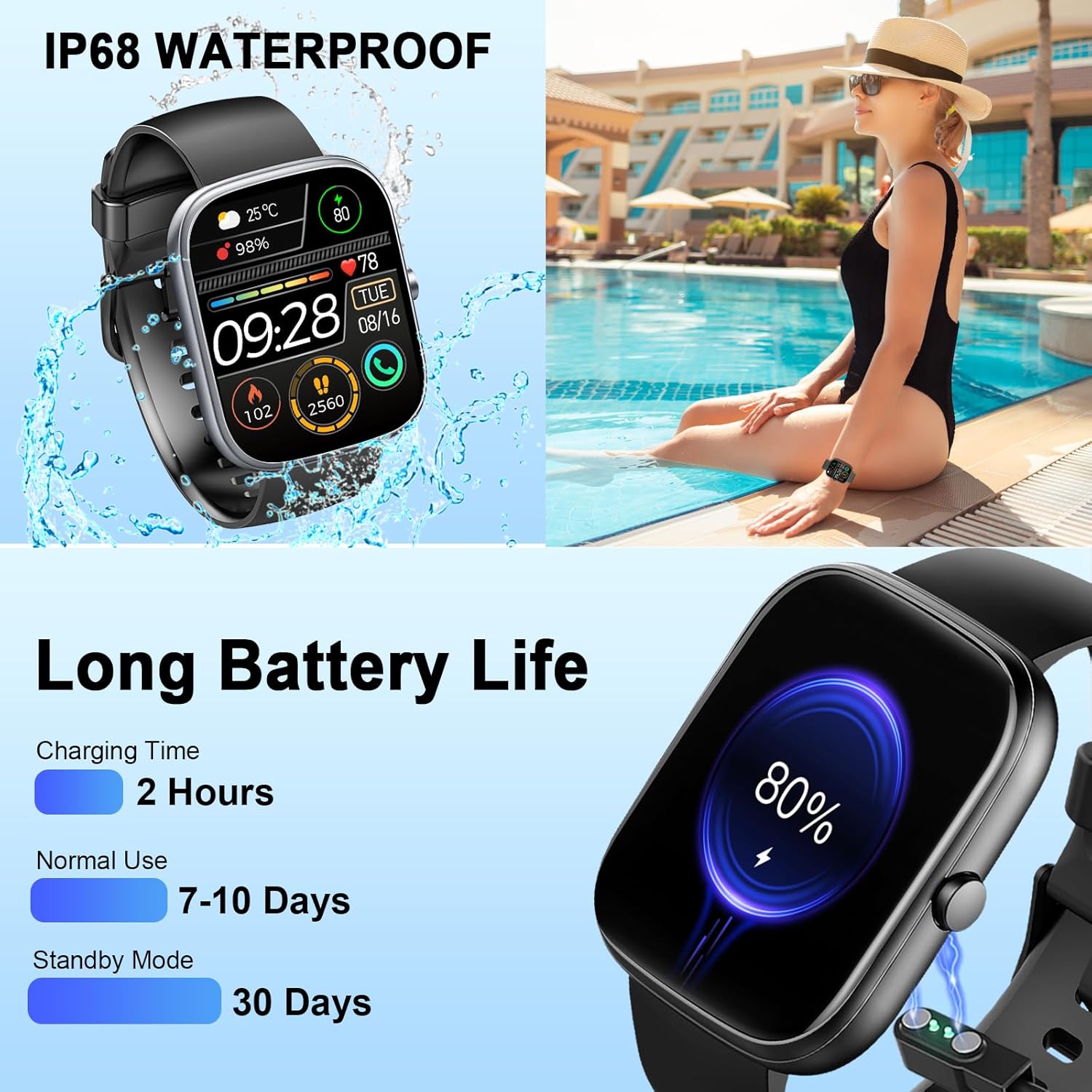
Image: The smartwatch connected to its magnetic charging cable, illustrating the charging process and highlighting its long battery life specifications.

Image: The smartwatch on its magnetic charger, with text indicating a daily use time of 7 days and a standby time of 30 days.
6. நீர்ப்புகா தகவல்
The Dyurwa Smart Watch T60 is IP68 waterproof. This means it is resistant to dust and can withstand immersion in water up to 1.5 meters for up to 30 minutes. It is suitable for daily use, such as hand washing, bathing, and swimming.
குறிப்பு:
- Not suitable for hot water, saunas, or diving.
- Avoid exposure to high humidity or corrosive liquids.
- Water resistance may decrease over time with normal wear and tear.

Image: The smartwatch being splashed with water, accompanied by icons indicating its IP68 waterproof rating for activities like bathing and swimming.
7. பராமரிப்பு
- சுத்தம்: மென்மையான, உலர்ந்த துணியால் கடிகாரத்தையும் பட்டையையும் தவறாமல் துடைக்கவும். தேவைப்பட்டால், சிறிது டி-ஸ்ட்ரீமைப் பயன்படுத்தவும்.amp துணி மற்றும் முற்றிலும் உலர்.
- இரசாயனங்களை தவிர்க்கவும்: கடுமையான இரசாயனங்கள், துப்புரவு கரைப்பான்கள் அல்லது வலுவான சவர்க்காரங்களைப் பயன்படுத்த வேண்டாம், ஏனெனில் இவை கடிகாரத்தின் பூச்சு மற்றும் சீல்களை சேதப்படுத்தும்.
- சார்ஜிங் தொடர்புகள்: Keep the charging contacts on the back of the watch clean and free of debris to ensure proper charging.
- சேமிப்பு: கடிகாரத்தைப் பயன்படுத்தாதபோது குளிர்ந்த, உலர்ந்த இடத்தில் சேமிக்கவும்.
8. சரிசெய்தல்
| பிரச்சனை | சாத்தியமான தீர்வு |
|---|---|
| வாட்ச் ஆன் ஆகவில்லை. | கடிகாரம் முழுமையாக சார்ஜ் செய்யப்பட்டுள்ளதா என்பதை உறுதிப்படுத்திக் கொள்ளுங்கள். குறைந்தபட்சம் 10 நிமிடங்களுக்கு அதை சார்ஜருடன் இணைக்கவும். |
| ஸ்மார்ட்போனுடன் இணைக்க முடியாது | 1. உங்கள் தொலைபேசியில் புளூடூத் இயக்கப்பட்டிருப்பதை உறுதிசெய்யவும். 2. கடிகாரம் உங்கள் தொலைபேசியின் வரம்பிற்குள் இருப்பதை உறுதிப்படுத்திக் கொள்ளுங்கள். 3. கடிகாரத்தையும் உங்கள் தொலைபேசியையும் மறுதொடக்கம் செய்யுங்கள். 4. Try unpairing and re-pairing the device through the GloryFit app and phone's Bluetooth settings. |
| Inaccurate heart rate/sleep data | Ensure the watch is worn snugly on your wrist, not too tight or too loose. Clean the sensor on the back of the watch. Note that data is for reference and not medical use. |
| அறிவிப்புகள் பெறப்படவில்லை | 1. Check app permissions for GloryFit on your phone (notifications, background activity). 2. Ensure Bluetooth connection is stable. 3. Verify notification settings within the GloryFit app. |
| குறுகிய பேட்டரி ஆயுள் | Reduce screen brightness, limit continuous heart rate monitoring, and disable unnecessary notifications. Ensure proper charging. |
9. விவரக்குறிப்புகள்
| அம்சம் | விவரக்குறிப்பு |
|---|---|
| மாதிரி | T60 |
| திரை அளவு | 1.91 inches (4.85 cm) HD Full Touch Screen |
| இணைப்பு | புளூடூத் 5.3 |
| இயக்க முறைமை | Android Wear 1.0 (compatible with iOS 9.0+ and Android 4.0+) |
| நீர்ப்புகா மதிப்பீடு | IP68 |
| பேட்டரி வகை | Lithium Ion (1 A battery included) |
| சார்ஜிங் நேரம் | தோராயமாக 2 மணி நேரம் |
| வழக்கமான பயன்பாட்டு நேரம் | 7-10 நாட்கள் |
| காத்திருப்பு நேரம் | 30 நாட்கள் வரை |
| பொருளின் எடை | 3.2 அவுன்ஸ் |
| ஜி.பி.எஸ் | ஜிபிஎஸ் இல்லை |
10. உத்தரவாதம் மற்றும் ஆதரவு
For warranty information and customer support, please refer to the documentation included with your purchase or contact Dyurwa customer service directly. Details for contacting support are typically available on the product packaging or the official Dyurwa webதளம்.