
1. அறிமுகம்
The Gens ace iMars D300 Plus is an advanced dual-channel smart charger, building upon the core features of the G-Tech system. This enhanced version integrates Bluetooth remote control, allowing RC enthusiasts to manage and monitor real-time data and historical records directly from the Gens Ace mobile application. This integration simplifies the charging experience, improves efficiency, and enhances safety during operation.
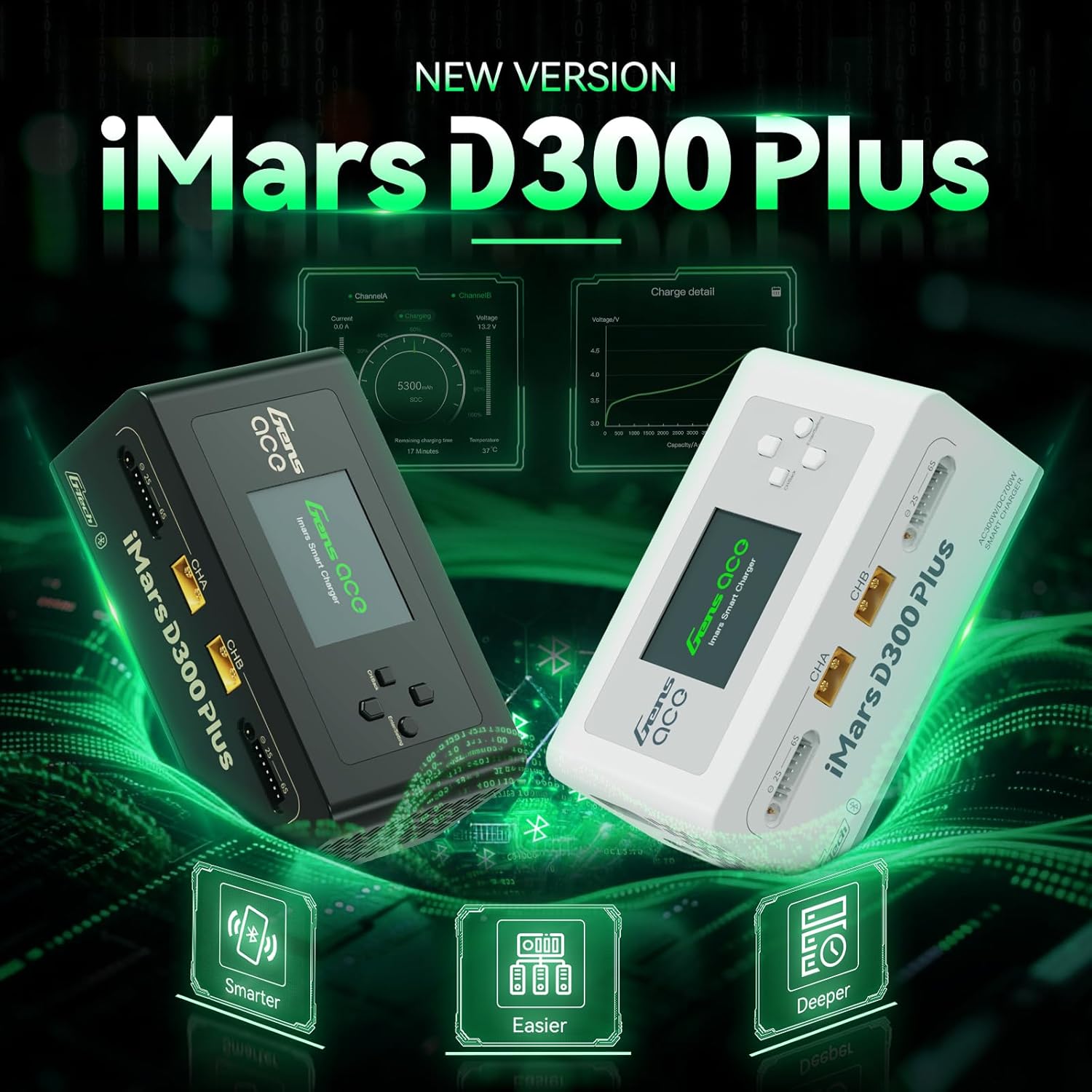
Figure 1.1: Gens ace iMars D300 Plus Lipo Charger, showcasing both black and white models.
2. பாதுகாப்பு தகவல்
Always prioritize safety when operating the Gens ace iMars D300 Plus charger. Improper use can lead to property damage or personal injury. Adhere to the following safety guidelines:
- கையேட்டைப் படியுங்கள்: Thoroughly read and understand this entire instruction manual before using the charger.
- காற்றோட்டம்: Operate the charger in a well-ventilated area, away from flammable materials.
- சக்தி ஆதாரம்: Use only the specified input voltage (AC100-240V or DC7-30V).
- பேட்டரி இணக்கத்தன்மை: Ensure the battery type and cell count match the charger settings. Incorrect settings can cause severe damage.
- மேற்பார்வை: செயல்பாட்டில் இருக்கும்போது சார்ஜரை கவனிக்காமல் விட்டுவிடாதீர்கள்.
- இணைப்பு: Always connect the balance lead and main power lead correctly. Incorrect polarity can cause damage.
- சேதம்: Do not use the charger if it or any connected components appear damaged.
2.1. 8-Level Protection System
The iMars D300 Plus is equipped with an 8-level protection system to ensure safe charging:
- அதிக வெப்பமடைதல் பாதுகாப்பு: அதிக வெப்பநிலையால் ஏற்படும் சேதத்தைத் தடுக்கிறது.
- Current Limiting Protection: Regulates current to prevent overcurrent conditions.
- மேல் தொகுதிtagஇ பாதுகாப்பு: வால்யூமுக்கு எதிரான பாதுகாப்புகள்tagமின் எழுச்சி.
- Wire Break Protection: Detects and alerts for broken charging wires.
- தலைகீழ் துருவமுனைப்பு பாதுகாப்பு: Prevents damage from incorrect battery connection.
- ஷார்ட் சர்க்யூட் பாதுகாப்பு: ஷார்ட் சர்க்யூட் ஏற்பட்டால் தானாகவே அணைந்துவிடும்.
- Cell Count Mismatch Alert: Warns if the detected cell count does not match the setting.
- அசாதாரண தொகுதிtagமின் எச்சரிக்கை: Notifies of unusual voltagமின் வாசிப்புகள்.
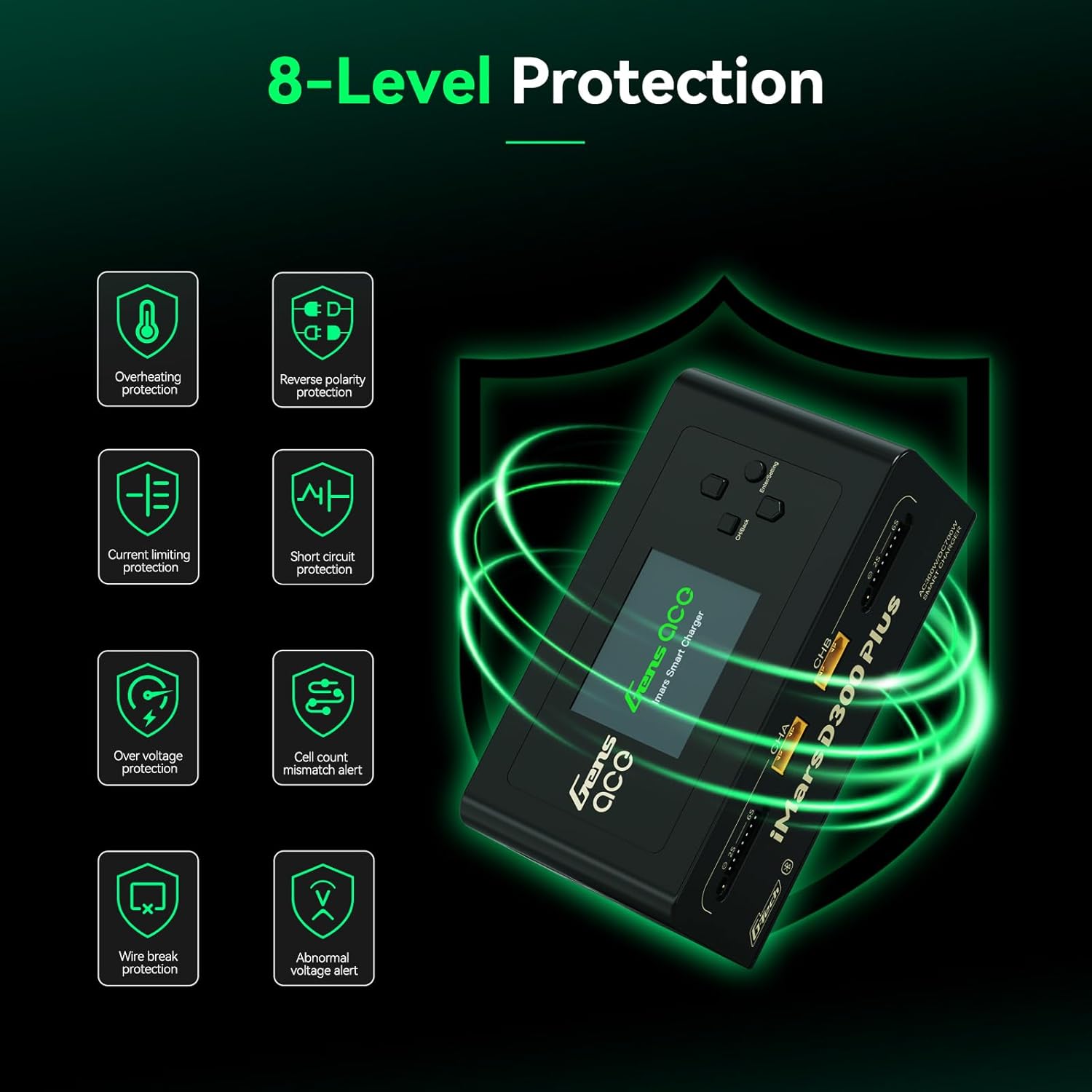
Figure 2.1: Visual representation of the 8-level protection system integrated into the iMars D300 Plus charger.
3. தொகுப்பு உள்ளடக்கங்கள்
கீழே பட்டியலிடப்பட்டுள்ள அனைத்து பொருட்களும் உங்கள் தொகுப்பில் சேர்க்கப்பட்டுள்ளதா என்பதை சரிபார்க்கவும்:
- Gens ace iMars D300 Plus Lipo Charger
- ஏசி உள்ளீடு கேபிள்
- XT60-T Adapter (x2)
- XT60-EC5 Adapter (x2)
- XT60-EC3 Adapter (x2)
- பயனர் கையேடு

Figure 3.1: All components included in the Gens ace iMars D300 Plus product package.
3.1. பாக்ஸிங் வீடியோ
Video 3.1: An official unboxing video demonstrating the contents and initial presentation of the iMars D300 Plus charger.
4. தயாரிப்பு அம்சங்கள்
The Gens ace iMars D300 Plus charger offers a range of features designed for convenience, efficiency, and safety:
- Dual-Channel Charging: Simultaneously charge two batteries independently.
- புளூடூத் இணைப்பு: Remote control and monitoring via the Gens Ace mobile app.
- G-Tech System: Automatic parameter detection for G-Tech batteries, simplifying setup.
- நிகழ் நேர கண்காணிப்பு: View charging status, cell data, and battery information in real-time.
- History Record: Access past charging and discharging data for analysis.
- சிறிய வடிவமைப்பு: Built-in power supply for portability and ease of travel.

Figure 4.1: The compact and lightweight design of the iMars D300 Plus, ideal for portability.
4.1. Product Introduction Video
Video 4.1: An official introduction video showcasing the key features and functionalities of the iMars D300 Plus charger.
5 அமைவு
Follow these steps for initial setup of your Gens ace iMars D300 Plus charger:
- பவர் இணைக்கவும்: Plug the AC input cable into the charger and then into a suitable power outlet (AC100-240V). Alternatively, connect a DC power source (DC7-30V) to the DC input port.
- பவர் ஆன்: The charger will power on automatically.
- பேட்டரியை இணைக்கவும்: Connect your battery's main power lead to the appropriate XT60 port (CHA or CHB) and the balance lead to the corresponding balance port (2S-6S). Use the provided adapters if necessary.
- Automatic Detection (G-Tech): For Gens Ace G-Tech batteries, the charger will automatically detect battery parameters.
- Manual Setup (Non-G-Tech): For non-G-Tech batteries, you will need to manually set the battery type, target voltage, cell count, and target current.

Figure 5.1: The 'Plug and Play' functionality of the iMars D300 Plus, showing battery connections.
6. இயக்க வழிமுறைகள்
The iMars D300 Plus offers intuitive operation through its onboard interface and the Gens Ace mobile app.
6.1. Onboard Operation
- சேனலைத் தேர்ந்தெடுக்கவும்: Use the navigation buttons to select Channel A (CHA) or Channel B (CHB).
- Task Setting: Press the 'Enter/Setting' button to access the task settings.
- அளவுருக்களை சரிசெய்யவும்: Navigate through options like 'Select Task' (Charge, Discharge, Storage), 'Battery Type' (LiPo, Li-ion, LiHV, LiFe, NiMH/Cd), 'Target Voltage', 'Cell Count', and 'Target Current'. Adjust values using the up/down buttons.
- பணியைத் தொடங்கவும்: Once all parameters are set, select 'Start Task' and confirm to begin the operation.
- முன்னேற்றத்தைக் கண்காணிக்கவும்: The display will show real-time charging/discharging status, current, voltagஇ, மற்றும் திறன்.
6.2. App Control (Bluetooth)
The Gens Ace app provides enhanced control and monitoring capabilities:
- பயன்பாட்டைப் பதிவிறக்குக: Download the official Gens Ace app from your device's app store.
- புளூடூத் மூலம் இணைக்கவும்: Enable Bluetooth on your mobile device and pair with the iMars D300 Plus charger.
- ரிமோட் கண்ட்ரோல்: From the app, you can remotely start, stop, and adjust charging/discharging tasks for both channels.
- நிகழ்நேர தரவு: View detailed real-time data, including individual cell voltages, temperature, charging percentage, and remaining time.
- வரலாற்று பதிவுகள்: Access a comprehensive history log of all charging and discharging cycles, including detailed graphs and parameters.

Figure 6.1: The Gens Ace mobile application interface for controlling and monitoring the charger.
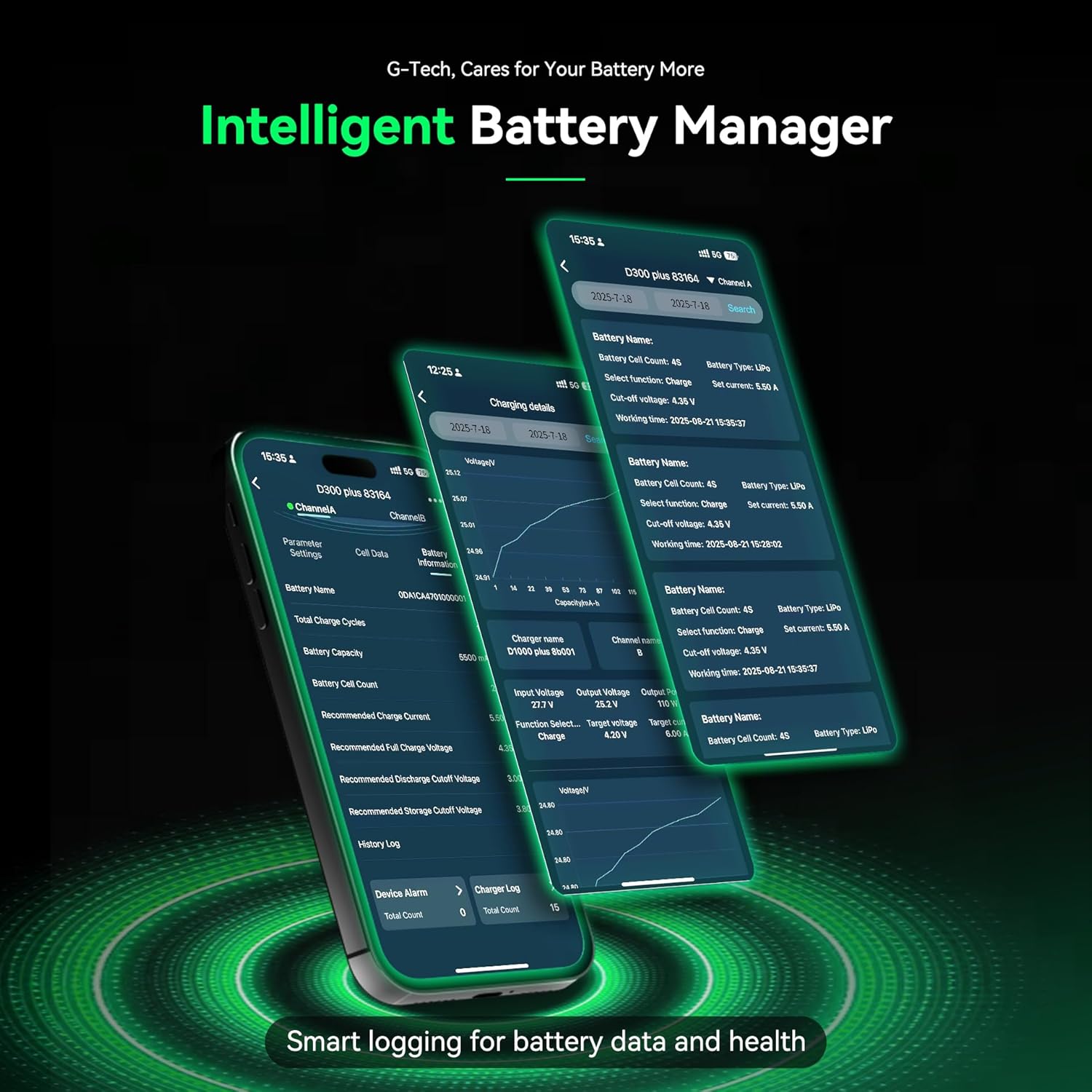
Figure 6.2: Detailed battery management and history logs available through the Gens Ace app.
7. பராமரிப்பு
Proper maintenance ensures the longevity and optimal performance of your iMars D300 Plus charger:
- சுத்தம்: Regularly clean the charger's exterior with a soft, dry cloth. Avoid using solvents or abrasive cleaners.
- காற்றோட்டம்: அதிக வெப்பமடைவதைத் தடுக்க காற்றோட்ட திறப்புகள் தூசி மற்றும் குப்பைகள் இல்லாமல் இருப்பதை உறுதி செய்யவும்.
- சேமிப்பு: சார்ஜரைப் பயன்படுத்தாதபோது நேரடி சூரிய ஒளி மற்றும் அதிக வெப்பநிலையிலிருந்து விலகி குளிர்ந்த, உலர்ந்த இடத்தில் சேமிக்கவும்.
- கேபிள் ஆய்வு: தேய்மானம் அல்லது சேதத்திற்கான அறிகுறிகள் ஏதேனும் உள்ளதா என அனைத்து கேபிள்கள் மற்றும் இணைப்பிகளையும் அவ்வப்போது ஆய்வு செய்யவும். சேதமடைந்த கூறுகளை உடனடியாக மாற்றவும்.
8. சரிசெய்தல்
If you encounter issues with your iMars D300 Plus charger, refer to the following common troubleshooting steps:
- சார்ஜர் இயக்கப்படவில்லை:
- Check if the AC input cable or DC power source is securely connected.
- பவர் அவுட்லெட் செயல்படுகிறதா என்று சரிபார்க்கவும்.
- பேட்டரி சார்ஜ் ஆகவில்லை:
- Ensure the battery's main power lead and balance lead are correctly connected.
- Check if the battery type, cell count, and charging parameters are correctly set on the charger or app.
- Inspect battery and charger connectors for damage.
- Verify the battery is not over-discharged or severely damaged.
- பிழைச் செய்திகள்:
- Refer to the 8-level protection system in Section 2.1. The error message on the screen will often indicate the specific protection triggered (e.g., 'Over Voltage', 'Cell Count Mismatch').
- Address the underlying cause of the alert before resuming operation.
- புளூடூத் இணைப்புச் சிக்கல்கள்:
- Ensure Bluetooth is enabled on your mobile device and the charger.
- Make sure the device is within the effective Bluetooth range.
- Try restarting both the charger and your mobile device.
9. விவரக்குறிப்புகள்
Detailed technical specifications for the Gens ace iMars D300 Plus Lipo Charger:
| பொருள் | விவரக்குறிப்பு |
|---|---|
| உள்ளீடு தொகுதிtage | AC 100-240V; DC 7-30V |
| வெளியீடு தொகுதிtage | DC 1-30V |
| அதிகபட்சம். உள்ளீட்டு மின்னோட்டம் | DC 34A |
| அதிகபட்சம். டிஸ்சார்ஜிங் பவர் | 15W x 2 |
| அதிகபட்ச சார்ஜிங் பவர் | AC 300W x 2; DC 350W x 2 |
| மின்னோட்டத்தை சார்ஜ் செய்யவும் | 0.1-16A x 2 |
| வெளியேற்ற மின்னோட்டம் | 0.1-3A x 2 |
| செல் சமநிலைப்படுத்துதல் | 1-6S |
| USB வெளியீடு | 5V / 2.4A |
| காட்சி வகை | 2.4 inch IPS LCD Display |
| ஆதரிக்கப்படும் பேட்டரி வேதியியல் | LiPo / Li-ion / LIHV / LiFe 1-6S; NiMH 1-16S |
| பரிமாணங்கள் (L x W x H) | 145 x 76 x 62 mm (5.7"W x 3"D x 2.4"H) |
| தயாரிப்பு நிகர எடை | 530 கிராம் |

Figure 9.1: Visual representation of the product specifications and dimensions.
10. உத்தரவாதம்
The Gens ace iMars D300 Plus Lipo Charger comes with a 180 நாள் உத்தரவாதம் from the date of purchase. This warranty covers manufacturing defects and malfunctions under normal use. Please retain your proof of purchase for warranty claims. The warranty does not cover damage caused by misuse, accident, modification, or unauthorized repair.
11. ஆதரவு
For technical assistance, troubleshooting beyond this manual, or warranty inquiries, please contact Gens ace customer support through their official website or the contact information provided with your product packaging. Ensure you have your product model number and proof of purchase ready when contacting support.