
1. தயாரிப்பு முடிந்துவிட்டதுview
The SURITCH MagSafe Wallet is a versatile accessory designed for convenience and security. It features integrated "Find My" functionality, RFID blocking, NFC support, and an adjustable tri-fold stand. Crafted from durable faux leather with strong magnetic attachment, it securely holds your essential cards while providing multiple viewing angles for your iPhone.
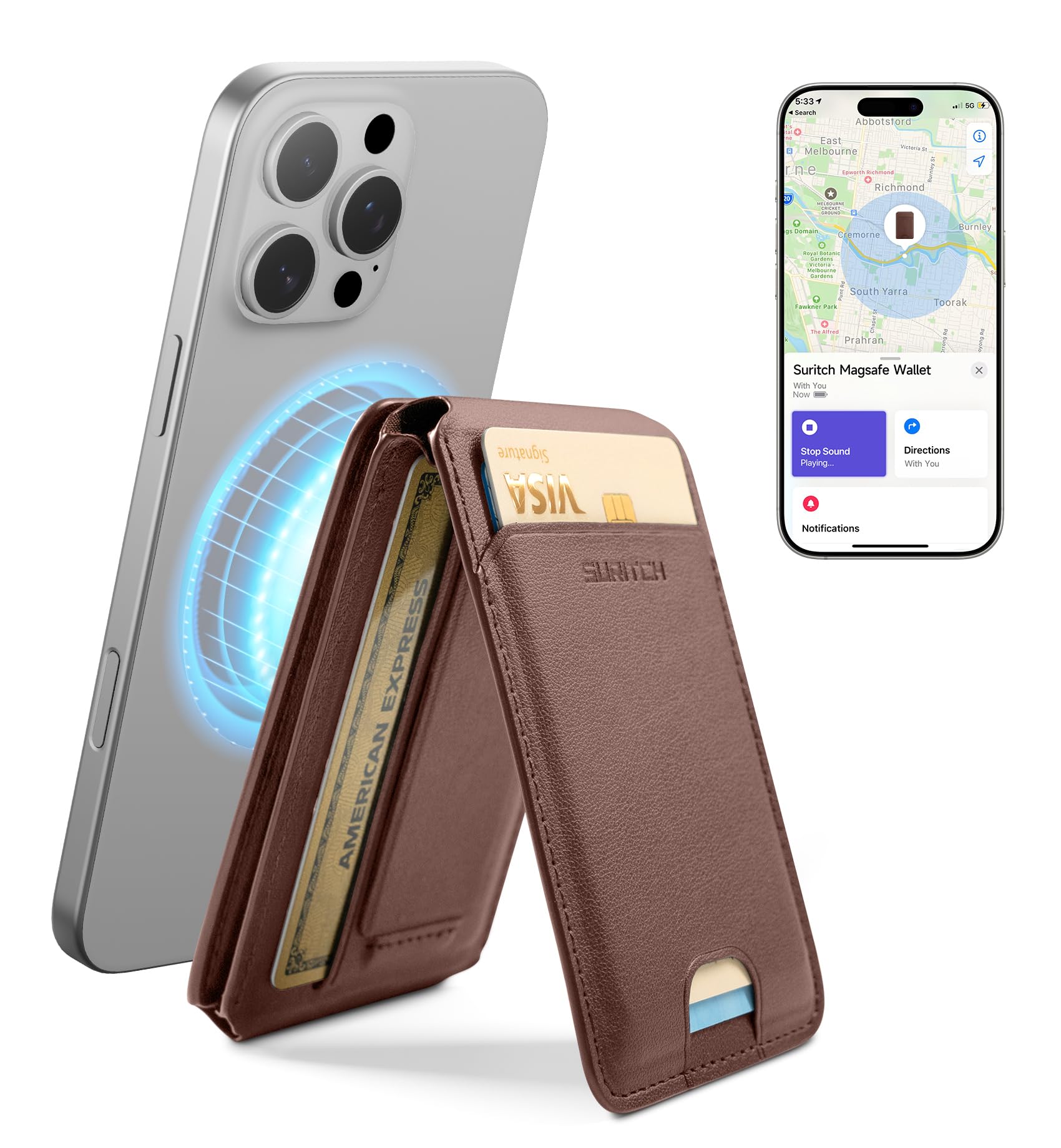
Image 1.1: The SURITCH MagSafe Wallet in brown, showcasing அதன் நேர்த்தியான வடிவமைப்பு.
2. இணக்கத்தன்மை
This magnetic wallet is designed for broad compatibility:
- iPhone 17/16/15/14/13/12 Series: Works seamlessly with these iPhone models. (Note: Not compatible with iPhone 13 mini/12 mini.)
- MagSafe Cases: Fully compatible with MagSafe-enabled cases.
- Android Phones or Non-MagSafe Cases: For these devices, please use the included metal ring. Attach the metal ring to the back of your phone or non-MagSafe case before attaching the wallet.

Image 2.1: Visual guide to device compatibility, including iPhones, MagSafe cases, and Android phones with the metal ring.
3. அமைவு மற்றும் நிறுவல்
3.1 Attaching the Wallet
- Ensure your iPhone is a compatible model (17/16/15/14/13/12 series, excluding mini models) or is equipped with a MagSafe case.
- Align the SURITCH MagSafe Wallet with the MagSafe area on the back of your iPhone or MagSafe case. The strong magnets will automatically snap it into place.
- For Android phones or non-MagSafe cases, first clean the back surface of your device. Peel off the adhesive backing from the included metal ring and firmly press it onto the desired location on your phone or case. Allow sufficient time for the adhesive to set before attaching the wallet.

Image 3.1: Illustration of the strong magnetic attachment between the wallet and a MagSafe-compatible phone.
3.2 Setting Up "Find My" Functionality
The SURITCH MagSafe Wallet includes built-in "Find My" integration to help you locate it if misplaced.
- உங்கள் ஐபோனின் புளூடூத் இயக்கப்பட்டிருப்பதை உறுதிசெய்யவும்.
- உங்கள் iPhone இல் "Find My" பயன்பாட்டைத் திறக்கவும்.
- Follow the on-screen instructions to add the SURITCH MagSafe Wallet as an item. You may need to press a button on the wallet (if available) or bring it close to your iPhone to initiate pairing.
- Once paired, you can track its location, play a sound, or get directions to your wallet through the "Find My" app.

Image 3.2: A smartphone displaying the "Find My" application, showing the location of the SURITCH MagSafe Wallet.
Video 3.1: An instructional video demonstrating the setup and use of the "Find My" functionality with the SURITCH MagSafe Wallet.
4. ஆபரேஷன்
4.1 Card Storage and Access
The wallet is designed to hold up to 6 cards securely. The tri-fold design allows for organized storage and easy access to your most frequently used cards.

Image 4.1: The wallet open, illustrating its capacity to hold up to six cards.

Image 4.2: A user easily sliding a card out of the wallet for quick access.
4.2 Adjustable Stand Functionality
The innovative tri-fold design with strong alloy hinges allows the wallet to transform into a versatile stand. Adjust the angle between 0-175° for optimal viewing, video calls, or content creation in both portrait and landscape orientations.

படம் 4.3: எ.கா.amples of the wallet's tri-fold stand in use for different activities like watching videos, browsing, and video calls.
4.3 RFID Blocking and NFC Support
- RFID Blocking: The wallet incorporates RFID-blocking technology to protect your cards from unauthorized scanning and electronic pickpocketing, safeguarding your personal information.
- NFC ஆதரவு: The two innermost card slots are NFC-enabled, allowing for contactless payments and transit passes with a single tap without removing your card.

Image 4.4: A user making a contactless payment using an NFC-enabled card within the wallet.

Image 4.5: A visual representation of the RFID blocking feature protecting cards from unauthorized scanning.
Video 4.1: A demonstration of the SURITCH MagSafe Wallet's features, including card storage, stand functionality, and magnetic attachment.
5. பராமரிப்பு
To ensure the longevity and appearance of your SURITCH MagSafe Wallet, follow these maintenance guidelines:
- சுத்தம்: ஃபாக்ஸ் லெதர் மேற்பரப்பை ஒரு மென்மையான, டி கொண்டு துடைக்கவும்amp துணி. கடுமையான இரசாயனங்கள் அல்லது சிராய்ப்பு கிளீனர்களைத் தவிர்க்கவும், ஏனெனில் இவை பொருளை சேதப்படுத்தும்.
- சேமிப்பு: Store the wallet in a cool, dry place away from direct sunlight and extreme temperatures.
- அதிகமாக நிரப்புவதைத் தவிர்க்கவும்: While the wallet can hold up to 6 cards, consistently overstuffing it may stretch the material and affect its magnetic attachment over time.
- பேட்டரி ரீசார்ஜிங்: The "Find My" module has a 4-month battery life. Recharge it easily in just 1.5 hours using a wireless charger (not included).

Image 5.1: The wallet being wirelessly charged, highlighting its 4-month battery life and 1.5-hour charging time.
6. சரிசெய்தல்
| பிரச்சனை | சாத்தியமான காரணம் | தீர்வு |
|---|---|---|
| "Find My" feature not working or wallet not found. |
|
|
| Wallet not securely attaching to phone. |
|
|
| NFC payment not working. |
|
|
7. விவரக்குறிப்புகள்
| அம்சம் | விவரம் |
|---|---|
| பிராண்ட் | சூரிட்ச் |
| மாதிரி பெயர் | Find my version |
| மாதிரி எண் | 6977140252177 |
| நிறம் | Find my-Brown |
| பொருள் | போலி தோல் |
| இணக்கமான தொலைபேசி மாதிரிகள் | iPhone 17/16/15/14/13/12 series (excluding mini models) |
| இணக்கமான சாதனங்கள் | iPhone 16/15/14/13/12 series with MagSafe cases; Android phones with metal ring attached |
| காந்த சக்தி | 3000 கிராம் வரை |
| அட்டை திறன் | 6 அட்டைகள் வரை |
| நிலை சரிசெய்தல் | 0-175° |
| Battery Life ("Find My") | 4 மாதங்கள் |
| Charging Time ("Find My") | 1.5 hours (wireless charging) |
| நீர் எதிர்ப்பு நிலை | வாட்டர் ரெசிஸ்டண்ட் இல்லை |
| பொருளின் பரிமாணங்கள் | 4.02 x 2.6 x 0.51 அங்குலம் |

Image 7.1: Detailed dimensions and weight of the SURITCH MagSafe Wallet, highlighting its portable design.