
1. அறிமுகம்
This manual provides detailed instructions for the setup, operation, and maintenance of your KiiBoom Phantom 81 V3 Pink Mechanical Gaming Keyboard. Please read this manual thoroughly before using the product to ensure optimal performance and longevity.
தொகுப்பு உள்ளடக்கங்கள்
- KiiBoom Phantom 81 V3 Pink Mechanical Gaming Keyboard
- USB டைப்-சி கேபிள் (1.5மீ)
- கீகாப் புல்லர்
- ஸ்விட்ச் புல்லர்
- ஸ்க்ரூட்ரைவர்
- உதிரி சுவிட்சுகள்
- Extra Nails

2 அமைவு
ஆரம்ப இணைப்பு
The KiiBoom Phantom 81 V3 supports three connectivity modes: Type-C Wired, Bluetooth 5.0, and 2.4GHz wireless. Locate the connectivity switches on the back of the keyboard.

Wired Mode (Type-C)
- வழங்கப்பட்ட USB Type-C கேபிளை விசைப்பலகையின் Type-C போர்ட்டுடன் இணைக்கவும்.
- உங்கள் கணினியில் கிடைக்கும் USB போர்ட்டில் கேபிளின் மறுமுனையை இணைக்கவும்.
- Ensure the connectivity switch on the keyboard is set to the 'USB' position.
புளூடூத் பயன்முறை
- Set the connectivity switch on the keyboard to the 'BT' position.
- உங்கள் சாதனத்தில் (கணினி, டேப்லெட், ஸ்மார்ட்போன்), புளூடூத்தை இயக்கி புதிய சாதனங்களைத் தேடுங்கள்.
- Select 'KiiBoom Phantom 81' from the list of available devices to pair.
- The keyboard supports up to three Bluetooth devices. Switch between them using Fn + 1/2/3.
2.4GHz வயர்லெஸ் பயன்முறை
- Locate the 2.4GHz USB receiver (usually stored in a compartment on the keyboard).
- உங்கள் கணினியில் கிடைக்கும் USB போர்ட்டில் USB ரிசீவரைச் செருகவும்.
- Set the connectivity switch on the keyboard to the '2.4G' position.
- விசைப்பலகை தானாகவே பெறுநருடன் இணைக்கப்பட வேண்டும்.
இயக்க முறைமை இணக்கத்தன்மை
The KiiBoom Phantom 81 V3 is compatible with both Windows and Mac operating systems. Use the dedicated 'Win/Mac' switch on the back of the keyboard to select your operating system for proper key mapping.

3. இயக்க வழிமுறைகள்
அடிப்படை செயல்பாடுகள்
- ஒலியளவு கட்டுப்பாடு: Use the rotary knob on the top right of the keyboard to adjust volume. Press the knob to mute/unmute.
- NKRO (N-Key Rollover): The keyboard supports N-Key Rollover, allowing all keys to register simultaneously for fast and accurate typing.

RGB பின்னொளி கட்டுப்பாடு
The KiiBoom Phantom 81 V3 features 16.8 million RGB backlights with south-facing LEDs for reduced glare and enhanced illumination. Use the following key combinations to control the lighting effects:
- Fn + V: Toggle backlight effects.
- Fn + J: Toggle backlight colors.
- Fn + P: Toggle bottom light mode.
- Fn + B: Toggle bottom light colors.

மென்பொருள் தனிப்பயனாக்கம்
The keyboard supports software for advanced customization, including key remapping, light effects, macro programming, and sharing settings. Refer to the official KiiBoom website for software downloads and detailed instructions.

4. ஹாட்-ஸ்வாப்பபிள் ஸ்விட்சுகள்
The KiiBoom Phantom 81 V3 features a full-key hot-swappable PCB, allowing you to easily change mechanical switches without soldering. This keyboard is compatible with both 3-pin and 5-pin mechanical switches.
Changing Switches
- கொடுக்கப்பட்டுள்ள கீகேப் இழுப்பான் மூலம் கீகேப்பை கவனமாக அகற்றவும்.
- Use the switch puller to gently grip the top and bottom clips of the switch.
- PCB-யிலிருந்து அகற்ற சுவிட்சை நேராக மேலே இழுக்கவும்.
- புதிய சுவிட்சின் பின்களை PCB-யில் உள்ள துளைகளுடன் சீரமைக்கவும். வளைவதைத் தவிர்க்க பின்கள் நேராக இருப்பதை உறுதிசெய்யவும்.
- Gently press the new switch into place until it clicks securely.
- சாவி மூடியை மாற்றவும்.


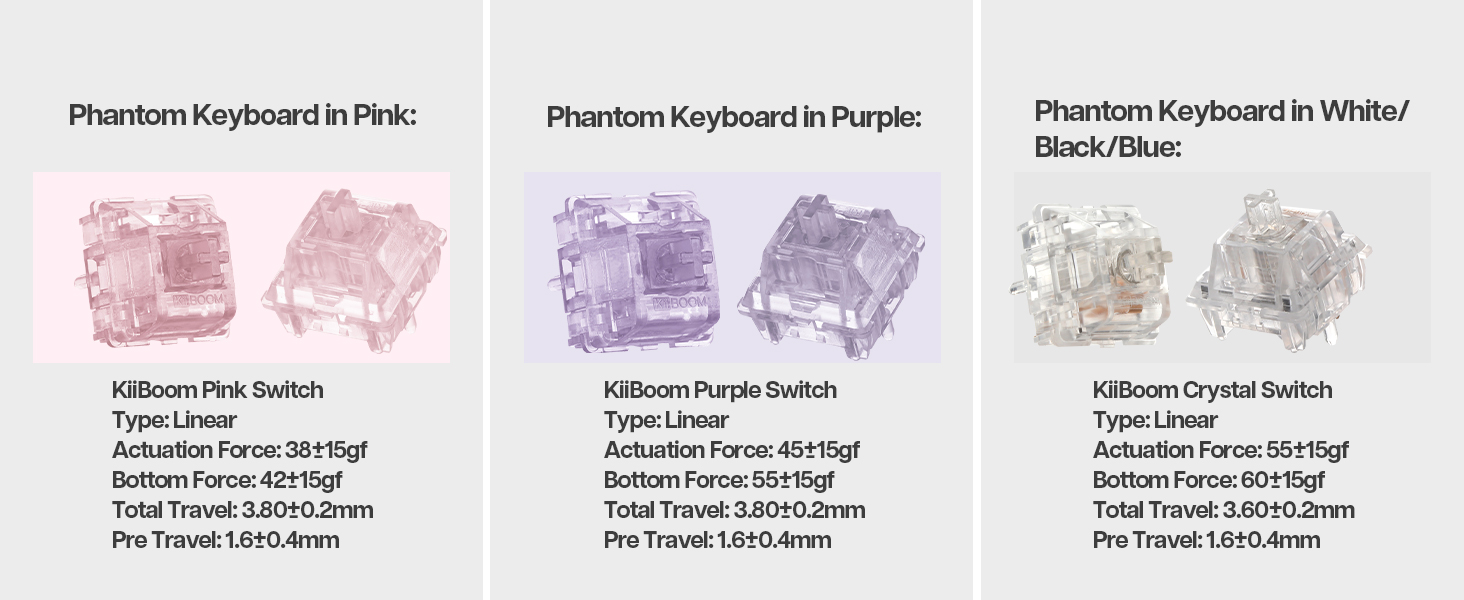
ஸ்விட்ச் விவரக்குறிப்புகள்
The Phantom 81 V3 Pink model typically comes with KiiBoom Pink Switches. Other KiiBoom switches are also compatible.
| சுவிட்ச் வகை | வகை | செயல்படுத்தும் படை | கீழ் படை | மொத்த பயணம் | முன் பயணம் |
|---|---|---|---|---|---|
| KiiBoom Pink Switch | நேரியல் | 38±15gf | 42±15gf | 3.80± 0.2மிமீ | 1.6± 0.4மிமீ |
| KiiBoom Purple Switch | நேரியல் | 45±15gf | 55±15gf | 3.80± 0.2மிமீ | 1.6± 0.4மிமீ |
| KiiBoom Crystal Switch | நேரியல் | 55±15gf | 60±15gf | 3.60± 0.2மிமீ | 1.6± 0.4மிமீ |


5. பேட்டரி மேலாண்மை
The KiiBoom Phantom 81 V3 is equipped with an 8000mAh rechargeable battery, providing extended wireless usage.
விசைப்பலகையை சார்ஜ் செய்கிறது
Connect the keyboard to a power source using the provided USB Type-C cable. The keyboard will indicate charging status through its RGB lighting.
பேட்டரி சக்தியைச் சரிபார்க்கிறது
To check the current battery level, press Fn + பேக்ஸ்பேஸ். The RGB lights will display the approximate battery percentage.

6. Construction and Design
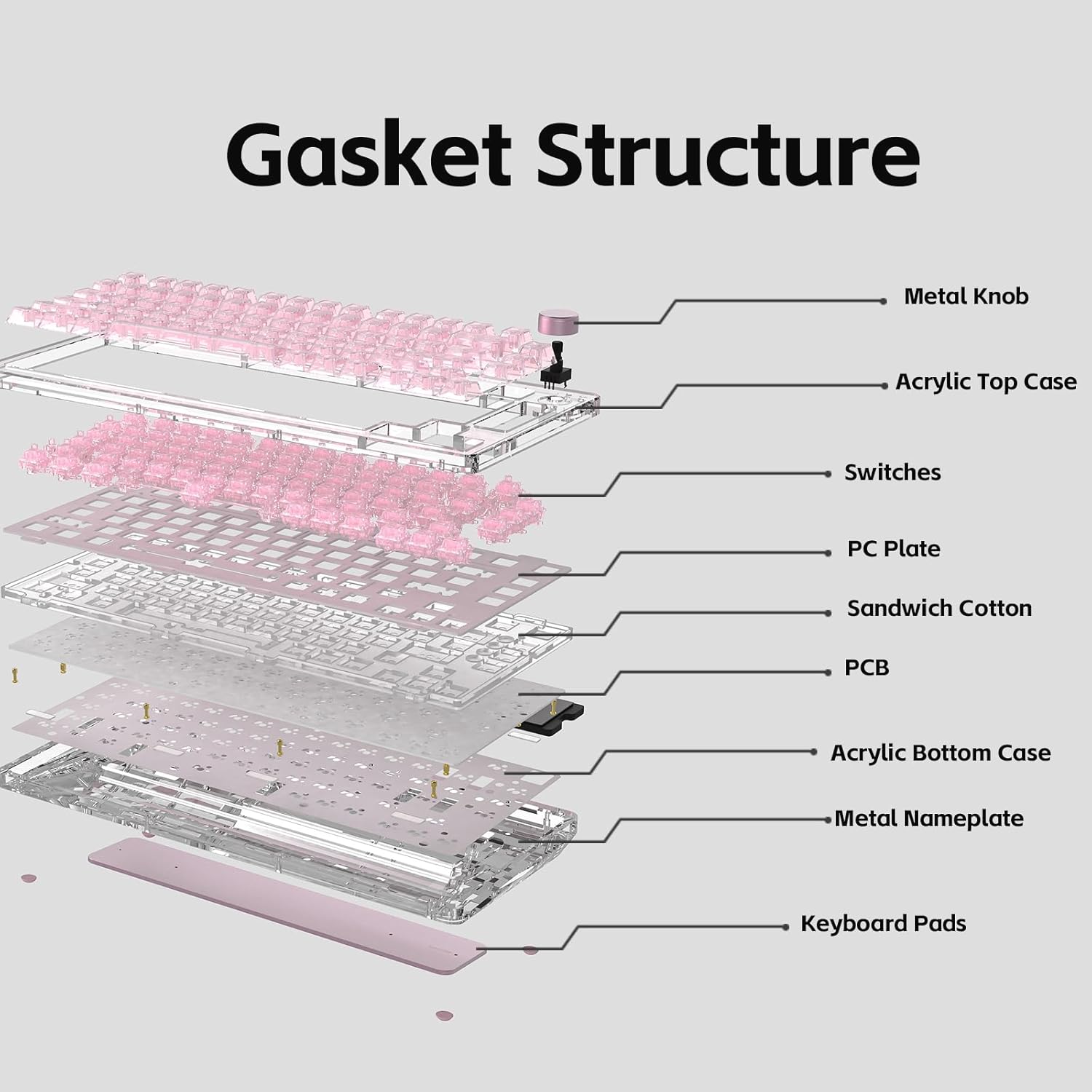
The KiiBoom Phantom 81 V3 features a unique transparent design and robust internal construction.
Acrylic Frame and Keycaps
The keyboard boasts a crystal-clear acrylic frame and transparent polycarbonate keycaps with UV printing, offering both durability and a distinctive aesthetic.


Gasket Mount Structure
The keyboard utilizes an enhanced gasket mount system with a PC (Polycarbonate) plate. This design provides a flexible, cushioned typing feel and contributes to a pleasant acoustic profile.

7. விவரக்குறிப்புகள்
| அம்சம் | விவரம் |
|---|---|
| மாதிரி | Phantom 81 V3 Pink |
| தளவமைப்பு | 75% (82 விசைகள் + 1 குமிழ்) |
| இணைப்பு | டைப்-சி வயர்டு, புளூடூத் 5.0, 2.4GHz வயர்லெஸ் |
| மாறுகிறது | ஹாட்-ஸ்வாப் செய்யக்கூடியது (3-பின்/5-பின் இணக்கமானது) |
| பின்னொளி | RGB, தெற்கு நோக்கிய LEDகள் |
| கீகாப்ஸ் | Transparent Polycarbonate with UV printing, ASA-Like Profile |
| வழக்கு பொருள் | அக்ரிலிக் |
| தட்டு பொருள் | பிசி (பாலிகார்பனேட்) |
| மவுண்டிங் ஸ்டைல் | கேஸ்கெட் மவுண்ட் |
| பேட்டரி திறன் | 8000mAh |
| இயக்க முறைமை | விண்டோஸ், மேக் |
| பரிமாணங்கள் | 332 மிமீ x 149 மிமீ x 47 மிமீ (தோராயமாக) |
| எடை | 1.45 கிலோ (தோராயமாக) |

8. பராமரிப்பு
விசைப்பலகையை சுத்தம் செய்தல்
- சுத்தம் செய்வதற்கு முன், விசைப்பலகையை அனைத்து மின் மூலங்களிலிருந்தும் துண்டிக்கவும்.
- மென்மையான, பஞ்சு இல்லாத துணியைப் பயன்படுத்தவும்ampened with a small amount of water or a mild cleaning solution to wipe down the keycaps and case.
- For deeper cleaning, remove keycaps using the provided keycap puller and use compressed air to clear debris from between switches.
- Avoid using harsh chemicals or abrasive materials, as these can damage the acrylic and keycap surfaces.
பொது பராமரிப்பு
- Avoid exposing the keyboard to extreme temperatures or direct sunlight.
- Do not spill liquids on the keyboard. In case of a spill, immediately disconnect power and allow it to dry completely before reconnecting.
- Handle switches and keycaps gently during removal and installation to prevent damage.
9. சரிசெய்தல்
விசைப்பலகை பதிலளிக்கவில்லை
- Ensure the keyboard is properly connected via USB, Bluetooth, or 2.4GHz.
- Check the connectivity switch on the back of the keyboard to ensure it's set to the correct mode.
- Verify the battery level. If low, connect the keyboard to a power source.
- உங்கள் கணினி அல்லது சாதனத்தை மறுதொடக்கம் செய்ய முயற்சிக்கவும்.
RGB விளக்குகள் வேலை செய்யவில்லை
- விசைப்பலகை இயக்கப்பட்டிருப்பதை உறுதிசெய்யவும்.
- Check the RGB control key combinations (Fn + V/J/P/B) to ensure lights are not turned off or set to a very dim setting.
- If using customization software, ensure settings are correctly applied.
விசைகள் பதிவு செய்யப்படவில்லை
- If a specific key is not working, try removing and re-inserting its switch to ensure it's properly seated.
- Test with a spare switch if available to rule out a faulty switch.
- Ensure no debris is obstructing the switch mechanism.
புளூடூத் இணைப்புச் சிக்கல்கள்
- விசைப்பலகை புளூடூத் இணைத்தல் பயன்முறையில் இருப்பதை உறுதிசெய்யவும்.
- உங்கள் சாதனத்தின் புளூடூத் பட்டியலிலிருந்து விசைப்பலகையை அகற்றி, மீண்டும் இணைக்க முயற்சிக்கவும்.
- உங்கள் சாதனத்தின் புளூடூத் இயக்கப்பட்டிருப்பதையும் சரியாகச் செயல்படுவதையும் உறுதிசெய்யவும்.
- Avoid excessive distance between the keyboard and the connected device.
10. உத்தரவாதம் மற்றும் ஆதரவு
KiiBoom products are manufactured to high-quality standards. For warranty information, technical support, or service inquiries, please refer to the official KiiBoom webதளத்தில் அல்லது அவர்களின் வாடிக்கையாளர் ஆதரவை நேரடியாகத் தொடர்பு கொள்ளவும். உத்தரவாதக் கோரிக்கைகளுக்கு வாங்கியதற்கான சான்றாக உங்கள் கொள்முதல் ரசீதை வைத்திருங்கள்.