
1. அறிமுகம்
The Pknight CR041R MK II is a compact, 4-port bidirectional converter designed for professional stage lighting and control systems. It facilitates seamless conversion between Art-Net/sACN and DMX512 protocols, offering flexible power options and versatile mounting capabilities. This manual provides essential information for setting up, operating, and maintaining your device.

Image: The Pknight CR041R MK II converter, highlighting its compact design and key features.
2. தயாரிப்பு அம்சங்கள்
- sACN Multicast and Priority Support: Compatible with Art-Net and sACN protocols. Enables multicast and sACN priority control for seamless integration into lighting systems with multiple sources.
- Triple Power Options – AC, USB-C, PoE: Can be powered anywhere via PowerCON AC mains (90–240 V), USB-C 5 V, or PoE IEEE 802.3af, ideal for mobile setups, tours, and fixed installations.
- Intuitive Integrated Menu with Color Screen: Features a 1.8” color TFT display and a four-button interface for stand-alone configuration, universe mapping, and signal status monitoring — no PC required.
- பல்துறை மவுண்டிங் விருப்பங்கள்: Supports installation on truss, wall, flat surface, or DIN rail — mountable horizontally or vertically for flexible implementation in any lighting setup.
- Bidirectional Protocol Conversion: Each port supports both DMX input and output. Easily switch from Art-Net/sACN to DMX512 or from DMX512 to network — ideal for flexible lighting control workflows.
- Compact Structure with Lockable RJ45: The robust compact metal casing ensures durability and resistance. The lockable RJ45 (etherCON) port ensures a stable and secure data connection for live shows and installations.
3. தொகுப்பு உள்ளடக்கங்கள்
கீழே பட்டியலிடப்பட்டுள்ள அனைத்து பொருட்களும் உங்கள் தொகுப்பில் சேர்க்கப்பட்டுள்ளதா என்பதை சரிபார்க்கவும்:
- 1 x CR041R MK II Controller Unit
- 1 x PowerCON AC Power Cable (EU, UK, US, or AU plug version depending on region)
- 1 x Metal Mounting Bracket
- 6 x மவுண்டிங் திருகுகள்

Image: The items included in the product package: one CR041R MK II Controller Unit, one PowerCON AC Power Cable, one Metal Mounting Bracket, and six Mounting Screws.
4. தயாரிப்பு முடிந்துவிட்டதுview
4.1 முன் பலகம் மற்றும் காட்சி
The front panel features a 1.8-inch color TFT display and four control buttons for navigation. The display provides real-time information about the device's status.
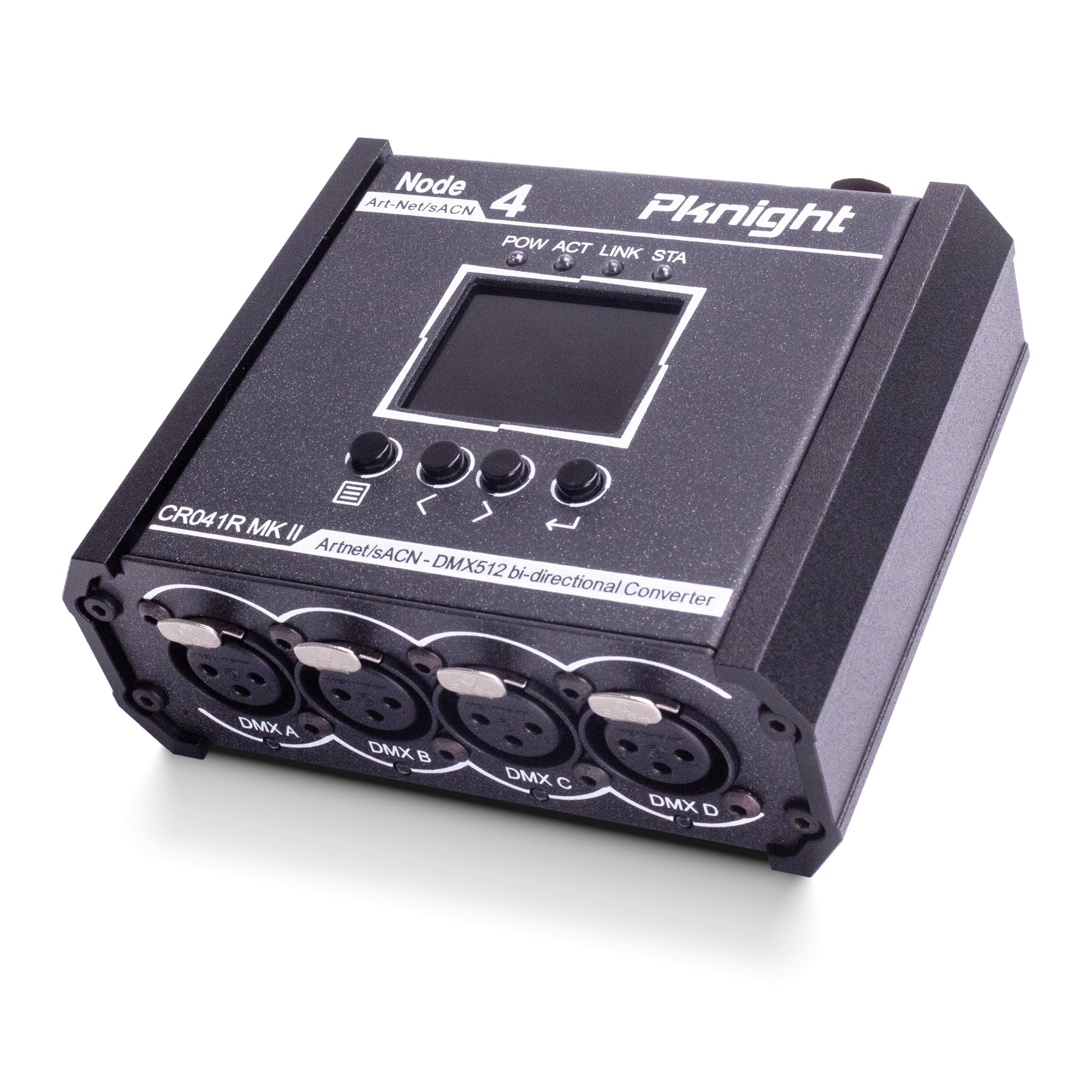
Image: The Pknight CR041R MK II converter, highlighting its front panel with a color display showing IP address, Net, Sub, and port status. A QR code is visible, linking to a universe and address tool. For more information, visit: https://qrco.de/ArtNet_sACN_Universe_Converter

படம்: ஒரு விரிவான view of the 1.8-inch color TFT display, which provides real-time information including the device's IP address, Net, Subnet, and the input/output status of each DMX port.
4.2 DMX Ports and Indicators
The device features four DMX ports (A, B, C, D), each with an LED indicator to show its current status:
- பச்சை: Port is set to Output.
- ஆஃப்: Port is set to Input with no signal received.
- ஆரஞ்சு: Port is set to Input and receiving DMX signal.

படம்: இது view focuses on the four DMX ports (A, B, C, D) on the converter's front. Each port is equipped with an LED indicator.

படம்: ஒரு நெருக்கமான படம் view of the four DMX XLR ports, labeled DMX A, DMX B, DMX C, and DMX D, emphasizing their robust construction.
4.3 Power and Network Ports
The device offers multiple power input options and a lockable network port for stable connections.

படம்: ஒரு விரிவான view of the converter's top panel, illustrating the three versatile power input options: a lockable RJ45 port for Power over Ethernet (PoE), a USB-C port for 5V power, and a PowerCON connector for AC mains power (90-240V).

Image: A detailed shot of the device's rear panel, highlighting the lockable RJ45 port for PoE/Art-Net connection and the PowerCON AC input (90-240V).
5 அமைவு
5.1 சாதனத்தை இயக்குதல்
The CR041R MK II offers three power options:
- PoE (பவர் ஓவர் ஈதர்நெட்): Connect an Ethernet cable from a PoE-enabled switch or injector to the lockable RJ45 port.
- USB-C 5V: Connect a standard USB-C 5V power adapter to the USB-C port.
- AC Mains Power: Connect the provided PowerCON AC power cable (90-240V) to the PowerCON inlet.
5.2 மவுண்டிங் விருப்பங்கள்
The device can be mounted in various ways to suit your setup:
- டிரஸ் மவுண்டிங்: Use the included metal mounting bracket and screws to attach the unit to a standard truss hook clamp (M10 recommended).
- Wall/Surface Mounting: The bracket allows for secure attachment to walls or flat surfaces.
- DIN ரயில் மவுண்டிங்: The design supports installation on a DIN rail for industrial or fixed installations.

Image: The Pknight CR041R MK II converter attached to a stage truss with a mounting bracket, emphasizing its compatibility with standard truss hook clamps (M10 recommended) for flexible installation.
6. இயக்க வழிமுறைகள்
6.1 Initial Configuration and Display Navigation
Use the four buttons below the display to navigate the menu and configure settings. The 1.8-inch color TFT display provides an intuitive interface for stand-alone operation.

Image: The "Quick Configuration" menu on the device's display, offering options to load IP addresses, including "Auto DHCP" and predefined static IP ranges.

Image: The "Setting" menu is displayed, allowing users to adjust parameters such as "Display Timeout" and perform a "Factory Set", and view the current "Version".
6.2 DMX Port Configuration
Each of the four DMX ports can be individually configured as either an input or an output for DMX512 signals. Refer to the display and LED indicators for current port status.
6.3 Art-Net/sACN to DMX512 Conversion
The device converts Art-Net or sACN network data into DMX512 signals for controlling lighting fixtures. Configure the desired universe mapping via the device's menu or a dedicated software tool.
6.4 DMX512 to Art-Net/sACN Conversion
The device can also convert incoming DMX512 signals into Art-Net or sACN data for network distribution, allowing DMX consoles to control network-based systems.

Image: A visual explanation of the bidirectional conversion capabilities, showing how to calculate both direct (Art-Net/sACN to DMX) and inverse (DMX to Art-Net/sACN) mappings. A QR code is provided for accessing the Universe & Address Tool. For more information, visit: https://qrco.de/ArtNet_sACN_Universe_Converter
7. பராமரிப்பு
- சுத்தம்: சாதனத்தை சுத்தம் செய்ய மென்மையான, உலர்ந்த துணியைப் பயன்படுத்தவும். சிராய்ப்பு கிளீனர்கள் அல்லது கரைப்பான்களைத் தவிர்க்கவும்.
- சேமிப்பு: பயன்பாட்டில் இல்லாதபோது நேரடி சூரிய ஒளி மற்றும் தீவிர வெப்பநிலையிலிருந்து விலகி, குளிர்ந்த, உலர்ந்த இடத்தில் சாதனத்தை சேமிக்கவும்.
- ஆய்வு: Regularly check cables and connectors for any signs of wear or damage.
8. சரிசெய்தல்
- சக்தி இல்லை: Ensure the power cable (PowerCON, USB-C, or PoE) is securely connected and the power source is active. Check the power indicator LED on the device.
- No DMX Signal Output: Verify that the DMX port is configured as an output and the correct Art-Net/sACN universe is mapped. Check DMX cable connections.
- No DMX Signal Input: Ensure the DMX port is configured as an input. Check the DMX cable and the signal source. The DMX indicator LED should be orange when receiving a signal.
- நெட்வொர்க் இணைப்பு சிக்கல்கள்: Check the Ethernet cable connection. Ensure the device's IP settings (DHCP or static) are compatible with your network. Verify network switch functionality.
- பதிலளிக்காத காட்சி: Try restarting the device. If the issue persists, perform a factory reset via the settings menu (if accessible).
9. விவரக்குறிப்புகள்
| மாதிரி எண் | UK-CR041R MK II |
| தயாரிப்பு பரிமாணங்கள் | 4.57 x 11 x 11.43 செமீ (1.8 x 4.33 x 4.5 அங்குலம்) |
| பொருளின் எடை | 549 g (0.75 kg as per image) |
| உடல் பொருள் | உலோகம் |
| இணைப்பான் வகை | XLR, RJ45, USB-C, PowerCON |
| ஆற்றல் உள்ளீடு | PowerCON AC (90-240V), USB-C (5V), PoE (IEEE 802.3af) |
| காட்சி | 1.8" Color TFT |
| நெறிமுறைகள் ஆதரிக்கப்படுகின்றன | Art-Net, sACN, DMX512 |

Image: An image of the converter with clear labels indicating its physical dimensions: 11.5 cm (4.5 inches) in length, 4.5 cm (1.8 inches) in height, and 11 cm (4.33 inches) in width. The weight is specified as 0.75 kg.
10. உத்தரவாதம் மற்றும் ஆதரவு
Pknight products are designed for reliability and performance. For warranty information, technical support, or service inquiries, please refer to the contact information provided with your purchase or visit the official Pknight webஉத்தரவாதக் கோரிக்கைகளுக்கு உங்கள் வாங்கியதற்கான ஆதாரத்தை வைத்திருங்கள்.