
1. அறிமுகம்
The NZXT H2 Flow (CI-H21FB-01) is a compact vertical Mini-ITX PC case designed to maximize airflow and save space while accommodating high-performance components. It features smart cable management, tool-less access, and includes dual top fans and a premium PCIe 5.0 riser cable for a streamlined building experience.
முக்கிய அம்சங்கள்:
- Hybrid Glass-and-Mesh Side Panel: Showcases your build while supporting up to a 280 mm radiator for efficient cooling.
- சிறிய வடிவமைப்பு: A 20.7 L volume fits most GPUs up to 331 mm, offering high-end power in a small footprint.
- High Airflow Panels: Ultra-fine mesh panels on multiple sides maximize fresh air intake and filter dust, keeping components cooler and cleaner.
- Effortless Building: Tool-less panels, integrated cable routing Velcro straps, and intuitive wire management channels simplify installation.
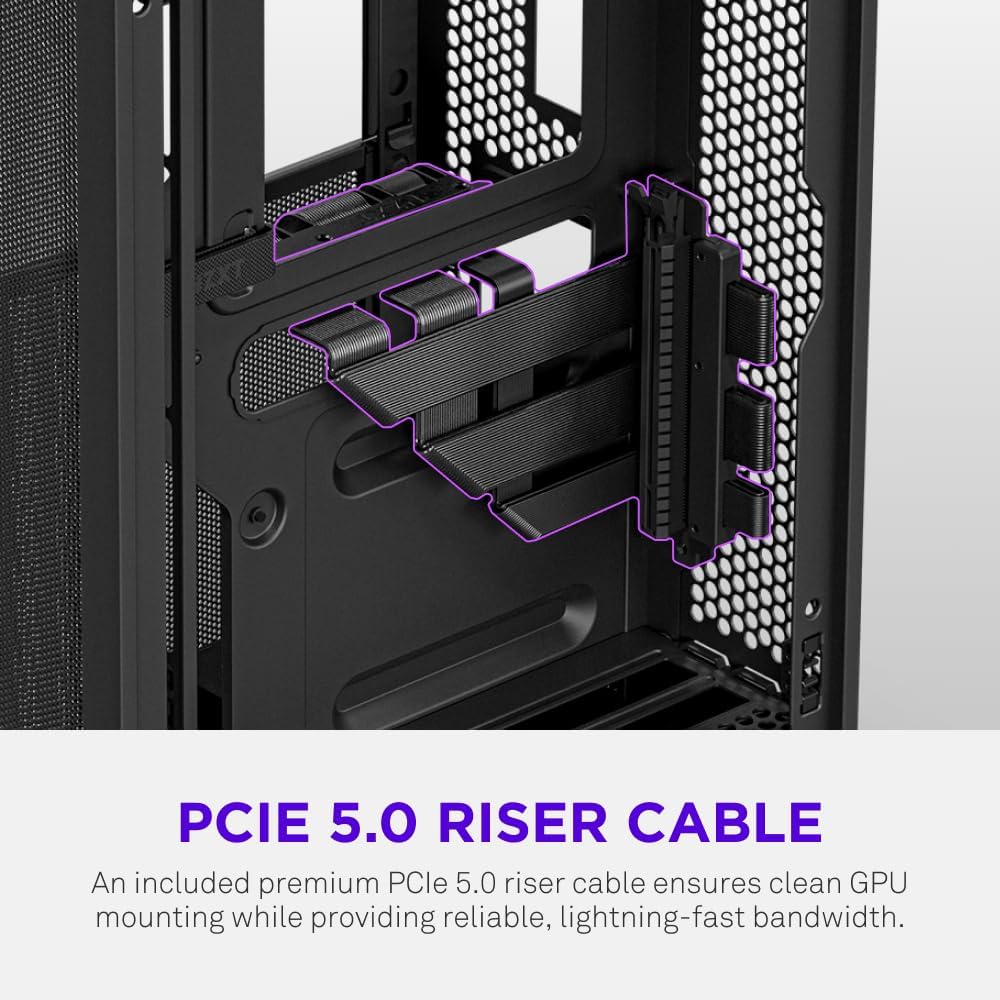
- Pre-Installed Performance: Includes a premium PCIe 5.0 riser cable for vertical GPU mounting and dual F120Q CV fans for immediate exhaust cooling.
2. பாதுகாப்பு தகவல்
WARNING: Always disconnect power from your PC before performing any installation, maintenance, or troubleshooting. Failure to do so may result in personal injury or damage to components.
- நிறுவும் முன் அனைத்து வழிமுறைகளையும் கவனமாக படிக்கவும்.
- Wear an anti-static wrist strap or frequently touch a grounded metal object to prevent electrostatic discharge (ESD) damage to components.
- Handle components with care. Avoid touching pins or exposed circuitry.
- சிறிய பாகங்கள் மற்றும் பேக்கேஜிங் பொருட்களை குழந்தைகளிடமிருந்து விலக்கி வைக்கவும்.
- அதிக வெப்பமடைவதைத் தடுக்க பிசி கேஸைச் சுற்றி சரியான காற்றோட்டத்தை உறுதி செய்யவும்.
3. தொகுப்பு உள்ளடக்கங்கள்
Verify that all items are present in your NZXT H2 Flow package:
- NZXT H2 Flow Mini-ITX PC Case
- 2 x 120mm F120Q CV Top Fans (pre-installed)
- Premium PCIe 5.0 Riser Cable (pre-installed)
- துணைப் பெட்டி (திருகுகள், கேபிள் டைகள் மற்றும் பிற சிறிய பாகங்களைக் கொண்டது)
4. கூறு இணக்கத்தன்மை
The NZXT H2 Flow case is designed to accommodate specific component sizes for optimal performance and fit:
- மதர்போர்டு: மினி ஐடிஎக்ஸ்
- கிராபிக்ஸ் அட்டை (GPU): Up to 331 mm in length
- ரேடியேட்டர்: Up to 280 mm (for liquid cooling solutions)
- பவர் சப்ளை (PSU): SFX/SFXL form factor is recommended for best compatibility and cable management.
- ரசிகர்கள்: Includes 2 x 120mm top fans. Additional fan mounting options may be available depending on other component choices.
5. அமைவு & நிறுவல்
Follow these steps to assemble your PC within the NZXT H2 Flow case. Refer to your individual component manuals for specific installation details.
5.1. வழக்கு முடிந்ததுview மற்றும் பரிமாணங்கள்
The NZXT H2 Flow is a compact vertical Mini-ITX case. Understanding its dimensions is crucial for planning your build.

5.2. Accessing the Case Interior
The H2 Flow features tool-less panels for easy access to the interior.

5.3. மதர்போர்டு மற்றும் CPU நிறுவல்
Install your Mini-ITX motherboard and CPU (with cooler) before placing it into the chassis.
5.4. மின்சாரம் வழங்கும் அலகு (PSU) நிறுவல்
The case supports SFX/SFXL power supplies. Mount the PSU in its designated area, typically at the bottom of the case.

5.5. கேபிள் மேலாண்மை
Utilize the integrated cable routing channels and Velcro straps for a clean and organized interior.
5.6. கிராபிக்ஸ் கார்டு (GPU) நிறுவல்
The H2 Flow supports GPUs up to 331 mm in length and includes a premium PCIe 5.0 riser cable for vertical mounting.

5.7. குளிரூட்டும் அமைப்பு
The case comes with two pre-installed 120mm F120Q CV fans at the top for exhaust. It also supports up to a 280mm radiator for liquid cooling.


5.8. தயாரிப்பு முடிந்துவிட்டதுview வீடியோ
காட்சிப்படுத்தலுக்கு இந்த அதிகாரப்பூர்வ வீடியோவைப் பாருங்கள்.view of the NZXT H2 Flow Mini-ITX PC Gaming Case.
6. இயக்க வழிமுறைகள்
6.1. பவர் ஆன்/ஆஃப்
Press the power button located on the front I/O panel to turn your PC on or off.
6.2. முன்பக்க I/O போர்ட்கள்
The front I/O panel provides convenient access to:
- USB 3.0 போர்ட்கள்
- யூ.எஸ்.பி-சி போர்ட்
- ஆடியோ ஜாக் (பொருந்தினால்)
Connect your peripherals such as keyboards, mice, and headsets to these ports.
7. பராமரிப்பு
7.1. தூசி வடிகட்டிகளை சுத்தம் செய்தல்
The NZXT H2 Flow features ultra-fine mesh panels that act as dust filters. Regularly clean these panels to maintain optimal airflow and prevent dust buildup inside your PC.
- Gently remove the mesh panels from the case.
- Use compressed air or a soft brush to remove accumulated dust.
- பேனல்களைப் பாதுகாப்பாக மீண்டும் இணைக்கவும்.
7.2 பொது சுத்தம்
ஒரு மென்மையான, டி பயன்படுத்தவும்amp உறையின் வெளிப்புறத்தைத் துடைக்க துணி. சிராய்ப்பு கிளீனர்கள் அல்லது கரைப்பான்களைத் தவிர்க்கவும்.
8. சரிசெய்தல்
If you encounter issues with your PC build, consider the following common troubleshooting steps:
- சக்தி இல்லை: அனைத்து மின் கேபிள்களும் (PSU முதல் சுவர் வரை, PSU முதல் மதர்போர்டு வரை, CPU, GPU வரை) பாதுகாப்பாக இணைக்கப்பட்டுள்ளதா என்பதை உறுதிப்படுத்திக் கொள்ளுங்கள். PSU-வில் உள்ள பவர் சுவிட்சைச் சரிபார்க்கவும்.
- காட்சி இல்லை: Verify that your monitor is connected to the graphics card (not the motherboard I/O unless using integrated graphics) and that the GPU has proper power connections. Reseat the GPU and RAM.
- அதிக வெப்பம்: Check fan connections and orientation. Ensure mesh panels are clean and not obstructed. Verify CPU cooler installation and thermal paste application.
- கூறு கண்டறியப்படவில்லை: Reseat the component (GPU, RAM, storage drives). Check power and data connections.
For more complex issues, consult your individual component manuals or NZXT customer support.
9. விவரக்குறிப்புகள்
| அம்சம் | விவரம் |
|---|---|
| பிராண்ட் | NZXT |
| மாதிரி பெயர் | NZXT H2 Flow |
| வழக்கு வகை | மினி-டவர் |
| மதர்போர்டு இணக்கத்தன்மை | மினி ஐடிஎக்ஸ் |
| GPU நீள ஆதரவு | 331 மிமீ வரை |
| ரேடியேட்டர் ஆதரவு | 280 மிமீ வரை |
| சேர்க்கப்பட்ட ரசிகர்கள் | 2 x 120mm F120Q CV Top Fans |
| Included Riser Cable | Premium PCIe 5.0 |
| பவர் சப்ளை மவுண்டிங் வகை | Bottom Mount (SFX/SFXL recommended) |
| குளிரூட்டும் முறை | Air, Liquid |
| நிறம் | கருப்பு |
| பொருள் | கண்ணாடி, உலோகம் |
| பொருளின் எடை | 4.55 கிலோகிராம் |
| Total USB 3.0 Ports | 1 |
| Other Special Features | Tool-less Installation, Integrated Cable Management |
10. உத்தரவாதம் & ஆதரவு
10.1. உத்தரவாதத் தகவல்
The NZXT H2 Flow Mini-ITX PC Case comes with a 2 ஆண்டு உற்பத்தியாளர் உத்தரவாதம்உத்தரவாதக் கோரிக்கைகளுக்கு உங்கள் வாங்கியதற்கான ஆதாரத்தை வைத்திருங்கள்.
10.2. வாடிக்கையாளர் ஆதரவு
For technical assistance, troubleshooting, or warranty inquiries, please visit the official NZXT support webதளம் அல்லது அவர்களின் வாடிக்கையாளர் சேவை குழுவை தொடர்பு கொள்ளவும்.
NZXT Store: Visit the NZXT Store on Amazon