
1. முக்கியமான பாதுகாப்பு வழிமுறைகள்
இந்த சாதனத்தைப் பயன்படுத்துவதற்கு முன் அனைத்து வழிமுறைகளையும் கவனமாகப் படித்து, எதிர்கால குறிப்புக்காக அவற்றை வைத்திருங்கள். இந்த வழிமுறைகளைப் பின்பற்றத் தவறினால் மின்சார அதிர்ச்சி, தீ அல்லது கடுமையான தனிப்பட்ட காயம் ஏற்படலாம்.
- மின்சாரம் வழங்கல் தொகுதியை உறுதி செய்யவும்tage சாதனத்தில் உள்ள மதிப்பீட்டு லேபிளுடன் பொருந்துகிறது.
- சேதமடைந்த கம்பி அல்லது பிளக்கைக் கொண்டு மின்விசிறியை இயக்க வேண்டாம். கம்பி சேதமடைந்தால், ஆபத்தைத் தவிர்க்க உற்பத்தியாளர், அதன் சேவை முகவர் அல்லது அதே போன்ற தகுதியுள்ள நபர்களால் அதை மாற்ற வேண்டும்.
- சுத்தம் செய்வதற்கு, சர்வீஸ் செய்வதற்கு அல்லது நகர்த்துவதற்கு முன்பு எப்போதும் மின் விசிறியை மின் இணைப்பிலிருந்து துண்டிக்கவும்.
- மின்விசிறி கிரில் இயங்கும்போது விரல்களையோ அல்லது வேறு எந்தப் பொருளையோ உள்ளே செருக வேண்டாம்.
- Keep the fan away from water or other liquids. Do not use it in wet or damp சூழல்கள்.
- இந்த சாதனம் உட்புற பயன்பாட்டிற்கு மட்டுமே. வெளியில் பயன்படுத்த வேண்டாம்.
- Do not place the fan near heat sources such as radiators, heat registers, stoves, or other appliances that produce heat.
- குழந்தைகள் கருவியுடன் விளையாடாமல் இருப்பதை உறுதிசெய்ய அவர்களைக் கண்காணிக்கவும்.
- Do not use the fan in areas where gasoline, paint, or flammable liquids are stored.
2. தயாரிப்பு முடிந்துவிட்டதுview
The Altus AL 40 TFB is a sleek and efficient tower air cooler designed for indoor use. It features a compact design, multiple speed settings, and easy-to-use push-button controls.
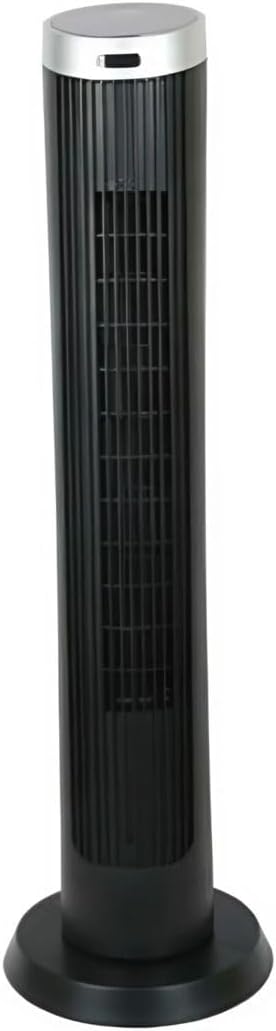
படம் 2.1: முன் view of the Altus AL 40 TFB Tower Air Cooler. This image shows the tall, slender black body of the fan with its air outlet grille and a stable round base.
கூறுகள்:
- கண்ட்ரோல் பேனல்: Located on the top of the unit for easy access to all functions.
- ஏர் அவுட்லெட் கிரில்: Vertical grille on the front for air dispersion.
- அடிப்படை: பாதுகாப்பான இடத்திற்கான நிலையான வட்ட அடித்தளம்.
- மின் கம்பி: அலகின் பின்புறத்தில் அமைந்துள்ளது.

படம் 2.2: விரிவான view of the control panel on top of the Altus AL 40 TFB Tower Air Cooler. The panel features a digital display showing '28' and several push buttons for various functions.
3 அமைவு
Follow these steps to set up your Altus AL 40 TFB Tower Air Cooler:
- திறக்கவும்: விசிறியை அதன் பேக்கேஜிங்கிலிருந்து கவனமாக அகற்றவும். எதிர்கால சேமிப்பு அல்லது போக்குவரத்துக்காக பேக்கேஜிங்கை வைத்திருங்கள்.
- அடிப்படை அசெம்பிளி (தேவைப்பட்டால்): Some models may require minor base assembly. If your unit's base is detached, align the base sections and secure them according to the diagrams in the packaging. Ensure it is firmly attached.
- இடம்: Place the fan on a firm, level surface. Ensure there is adequate space around the fan for proper airflow, at least 30 cm (12 inches) from walls or furniture. This appliance is designed for indoor use only.
- மின் இணைப்பு: Plug the power cord into a standard electrical outlet. Ensure the outlet meets the voltagதயாரிப்பு லேபிளில் குறிப்பிடப்பட்டுள்ள மின் தேவைகள்.
4. இயக்க வழிமுறைகள்
Your Altus AL 40 TFB Tower Air Cooler is equipped with user-friendly push-button controls on the top panel.
கண்ட்ரோல் பேனல் செயல்பாடுகள்:
- ஆற்றல் பொத்தானை (⏻ ⏻ தமிழ்): Press once to turn the fan ON, press again to turn it OFF.
- வேக பொத்தான் (💨): Press repeatedly to cycle through the 3 available fan speeds: Low, Medium, and High. The current speed setting may be indicated on the digital display.
- பயன்முறை பொத்தான் (M): If available, press to select different operating modes (e.g., Normal, Natural, Sleep). Refer to the digital display for the active mode.
- அலைவு பொத்தான் (↔ काल ↔ काल�): Press to activate or deactivate the oscillation function, which allows the fan to rotate from side to side to distribute air over a wider area.
- டைமர் பொத்தான் (🕒): If available, press to set an automatic shut-off timer. Each press typically increases the timer duration by a set increment (e.g., 1 hour).
பொது செயல்பாடு:
- விசிறியை பொருத்தமான பவர் அவுட்லெட்டில் செருகவும்.
- பவர் பட்டனை அழுத்தவும் (⏻ ⏻ தமிழ்) to turn on the fan.
- Select your desired fan speed using the Speed Button (💨).
- Activate oscillation if desired by pressing the Oscillation Button (↔ काल ↔ काल�).
- To turn off the fan, press the Power Button (⏻ ⏻ தமிழ்) மீண்டும்.
5. பராமரிப்பு
Regular maintenance ensures optimal performance and extends the lifespan of your Altus AL 40 TFB Tower Air Cooler.
சுத்தம்:
- சுத்தம் செய்வதற்கு முன் எப்போதும் மின்விசிறியை அவிழ்த்து விடுங்கள்.
- வெளிப்புற சுத்தம்: மின்விசிறியின் வெளிப்புற மேற்பரப்புகளை மென்மையான, d துணியால் துடைக்கவும்.amp cloth. Do not use abrasive cleaners, waxes, or polishes as they may damage the finish.
- காற்று நுழைவாயில்/வெளியேற்றும் கிரில்ஸ்: Use a vacuum cleaner with a brush attachment to gently remove dust and debris from the air inlet and outlet grilles. Do not attempt to disassemble the fan for cleaning.
- மீண்டும் செருகி இயக்குவதற்கு முன், மின்விசிறி முற்றிலும் உலர்ந்திருப்பதை உறுதிசெய்து கொள்ளுங்கள்.
சேமிப்பு:
When not in use for extended periods, store the fan in a cool, dry place. It is recommended to store it in its original packaging to protect it from dust and damage.
6. சரிசெய்தல்
If you encounter any issues with your Altus AL 40 TFB Tower Air Cooler, please refer to the following common problems and solutions:
- மின்விசிறி இயக்கப்படவில்லை:
- மின் கம்பி வேலை செய்யும் மின் நிலையத்தில் பாதுகாப்பாக இணைக்கப்பட்டுள்ளதா எனச் சரிபார்க்கவும்.
- Ensure the power button on the control panel has been pressed.
- Verify that the household circuit breaker or fuse has not tripped.
- பலவீனமான காற்றோட்டம்:
- Check if the fan speed is set to a higher setting.
- Ensure the air inlet and outlet grilles are not blocked by dust or obstructions. Clean them if necessary.
- அசாதாரண சத்தம்:
- மின்விசிறி ஒரு நிலையான, சமதள மேற்பரப்பில் வைக்கப்பட்டுள்ளதா என்பதை உறுதிப்படுத்திக் கொள்ளுங்கள்.
- Check for any foreign objects that might have fallen into the fan grilles.
- சத்தம் தொடர்ந்தால், பயன்படுத்துவதை நிறுத்திவிட்டு வாடிக்கையாளர் ஆதரவைத் தொடர்பு கொள்ளவும்.
If the problem cannot be resolved using the above steps, please contact Altus customer support.
7. விவரக்குறிப்புகள்
Detailed technical specifications for the Altus AL 40 TFB Tower Air Cooler:
| அம்சம் | விவரக்குறிப்பு |
|---|---|
| பிராண்ட் | அல்டஸ் |
| மாதிரி பெயர் | AL 40 TFB |
| நிறம் | கருப்பு |
| மின்சார விசிறி வடிவமைப்பு | Floor Fan (Tower Type) |
| சக்தி ஆதாரம் | கம்பியூட்டப்பட்ட மின்சாரம் |
| தயாரிப்பு பரிமாணங்கள் (அளவு x அளவு x அளவு) | 29D x 29W x 101H செ.மீ. |
| மவுண்டிங் வகை | மாடி மவுண்ட் |
| பினிஷ் வகை | வர்ணம் பூசப்பட்டது |
| உட்புறம்/வெளிப்புற பயன்பாடு | உட்புறம் |
| கட்டுப்பாட்டு முறை | புஷ் பட்டன் |
| சக்தி நிலைகளின் எண்ணிக்கை | 3 |
| வயர்லெஸ் | இல்லை |
8. உத்தரவாதம் மற்றும் ஆதரவு
Altus provides comprehensive support for its products. For any assistance or warranty-related inquiries, please contact our customer service.

படம் 8.1: Altus customer service and warranty information. The image displays the Altus logo, a message about service availability, and a contact number for support.
Our services are always available for your Altus products. You can benefit from our door-to-door service by calling our support line for any assistance you may need.
Arçelik Service Warranty: For products under warranty, our home product pickup service is provided free of charge.
Customer Support Line: 0850 210 0 888
Please have your product model number (AL 40 TFB) and purchase details ready when contacting support.