
1. அறிமுகம்
This user manual provides detailed instructions for the T&G Portable Bluetooth Speaker, model TG116C. Designed for exceptional audio performance, this compact speaker delivers crystal-clear sound and powerful bass, making it ideal for various indoor and outdoor environments. Please read this manual thoroughly before using the product to ensure proper operation and longevity.
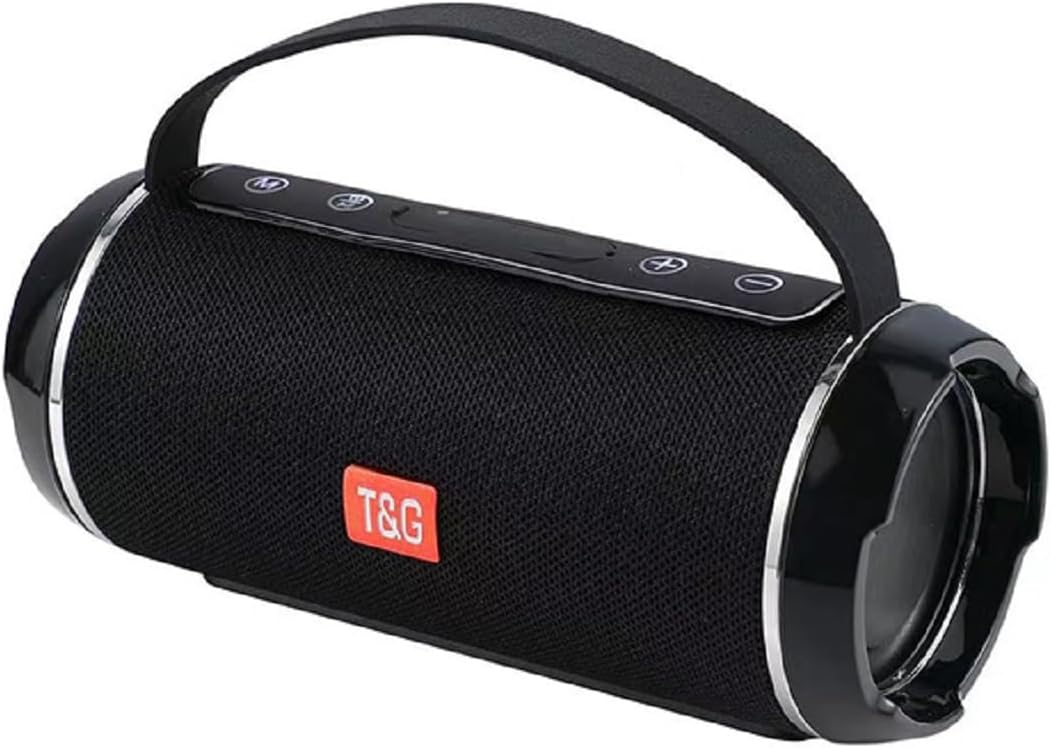
Figure 1: T&G Portable Bluetooth Speaker TG116C
2 முக்கிய அம்சங்கள்
- Immersive HD Sound with Deep Bass: Experience crystal-clear audio and powerful, distortion-free bass from this compact Bluetooth speaker. Advanced dual-driver technology and passive radiators deliver rich, balanced sound across all frequencies.
- 360° சரவுண்ட் ஒலி: Designed to fill any room with sound, providing an immersive listening experience.
- சிறிய மற்றும் சிறிய வடிவமைப்பு: Measuring just 3.2" tall and 7.08" wide, this lightweight speaker fits easily in bags or backpacks. Features a convenient carry lanyard for on-the-go convenience.
- நீண்ட கால பேட்டரி ஆயுள்: Enjoy up to 50 hours of nonstop music with a high-capacity lithium battery. Smart power-saving technology auto-adjusts consumption and enables deep sleep when idle.
- வேகமாக சார்ஜ் செய்தல்: USB-C fast charging delivers 5 hours of playtime in just 10 minutes.
- IPX4 Waterproof Grade: This speaker is splash-proof, making it suitable for outdoor adventures, beach trips, and poolside use. Note: IPX4 protects against splashes from any direction; it is not designed for full immersion.
- பல்துறை இணைப்பு: Supports Bluetooth for wireless freedom, as well as AUX input, USB, and MicroSD card playback.
- உண்மையான வயர்லெஸ் ஸ்டீரியோ (TWS) இணைத்தல்: Connect two TG116C speakers wirelessly for an enhanced stereo sound experience.

Figure 2: IPX4 Waterproof Grade - Splash Resistant

Figure 3: Compact Product Dimensions (7.08" x 3.14" x 3.14")
3. தொகுப்பு உள்ளடக்கங்கள்
பின்வரும் பொருட்களுக்கு தொகுப்பைச் சரிபார்க்கவும்:
- T&G Portable Bluetooth Speaker (TG116C)
- USB-C சார்ஜிங் கேபிள்
- 3.5மிமீ ஆடியோ கேபிள் (AUX)
- பயனர் கையேடு
4. கட்டுப்பாடுகள் மற்றும் துறைமுகங்கள்
ஸ்பீக்கரின் கட்டுப்பாடுகள் மற்றும் போர்ட்களைப் பற்றி நன்கு தெரிந்து கொள்ளுங்கள்:
- ஆற்றல் பொத்தானை (⑂ ⑂ कालिक): Long press to power on/off. Short press to play/pause.
- பயன்முறை பொத்தான் (எம்): Short press to switch between Bluetooth, AUX, USB, and MicroSD modes.
- ஒலியளவு குறைவு / முந்தைய பாடல் (-): ஒலியைக் குறைக்க சிறிது நேரம் அழுத்தவும். முந்தைய டிராக்கைப் பார்க்க நீண்ட நேரம் அழுத்தவும்.
- ஒலியளவை அதிகரித்தல் / அடுத்த பாடல் (+): ஒலியளவை அதிகரிக்க சிறிது நேரம் அழுத்தவும். அடுத்த டிராக்கிற்கு நீண்ட நேரம் அழுத்தவும்.
- USB-C சார்ஜிங் போர்ட்: ஸ்பீக்கரை சார்ஜ் செய்ததற்காக.
- USB-A போர்ட்: USB டிரைவ் பிளேபேக்கிற்கு.
- மைக்ரோ எஸ்டி கார்டு ஸ்லாட்: மைக்ரோ எஸ்டி கார்டு பிளேபேக்கிற்கு.
- AUX உள்ளீடு (3.5மிமீ): கம்பி ஆடியோ இணைப்புக்கு.
படம் 4: மேல்view of Speaker Controls and Ports (refer to product for exact layout)
5 அமைவு
5.1 ஸ்பீக்கரை சார்ஜ் செய்தல்
- வழங்கப்பட்ட USB-C சார்ஜிங் கேபிளை ஸ்பீக்கரின் USB-C போர்ட்டுடன் இணைக்கவும்.
- கேபிளின் மறுமுனையை USB பவர் அடாப்டருடன் (சேர்க்கப்படவில்லை) அல்லது கணினியின் USB போர்ட்டுடன் இணைக்கவும்.
- The charging indicator light will illuminate. Once fully charged, the light will change or turn off (refer to specific product behavior).
- A full charge provides up to 50 hours of playtime. For quick power, 10 minutes of charging can provide 5 hours of playtime.
5.2 பவர் ஆன்/ஆஃப்
- பவர் ஆன் செய்ய: Long press the Power button (⑂ ⑂ कालिक) until you hear a power-on prompt or see the indicator lights illuminate.
- பவர் ஆஃப் செய்ய: Long press the Power button (⑂ ⑂ कालिक) again until you hear a power-off prompt or the indicator lights turn off.
5.3 ப்ளூடூத் இணைத்தல்
- Ensure the speaker is powered on and in Bluetooth mode (indicated by a flashing blue light or voice prompt "Bluetooth Mode"). If not, short press the Mode (M) button to switch.
- On your mobile device (smartphone, tablet, computer), enable Bluetooth.
- தேடுங்கள் available Bluetooth devices. The speaker will appear as "TG116C" or similar.
- Select "TG116C" to connect. Once paired, you will hear a confirmation sound or voice prompt, and the Bluetooth indicator light will become solid.
- இயக்கப்பட்டிருக்கும் போது, ஸ்பீக்கர் தானாகவே கடைசியாக இணைக்கப்பட்ட சாதனத்துடன் மீண்டும் இணைக்க முயற்சிக்கும்.
5.4 உண்மையான வயர்லெஸ் ஸ்டீரியோ (TWS) இணைத்தல்
To achieve a true stereo sound experience, you can pair two TG116C speakers together:
- Ensure both TG116C speakers are powered on and in Bluetooth mode, but not connected to any device.
- On one of the speakers (this will be your primary speaker), long press the Mode (M) button until you hear a pairing sound, indicating TWS pairing mode.
- இரண்டு ஸ்பீக்கர்களும் தானாகவே ஒன்றையொன்று தேடி இணைக்கும். இணைக்கப்பட்டதும், உறுதிப்படுத்தல் ஒலியைக் கேட்பீர்கள்.
- Now, connect your mobile device to the primary speaker via Bluetooth as described in Section 5.3. Both speakers will play audio in stereo.

Figure 5: TWS Pairing for 3D Stereo Sound

Figure 6: TWS Pairing for Enhanced Bass
6. இயக்க வழிமுறைகள்
6.1 இசை வாசித்தல்
- புளூடூத் பயன்முறை: After successful pairing, open your music app and start playback. Use the speaker's Power button for play/pause.
- ஆக்ஸ் பயன்முறை: Connect one end of the 3.5mm audio cable to the speaker's AUX input and the other end to your audio device's headphone jack. Short press the Mode (M) button to switch to AUX mode.
- USB/MicroSD பயன்முறை: Insert a USB drive into the USB-A port or a MicroSD card into its slot. The speaker will automatically switch to the respective mode and begin playing supported audio files. If not, short press the Mode (M) button.
6.2 ஒலியளவு கட்டுப்பாடு மற்றும் தட வழிசெலுத்தல்
- ஒலியை பெருக்கு: '+' பொத்தானை சுருக்கமாக அழுத்தவும்.
- ஒலியை குறை: '-' பொத்தானை சுருக்கமாக அழுத்தவும்.
- அடுத்த ட்ராக்: '+' பொத்தானை நீண்ட நேரம் அழுத்தவும்.
- முந்தைய ட்ராக்: '-' பொத்தானை நீண்ட நேரம் அழுத்தவும்.
6.3 Call Functionality (Bluetooth Mode)
- பதில் அழைப்பு: பவர் பட்டனை சுருக்கமாக அழுத்தவும் (⑂ ⑂ कालिक) when an incoming call rings.
- அழைப்பை முடிக்கவும்: பவர் பட்டனை சுருக்கமாக அழுத்தவும் (⑂ ⑂ कालिक) அழைப்பின் போது.
- அழைப்பை நிராகரி: Long press the Power button (⑂ ⑂ कालिक) when an incoming call rings.
7. பராமரிப்பு மற்றும் பராமரிப்பு
- சுத்தம்: Use a soft, dry cloth to clean the speaker. Do not use abrasive cleaners, alcohol, or chemical solvents.
- நீர் எதிர்ப்பு: The speaker is IPX4 rated, meaning it is protected against splashing water from any direction. Do not submerge the speaker in water or expose it to strong jets of water. Ensure the port cover is securely closed before exposing to water.
- சேமிப்பு: Store the speaker in a cool, dry place away from direct sunlight and extreme temperatures. If storing for a long period, charge the battery periodically to maintain its lifespan.
- பாதிப்புகளைத் தவிர்க்கவும்: ஸ்பீக்கரை கீழே போடாதீர்கள் அல்லது வலுவான தாக்கங்களுக்கு ஆளாக்காதீர்கள், ஏனெனில் இது உள் கூறுகளை சேதப்படுத்தும்.
8. சரிசெய்தல்
| பிரச்சனை | சாத்தியமான காரணம் | தீர்வு |
|---|---|---|
| ஸ்பீக்கர் இயக்கப்படவில்லை. | பேட்டரி குறைவாக உள்ளது; பவர் பட்டனை போதுமான நேரம் அழுத்தவில்லை. | Charge the speaker for at least 30 minutes. Long press the Power button for 3-5 seconds. |
| புளூடூத் சாதனத்துடன் இணைக்க முடியாது. | Speaker not in pairing mode; Device Bluetooth off; Too far from speaker; Already connected to another device. | Ensure speaker is in Bluetooth mode (flashing light). Turn device Bluetooth off/on. Move device closer (within 10m). Disconnect from other devices. |
| ஒலி இல்லை அல்லது குறைந்த அளவு. | Volume too low on speaker/device; Incorrect mode selected; Cable not fully inserted (AUX). | Increase volume on both speaker and device. Press Mode (M) button to select correct input. Ensure AUX cable is fully inserted. |
| ஒலி விலகல். | ஒலி அளவு மிக அதிகம்; சாதனம் ஸ்பீக்கரிலிருந்து வெகு தொலைவில் உள்ளது; குறுக்கீடு. | Lower volume. Move device closer. Move away from other electronic devices. |
| TWS இணைத்தல் தோல்வியடைந்தது. | Speakers already paired to a device; Not in TWS pairing mode. | Ensure both speakers are disconnected from any Bluetooth devices. Long press the Mode (M) button on one speaker to initiate TWS pairing. |
9. விவரக்குறிப்புகள்
| அம்சம் | விவரம் |
|---|---|
| பிராண்ட் | டி&ஜி |
| மாதிரி பெயர் | TG116C |
| இணைப்பு தொழில்நுட்பம் | வயர்லெஸ் (புளூடூத்) |
| வயர்லெஸ் கம்யூனிகேஷன் டெக்னாலஜி | புளூடூத் |
| பேச்சாளர் வகை | வெளிப்புற |
| சிறப்பு அம்சம் | Bass Boost, Hi Res Audio, Waterproof, auto speaker setup, dolby trueHD |
| தயாரிப்புக்கான பரிந்துரைக்கப்பட்ட பயன்பாடுகள் | உட்புறம்/வெளிப்புறம் |
| சக்தி ஆதாரம் | பேட்டரி மூலம் இயங்கும் |
| தயாரிப்பு பரிமாணங்கள் | 7.09"டி x 3.15"அடி x 3.15"ஹெட் |
| பொருளின் எடை | 1.22 பவுண்டுகள் |
| நிறம் | கருப்பு |
| அலகு எண்ணிக்கை | 1.0 எண்ணிக்கை |
| உற்பத்தியாளர் | டி&ஜி |
10. உத்தரவாதம் மற்றும் ஆதரவு
The T&G Portable Bluetooth Speaker TG116C comes with a standard manufacturer's warranty. Please refer to the product packaging or the official T&G webகுறிப்பிட்ட உத்தரவாத விதிமுறைகள் மற்றும் நிபந்தனைகளுக்கான தளம்.
For technical support, troubleshooting assistance, or warranty claims, please contact T&G customer service through their official channels. Contact information can typically be found on the product packaging or the brand's official webதளம்.
குறிப்பு: உத்தரவாத நோக்கங்களுக்காக வாங்கியதற்கான சான்றாக உங்கள் கொள்முதல் ரசீதை வைத்திருங்கள்.