
1. அறிமுகம்
The CUBOT Kingkong 11 is a rugged 5G smartphone designed for durability and high performance. It features a powerful processor, extensive memory, a large battery, and an advanced camera system, all housed in a robust, water-resistant, and dustproof body.
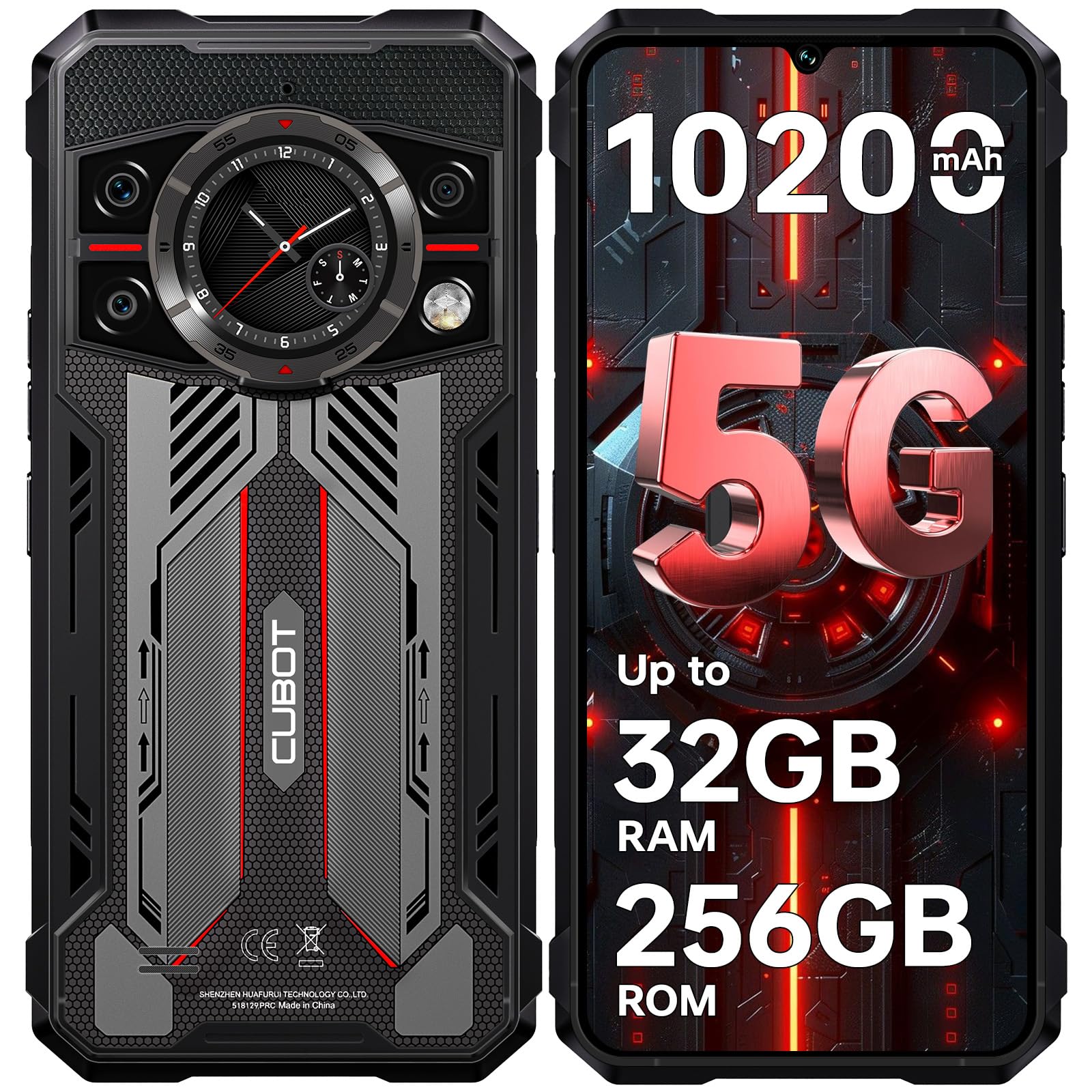
படம்: முன் மற்றும் பின் view of the CUBOT Kingkong 11 5G smartphone, highlighting its rugged design.
2. ஆரம்ப அமைப்பு
2.1. சிம் கார்டுகள் மற்றும் மைக்ரோ எஸ்டி கார்டைச் செருகுதல்
The CUBOT Kingkong 11 supports dual SIM cards and a MicroSD card for expanded storage.
- சாதனத்தின் பக்கத்தில் சிம் கார்டு ட்ரேயைக் கண்டறியவும்.
- ட்ரேயைத் திறக்க, கொடுக்கப்பட்டுள்ள சிம் எஜெக்டர் கருவியைப் பயன்படுத்தவும்.
- Carefully place your Nano-SIM cards and/or MicroSD card into the designated slots. Ensure correct orientation.
- பக்கவாட்டில் சரியாகும் வரை ட்ரேயை சாதனத்திற்குள் மெதுவாகத் தள்ளவும்.

Image: Close-up of the CUBOT Kingkong 11 showing the SIM card tray with waterproof seals.
2.2. Powering On and Initial Charge
- Press and hold the power button located on the side of the device until the CUBOT logo appears.
- For first-time use, it is recommended to fully charge the device. Connect the USB-C cable to the phone and the 33W fast charger to a power outlet.
- திரையில் உள்ள பேட்டரி காட்டி சார்ஜிங் நிலையைக் காண்பிக்கும்.

Image: Illustration of the 10200mAh battery capacity and 33W fast charging capability of the CUBOT Kingkong 11.
2.3. மென்பொருள் கட்டமைப்பு
Follow the on-screen prompts to complete the initial setup, including language selection, Wi-Fi connection, Google account login, and security settings (Face ID/Fingerprint).
3. ஆபரேஷன்
3.1. ஆண்ட்ராய்டு 15 இயக்க முறைமை
The CUBOT Kingkong 11 runs on Android 15, offering an intuitive user interface and enhanced features. Navigate through apps, customize settings, and utilize smart functions for an optimized experience.

Image: Screenshot of the Android 15 operating system interface on the CUBOT Kingkong 11.
3.2. Main Display (6.72" FHD+ 120Hz)
The 6.72-inch FHD+ display provides vibrant visuals with a 120Hz refresh rate for smooth scrolling and gaming. The 1080x2400 resolution ensures clear and detailed content viewing.

Image: Visual representation of the 6.72-inch FHD+ display with 120Hz refresh rate on the CUBOT Kingkong 11.
3.3. Rear Smart Display (1.46")
The 1.46-inch rear smart display provides quick access to essential information such as time, notifications, battery status, and compass without activating the main screen. This feature is useful for quick glances during activities.

Image: The 1.46-inch rear smart display of the CUBOT Kingkong 11, showing widgets for clock, camera, music, battery, calls, compass, and alarm.
3.4. கேமரா அமைப்பு
The device features a versatile quad-camera system:
- 108MP பிரதான கேமரா: Captures high-resolution photos with impressive detail.
- 32MP முன்பக்க கேமரா: For high-definition selfies and video calls.
- 24MP இரவு பார்வை கேமரா: Equipped with infrared LEDs for clear imaging in complete darkness.
- 8MP Macro Lens: Allows for close-up photography, capturing intricate details of small subjects.

படம்: முடிந்ததுview of the CUBOT Kingkong 11's quad-camera system, including the 108MP main, 32MP front, 24MP night vision, and 8MP macro lenses, with exampபுகைப்படங்கள்.
3.5. இணைப்பு மற்றும் வழிசெலுத்தல்
The Kingkong 11 supports 5G full-band connectivity for fast data speeds. It includes NFC for contactless payments and data transfer, and a quadruple positioning system (GPS+GLONASS+BeiDou+Galileo) for accurate navigation.

Image: Graphic illustrating the CUBOT Kingkong 11's 5G ultra-fast global coverage and connectivity features.
4. பராமரிப்பு
4.1. ஆயுள் மற்றும் பாதுகாப்பு
The CUBOT Kingkong 11 is certified with IP68/IP69K for dust and water resistance, and MIL-STD-810H for shock resistance. It can withstand submersion in water up to 5 meters for 30 minutes.
- நீர் எதிர்ப்பு: Ensure all ports (USB-C, SIM tray) are properly sealed before exposing the device to water. After exposure to water, dry the device thoroughly before charging.
- தூசி எதிர்ப்பு: The device is designed to prevent dust ingress. Clean any accumulated dust from ports and crevices using a soft, dry brush.
- அதிர்ச்சி எதிர்ப்பு: While rugged, avoid intentional drops or impacts from extreme heights to preserve the device's integrity.

Image: Visual representation of the CUBOT Kingkong 11's IP68, IP69K, and MIL-STD-810H certifications for water, dust, and shock resistance.
4.2. சுத்தம் செய்தல்
Use a soft, lint-free cloth to clean the screen and body of the phone. For stubborn smudges, a slightly damp துணியைப் பயன்படுத்தலாம், அதைத் தொடர்ந்து உடனடியாக உலர்த்தலாம்.
5. சரிசெய்தல்
5.1. சாதனம் இயக்கப்படவில்லை
- பேட்டரி சார்ஜ் செய்யப்பட்டுள்ளதா என்பதை உறுதிப்படுத்திக் கொள்ளுங்கள். சார்ஜரை இணைத்து, மீண்டும் பவர் ஆன் செய்ய முயற்சிக்கும் முன் சில நிமிடங்கள் காத்திருக்கவும்.
- கட்டாய மறுதொடக்கம் செய்ய பவர் பட்டனை குறைந்தது 10-15 வினாடிகள் அழுத்திப் பிடிக்கவும்.
5.2. Poor Performance/Lag
- தேவையற்ற பின்னணி பயன்பாடுகளை மூடு.
- அடிக்கடி பயன்படுத்தப்படும் பயன்பாடுகளுக்கான கேச் தரவை அழிக்கவும்.
- Ensure sufficient storage space is available. Consider moving large files to the MicroSD card or cloud storage.
- சாதனத்தை அவ்வப்போது மறுதொடக்கம் செய்யுங்கள்.
5.3. சார்ஜிங் சிக்கல்கள்
- சார்ஜிங் கேபிள் மற்றும் அடாப்டர் பாதுகாப்பாக இணைக்கப்பட்டுள்ளதா மற்றும் சேதமடையாமல் இருப்பதைச் சரிபார்க்கவும்.
- Try using a different compatible charger and cable.
- Check the USB-C port for any debris or obstruction.
5.4. நெட்வொர்க் இணைப்பு சிக்கல்கள்
- Ensure SIM cards are correctly inserted and activated.
- Check network settings (e.g., APN settings) with your service provider.
- விமானப் பயன்முறையை ஆன் மற்றும் ஆஃப் செய்யவும்.
- சாதனத்தை மறுதொடக்கம் செய்யுங்கள்.
6. விவரக்குறிப்புகள்
| அம்சம் | விவரம் |
|---|---|
| பிராண்ட் | CUBOT |
| மாதிரி | கியூபா கிங்காங் 11 |
| இயக்க முறைமை | ஆண்ட்ராய்டு 15 |
| செயலி | 5G Dimensity 7025 Octa-Core |
| ரேம் | Up to 32 GB (16 GB physical + 16 GB extended) |
| உள் சேமிப்பு | 256 ஜிபி |
| விரிவாக்கக்கூடிய சேமிப்பு | Up to 1 TB via MicroSD card |
| முக்கிய காட்சி | 6.72 inches FHD+ (1080x2400), 120Hz refresh rate, 450 nits brightness |
| பின்புற காட்சி | 1.46 inches Smart Display |
| முக்கிய கேமரா | 108 எம்.பி |
| முன் கேமரா | 32 எம்.பி |
| நைட் விஷன் கேமரா | 24 MP with IR LED |
| மேக்ரோ லென்ஸ் | 8 எம்.பி |
| பேட்டரி திறன் | 10200 mAh |
| சார்ஜ் செய்கிறது | 33W ஃபாஸ்ட் சார்ஜிங், OTG ரிவர்ஸ் சார்ஜிங் |
| இணைப்பு | 5G, NFC, Dual SIM |
| வழிசெலுத்தல் | GPS+GLONASS+BeiDou+Galileo |
| ஆயுள் | IP68/IP69K, MIL-STD-810H (Water resistant up to 5m for 30 min) |
| பாதுகாப்பு | Face ID, Fingerprint Sensor |
| பரிமாணங்கள் | 22.4 x 17.3 x 4.2 செ.மீ (தொகுப்பு) |
| எடை | 700 g (Package) |

Image: Energy label for the CUBOT Kingkong 11, showing battery life and durability ratings. View EPREL தயாரிப்பு தகவல் தாள்
7. உத்தரவாதம் மற்றும் ஆதரவு
CUBOT offers a comprehensive support package for the Kingkong 11:
- வருமானம்: வாங்கிய 30 நாட்களுக்குள் தொந்தரவு இல்லாத வருமானம்.
- உத்தரவாதம்: A two-year warranty covers manufacturing defects.
- தொழில்நுட்ப ஆதரவு: Long-term technical assistance is available.
- வாடிக்கையாளர் சேவை: 24/7 online customer service is provided for any inquiries during your ownership.
For assistance, please contact CUBOT customer service through their official channels.